Meta introduced Muse as a personal AI agent that can keep working after you leave the app, browse the web through its own computer, connect to everyday services, track goals, and ask for approval before sensitive actions. OpenMuse takes that personal-agent idea into open source.
OpenMuse is an MIT-licensed personal AI agent from CopilotKit with a persistent Chromium browser, durable background tasks, files, PDF handling, Gmail and Google Calendar connections, page tracking, and an optional Linux workspace. You can run the project yourself and choose the model provider behind the agent.
Key Features
- Run a personal AI agent on your own server with an MIT-licensed codebase.
- Keep Chromium profiles across tasks and reopen the live browser session later.
- Take manual control of the browser session the agent is using.
- Delegate jobs that retain plans, progress, requested input, approvals, retries, and receipts.
- Read Gmail threads and attachments and prepare reviewed mail actions.
- Read Google Calendar data and prepare reviewed event changes.
- Work with PDFs, including compatible form-filling tasks and document transfer.
- Track public pages for changes, text availability, and USD price thresholds.
- Import transaction CSV files and create structured spending summaries.
- Use an optional Docker Linux workspace for commands, files, and PDF transfer.
- Connect OpenAI, Anthropic, Google, or an OpenAI-compatible model endpoint.
- Run the shared React Native client on the web, iOS, and Android development builds.
OpenMuse vs Meta Muse
| Capability | Meta Muse | OpenMuse |
|---|---|---|
| Product model | Meta-hosted personal AI agent | MIT-licensed self-hosted alpha |
| Agent computer | Persistent Muse Secure VM with browser | Persistent Chromium plus optional Docker Linux workspace |
| Background work | Continues after the app closes | Durable server tasks continue as long as your host is running |
| Human approval | Approval for sensitive actions such as messages and purchases | Stored reviews for Gmail and Calendar writes |
| Connected apps | Email, calendar, Instagram, and other connectors | Gmail and Google Calendar in the current alpha |
| Client access | iPhone, Android, Mac, web, and WhatsApp access | React Native client for web, iOS, and Android development builds |
| Goals and monitoring | Goals, proactive ideas, reminders, and monitoring | Goals, Ideas, public-page tracking, and in-app notifications |
| Purchases and reservations | Purchase and booking actions with approval | Autonomous checkout and reservations are planned work |
| Media and voice | Image generation plus wider Meta AI capabilities | Voice and image generation are planned work |
| Source code | Proprietary service | Public MIT-licensed repository |
What You Can Do With OpenMuse
Research the Web and Take Over the Browser
OpenMuse can send a task to a real Chromium worker, open public pages, read visible page text, capture screenshots, and return browser results inside the conversation. Browser profiles persist across sessions. A later task can reopen the existing profile and continue from its saved state.
The Take control action opens the live browser session for manual interaction. The official mobile demo uses this flow to inspect Hacker News, research CopilotKit, and hand the active browser back to the person using the app.
Move From Email to Research in One Conversation
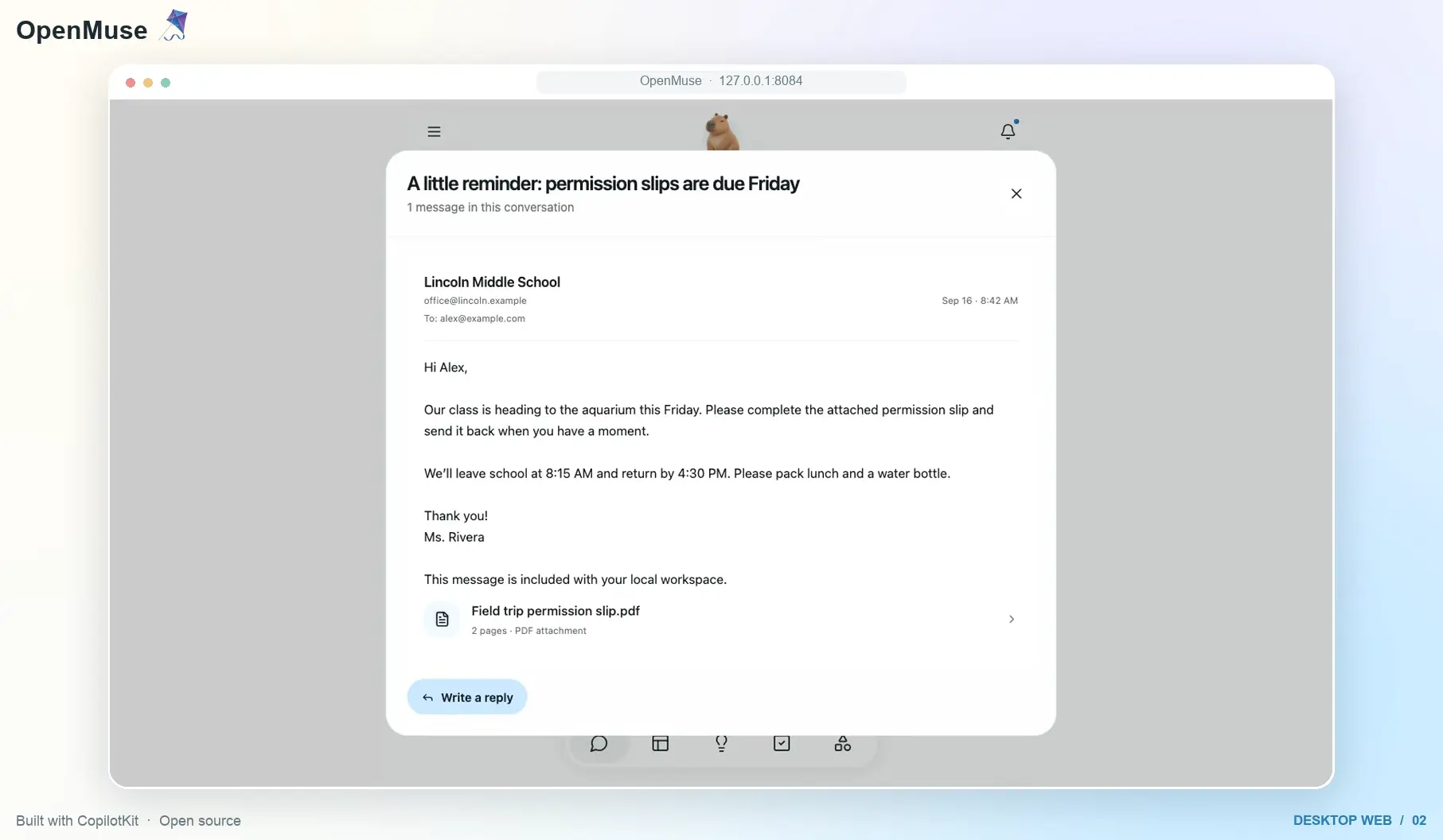
The desktop demo starts with a fictional school-trip email, opens the full message, and continues into web research about Monterey Bay Aquarium. Email and browser results appear inside the conversation as structured cards.
Live Gmail access uses Google OAuth. OpenMuse can search mail, read full threads and attachments, prepare drafts, and place send actions into a review step. The Google adapter exists in the current alpha, although a live real-account acceptance run is listed as pending.
Read Calendar Data and Review Changes
Google Calendar uses the same reviewed-action model. The agent can discover calendars and prepare event creation, updates, or deletion. A stored review keeps the exact action tied to the connected account before the write is dispatched.
Fill PDFs and Keep Documents With the Task
OpenMuse can import an email attachment, collect form values, create a filled PDF, prepare a reply, and save the result as part of the task history. The native and web clients include PDF viewing with paging and zoom controls.
The current form flow focuses on compatible AcroForms. Scanned forms that need OCR and some additional PDF field types are outside the alpha’s current scope.
Track Pages and Prices
Goals and Tracking can run recurring checks against public pages. Built-in tracking includes page changes, text availability, and USD price thresholds. Observations are deduplicated before they appear as alerts in OpenMuse.
This page-tracking feature shows the persistent-agent model directly. The task exists independently from the current conversation and can report new results later.
Turn Transaction CSV Files Into Spending Summaries
The Finance task imports transaction CSV data and creates a structured spending summary with categories, transactions, and a savings-goal action. It works from files you provide. Direct bank connections are not part of the current release.
Keep Personal Context, Goals, and Ideas
OpenMuse stores editable profile information such as name, tone, avatar, and memories. Goals and milestones live outside the chat history, and the Ideas area can surface suggestions tied to existing goals or source evidence.
Live deployments use CopilotKit Rich Threads for durable conversations, side chats, renaming, archiving, restoring, and replay. Sample mode keeps one conversation in OpenMuse’s local database.
The Agent Computer: Browser Plus Linux Workspace
OpenMuse splits computer work into two environments. Public web work goes through the Chromium worker. Command-line work and files can run inside an optional Linux container.
Persistent Chromium
The browser worker runs Playwright and Chromium with saved profiles. It can navigate public HTTP and HTTPS pages, read rendered text, capture screenshots, accept controlled input, and collect PDF downloads. Closing a browser session preserves its profile and accepted downloads, and reopening the session uses the saved profile again.
The worker currently handles up to three active sessions and 20 saved profiles per deployment. Sites that depend on browser behaviors such as WebSockets, service workers, popups, or dialogs can fail in the current implementation.
Optional Linux Computer
The Linux workspace runs inside a nonroot Docker container with a persistent /workspace volume. It can execute bounded shell commands, use Python, Node, and Git, edit text files, retain command receipts, and move PDFs between the workspace and OpenMuse Documents.
The Linux computer has no network access. OpenMuse sends public web work to the Chromium worker. The container also has no host-directory mounts, Docker socket, model keys, Google tokens, or OpenMuse API access key.
This Linux workspace is not equivalent to Meta’s Muse Secure VM. It has no graphical desktop and is designed as a controlled command-and-file environment for one owner.
Durable Tasks and Human Approval
A delegated OpenMuse task can keep a plan, progress, requested input, pause state, approval state, receipts, and saved results on the server. SQL leases help recover interrupted work, and task workers can coordinate through PostgreSQL when the API and worker run as different processes.
Stopping a chat response does not automatically cancel a delegated task. Chat follow-ups have their own queue, and delegated jobs have their own server state. That distinction lets a long job continue even if the conversation UI is closed or the current response is stopped.
External writes receive extra handling. Gmail sends and Calendar changes require a stored review. If a provider returns an uncertain result after an approved write, OpenMuse records the outcome and avoids an automatic replay that could duplicate the action.
Models and Agent Backends
You need to configure the model or agent backend that handles open-ended reasoning.
- OpenAI provider models
- Anthropic provider models
- Google provider models
- OpenAI-compatible Responses API endpoints
- External raw AG-UI agents
How to Run OpenMuse
Clone the repository and start the API:
git clone https://github.com/CopilotKit/OpenMuse.git openmuse
cd openmuse
pnpm install --frozen-lockfile
cp .env.example .env
pnpm dev
Open a second terminal for the web client:
pnpm dev:webThe web app opens on localhost:8081.
Enable Browser Research
Install Chromium for the worker and start it after configuring BROWSER_WORKER_URL and a long WORKER_TOKEN:
pnpm --dir apps/worker exec playwright install chromium
pnpm dev:browser
Enable the Linux Workspace
Build the computer image and enable it on the API host:
docker build -t openmuse-computer:local apps/computer
COMPUTER_ENABLED=true pnpm dev
Privacy and Deployment
The current OpenMuse security model assumes one owner per deployment. Live mode uses a shared access key and does not provide multi-user account authentication. A remote installation should use HTTPS and restricted network access.
Google tokens are encrypted at rest. File and browser-console URLs use short-lived signatures. Provider credentials stay on the API server. The browser worker has its own token, and the Linux computer receives no model keys, Google tokens, or OpenMuse API access key.
The browser worker applies public-network destination checks before navigation and subrequests. This is application-level protection around Chromium. The Linux computer uses Docker restrictions such as a nonroot user, read-only root filesystem, dropped capabilities, limited resources, and disabled networking.
Pros
- MIT-licensed personal-agent codebase
- Persistent Chromium with manual takeover
- Durable delegated tasks and saved receipts
- Reviewed Gmail and Calendar writes
- Optional isolated Linux workspace
Cons
- Single-owner deployment model
- No autonomous checkout or reservations
- No graphical desktop computer
- Live mode depends on CopilotKit Intelligence
FAQs
Is OpenMuse an official Meta Muse project?
No. OpenMuse is an independent MIT-licensed project in the CopilotKit GitHub organization.
Is OpenMuse completely free?
The OpenMuse source code is free under the MIT license. A live deployment can incur model API, server, and CopilotKit Intelligence costs depending on the configuration you choose.
Can OpenMuse do everything Meta Muse can do?
No. OpenMuse already implements persistent browser sessions, background tasks, reviewed actions, goals, page tracking, documents, files, and Google adapters. Meta Muse currently has a wider consumer product scope that includes purchases, additional connectors, image generation, and a dedicated Secure VM.
Can OpenMuse keep working after I close the browser?
Delegated jobs run on the OpenMuse server and can continue after the client UI closes. The server host has to stay running. Queued chat follow-ups are different and depend on the open app until they are sent.
Alternatives & Related Resources
- Automate Anything: 10 Best & Open-source AI Agents
- 7 Best OpenClaw Alternatives for Safe & Local AI Agents
- Moltis: Personal AI Agent for Secure Local Automation (OpenClaw Alternative)
- OpenHuman: Open-Source Private AI Agent App with Local Memory
- holaOS: Open-Source Agentic Workspace for Claude Code & Codex