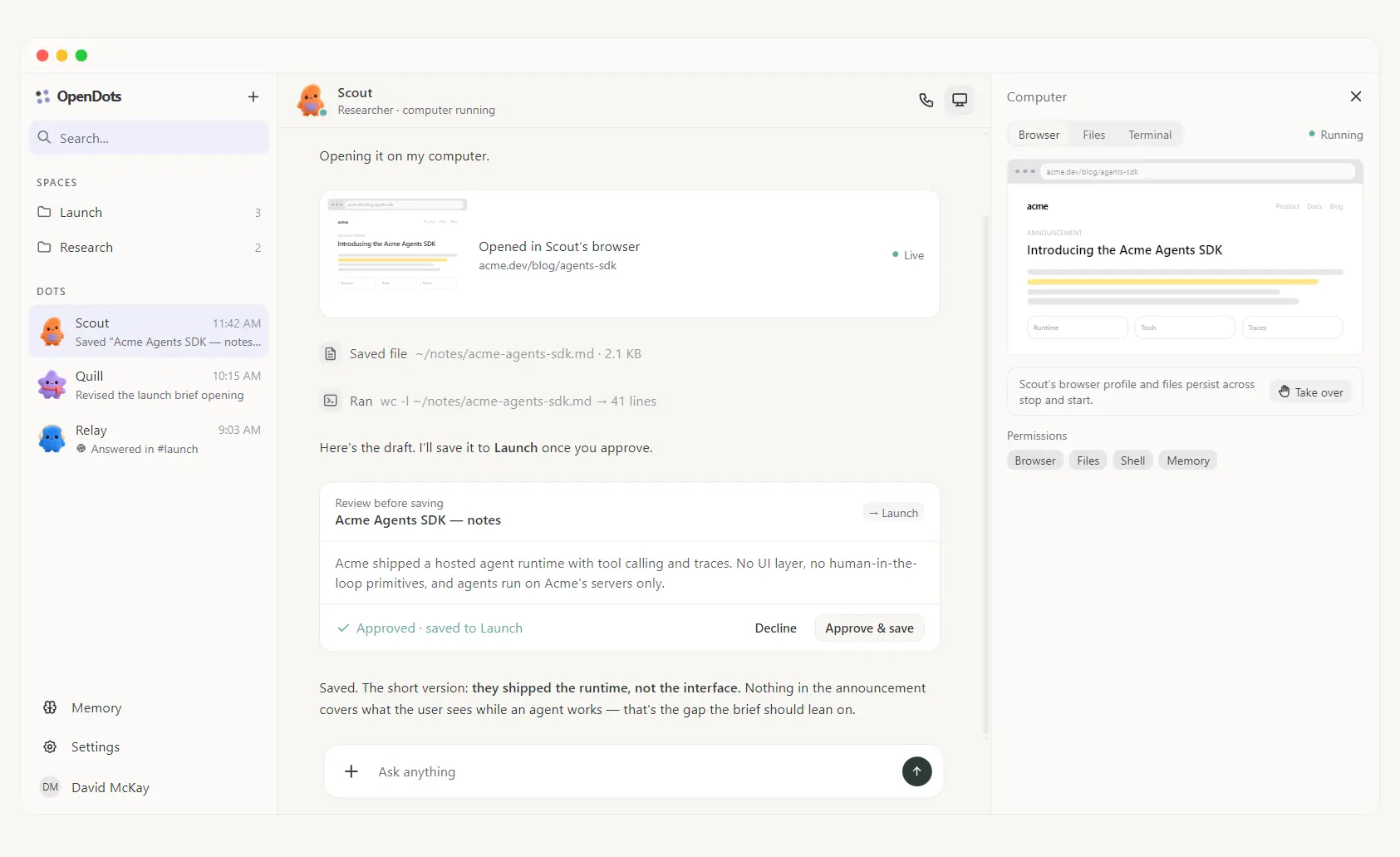
OpenDots is CopilotKit’s open-source, self-hosted alternative to OpenAI Dots.
It allows you to run specialist AI coworkers with their own roles, conversations, selected Space access, and optional isolated computers with a browser, files, and shell tools.
Work can move from chat into an editable page after you approve the save.
A Dot can keep its browser profile and workspace files across restarts. Spaces organize the documents it creates or revises, and CopilotKit Threads keeps conversations tied to each page and specialist.
Research, drafting, document updates, and recurring work can continue across multiple sessions.
Features
- Create specialist Dots with their own roles, instructions, Space access, research permissions, memory permissions, and computer permissions.
- Keep working documents in Spaces with searchable pages, nested subpages, a text editor, Markdown source mode, autosave, and revision checks.
- Keep a distinct conversation for each page and specialist through CopilotKit Threads.
- Give a Dot an isolated computer with a persistent browser profile, workspace files, optional shell access, and manual browser takeover.
- Review a proposed page in chat and choose Approve & save or Decline before the page is written to an authorized Space.
- Talk to a Dot through text or a real-time voice call.
- Connect one specialist to Slack through CopilotKit Channels with explicit workspace and account allowlists.
- Schedule recurring server-side turns in the conversation where the work was created.
- Save user-managed preferences as memory and connect a Dot to CopilotKit Automatic Learning for reviewed, published skills.
How OpenDots Works
A Dot is a specialist agent profile. Give it a name, role, instructions, permitted tools, research access, memory access, and access to the Spaces it needs. A research Dot can investigate a topic and save notes. A writing Dot can use an authorized Space to create or revise a page.
Spaces hold working documents. Pages can be searched, nested, edited directly, or opened with a page-specific Dot conversation. Each Dot also has a default destination for saved pages. Revision checks protect newer edits from stale writes, and failed saves retain the draft for recovery.

OpenDots stores pages, Spaces, Dot configuration, and work metadata separately from conversation history. CopilotKit Intelligence provides durable Threads for conversations. A deployment has two persistence layers: local OpenDots data and the conversation service.
AG-UI carries streamed messages, tool calls, and agent state between the agent runtime and the web UI. TanStack AI handles model streaming and server-tool execution. Model calls go to an OpenAI-compatible endpoint you configure.
Persistent Computers for Individual Dots
A Dot can receive its own isolated computer through OpenBot’s computer service and container supervisor. The browser profile and workspace files persist across stop and start, letting the specialist return to sites and files from an earlier task.

Computer permissions are assigned per Dot. Browser, file, and shell access start disabled. Enable only the capabilities needed for that specialist. The Computer panel shows browser activity, files, terminal output, and recent actions.
Manual takeover lets you click, type, scroll, or handle a login step in the browser. Releasing control returns the browser to the Dot after a fresh snapshot.
The computer layer requires extra services beyond the basic OpenDots app. You need Docker Engine, Compose v2, BuildKit, and the OpenBot computer components. An OpenDots installation with no computer service configured does not execute computer commands on the host.
Review Work Before It Becomes a Page
OpenDots can pause a conversation when a Dot proposes saving a page. The review card presents Approve & save and Decline. Approval creates the page inside a Space that the Dot is authorized to use, and the conversation receives a link to the saved document.
The save flow also handles retries. If a save action is retried after a reconnect, OpenDots returns the page created by the original attempt and avoids a duplicate.
Text, Voice Calls, Slack, and Recurring Work
Text chat is the main place to give a Dot work and inspect the result. Tool activity, source links, work updates, and computer output can appear in the conversation, and the side panel can show the Dot’s computer.

Voice calls pair real-time speech with a dedicated compute agent for longer work. The call screen includes captions, microphone and speaker controls, a timer, and a minimized state that lets you return to chat. Voice needs its own provider configuration. Real-time speech and call controls have been tested with live services. Live verification for spoken compute delegation is pending.
Slack uses a managed CopilotKit Channels connection. You select one specialist and restrict access with workspace and account allowlists. The template includes the Slack connection, and live connected-service verification is pending.

Recurring work runs as scheduled server-side turns in the original conversation. The host must stay available for those jobs. The scheduler handles recurring instructions and is not a general event-trigger engine.
Memory and Automatic Learning
OpenDots can store user-managed preferences that permitted Dots can use in later conversations. Memory access is granted per Dot.
Automatic Learning connects a Dot to a CopilotKit Learning container. Conversations assigned to that container can contribute evidence for reusable skills. A skill must be reviewed and published in CopilotKit Intelligence before the Dot can load it on later turns.
Permitted Dots can reuse saved preferences in later conversations and load approved skills published from earlier work.
How to Get Started
OpenDots requires Node.js and npm for the basic local setup. Clone the repository, install the dependencies, copy the environment template, and start the development server.
git clone https://github.com/CopilotKit/OpenDots.git
cd OpenDots
npm ci
cp .env.example .env
npm run dev
Get to the First Useful Result
- Open
http://127.0.0.1:5173. - Create a Space for the documents you want to keep.
- Create a Dot, define its role, and grant access to that Space.
- Put your CopilotKit Intelligence project credential and OpenAI-compatible model configuration in
.env, then restart the app. - Open the Dot conversation and request a small document, for example a project brief or research note.
- Review the proposed result and approve the save action.
- Open the returned page link and confirm that the document appears in the Space.
Cost, Deployment, and Security
The OpenDots code is MIT-licensed and self-hostable. Operating costs depend on the services you connect, including model APIs, hosting, CopilotKit Intelligence, speech, and any external providers your deployment uses.
Local development should stay on loopback. Remote deployments need authentication and HTTPS. Browser and computer services should stay isolated from the OpenDots host and private networks, and service credentials should stay on the server.
OpenDots is a template under active development. It is not presented as a security-audited autonomous agent.
Pros
- MIT-licensed code that you can modify and self-host.
- Specialist Dots keep distinct roles, conversations, Space access, and permissions.
- Per-Dot computers can retain browser profiles and workspace files across restarts.
- Human review can pause a page save until you approve it.
- Spaces and Pages keep agent output editable after the conversation.
- Model calls can use an OpenAI-compatible provider endpoint you configure.
Cons
- The current deployment model is designed for a single owner.
- Persistent chat depends on a CopilotKit Intelligence project.
- Per-Dot computers require an additional Docker and OpenBot service layer.
- Shared page editing, invitations, file uploads, and multi-Dot group conversations are not included.
FAQs
Do I need Docker to try OpenDots?
No. The basic app runs with Node.js and npm, and you can create Spaces, edit pages, and configure Dots before connecting the optional computer services. Docker is required when you enable the OpenBot-based per-Dot computer layer.
Can OpenDots use models other than OpenAI-hosted models?
Yes. The compute agent can use an OpenAI-compatible model endpoint configured on the server. Voice has its own speech-provider configuration.
Can I use OpenDots with a team?
The current template is designed for a single owner. Shared editing, invitations, multi-user identity enforcement, and multi-Dot group conversations need additional work before a connected team deployment.
How is OpenDots different from OpenBot?
OpenDots focuses on a personal workspace built around specialist Dots, Spaces, editable Pages, chat, calls, and Slack. It uses OpenBot’s computer supervisor and computer service when a Dot needs its own browser, files, and shell environment.
Alternatives & Related Resources
- OpenBot: Self-Hosted AI Coworkers with Governed Computer Access
- OpenMuse: Open-Source Meta Muse Alternative for Personal AI Agents
- OpenWorker: Free Local AI Coworker with 25+ App Connectors
- OpenWork: Free Open-Source Claude Cowork Alternative
- 7 Best & Open-source Claude Cowork Alternatives in 2026