Crush is a source-available AI coding agent from Charm that runs in your terminal. It can inspect and change code, run project commands, debug errors, and keep multiple sessions for different tasks.
Charm Hyper is the official provider and has a free tier. Crush also works with Anthropic, OpenAI, Google Gemini, OpenRouter, Amazon Bedrock, Azure OpenAI, Vertex AI, local model servers, and many others.
OpenAI users can sign in with a ChatGPT account and use the Codex models available through their subscription. API key access is also available.
Features
- Connect Charm Hyper, API-key providers, local models, custom endpoints, or ChatGPT through OpenAI OAuth.
- Switch models during an active session and preserve its conversation context.
- Run interactive TUI sessions or one-off tasks with
crush run. - Use LSP connections for code context, symbol renaming, and whole-symbol replacement.
- Connect MCP servers over
stdio, HTTP, or SSE with OAuth for compatible servers. - Run Crush on macOS, Linux, Windows, Android, FreeBSD, OpenBSD, NetBSD, and illumos.
- Configure project and global settings through Bash-based
crushrcfiles. - Run
PreToolUsehooks to inspect, block, rewrite, approve, or log tool calls. - Load Agent Skills from global, project, or configured directories.
- Allow selected tools, deny others, or skip permission prompts with
--yolo.
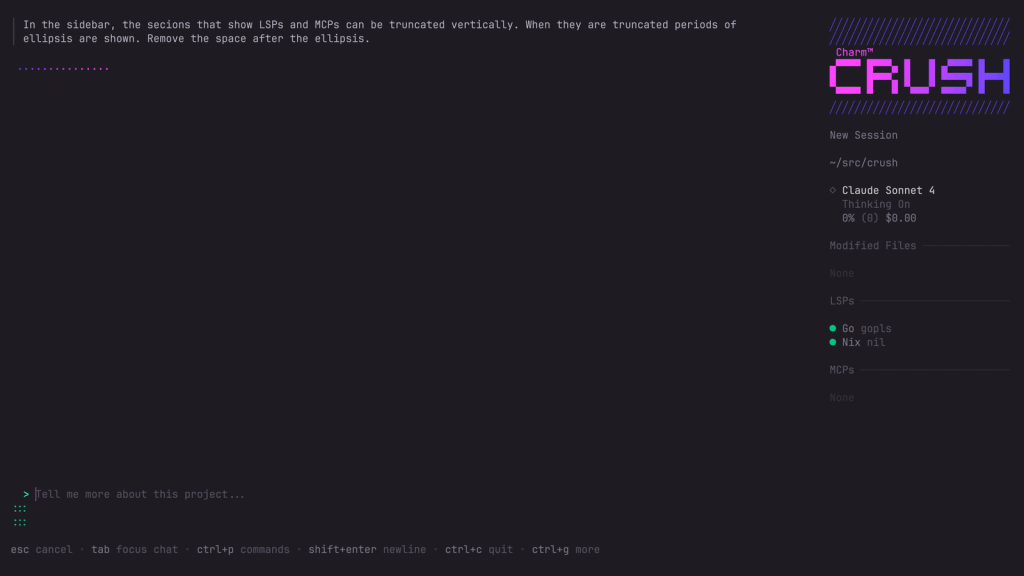
See It In Action
Installation
Quick Install Commands
| Platform | Command |
|---|---|
| Homebrew | brew install charmbracelet/tap/crush |
| npm | npm install -g @charmland/crush |
| Windows Winget | winget install charmbracelet.crush |
| Windows Scoop | scoop bucket add charm https://github.com/charmbracelet/scoop-bucket.gitscoop install crush |
| Arch Linux | yay -S crush-bin |
| Nix | nix run github:numtide/nix-ai-tools#crush |
| FreeBSD | pkg install crush |
| Go | go install github.com/charmbracelet/crush@latest |
Nix users can also install the current NUR package at nur.repos.charmbracelet.crush. The official NUR module configures Crush for NixOS or Home Manager.Debian / Ubuntu
On a Debian-based system, add the Charm package repository and install Crush through apt:
sudo mkdir -p /etc/apt/keyrings
curl -fsSL https://repo.charm.sh/apt/gpg.key | sudo gpg --dearmor -o /etc/apt/keyrings/charm.gpg
echo "deb [signed-by=/etc/apt/keyrings/charm.gpg] https://repo.charm.sh/apt/ * *" | sudo tee /etc/apt/sources.list.d/charm.list
sudo apt update && sudo apt install crush
Fedora / RHEL
On Fedora, RHEL, or CentOS, add the Charm yum repository:
echo '[charm]
name=Charm
baseurl=https://repo.charm.sh/yum/
enabled=1
gpgcheck=1
gpgkey=https://repo.charm.sh/yum/gpg.key' | sudo tee /etc/yum.repos.d/charm.repo
sudo yum install crush
Manual Download
Prebuilt packages and binaries are available from the Crush GitHub releases page. Release assets include Linux, macOS, Windows, FreeBSD, OpenBSD, and NetBSD builds, plus Debian and RPM packages. The Go installation command also works on illumos. Oracle Solaris requires the sqlite3_dotlk build tag.
How to Use Crush CLI
Open a terminal in your project directory and run crush to open the TUI. On first launch, choose a Charm Hyper model and complete authentication, or press Ctrl+L to select another provider and enter its API key. Charm Hyper uses zero data retention. Once a model is available, ask Crush to inspect files, explain code, write a patch, run project commands, or debug an error.
crushUse your ChatGPT subscription
Crush can authenticate the OpenAI provider through your ChatGPT account. Complete the browser sign-in to load the Codex models available through your subscription. The chatgpt alias opens this authentication flow. Use -f to replace an existing OpenAI login.
crush login openai
# Alias
crush login chatgpt
# Replace an existing OpenAI login
crush login -f openai
Set provider API keys
Environment variables supply credentials before launch and work well for scripts or provider-specific project setups.
| Provider | Environment variable |
|---|---|
| Charm Hyper | HYPER_API_KEY |
| Anthropic | ANTHROPIC_API_KEY |
| OpenAI | OPENAI_API_KEY |
| Google Gemini | GEMINI_API_KEY |
| OpenRouter | OPENROUTER_API_KEY |
| Vercel AI Gateway | VERCEL_API_KEY |
| Z.ai | ZAI_API_KEY |
| MiniMax | MINIMAX_API_KEY |
| Synthetic | SYNTHETIC_API_KEY |
| Hugging Face Inference | HF_TOKEN |
| Cerebras | CEREBRAS_API_KEY |
| Groq | GROQ_API_KEY |
| io.net | IONET_API_KEY |
| Alibaba | ALIBABA_SINGAPORE_API_KEY or ALIBABA_US_API_KEY |
| Avian | AVIAN_API_KEY |
| OpenCode Zen & Go | OPENCODE_API_KEY |
| Moonshot | MOONSHOT_API_KEY |
| Google Vertex AI | VERTEXAI_PROJECT, VERTEXAI_LOCATION |
| Amazon Bedrock | AWS_BEARER_TOKEN_BEDROCK, or AWS profile and credential variables |
| Azure OpenAI | AZURE_OPENAI_API_ENDPOINT, AZURE_OPENAI_API_KEY, AZURE_OPENAI_API_VERSION |
Crush can discover models from Ollama, llama.cpp, OMLX, LM Studio, and LiteLLM. Add the local provider in crushrc and leave its model list empty when you want automatic discovery.Run Crush non-interactively
crush run executes one prompt and exits. It works for one-off repository tasks, shell pipelines, redirected output, and scripted tasks. Use --model to select a model, --continue to resume the most recent session, or --session to continue a specific session. Reasoning-effort levels depend on the selected model.
crush run "Review this repository for failing tests"
git diff | crush run "Summarize these changes"
crush run --reasoning-effort high "Find the cause of this failing test"
Work with project sessions
Each session stores its conversation, project context, tool activity, and coding task history. Open the session manager when you want to continue an earlier task.
Clients that share a backend and resolved working directory join one workspace. A new client opens a fresh session by default. Select an active session in the session manager to mirror another client’s conversation. The first client sets workspace-wide --yolo and --debug values until the workspace closes.
Configuration
Crush uses crushrc, a Bash-based configuration format with Crush-specific commands. Its built-in Bash interpreter runs the configuration syntax on Unix-like systems and Windows. Existing JSON configuration remains compatible and is deprecated.
Crush checks project configuration before the global file. Its load order is ./.crushrc, ./crushrc, and ~/.config/crush/crushrc on Unix-like systems or %USERPROFILE%\.config\crush\crushrc on Windows. Store repository rules in a project file and personal defaults in the global file. Application state remains under the platform data directory and is not executable configuration.
Every crushrc and legacy crush.json file is trusted code. A crushrc runs in a full shell, and command substitution in JSON runs when Crush loads the file. Review project configuration before launching Crush in an unfamiliar repository.
Add LSP context
Language Server Protocol connections provide code context and power the lsp_rename and lsp_replace_symbol tools. Register only language servers that are installed for your project.
# crushrc
lsp add go --command "gopls"
lsp add typescript --command "typescript-language-server" --args --stdio
lsp add nix --command "nil"
Connect MCP servers
Crush connects to MCP servers through stdio, HTTP, and SSE. HTTP and SSE servers can use OAuth. Services with pre-registered OAuth clients require a client ID, client secret, and callback port.
# crushrc
mcp add filesystem --command node --args /path/to/mcp-server.js \
  --timeout 120 --env NODE_ENV production
mcp add github \
  --type http \
  --url "https://api.githubcopilot.com/mcp/" \
  --timeout 120 \
  --header Authorization "Bearer $GH_PAT"
MCP OAuth
Set oauth to true for an HTTP or SSE server that uses Crush’s built-in authorization-code flow.
{
  "mcp": {
    "linear": {
      "type": "http",
      "url": "https://mcp.linear.app/mcp",
      "oauth": true
    }
  }
}
Add PreToolUse hooks
Crush hooks run shell commands at specific points in the agent lifecycle. PreToolUse runs before a tool call and can block the call, rewrite its input, inject context, approve an action, or record activity. Hook commands can use Bash, Python, Node, Rust, or another executable available on the system. Crush hooks are compatible with Claude Code hook behavior.
# crushrc
hook add PreToolUse --matcher "^bash$" \
  --command "./hooks/check-command.sh" \
  --name check-command
Use Agent Skills
Crush follows the Agent Skills open standard and discovers folders that contain a SKILL.md file.
Project skills can live in .agents/skills, .crush/skills, .claude/skills, or .cursor/skills. Global skill locations include the Crush and Agent Skills config folders. A skill with user-invocable: true is listed in the command palette. Set disable-model-invocation: true to restrict the skill to manual invocation. Add extra skill directories in crushrc.
option skill-path "$HOME/squid-skills" "./project-skills"Read More About Skills for AI Coding Agents.
Add context and ignore files
Crush reads ~/.config/crush/CRUSH.md for product-specific instructions and ~/.config/AGENTS.md for rules shared with other coding agents. Add another file or a directory of Markdown context through option global-context-path.
Crush reads .gitignore and .crushignore as it scans the project tree. Use .crushignore for tracked files or directories that should stay outside Crush context. Put it in the repository root for project-wide exclusions, or place one in a subdirectory for rules that apply from that directory. It follows .gitignore pattern syntax.
Control permissions
Crush asks before running tool calls by default. Allow trusted tools or deny tools that should stay hidden from the agent. The --yolo flag skips every permission prompt. Reserve it for repositories and commands you have already reviewed.
permissions allow view ls grep edit
permissions deny bash sourcegraph
Check logs and debug output
Crush writes project logs to ./.crush/logs/crush.log. Use crush logs to read or follow recent output. Run crush --debug for more detail, or enable debug output in crushrc.
# Print the last 1000 lines
crush logs
# Print the last 500 lines
crush logs --tail 500
# Follow logs in real time
crush logs --follow
option debug true
option debug-lsp trueManage provider updates and metrics
Crush checks Catwalk, Charm’s public provider database, for updated provider and model metadata. Disable the check in crushrc with option provider-auto-update false or set CRUSH_DISABLE_PROVIDER_AUTO_UPDATE=1 in a restricted environment. The crush update-providers command can load Catwalk data from the network, a custom URL, a local file, or the embedded copy.
Crush records pseudonymous usage metadata tied to a device-specific hash. Prompts and responses are excluded. Set CRUSH_DISABLE_METRICS=1 or DO_NOT_TRACK=1 to opt out.
Alternatives & Related Resources
- Best Free CLI AI Coding Agents
- OpenAI Codex Commands Cheat Sheet
- The Ultimate Claude Code Resource List
- Best & Open-source MCP Servers
- SmallCode
- Pi Coding Agent
Pros
- Free CLI installation
- Wide model-provider choice
- Terminal-native coding sessions
- LSP and MCP integrations
- macOS, Linux, Windows, Android, and BSD builds
Cons
- Model access can cost extra
- Project configuration executes trusted code
- Metrics require manual opt-out
FAQs
Q: Do I need a paid AI account after installing Crush?
A: The CLI is free to install. Charm Hyper has a free tier and paid subscriptions. Hosted providers can require API credits or an active plan. Local models require compatible hardware and a running model server.
Q: Is Crush open source?
A: Crush publishes its source under FSL-1.1-MIT. The license permits use, modification, and redistribution for non-competing purposes. Each released version receives an MIT license on the second anniversary of its publication.
Q: What should I check before using Crush in a private repository?
A: Review the selected provider, project configuration, MCP commands, permission rules, and ignored paths. Your chosen provider receives the prompts and code context sent through Crush. Keep secrets outside tracked configuration and inspect unfamiliar crushrc files before launch.
Q: Why does clipboard copy and paste fail on Linux or BSD?
A: Wayland environments need wl-copy and wl-paste. X11 environments need xclip or xsel. Windows and macOS use native clipboard APIs.
Q: How should I choose between Crush, Gemini CLI, Claude Code, and Codex CLI?
A: Crush connects multiple model providers in one terminal agent with persistent sessions, LSP context, Agent Skills, and configurable MCP servers. Gemini CLI, Claude Code, and Codex CLI each use their provider’s model ecosystem and account authentication.
Last Updated: September 12 2026