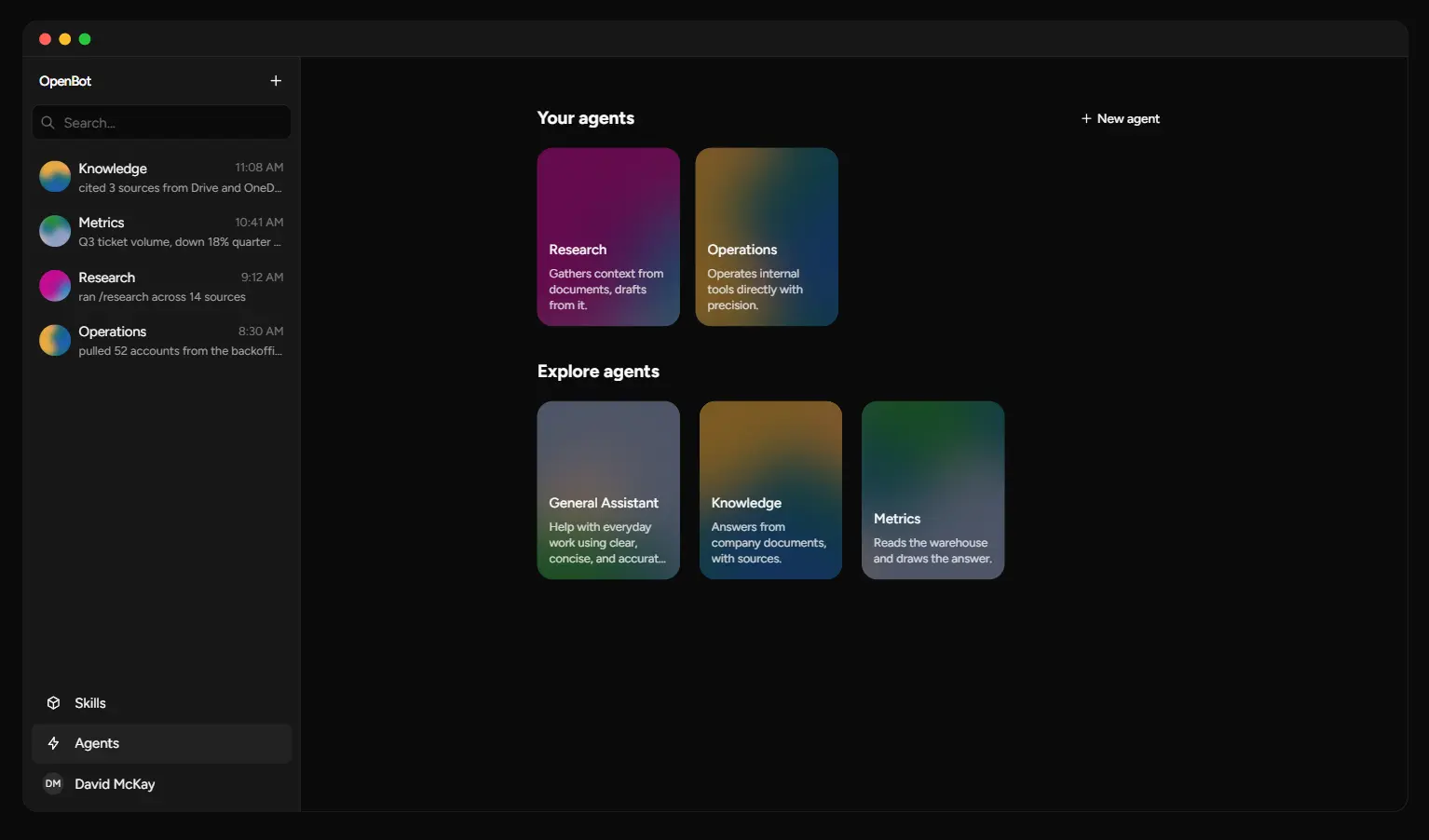
OpenBot is an open-source agent platform for running persistent AI coworkers inside your own infrastructure.
Each coworker has a standing role and its own conversation channel, and the platform can connect that agent to a browser, files, shell commands, MCP tools, knowledge sources, and interactive components.
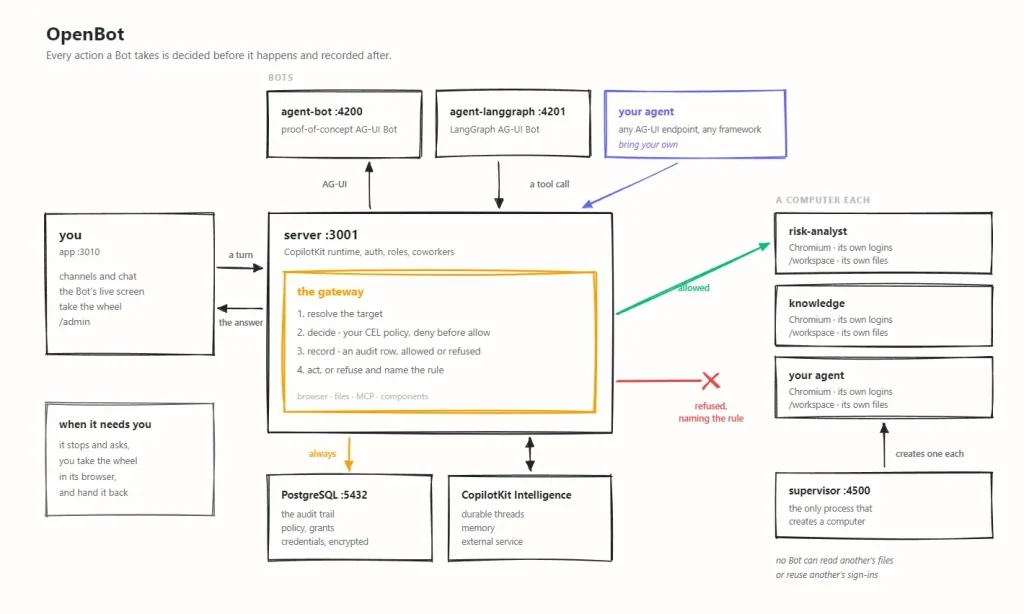
Its central control point is an action gateway. Browser, file, shell, and governed MCP operations pass through policy checks and receive an audit record before execution.
With per-Bot computers enabled, each coworker receives its own Chromium profile and workspace. You can watch the browser as the agent works and take manual control for a login, 2FA prompt, or another sensitive step.
Key Features
- Each coworker keeps a durable profile, standing role, visibility setting, and channel-based conversation history.
- AG-UI endpoints connect framework-based or custom agents to the same coworker workspace.
- Supervised Bots receive independent Chromium profiles, workspaces, files, and login sessions.
- CEL policies govern browser, file, shell, and MCP operations before execution.
- The audit trail records permitted, refused, and failed actions with the policy result.
- Human takeover supports login, 2FA, and other steps that need direct control.
- Stored credentials use encryption at rest and credential values do not return through product APIs.
- MCP grants control which external tools each Bot can access.
- Published components let agents return interactive UI inside conversations.
- Personal and deployment skills package reusable instructions for selected Bots.
- CopilotKit Intelligence stores durable threads and memory across application restarts.
- Google Drive and Microsoft OneDrive can serve as company knowledge sources in the current tenant package model.
See it in Action
How OpenBot Organizes AI Coworkers
A coworker in OpenBot is a durable Bot profile with a name, title, role description, visibility setting, runtime identity, and optional external AG-UI endpoint. The standing role accompanies each run and keeps the coworker’s job consistent across tasks.
Read More: AG-UI: the Agent-User Interaction Protocol
Starting a channel creates a new conversation and a new CopilotKit Intelligence thread for that coworker. Two channels with the same coworker keep independent histories. You can use one research agent across several projects while each project keeps its own conversation context.
OpenBot supports private and public coworkers. Private coworkers are visible to their owner and administrators. Public coworkers are available across the deployment. Package-provided agents are public, and user-created coworkers belong to their creator.
Deleting a user-created coworker uses soft deletion. Existing channel history remains readable. Hiding a coworker changes only that user’s roster.
Per-Bot Computers and Human Takeover
OpenBot can assign each Bot a dedicated computer container. A supervised computer has its own /workspace volume, Chromium profile, files, and browser login state.
Per-Bot computers require COMPUTER_SUPERVISOR_URL. A deployment that disables this mode uses the shared computer configured through AGENT_COMPUTER_URL.
A Bot can navigate websites, interact with page elements, work with files, and run shell commands in its workspace. Shell commands pass through the same policy boundary and audit system. The command environment receives PATH, locale, terminal names, proxy variables, and any extra variables explicitly named through COMPUTER_SHELL_ENV.
For stronger process isolation, COMPUTER_RUNTIME=runsc runs supervised computers under gVisor on compatible hosts.
Human takeover is built into the computer workflow. A Bot can request help when it reaches a login screen, 2FA prompt, or another step that needs a person. You take control in the computer panel, complete the step, and return control to the Bot. OpenBot records the request, takeover, and release as audit events.
Secret entry uses its own handling path. Audit events record that a secret was supplied and its character count. The secret value stays out of the audit trail.
Bring Your Own AG-UI Agent
Any compatible AG-UI endpoint can become an OpenBot coworker.
From /agents, create a coworker and configure:
- a name;
- a title;
- a standing role description;
- private or public visibility;
- an optional AG-UI endpoint;
- an optional authorization header.
OpenBot validates external agent endpoints before saving them. Cloud metadata addresses are refused. Authorization headers are stored as write-only credentials.
Tenant packages can also declare remote agents in agents.yaml:
agents:
  - id: risk
    name: Risk
    title: Risk & Compliance
    role_description: Investigate policies and controls.
    type: remote-ag-ui
    endpoint: http://risk.internal/ag-ui
A product-created coworker uses MANAGED_AGENT_AG_UI_URL when you do not assign a custom endpoint. Editing the standing role changes the system content sent on the next run.
This model keeps the coworker layer independent from a specific agent framework. Your existing agent retains its own runtime logic, and OpenBot handles the surrounding channel, computer, policy, credentials, components, and grants.
Knowledge Sources, MCP Tools, Components, and Skills
OpenBot has several extension points, and each serves a different part of the coworker environment.
Company knowledge sources are declared through the tenant package. The current knowledge configuration supports Google Drive and Microsoft OneDrive roots. Connector credentials live in the credential vault and are referenced by ID.
MCP servers connect agents to external systems. Administrators grant MCP access per Bot. Each MCP call checks the grant, evaluates the action policy with MCP context, and records the result.
Components let an agent return interactive UI inside a conversation. Compiled React components live in the application gallery. Administrators can also create sandboxed components in /admin/playground and publish them for use. Component calls check publication status and Bot access before execution.
Skills contain reusable instructions. Personal skills can attach to Bots owned by the author. Administrators manage deployment skills.
Read More: Most Popular Agent Skills on GitHub for Coding Agents
Model Providers
OpenBot does not bundle an LLM. Administrators supply model credentials for the agents they run.
The shipped LangGraph Bot supports OpenAI, Anthropic, and Google through BOT_PROVIDER. OpenAI-compatible gateways can use OPENAI_BASE_URL, and equivalent base URL settings exist for Anthropic and Google-compatible endpoints.
Model names pass through as configured. A gateway that uses namespaced IDs can use that provider-specific model name in BOT_MODEL.
For computer work, choose a model that supports tool calling. BOT_RESPONSES_API=true also requires an OpenAI-compatible endpoint that implements the Responses API.
The tenant package has its own model configuration for built-in agents:
model:
  provider: openai
  credential_secret_ref: openai-api-key
  default_model: gpt-4.1
How to Run OpenBot Locally
The local development setup requires Docker, Bun 1.3+, a CopilotKit Intelligence project and license, PostgreSQL, and a model key.
Create the environment file:
cp .env.example .envGet the CopilotKit Intelligence credentials:
npx --yes copilotkit@latest login
npx --yes copilotkit@latest project select
npx --yes copilotkit@latest license --write
Place the runtime key in .env as INTELLIGENCE_API_KEY. The license command writes COPILOTKIT_LICENSE_TOKEN into the environment file.
The proof-of-concept configuration uses an OpenAI key:
OPENAI_API_KEY=...Generate a private encryption key for stored credentials:
openssl rand -base64 32Install dependencies and start the stack:
bun install
bash scripts/start.sh
Open:
http://localhost:3010The startup script launches the Docker services, applies migrations, starts the API server on port 3001, starts the app on port 3010, and checks the service health routes.
Pros
- Open-source MIT-licensed code.
- AG-UI makes the coworker layer compatible with agents built on several frameworks.
- Per-Bot computers can isolate browser profiles, files, and workspaces for different coworkers.
- Policy checks and audit records create a clear control point for agent actions.
- Human takeover handles authentication and other steps that need direct intervention.
- MCP, components, skills, and knowledge sources extend the platform across internal workflows.
Cons
- The local stack combines several services and requires technical administration.
- CopilotKit Intelligence is a required part of the current server configuration.
- Model credentials and inference costs come from external providers.
- Dedicated per-Bot computers depend on the supervisor and suitable container infrastructure.
Alternatives & Related Resources
- OpenMausBot: Claude, Codex as Persistent AI Bots (Grok Bot Alternative)
- AionUi: Free Open-source Cowork App
- OpenWork: Free Open-Source Claude Cowork Alternative
- 7 Best & Open-source Claude Cowork Alternatives
- Automate Anything: 10 Best & Open-source AI Agents
FAQs
Q: What happens to a coworker’s channels if the coworker is deleted?
A: OpenBot uses soft deletion for user-created coworkers. The coworker stops running, and existing channel history remains readable to channel members. Those channels restore the deleted coworker as a tombstone record.
Q: Do two channels with the same coworker share one conversation history?
A: No. Starting a channel creates a new CopilotKit Intelligence thread. Two channels that use the same coworker keep independent conversation histories while sharing the coworker’s standing role.
Q: What happens when a person takes control of a Bot’s browser?
A: OpenBot records the help request and control handoff. Bot actions are refused during manual control. Releasing control returns the computer to the Bot and creates another audit event.
Q: Does every OpenBot coworker automatically receive browser and MCP access?
A: Capabilities are granted independently from the coworker’s role. Browser and file actions follow the computer policy, MCP tools require administrator grants, components must be published and permitted, and skills follow their ownership rules.
Q: What Bot does a new coworker run on if I don’t give it a custom AG-UI endpoint?
A: It uses MANAGED_AGENT_AG_UI_URL, the default endpoint configured for the deployment. A custom endpoint is only needed to point a coworker at a different agent.