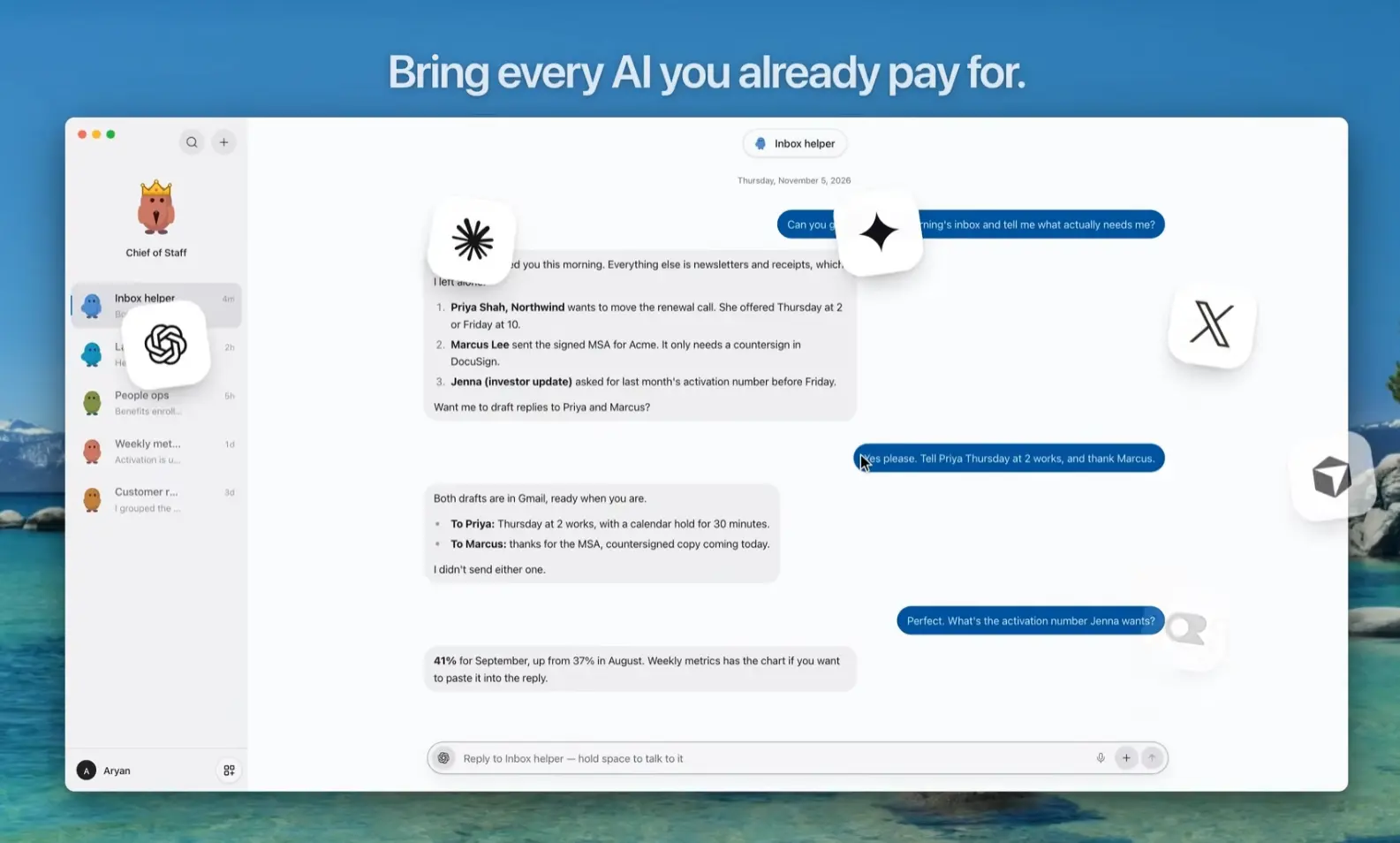
Turnstone is a free Mac app for creating a team of persistent AI agents that handle research, documents, email, browser tasks, and recurring assignments. It was created as an alternative to Grok Bot for people who want to choose the AI behind each agent and run their team on a Mac.
Each agent in Turnstone has a defined job and its own conversation. You can power the agents with your existing ChatGPT, Claude, Grok, Gemini, or Cursor account, an API key, or a local model through Ollama.
A central agent called Pebbles helps organize specialists and delegate work between them. The agents can use information from your files and connected apps, share an editable memory of your projects, and return results to their conversations.
Key Features
- Create persistent agents with individual responsibilities, instructions, and conversations.
- Ask an agent to delegate part of an assignment to another agent and return the result.
- Connect AI subscriptions, API keys, or Ollama models, with a different model for each agent.
- Change models during a conversation and set fallback priorities for connected AI providers.
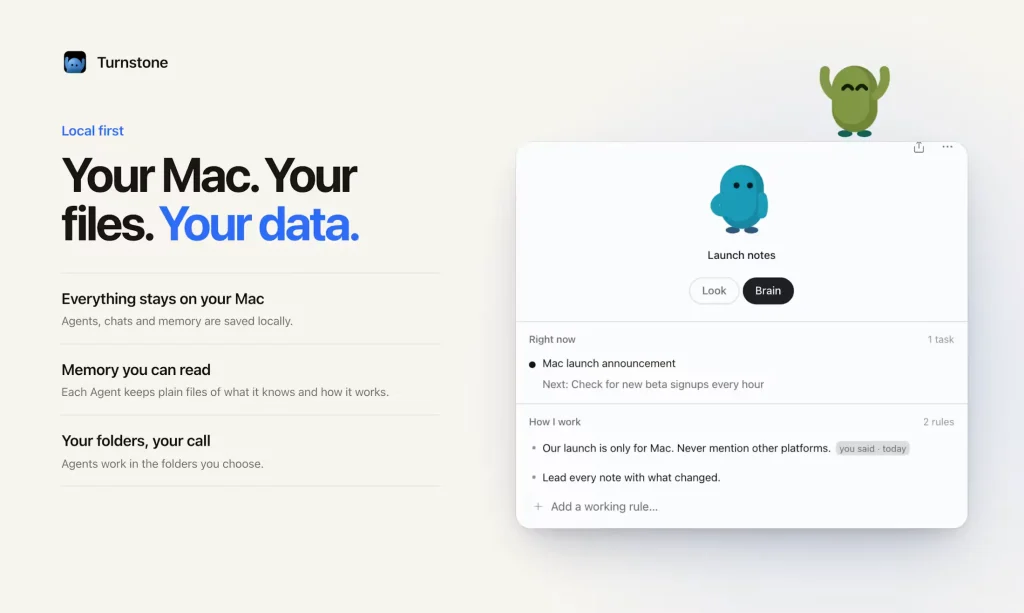
- Share project details and preferences through an editable local memory called Brain.
- Read and edit authorized local files, including documents and spreadsheets.
- Work with Gmail, Google Calendar, Slack, Notion, and other connected apps.
- Navigate websites and fill out forms in a browser session you can follow.
- Schedule recurring tasks and save reusable instructions as Skills.
How Turnstone’s AI Agents Work Together
Pebbles can set up specialists from a request, and the Agent Library offers ready-made agents for common responsibilities. For a weekly project update, you might create a research agent to gather developments and a writing agent to prepare the report. Each specialist retains its instructions and conversation when you return to it.
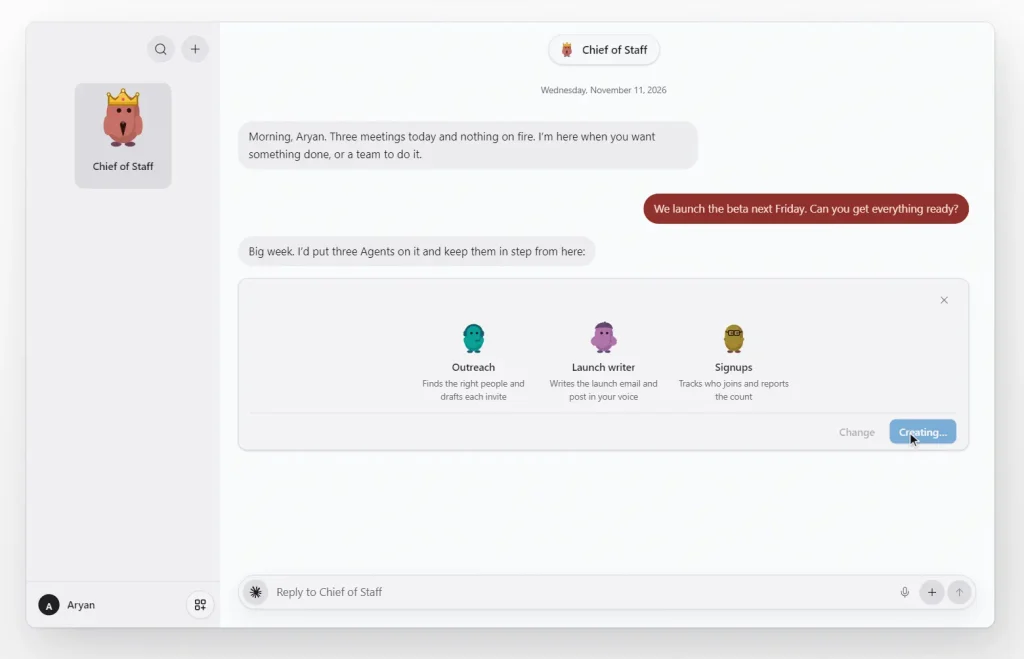
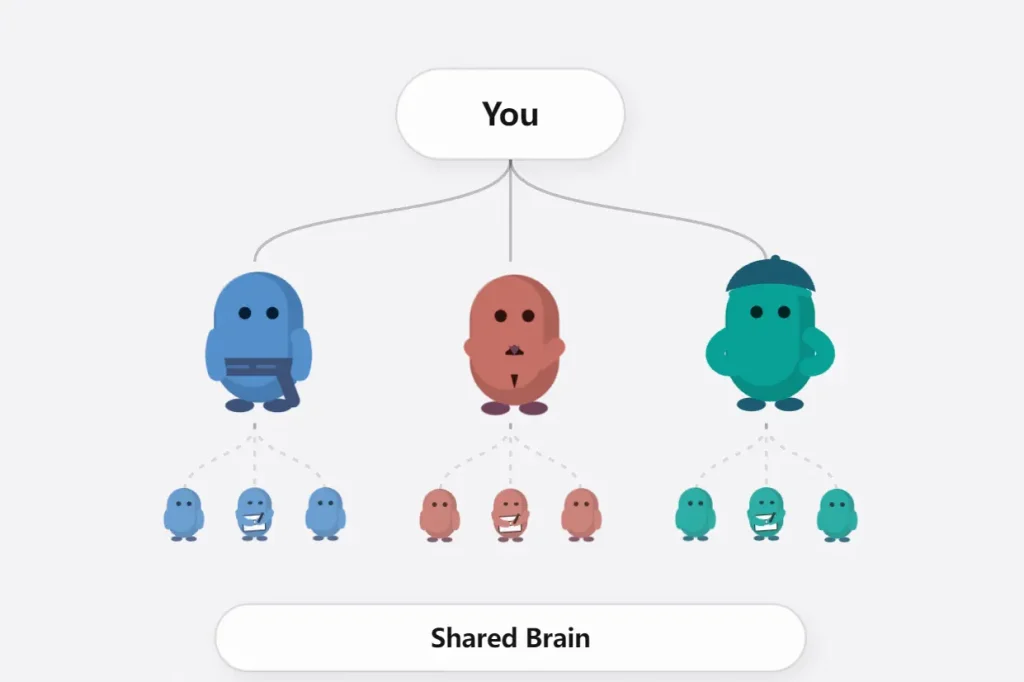
One agent can ask another to handle part of its work. The research agent could collect background for a client update and send it to the writing agent, which drafts a message for review. The delegated result returns to the agent that requested it, preserving the context of the original assignment. Related agents can also be organized into a Family, with a shared chat for working with several of them.
Turnstone’s Brain holds information about people, projects, decisions, and preferences that multiple agents can use. It is stored as editable files on your Mac. Each agent also has its own working rules and focus, so a research specialist can follow different instructions from an outreach specialist. You can inspect and correct saved information as your work changes.
Working With Files, Connected Apps, and Websites
Agents can read files in an authorized folder and create or modify files when you grant permission. For example, give an agent meeting notes and ask it to prepare a project brief in the same folder. Turnstone lets you open documents, PDFs, and CSV files beside the chat to review the result. You can also ask agents to organize folders, prepare a spreadsheet, or assemble a report from existing documents.
Connected apps let an agent gather the information needed for a task. An agent preparing a client follow-up could look up an email conversation, check the calendar, and draft a response using relevant project notes. Gmail drafts can appear in an editable review card. Turnstone also connects to services such as Slack, Outlook, Google Drive, Notion, iMessage, and WhatsApp. Supported accounts can be used for actions such as sending messages after you grant the relevant permissions.
Agents can navigate websites, inspect pages, and fill out forms through Turnstone’s browser. You can follow the browser activity and complete sign-in or verification steps when needed. For repeat assignments, ask an agent to create a Schedule, such as a weekday summary of customer replies. The agent saves the timing and instructions and posts results back to its conversation.
Local Schedules run while Turnstone is open and your Mac is awake.
A successful repeatable process can become a Skill. For example, save your client-brief instructions and invoke the Skill for another project. Skills preserve the task instructions, while Schedules determine when recurring work runs.
Use ChatGPT, Claude, Grok, or Local AI Models
Turnstone enables you to select the AI connection for each agent. You can switch an agent to another connected model during a conversation and retain its role, context, and history. Turnstone also supports a priority order for fallback models when the selected connection becomes unavailable.
- ChatGPT: Sign in to OpenAI’s Codex using an eligible ChatGPT account. Turnstone uses the Codex allowance associated with that plan.
- Claude: Connect through Claude Code and Anthropic sign-in, using the access available on your Claude plan.
- Gemini, Grok, and Cursor: Use supported account connections in Turnstone’s model settings.
- API keys and custom endpoints: Connect supported OpenAI, Anthropic, OpenRouter, or compatible model services using their credentials.
- Ollama: Run a supported local model on your Mac.
- Turnstone Credits: Prepay for Turnstone-managed model usage if you prefer that option.
How to Get Started
1. Download the Mac app for your Apple Silicon or Intel Mac.
2. Sign in with a supported account, add an API key, or configure Ollama in the model settings.
3. Open the Agent Library or ask Pebbles for a specialist. Assign a working folder and choose Read Only or Ask First permissions for an initial document task.
4. Ask the agent to read meeting notes in that folder, summarize the decisions, and prepare a project brief. Review the response and any file it creates in the conversation or file panel.
5. After the first assignment, connect an app for a task that needs account information, or give a second agent part of the work.
6. You can save recurring instructions as a Skill and schedule future runs once the task is working as intended.
Turnstone vs a Grok Bot
Turnstone and Grok Bot both let persistent AI agents work across apps, websites, and recurring tasks. They differ in model choice, where agents run, and how you pay for access.
| Turnstone | Grok Bot | |
|---|---|---|
| AI models | Choose a model per agent from connected AI accounts, API keys, or Ollama. | Selects a model automatically for each task. |
| Agent teamwork | Agents delegate tasks and share an editable Brain. | Bots coordinate tasks and collaborate in group chats. |
| Where agents run | On your Mac, with optional Cloud in limited beta. | On a hosted cloud computer. |
| Scheduled tasks | Local Schedules run while Turnstone is open and your Mac is awake. | Cloud Routines run when your computer is off. |
| Memory | Shared Brain stored as editable files on your Mac. | Bot memory is reviewed and corrected through chat. |
| Files and apps | Access authorized local files, connected apps, and a browser. | Use connected apps, websites, and files on the cloud computer. |
| Price | Free Mac app with your own AI access or local model; optional prepaid Credits. | Included with eligible plans, starting at $30/month for Premium. |
| Devices | macOS; iPhone companion available through TestFlight beta. | macOS, Windows, Linux, iPhone, iPad, and Android. |
To move an existing Grok Bot, connect it to Turnstone’s MCP server and ask it to recreate the bot’s role, instructions, memory, Skills, and Routines as an agent. Public Marketplace bots can also be imported by URL. Reconnect app accounts and permissions after the transfer.
Pricing and Platform Availability
Turnstone for Mac is free, including persistent agents, local memory, and app connectors.
Optional Turnstone Credits provide prepaid model usage. The minimum top-up is $10, plus a processing fee. Agents using your own subscriptions or API keys do not consume those Credits.
Turnstone Cloud is priced at $49 per month as a separate service for running agents and schedules while your Mac is off.
Privacy, Memory, and Permissions
Turnstone keeps your local agent conversations and Brain files on your Mac. You can open and edit the Brain directly.
File permissions determine how an agent works with your computer: Read Only permits inspection, Ask First requires approval for protected changes, and Always Allow permits changes inside the selected workspace. Full Access lets the agent read and change files beyond that folder.
When an agent uses a hosted AI model, the task context needed for its request is processed by that model provider. Connected-app actions can also pass through Turnstone’s backend or connection providers.
Turnstone does not use customer work to train general-purpose AI models. The privacy and retention terms of connected model providers also apply. Cloud users have additional hosted execution records and files associated with cloud tasks.
Pros
- 100% free when you use your own AI agent.
- Specialist agents can delegate work and share editable project memory.
- A conversation can continue using another AI provider.
- File, app, and browser tasks are available from the same desktop workspace.
Cons
- Desktop access is currently limited to macOS.
- Local schedules require the Mac to stay awake.
- Hosted AI usage depends on provider allowances, API charges, or optional Credits.
FAQs
Is Turnstone open source?
Turnstone’s Mac app is closed source.
Can I import a private Grok Bot?
A public Marketplace bot can be imported from its listing URL. For a private bot, use the MCP migration route and ask the existing bot to transfer its instructions, memory, Skills, and Routines. Review the resulting agent’s information and reconnect its apps after the transfer.
What happens to my Brain if I uninstall Turnstone?
The local Brain is stored in files on your Mac and can be kept or backed up after uninstalling the app.
Alternatives & Related Resources
- Rakazo: Open-Source Grok Bot Alternative With Persistent AI Bots
- OpenMausBot: Claude, Codex as Persistent AI Bots (Grok Bot Alternative)
- Codync: Run Claude Code, Codex & More as Persistent Bots
- 10 Best Open-Source Grok Bot Alternatives