ClaudePrism is a free, open-source desktop app that turns Claude Code into a local LaTeX writing workspace for papers, theses, posters, and other scientific documents.
It runs natively on macOS, Windows, and Linux through Tauri 2 and Rust, stores every project file on your disk, and compiles LaTeX offline through an embedded Tectonic engine.
A typical LaTeX project involves several disconnected steps: open a template, write the document, manage a Python script for a figure, track citations in Zotero, and check the change history before submission.
ClaudePrism keeps those steps inside one local project folder. The project wizard sets up a paper, thesis, presentation, poster, or letter template, then Claude Code drafts initial content from a short description and any reference files you drag into the workspace.
A built-in uv environment creates a Python virtual environment for the project, so you can run analysis scripts and generate plots inside the same project window.
Every save creates a snapshot in a local Git repository, and the History panel displays commit labels, diffs, and rollback options.
Key Features
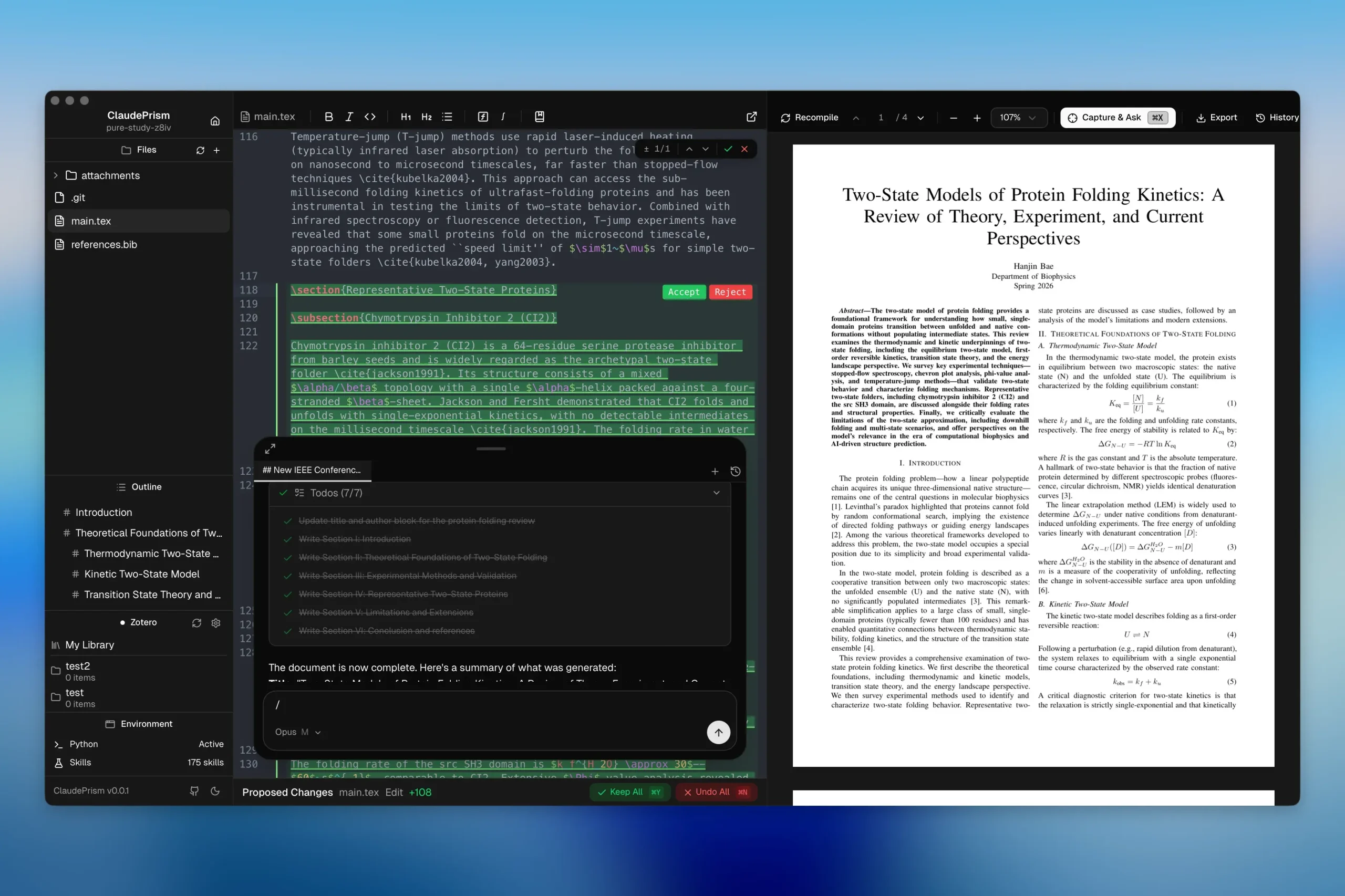
- LaTeX and BibTeX editor with syntax highlighting, linting, regex search, autosave, and multi-file project navigation.
- Live PDF preview with SyncTeX navigation between the compiled PDF and its source lines.
- Embedded Tectonic compiler that caches required packages locally and does not require TeX Live.
- Claude chat inside the editor for manuscript revisions, project questions, file edits, shell tasks, and slash commands.
- Proposed changes panel with visual diffs and per-section accept or reject controls.
- Local Git-based history that saves snapshots, compares revisions, and restores earlier document states.
- Project-level Python environments powered by
uvfor analysis scripts, charts, and data processing. - 100+ scientific agent skills for fields such as bioinformatics, cheminformatics, machine learning, clinical research, and academic writing.
- Template gallery for papers, theses, posters, presentations, letters, and other academic documents.
- Zotero integration for reference browsing and citation insertion.
ClaudePrism vs. OpenAI Prism
ClaudePrism and OpenAI Prism both bring AI into LaTeX research writing, but they use different workspace models.
| Workflow area | ClaudePrism | OpenAI Prism |
|---|---|---|
| Main workspace | Native desktop app | Browser-based cloud workspace |
| Project files | Local folders | Cloud-hosted projects |
| AI assistant | Claude Code | ChatGPT and Codex |
| Collaboration | Local Git history and change review | Real-time editing and unlimited collaborators |
| LaTeX workflow | Embedded Tectonic compiler with offline compilation after package caching | Built-in cloud LaTeX workspace |
ClaudePrism suits projects that need local files, local compilation, and Git-based revision history. OpenAI Prism centers on browser access, real-time collaboration, and shared cloud workspaces.
Use Cases
- Draft a research paper, thesis chapter, or poster from a built-in template.
- Run Python analysis scripts and generate plots inside the same writing project.
- Load a bioinformatics, cheminformatics, or machine learning skill for dataset-specific help.
- Capture an equation, table, or figure from a PDF and ask Claude to explain it.
- Track every manuscript revision through Git history before sharing a draft with a co-author.
How to Use ClaudePrism
1. Download the desktop build for macOS, Windows, or Linux.
2. Start with a paper, thesis, poster, presentation, or letter template. You can also open an existing local LaTeX project.
3. Add the materials that belong with the project, such as .tex files, .bib files, PDFs, images, data files, and Python scripts.
4. Compile the project with Tectonic and review the result in the PDF preview. Click within the preview to jump to the related LaTeX source.
5. Connect Claude Code, then use the built-in chat to discuss a section, revise selected text, inspect a PDF region, or work with project files.
6. Review each AI-generated change in the proposed changes panel before applying it. Use local snapshots and diffs to compare versions or restore an earlier draft.
7. Create a project-level Python environment when the paper needs analysis code, data processing, tables, or figures.
Alternatives & Related Resources
- Prismer.AI: Open-Source Alternative to OpenAI Prism
- Dr. Claw: Free Self-Hosted AI Research Assistant
- Free AI Citation Verification Tool to Catch Fake Citations – CiteTrue
- Auto Clean and Standardize Your BibTeX Files with AI – Bibfixer
- Free AI Paper to Presentation Generator with RAG Support – Paper2Slides
Pros
- Fully open source under MIT license.
- Local file storage and offline compilation.
- One-click Python environment setup.
- 100+ domain-specific scientific skills.
- Git-based history with visual diffs.
- Runs as a native desktop app.
- Built-in Zotero citation integration.
Cons
- AI features require Anthropic API access.
- No local model support yet.
- Real-time collaboration still in progress.
- No built-in literature search yet.
FAQs
Q: Does ClaudePrism work without an internet connection?
A: Document storage, editing, and LaTeX compilation through Tectonic run fully offline after the first package download. AI features such as chat, drafting, and Capture and Ask need an internet connection. They send content to Anthropic’s API.
Q: Does ClaudePrism store my files in the cloud?
A: No. ClaudePrism stores and compiles documents on your local disk. ClaudePrism sends only the prompts and file contents that Claude reads during AI features to Anthropic’s API for inference.
Q: What is the difference between ClaudePrism and OpenAI Prism?
A: OpenAI Prism is a cloud-based LaTeX workspace built on GPT that requires uploading files to OpenAI’s servers. ClaudePrism stores files locally, compiles LaTeX offline through Tectonic, and runs on Claude Opus, Sonnet, or Haiku.
Q: Do I need to install TeX Live?
A: No. ClaudePrism includes the Tectonic compiler. Tectonic downloads missing packages when needed, stores them locally, and can compile later documents from that cache without a separate TeX Live installation.
Q: Can I open an existing LaTeX project?
A: Yes. ClaudePrism supports existing local projects with multiple LaTeX and BibTeX files. You can compile the project, browse files, edit source, use the live PDF preview, and keep local Git-based snapshots as the manuscript changes.
Q: Does ClaudePrism support real-time collaboration?
A: Not currently. ClaudePrism focuses on local projects, Git-based history, and reviewable changes.