Mortiflix is an open-source AI motion design studio that runs on your device and uses Claude Code to create animated videos.
You can turn a brief into an explainer video, social media short, or logo animation through a production process that includes scripting, visual design, animation, and rendering.
You direct the production through creative reviews. Approve a script, comment on a style frame, or pause an animation to request a specific change.
Claude Code revises the work and responds to your feedback before the next stage is approved.
Key Features
- Create explainer videos, social shorts, and animated logos with Claude.
- Review and approve scripts, style frames, transitions, animatics, and final videos.
- Pin feedback to exact image coordinates, video timestamps, or script paragraphs.
- Receive revised submissions that respond to every review comment.
- Resume unfinished projects across Claude sessions with saved feedback and production history.
- Inspect animations through automated checks for rendering errors, frozen frames, and audio problems.
- Generate narration with ElevenLabs or local Qwen3-TTS, or record your own voice.
- Create optional soundtracks with Strudel and 3D animations with Blender.
- Build custom production pipelines with your own stages and quality checks.
How Mortiflix Works
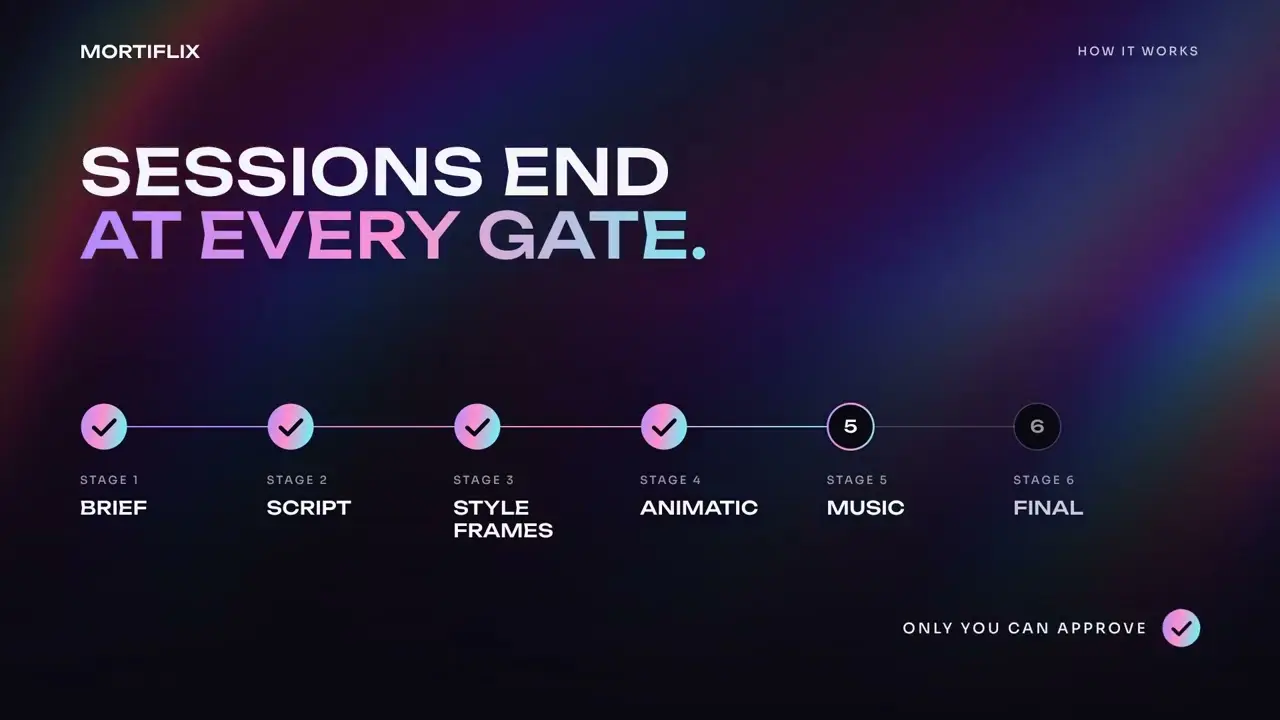
Mortiflix creates videos through a series of production stages. Each stage has a defined task, review requirements, and quality checks.
An explainer video begins with your brief. Claude develops a script and style frames to establish the message and appearance of the video. You can review these materials before work progresses into animation.
The transition board determines how one scene connects to another. It includes intermediate frames, motion timing, and the elements that move between shots. Claude uses the approved materials to create an animatic, followed by optional music and the final rendered video.
The animations use Remotion, a React-based video rendering framework. Claude writes and revises the animation code, and Mortiflix uses FFmpeg to inspect the rendered output.
Review and Revise Videos
The review room lets you give feedback directly on the material Claude produces.
For example, you can pause an animatic at eight seconds and comment on a transition that needs more time. You can also click a specific position on a style frame to request a typography or layout change.
Script comments work at the paragraph level, and video comments can reference an exact time and position.
When Claude submits another version, it must address every comment from the previous review and report the changes made. Approved submissions are copied into a saved project record, preserving the material you reviewed.
Only the studio owner can approve a reviewed stage through Mortiflix’s normal review controls.
Continue Projects Across Claude Sessions
Each Claude session works until it reaches a review checkpoint or completes its assigned work. When your approval is needed, the session ends.
After you respond, a new session continues the project using its production journal, previous submissions, and your feedback. A video can stay in review for several days with no active Claude session consuming tokens during that period.
You can also establish recurring production rules. If you identify a technical error, Claude can propose a new quality check for your approval. Approved checks apply to future projects.
Mortiflix maintains a TASTE.md file for creative preferences that can be carried into later productions.
What Videos Can Mortiflix Create?
Mortiflix currently includes three production pipelines.
| Pipeline | Video Type | Duration |
|---|---|---|
explainer | Animated explainers with optional narration and music | 30 seconds–2 minutes |
social-short | Vertical shorts with hook frames and transitions | 45 seconds–3 minutes |
logo-sting | Short animated logo sequences | 3–8 seconds |
Narration, Music, and 3D Animation
Mortiflix can incorporate narration, soundtracks, external assets, and 3D scenes into its video productions.
AI Narration and Voice Recording
You can generate narration through ElevenLabs or Qwen3-TTS.
ElevenLabs connects through your own API key and account. You can select voices, configure speech settings, and generate narration for an approved script.
For local speech generation, Mortiflix uses Qwen3-TTS through ComfyUI. The 0.6B voice model requires an NVIDIA GPU with at least 4 GB of VRAM. The 1.7B model requires at least 8 GB.
You can also record your own narration. The web studio includes a recording booth where you read individual script lines, listen to takes, and select the recordings to use. Terminal recording and audio-file import are available.
Speech-to-text checks can identify missing or incorrect words in generated narration. Word timings help synchronize the voiceover with the animation.
Original Music and Sound Effects
The explainer pipeline can generate an original soundtrack with Strudel.
Claude composes the music around the approved animatic, including scene timing, narration, and important transitions. Automated checks inspect the musical structure and synchronization.
You can request an optional MIDI package containing individual musical parts, audio stems, and a cue sheet for further editing.
ElevenLabs is another option for sound effects and music beds when your account has the required access.
Blender Integration and External Assets
Mortiflix can use Blender to create 3D scenes and motion graphics. Optional toolkits handle camera animation, procedural motion, mathematical graphics, and particle effects.
The Nova FX particle toolkit currently builds on Linux.
You can also configure websites that you use for stock footage, images, illustrations, and other assets. Mortiflix accesses these sites through browser-harness in your Chrome browser and records the source and licensing information for downloaded assets.
How to Install and Use Mortiflix
Mortiflix runs as a local Node.js application. You can manage video projects through its CLI or browser-based studio.
Requirements and Platform Support
You need Node.js 20 or later, Git, FFmpeg, and either a working Claude Code login or an Anthropic API key for real video production.
A dedicated NVIDIA GPU is optional for the main motion design process. Local Qwen3-TTS requires compatible NVIDIA hardware.
Install Mortiflix
Clone the official GitHub repository and install the Node.js dependencies.
git clone https://github.com/GTKottman/mortiflix-oss.git
cd mortiflix-oss
npm install
npm link
Initialize Your Studio
Create the local studio directory and configure the components you want to use. Mortiflix normally stores its projects and settings in ~/Mortiflix.
The setup walkthrough asks before installing optional components such as music tools, narration models, and Blender utilities.
mortiflix init
mortiflix setup
Try the Free Demo
You can explore Mortiflix’s production and review process before connecting Claude.
The demo uses placeholder frames and a test-pattern video to demonstrate the review checkpoints. It requires no Anthropic API key or Claude subscription.
mortiflix demoCreate Your First Video
After configuring Claude access, create an explainer project. Mortiflix asks questions about your brief and prepares the project for production.
The run command starts the production process. When a submission needs your approval, review opens the pending material and lets you approve it or request changes.
mortiflix new explainer
mortiflix run
mortiflix review
Open the Web Studio
You can manage the production through your browser. The web studio displays current projects, Claude’s activity, review submissions, and settings.
It also lets you pin comments to frames and video timestamps. Queued sessions run automatically while the studio server is active.
Start the local web server and open http://127.0.0.1:4646.
mortiflix servePrivacy and Security
Mortiflix stores project files, production records, settings, and credentials in your local studio folder.
Its web server listens on localhost by default. For access from another device, you can configure a non-loopback host with token-based authentication. Remote exposure also requires suitable HTTPS protection.
Claude Code and the Anthropic API communicate with Anthropic during production. ElevenLabs and other connected services process the information sent to them when used.
Claude sessions also execute commands on your computer. In the default configuration, the agent’s shell permissions can extend beyond the active project directory.
On Linux, Mortiflix has an optional bubblewrap sandbox for its Claude Code backend. This restricts filesystem access during agent sessions while retaining the project files and tools required for production.
Pros
- Human approval at major creative stages.
- Precise feedback on frames, videos, and scripts.
- Persistent production history across Claude sessions.
- Local project management and customizable pipelines.
- Automated video and audio quality checks.
Cons
- Requires Claude access for video production.
- Agent shell execution requires security consideration.
- Remotion and optional services have separate licensing terms.
- Only three built-in video pipelines are currently available.
FAQs
Does Mortiflix support AI models other than Claude?
Mortiflix does not currently provide a general-purpose model picker for replacing Claude as its production agent.
Can Mortiflix edit existing video footage?
The built-in pipelines focus on creating motion graphics, explainers, short-form animations, and logo sequences. Mortiflix does not currently include a non-linear video editor for importing and trimming existing footage.
Can clients review videos through Mortiflix?
Mortiflix currently works as a single-owner studio. It does not include client accounts, team permissions, or dedicated client review links.
Can I create custom video pipelines?
Yes. You can define additional production stages, review requirements, and quality checks through pipeline.json and PIPELINE.md files inside your studio’s pipeline directory.
Alternatives & Related Resources
- OpenMontage: Open-Source AI Video Production System
- LTX-Desktop: Free Local AI Video Editor Powered by LTX-2.5
- 10 Best AI Video Generators
- 10 Best AI Video Editors for Quick Professional Videos