Morphic is an open-source AI answer engine from miurla.
It combines web search, cited answers, related questions, and generative UI in a self-hostable Next.js app that you can run locally, deploy with Docker, or adapt from the GitHub repository.
The project is useful when you want a Perplexity-style search engine that you control yourself.
You still need at least one AI provider key, but Docker Compose now includes SearXNG by default, so a basic local setup no longer requires a separate commercial search API key.
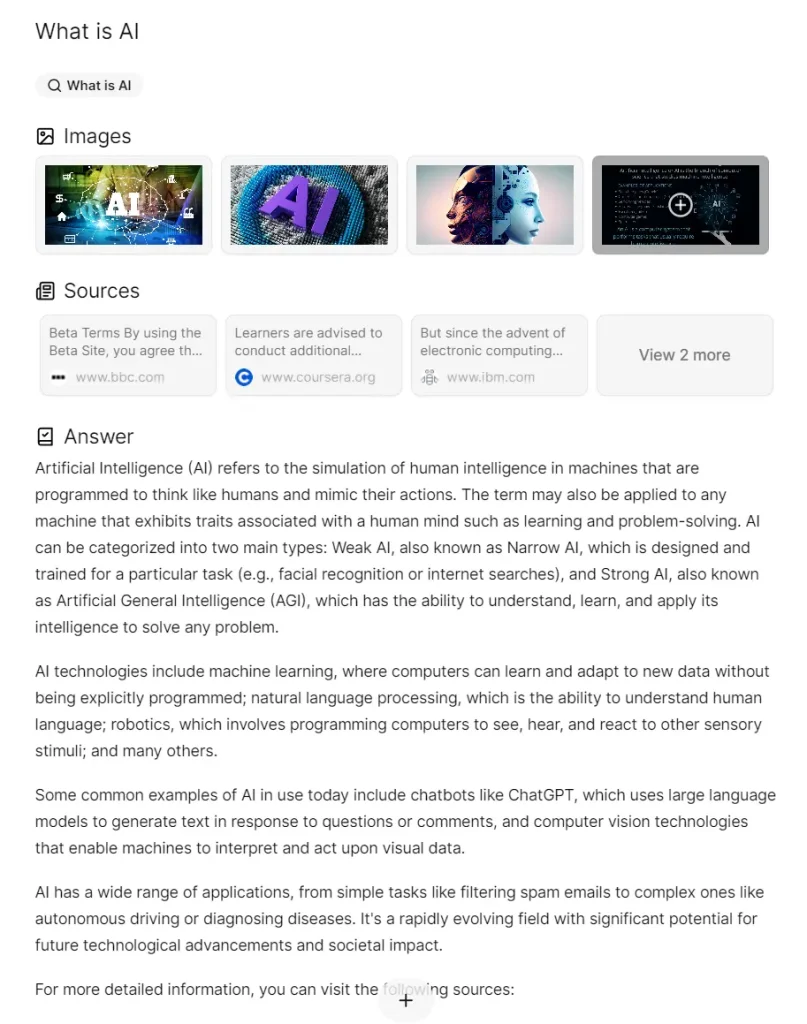
If the initial answer doesn’t fully address your query, you can engage in a back-and-forth dialogue with the AI to get a deeper understanding. This interactive approach can be helpful for complex or nuanced topics.
How to deploy it:
Docker Compose
Docker Compose is the recommended method for running Morphic locally. It starts the app with PostgreSQL, Redis, and SearXNG, so you get chat history storage, search caching, and a local search backend in one stack.
1. Pull the prebuilt image:
docker pull ghcr.io/miurla/morphic:latest
2. Clone the repository so you have the Docker Compose file and environment template:
git clone https://github.com/miurla/morphic.git
cd morphic
3. Create your local environment file:
cp .env.local.example .env.local
4. Add at least one AI provider key to .env.local. Morphic can work with OpenAI, Anthropic, Google Gemini, Vercel AI Gateway, Ollama, or an OpenAI-compatible provider.
OPENAI_API_KEY=[YOUR_OPENAI_API_KEY]
ANTHROPIC_API_KEY=[YOUR_ANTHROPIC_API_KEY]
GOOGLE_GENERATIVE_AI_API_KEY=[YOUR_GOOGLE_GENERATIVE_AI_API_KEY]
AI_GATEWAY_API_KEY=[YOUR_AI_GATEWAY_API_KEY]
OLLAMA_BASE_URL=http://localhost:11434
5. Start all services:
docker compose up -d
6. Open http://localhost:3000 and choose a model in the UI. In Docker mode, Morphic detects available providers from your environment variables and stores the selected model for local chat sessions.
Local Development from GitHub
1. Clone the repository and install dependencies:
git clone https://github.com/miurla/morphic.git
cd morphic
bun install
2. Create the environment file:
cp .env.local.example .env.local
3. Add your API keys. For local development, the repository documentation still shows OpenAI and Tavily as the basic example:
OPENAI_API_KEY=your_openai_key
TAVILY_API_KEY=your_tavily_key
4. Start the development server:
bun install
bun dev
Open http://localhost:3000 after the dev server starts. Add database, authentication, file upload, or search-provider settings only when your local development task needs them.
Vercel
Morphic also provides a Vercel deployment link. You can use it when you want a hosted web deployment and are ready to configure the required environment variables for your AI provider, search provider, and authentication setup.
Supported AI Providers and Search Options
Morphic supports several model providers. OpenAI, Anthropic, Google Gemini, Vercel AI Gateway, Ollama, and OpenAI-compatible endpoints can appear in the model selector when you add the matching environment variables.
For OpenAI-compatible providers, Morphic sends requests to the chat completions endpoint. You can set the API key, base URL, provider display name, and a fixed model list when the provider does not expose a usable model endpoint.
OPENAI_COMPATIBLE_API_KEY=[YOUR_API_KEY]
OPENAI_COMPATIBLE_API_BASE_URL=https://api.deepseek.com
OPENAI_COMPATIBLE_PROVIDER_NAME=DeepSeek
OPENAI_COMPATIBLE_MODELS=deepseek-chat,deepseek-reasoner
For search, Docker Compose includes SearXNG. Morphic can also use providers such as Tavily, Brave Search, Exa, and Firecrawl depending on your configuration. If you want the simplest self-hosted deployment, start with Docker Compose and SearXNG before adding paid search APIs.
FAQs:
Q: What technologies are used in Morphic?
A: Morphic uses Next.js 16, the Vercel AI SDK, AI SDK 6, PostgreSQL with Drizzle ORM, Supabase authentication options, Docker Compose, and multiple AI and search providers. Docker Compose can start PostgreSQL, Redis, SearXNG, and the Morphic app together.
Q: Is Morphic free to use?
A: Yes. Morphic is an open-source project, so you can use and modify the code. You may still pay for model API usage, hosted databases, object storage, or third-party search APIs depending on how you configure it.
Q: Do I need a search API key to run Morphic?
A: Not for the default Docker Compose setup. Docker Compose includes SearXNG as the search backend. You can add Tavily, Brave Search, Exa, Firecrawl, or another supported provider later if your deployment needs it.
Q: Can Morphic run with Ollama?
A: Yes. Set OLLAMA_BASE_URL to your Ollama server, usually http://localhost:11434. The model selector can discover Ollama models when the provider is configured.
Q: What are the benefits of using Morphic?
A: Morphic gives you an open-source answer engine that you can self-host, configure with your preferred model provider, and connect to local or external search. It is most useful when you want control over the stack, provider setup, and deployment path.
Last Updated: July 01, 2026