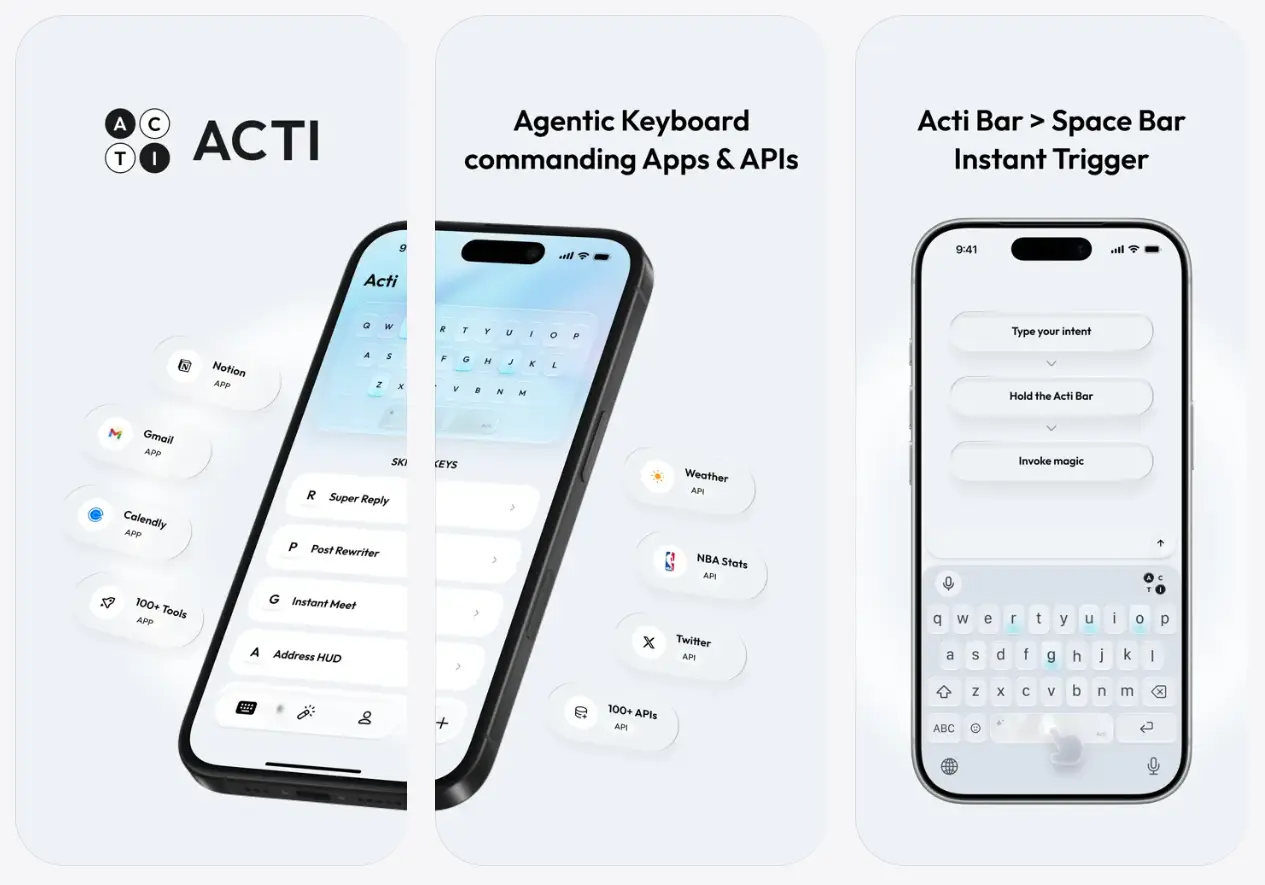
Acti is an agentic keyboard app for iPhone and Android that turns a typed request into a result, link, or action inside whatever app you already have open.
Type a request in a chat, email, or note, hold the space bar (called the Acti Bar), and the keyboard returns a live answer without a switch to a separate app.
The app is free to download and use on iOS 17+ and on Android, and it runs on Google’s Gemini models under the hood.
A typical Acti session starts inside a normal text field.
A friend asks where you are, and you type your location, hold the Acti Bar, and the keyboard drops your location directly into the chat.
Someone brings up a soccer match, and holding the bar after typing the team name pulls up the live score.
Beyond the Acti Bar itself, you can turn individual keys into Skill Keys: hold N to summon a specific Notion document, hold L to pull a LinkedIn profile into the conversation, or hold C to attach a Google Meet link. All without leaving the message thread.
Features
- Turns any typed intent into a result, link, or action after you hold the spacebar.
- Skill Keys map a long press of any letter key to a predefined app lookup, such as a Notion doc or a LinkedIn profile.
- Skill Builder lets you create custom workflows by describing what you want and connecting apps and APIs without code.
- Skill Community allows you to share your skills and discover workflows created by other Acti users.
- Works inside any text field across iOS and Android apps.
- On‑device processing handles common intents locally to reduce data exposure.
How to Use Acti
Add Acti as Your Keyboard
On iPhone
- Install Acti from the App Store.
- Open Settings > General > Keyboard > Keyboards > Add New Keyboard.
- Select Acti, then enable Allow Full Access.
- Open a message, note, browser form, or email and switch to Acti from the keyboard selector.
On Android
- Install Acti from Google Play.
- Open Settings > System > Languages & input > On-screen keyboard.
- Enable Acti.
- Open a text field, tap the keyboard switcher, and select Acti.
Run an Acti Bar Request
- Switch to Acti in the text field you are working in.
- Type a clear request, such as “Find the latest Lakers schedule,” “Get the Acme onboarding doc from Notion,” or “Create a 30-minute Google Meet link.”
- Hold the Acti Bar.
- Use the returned result, link, or action in the active conversation.
Create a Custom Skill Key
- Open Skill Builder inside Acti.
- Describe the full task and the expected output. For example: “Summarize this message in three bullets and write a concise reply.”
- Add an app or API connection when the workflow needs one.
- Save the Skill and bind it to a keyboard key.
- Long-press that key whenever the same task comes up again.
Alternatives and Related Tools
- Acti official website: Company information and product updates from TypeX Limited.
- Acti privacy policy: Full data handling terms referenced in the App Store listing.
- Everywhere: A free, open-source desktop assistant that reads on-screen context through a keyboard shortcut on your computer.
- FreeFlow Dictation: A free Mac dictation tool for hands-free text input across any app.