Pi Coding Agent is a free, open-source terminal coding agent built around a small, editable core.
You can run pi inside a project and it can inspect code, change files, execute shell commands, and work with a model connected through an account, API key, or local setup.
The default coding loop starts with four active tools: read, bash, edit, and write. Built-in MCP and Codemode extend that core, and TypeScript extensions can change tools, commands, providers, permissions, and terminal behavior.
Pi stores sessions as JSONL trees. Returning to an earlier point creates another branch, and both continuations stay in the session history.
Pi Coding Agent at a Glance
| Item | Details |
|---|---|
| Product type | Terminal AI coding agent and extensible agent harness |
| License | MIT |
| Default coding tools | read, bash, edit, write |
| Model access | Account sign-in, API key, custom provider, or local llama.cpp |
| MCP | Built in, over stdio or streamable HTTP |
| Codemode | Built-in extension for JavaScript tool orchestration |
| Automation | Print, JSON event stream, RPC, and TypeScript SDK |
| Platforms | macOS, Linux, Windows, and Termux on Android |
| Built-in subagents | No |
How Pi Works
A task begins with the active conversation branch, the current model settings, project context, and the tools available to the model. Pi sends that state to the selected provider, executes any tool calls in the response, records the results, and continues the loop until the run ends.
A session records messages, tool calls, model changes, compactions, and other events in a JSONL tree. /tree moves back to an earlier entry and opens a new continuation from that point. The previous branch stays available. Two implementation ideas can live inside one session history.
Customization reaches deeper than prompt files. Pi can load project instructions, skills, prompt templates, themes, and packages. TypeScript extensions can register tools, commands, provider logic, virtual models, permission checks, and terminal components. MCP and Codemode use the extension architecture as built-in capabilities.
Is Pi Coding Agent Free?
Pi Coding Agent is MIT-licensed and has no separate paid Pi plan. You can install, inspect, modify, and distribute the agent itself at no charge.
Model access is a separate cost decision. /login handles account or provider authentication where available, API credentials can come from Pi or environment variables, and llama.cpp can run local models on your own hardware.
How to Install and Start Pi
macOS and Linux
The managed installer pins Pi’s dependencies and can install the required Node.js runtime when needed.
curl -fsSL https://pi.dev/install.sh | shWindows
Use the official PowerShell installer for a native Windows setup.
powershell -c "irm https://pi.dev/install.ps1 | iex"npm
npm installation requires Node.js 22.19.0 or newer.
npm install -g --ignore-scripts @earendil-works/pi-coding-agentStart the First Session
Open the project directory, launch Pi, and run /login if the selected provider needs account or API authentication. /model opens the model picker after credentials are available.
cd /path/to/your-project
pi
Working in the Terminal
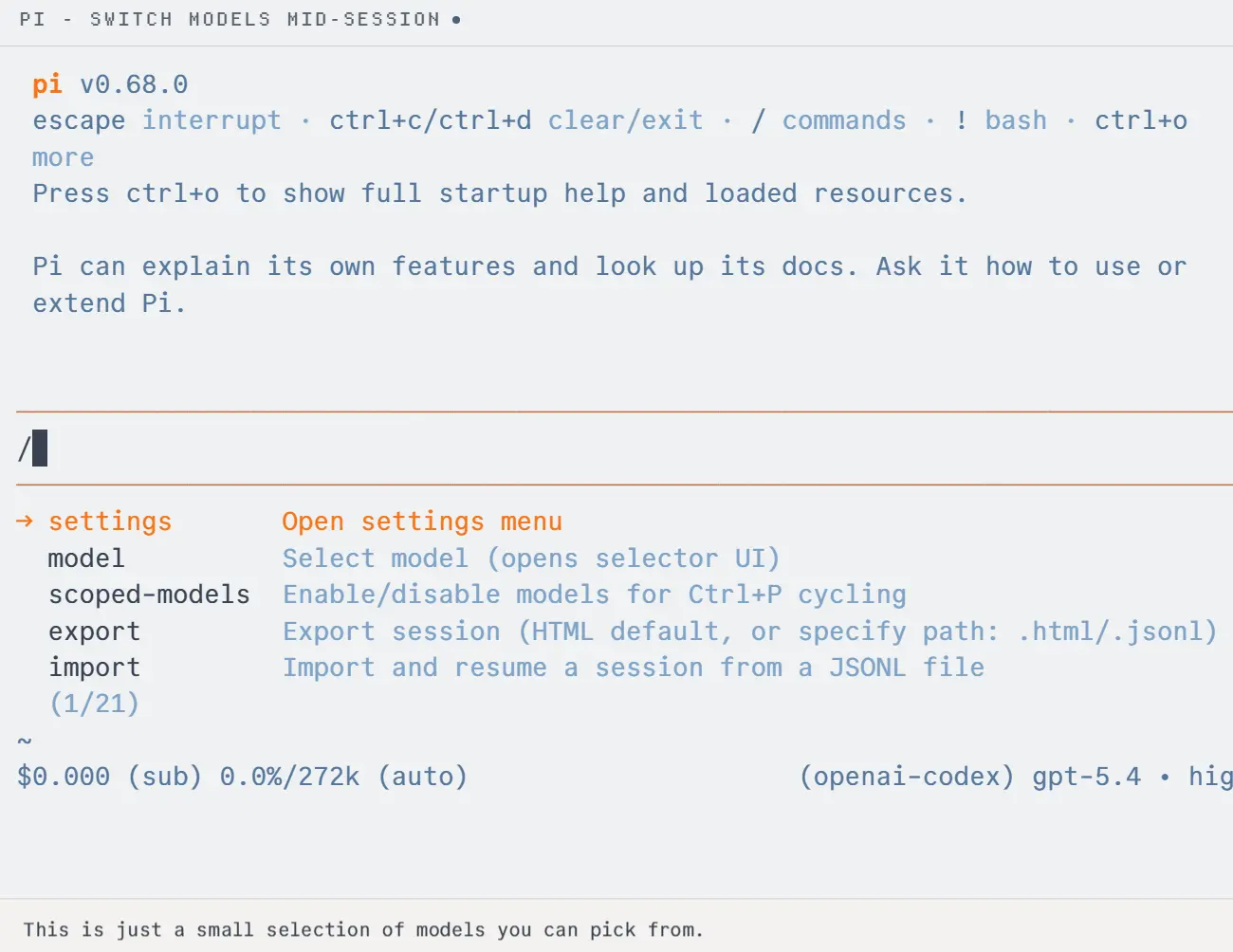
Pi opens a fullscreen terminal UI by default. The conversation, editor, tool calls, active model, reasoning level, token use, context use, and reported cost stay visible during the session. Set tuiMode to "regular" or pass --tui-mode regular when normal terminal scrollback is preferable.
Type a task and press Enter to send it. Prefix a path with @ to reference a file. A line beginning with ! runs a shell command and places its output in the conversation. Use !! when the command output should stay in the terminal.
Pi also accepts input during an active model response. Enter sends a steering message at the next safe boundary, Alt+Enter queues a follow-up, and Escape stops the response. /model changes the model, /thinking changes the reasoning level, and /settings edits common preferences.
Project instructions can come from AGENTS.md, AGENTS.override.md, or CLAUDE.md. Global settings live under ~/.pi/agent/, and project settings live under .pi/. Protected project resources load only after the project trust decision allows them.
Pi Command Quick Reference
Read More: Pi Coding Agent Cheat Sheet: Commands, Flags & Shortcuts
| Command | Purpose |
|---|---|
pi | Start an interactive session |
pi -p "PROMPT" | Run one prompt and exit |
/login | Manage provider authentication |
/model | Select the active model |
/mcp | Inspect and manage MCP connections |
/tree | Navigate session branches |
/resume | Open a saved session |
/compact | Compact older context |
/reload | Reload settings and resources |
pi update | Update Pi |
pi update --models | Refresh the model catalog |
Sessions, Branching, and Context
Interactive sessions save automatically under ~/.pi/agent/sessions/ unless persistence is disabled. pi -c continues the latest session, pi -r opens the session picker, and /name assigns a readable session name.
Every session branch is linked through entry IDs and parent IDs. /tree changes the active point inside that tree. /fork starts a new session from a selected point, and /clone copies the current branch into another session.
Compaction keeps long sessions inside the model’s context limit. Pi replaces older active context with a summary and keeps the full JSONL history on disk. /compact runs compaction manually, and /export creates an HTML or JSONL export when a portable copy is needed.
MCP, Codemode, Extensions, and Skills
MCP Servers
Pi connects to MCP servers over stdio or streamable HTTP. User-level servers live in ~/.pi/agent/mcp.json, and trusted projects can use .pi/mcp.json. pi mcp add configures a server from the shell, and /mcp handles connections, authentication, exposure, and enable or disable controls inside a session.
MCP tools do not have to occupy the model’s declared tool list from the first prompt. Pi can expose a tool directly, defer it until tool search finds it, or let Codemode call it. The default MCP exposure uses Codemode, which keeps large server tool sets out of the normal tool declaration.
Codemode
Codemode is a built-in extension, outside the default four-tool set. It runs model-written JavaScript in a QuickJS sandbox. Scripts can call Pi tools, MCP tools, classifier models, and image models. Only the script output returns to the language model, which is useful for parallel calls and large results that need filtering first.
Extensions, Skills, and Packages
TypeScript extensions can register tools, slash commands, shortcuts, events, provider logic, virtual models, permission checks, and terminal components. They can also implement subagents, plan mode, sandbox execution, custom compaction, or other behavior that Pi does not ship as part of the default coding setup.
Skills store reusable instructions in SKILL.md files. Pi packages distribute extensions, skills, prompts, and themes through npm, Git, or local sources. Manage packages with pi install, pi list, pi remove, and pi update --extensions. Project-local packages and extensions require project trust before Pi loads them.
Models and Provider Access
Pi does not bundle its own coding model. The agent connects to a provider account, an API, a custom provider, or a local model runtime. /login shows the authentication methods available for a provider, and /model lists models that have usable credentials.
| Access method | How it works |
|---|---|
| Account sign-in | OAuth or device flow through /login where the provider offers it |
| API key | Stored credential or provider environment variable |
| Custom provider | models.json or a TypeScript provider extension |
| Local model | Built-in llama.cpp integration and local model files |
Automation, RPC, and the TypeScript SDK
The terminal UI is only one entry point into Pi. Scripts can run a single prompt, another process can consume JSON events, external clients can control a long-lived Pi process through RPC, and TypeScript code can embed the agent directly through the SDK.
| Mode | Use |
|---|---|
| Interactive | Terminal coding sessions |
| One-off prompts, shell pipelines, and CI jobs | |
| JSON | Structured event output from one run |
| RPC | Long-lived process controlled by another client |
| TypeScript SDK | In-process agent integration for Node.js or Bun |
Security, Project Trust, and Data Flow
Pi can read, change, and execute files with the operating-system permissions of the account that started it. The default agent does not ask for approval before every tool call. Project trust decides whether protected project settings, MCP configuration, extensions, skills, packages, themes, and system-prompt files can load. It is not a sandbox for tool execution.
Cloud model requests send the selected conversation context and relevant tool results to the chosen provider. Local llama.cpp inference keeps the model runtime on your machine. Extensions and shell commands can have their own file, process, credential, and network access. Unfamiliar code belongs in an operating-system, container, or virtual-machine boundary.
/trustsaves or changes the trust decision for a project.PI_OFFLINE=1skips Pi’s automatic startup network activity. Cloud inference continues to use its provider connection.PI_TELEMETRY=0disables telemetry and leaves other network checks available.--approveand--no-approveset an explicit project-trust decision for non-interactive runs.
Pi vs Claude Code
Pi and Claude Code both edit project files and run commands from a coding session. Pi centers on an MIT-licensed, multi-provider harness with a TypeScript extension API. Claude Code centers on Anthropic’s coding agent and its first-party terminal, IDE, web, desktop, mobile, GitHub, and Slack clients.
| Pi | Claude Code | |
|---|---|---|
| Distribution | MIT-licensed agent harness | Anthropic coding agent |
| Model access | Provider accounts, APIs, custom providers, and local models | Claude plans, Anthropic API, and configured cloud providers |
| Customization | TypeScript extensions, skills, prompts, themes, and packages | Claude Code settings, hooks, MCP, skills, and first-party clients |
| Default coding setup | Four active coding tools, with MCP and Codemode built in | More first-party coding-agent features and clients |
| Agent price | Free agent, model access is separate | Eligible Claude plan, API, or cloud billing |
Common Setup and Usage Problems
picommand not found: check the install location and yourPATH.- npm installation fails: confirm Node.js 22.19.0 or newer.
- No models appear: authenticate a provider through
/login, configure the required API credential, or start the local model runtime. - An MCP server is missing: run
pi mcp list, inspect it through/mcp, and run/reloadafter file-based configuration changes. - Project extensions or skills do not load: inspect the saved decision with
/trustand reload the project resources after a change. - Context use grows too high: run
/compact, branch from a focused point with/tree, or start a new session.
Pros
- Free, MIT-licensed agent harness.
- Multiple provider, API, custom-provider, and local-model access methods.
- JSONL session trees preserve alternate coding branches.
- Built-in MCP and Codemode work with a small default coding toolset.
- TypeScript extensions can change runtime behavior deeply.
- Print, JSON, RPC, and SDK modes work for automation and embedding.
Cons
- Subagents and plan mode require extensions, packages, or custom configuration.
- Per-tool permission prompts require custom logic.
- Extensions and packages can execute code with Pi’s process permissions.
- Local-model speed and quality depend on the selected model and hardware.
Alternatives and Related Resources
- 10 Best CLI AI Coding Agents (Open Source)
- Qwen Code CLI: Open-source Command-line AI Agent
- Kimi Code CLI: Open-Source AI Coding Agent with Skills & MCP Support
- Pi Coding Agent Official Documentation
FAQs
Q: Can Pi use a ChatGPT subscription?
A: Pi’s OpenAI login flow can use ChatGPT account access. Run /login and choose the OpenAI provider. The account plan sets the available models and usage limits.
Q: How do I change Pi’s keyboard shortcuts?
A: Create ~/.pi/agent/keybindings.json and map Pi action IDs to the preferred key combinations. Run /reload after saving the file.
Q: Can I change where Pi stores sessions?
A: Yes. Use --session-dir <dir> for one run, set PI_CODING_AGENT_SESSION_DIR, or configure sessionDir in settings.
Q: Can Pi import a saved JSONL session?
A: Yes. Run /import <file> inside Pi to load a JSONL session and continue it.
Last Updated: October 2, 2026