Free AI email writers can draft meeting requests, rewrite blunt replies, or prepare client follow-ups from a few notes. For everyday use, the free allowance matters as much as the writing controls. A tool that lets you revise several drafts without paying is more practical than a short trial.
These seven free AI email writers and generators offer ongoing access for professional and personal correspondence. Five work without registration, and two have account-based free plans with monthly allowances. The selection includes unlimited generators, tools with dedicated reply modes, and writing assistance in your Gmail app.
Last updated: Nov 03, 2026
Quick Comparison
| Tool | Free Access | Highlight |
|---|---|---|
| Mailmeteor | Unlimited; no signup | Prompt-controlled drafts |
| WPS | Unlimited; no signup | Email length selector |
| QuillBot | Free; no signup | Conversational revisions |
| EmailWritingAI | 60 requests/day per tool | Drafting + text polishing |
| TotBot | Free; no signup | Three drafts + reply mode |
| Rytr | 10,000 characters/month | Tone and language controls |
| Grammarly | 100 AI prompts/month | Writing inside Gmail |
1. Mailmeteor AI Email Writer
Mailmeteor creates complete email drafts from short prompts for work and personal correspondence.

Free access:
Unlimited email generation. No signup required.
Features:
- Generates subject lines, greetings, email bodies, and sign-offs from your brief.
- Follows your instructions for tone, length, and language.
- Rewrites existing replies or drafts new versions from updated instructions.
Try Mailmeteor AI Email Writer
2. WPS AI Email Writer
WPS allows you to control the length of an email before generation, from a brief acknowledgment to a detailed request.

Free access:
Unlimited generation. No sign-up required.
Features:
- Sets the output length before writing the draft.
- Creates requests, apologies, follow-ups, thank-you notes, and replies from a short idea.
- Produces copy-ready text for Gmail, Outlook, or another email app.
3. QuillBot AI Email Writer
QuillBot lets you refine a draft through follow-up messages in its conversational email writer.

Free access:
Free. No signup required.
Features:
- Drafts professional, client, and personal emails from a plain-language request.
- Request a shorter draft, a more formal tone, or a clearer call to action through follow-up messages.
- Produces structured messages with greetings, main text, and sign-offs.
4. EmailWritingAI
EmailWritingAI combines a new-email generator with a separate text polisher for improving drafts you have already written.

Free access:
20 requests/hour and 60 requests/day per tool. No signup required.
Features:
- Generates complete emails from key points, with 11 output languages.
- Polishes existing text for clarity and grammar in a separate tool.
- Remembers optional sender details, including your role and signature, in your browser.
5. TotBot AI Email Writer
TotBot generates three versions of an email at once. It has separate modes for composing a new message and replying to one you received.

Free access:
Free. No signup required.
Features:
- Returns three complete drafts, each with its own subject line.
- Uses a pasted incoming message and your key points to draft a reply.
- Offers email types such as follow-up, reminder, customer support, and job application.
- Includes Formal, Friendly, and Apologetic tones plus Improve, Expand, Shorten, and Rephrase controls.
- Writes in the language used in your instructions.
6. Rytr Email Generator
Rytr creates emails inside its writing editor, with controls for language, tone, and subsequent revisions.

Free access:
10,000 generated characters per month on a free account.
Features:
- Drafts emails from key points using its dedicated Email Generator use case.
- Supports more than 30 languages and multiple preset tones.
- Rephrases, shortens, and expands text using the inline editor.
- Offers a Chrome extension for writing in other apps.
7. Grammarly
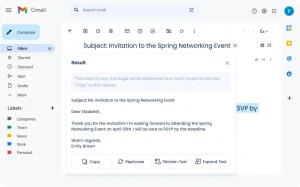
Grammarly adds AI drafting and editing to Gmail. Install Grammarly for desktop, then use its writing assistance as you compose or answer messages.

Free access: 100 generative AI prompts per month on a free account.
- Creates new emails and replies from a writing prompt inside Gmail.
- Revises existing text with follow-up instructions.
- Checks spelling and grammar and identifies the tone of your message.
- Also offers a standalone AI Email Writer for drafting in a browser.
FAQs
Can I use ChatGPT to write emails for free?
Yes. ChatGPT Free can draft meeting requests, follow-ups, and replies from a prompt. Give it the recipient, purpose, key points, and tone, then ask for revisions to the draft.
What should I include in an AI email writing prompt?
Include who you are writing to, why you are contacting them, the essential details, and the tone or length you want. For example: “Write a friendly 90-word follow-up to a client who received my proposal on Monday. Ask if they have time for a 15-minute call next week.”
Can an AI email writer draft a reply to an email I received?
Yes. TotBot has a Reply to Email mode where you paste the incoming message and add your key points. With Mailmeteor or QuillBot, describe the original message and tell the writer what your reply needs to address.
Can I improve an email I have already drafted?
Yes. EmailWritingAI has a dedicated text polisher. TotBot offers Shorten, Expand, Improve, and Rephrase controls, and QuillBot accepts follow-up editing instructions. Grammarly also checks grammar and tone as you write in Gmail.
Can I use these AI email writers with Gmail or Outlook?
Yes. The browser-based generators produce text you can copy into Gmail, Outlook, or another email app. Grammarly provides writing assistance directly inside Gmail, and TotBot can open its draft in your email app for you to address and send.
Can I generate emails in Spanish and other languages?
Yes. EmailWritingAI supports 11 output languages, and Rytr supports more than 30. TotBot writes in the language of your instructions, and Mailmeteor accepts language requests in the prompt.
Is it safe to paste confidential emails into an AI email writer?
For private correspondence, review the tool’s data-handling policy before submitting the message. Remove confidential names, account details, and other sensitive information from the prompt where possible, then add the necessary details to your final draft.
Alternatives & Related Resources
- 10 Best Free AI Writing Tools (Tested & Compared)
- Free AI Email App That Handles Your Gmail on iPhone – Avec
- Free Context-Aware AI Email Assistant for Gmail – Lightfern