Idol is an open-weight image-to-3D model from Speridlabs that turns a single photograph, render, or AI-generated image of an object into a rotatable 3D Gaussian splat.
It removes the background, infers the object’s hidden sides, and exports the result as a standard 3DGS .ply file.
You can try Idol in a browser or generate splats locally from the command line or Python, with control over the number of Gaussians in the output.
Key Features
- Generate a 3D Gaussian splat from one photograph, render, or AI-generated image.
- Preview and rotate generated objects in an online 3D viewer.
- Download standard 3DGS
.plyfiles for Gaussian splat viewers. - Choose an output density between 32,768 and 1,048,576 Gaussians.
- Automatically remove image backgrounds and frame the main object.
- Process individual images or an entire image folder with the local CLI.
- Call the model from Python using
IdolPipeline.
How Idol Turns an Image Into a 3D Gaussian Splat
BiRefNet removes the background and isolates the object. DINOv3 and a FLUX.2 VAE extract image features, and Idol’s diffusion model and decoders use them to generate spatially positioned Gaussians.
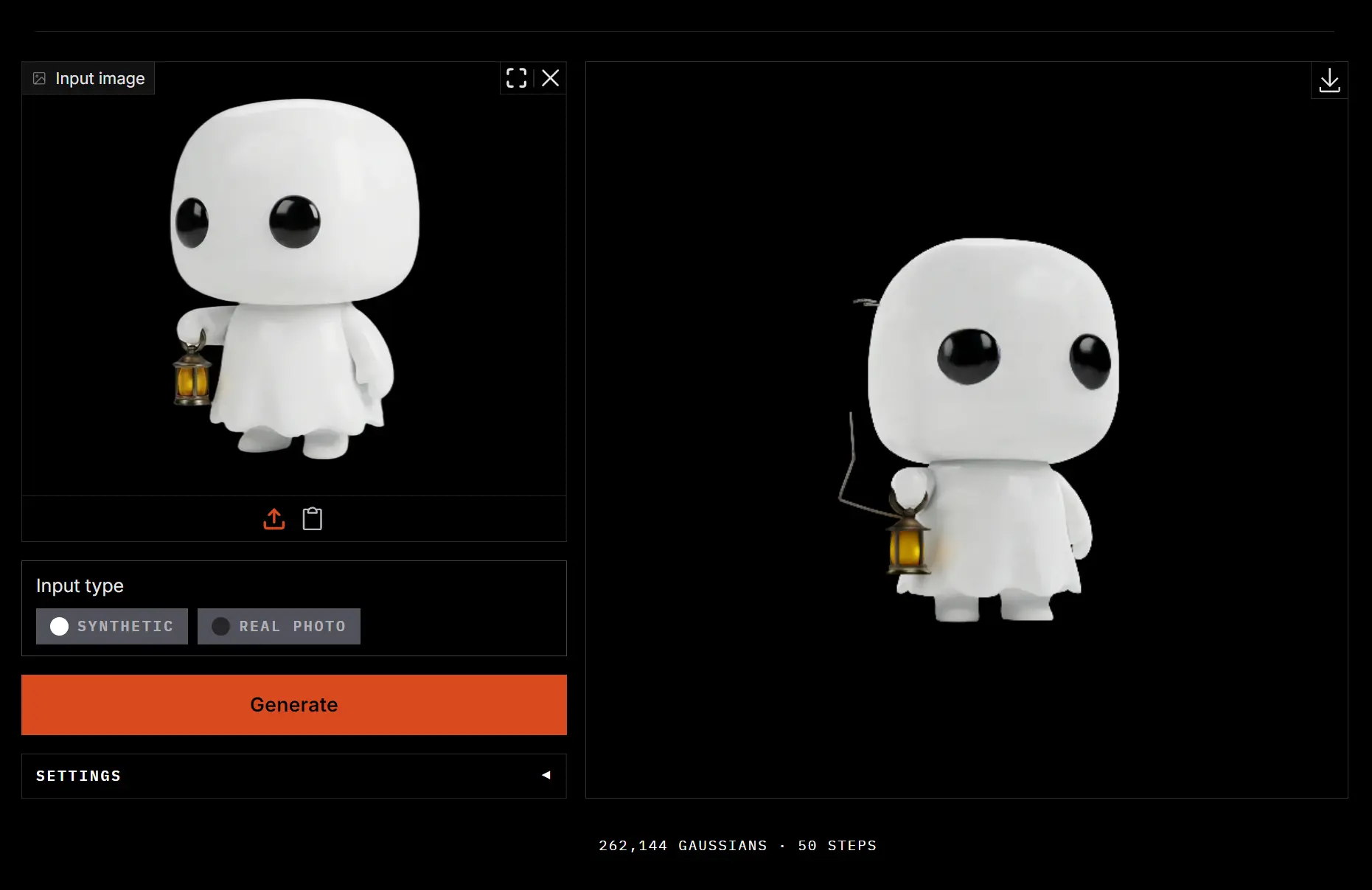
These Gaussians render a rotatable view of the object. The default output contains 262,144 Gaussians, adjustable between 32,768 and 1,048,576.
Try Idol Online
1. Open the Idol Hugging Face space and choose an example image or upload your own.
2. Under Input type, choose Real photo for a photograph or Synthetic for a render or AI-generated image.
3. Optionally open Settings to adjust the Gaussian count, sampling steps, guidance scale, time shift, or random seed.
4. Click Generate. The hosted ZeroGPU service may queue the request. Rotate the generated object in the 3D preview.
5. Download the .ply file.
Run Idol Locally
Local inference requires Python 3.10 or newer, PyTorch 2.5 or newer, and an NVIDIA GPU with CUDA. The full pipeline has a published peak GPU memory measurement of 7.2 GB.
The first run downloads about 3 GB of Idol weights and the required image encoder checkpoints to the Hugging Face cache.
git clone https://github.com/speridlabs/idol-sdk.git
cd idol-sdk
pip install -e .
hf auth login
Generate a splat from a photograph:
python -m idol.sample --image photo.jpg --mode realTo process a directory of renders or AI-generated images, use synthetic mode:
python -m idol.sample --image renders/ --mode synthetic --out outputsEach image generates three files in outputs/: <name>.ply (the 3D splat), <name>_input.png (the processed image), and <name>_camera.json (the predicted input camera). real preserves more space around photographed objects, and synthetic crops renders more tightly.
Set output density and a random seed with --num_gaussians and --seed:
python -m idol.sample --image photo.jpg --mode real --num_gaussians 1048576 --seed 42Use Idol From Python
For Python projects, IdolPipeline loads the model, generates a splat from an image, and saves the result:
from idol import IdolPipeline
pipeline = IdolPipeline.from_pretrained("speridlabs/idol")
output = pipeline("photo.jpg", mode="real", seed=42, num_gaussians=262144)
output.gaussian.save_ply("photo.ply")
You can also run the Gradio demo on your own GPU:
pip install -e ".[demo]"
cd demo && python app.py
GPU Requirements and Generation Speed
The first generation in a process takes additional time for PyTorch compilation. Optimized GPU sampling is enabled by default for subsequent requests.
| GPU | Median request time |
|---|---|
| NVIDIA H100 | 6.7 seconds |
| NVIDIA RTX 5090 | 14.1 seconds |
| NVIDIA RTX 4090 | 19.1 seconds |
| NVIDIA RTX 3080 | 46.2 seconds |
Free Access and Licensing
Idol’s inference SDK and model weights are released under Apache-2.0.
The image encoders used for local inference have their own license conditions. DINOv3 requires acceptance of Meta’s model terms. The FLUX.2-dev VAE uses the FLUX Non-Commercial License for qualifying noncommercial and nonproduction uses. Commercial or production deployment using that dependency requires appropriate rights from Black Forest Labs.
Pros
- Generates rotatable 3D Gaussian splats from a single image.
- Online playground, local CLI, and Python API.
- Releases Idol’s weights and SDK under Apache-2.0.
Cons
- Hosted ZeroGPU requests can enter a queue.
- Local inference requires access to gated third-party checkpoints.
- FLUX.2-dev licensing restricts commercial and production deployment.
Alternatives & Related Resources
- TripoSplat AI: Free Open-Source Image-to-3D Gaussian Generator
- Modly: Free Local AI Image-to-3D Mesh Generation
- 7 Best Free AI Image-to-3D Model Generators
- CADAM AI: Free AI Text-to-3D & Image-to-3D Model Generator