MailTester.AI is a free AI-powered email deliverability testing tool that analyzes newsletters, campaigns, and community emails to predict inbox placement and identify technical issues.
You forward any email to your unique test address, and within 30 seconds, you receive a detailed report covering spam scores, technical authentication (SPF/DKIM/DMARC), content analysis, and AI-driven predictions about where your email will land.
Features
- AI Inbox Placement Predictions: The tool forecasts where your email will land (inbox, promotions, or spam folder) with confidence ratings based on analysis of millions of emails.
- Technical Authentication Checks: Scans SPF, DKIM, and DMARC records to identify configuration issues that hurt deliverability. The reports include exact DNS records you need to add.
- SpamAssassin Analysis: Runs your email through the same spam filtering engine used by major email providers to calculate your spam score from 0 to 100.
- Content Quality Scoring: AI evaluates your email content across multiple dimensions including mobile optimization, call-to-action effectiveness, accessibility, and content structure.
- Interactive Content Editor: Premium users get an AI-powered editor that highlights problematic text and suggests improvements you can apply in real time.
- Open Rate Predictions: Estimates your expected open rate based on subject line quality, sender reputation, and technical setup compared to industry benchmarks.
- Sender Reputation Analysis: Checks your sending IP address and domain reputation across major blacklists and reputation databases.
- Detailed Issue Prioritization: Every report ranks problems by impact (critical, high, medium, low) so you know what to fix first for maximum improvement.
- Free Credits: New signups receive 100 credits plus one free AI analysis immediately and another free analysis every 14 days.
Use Cases
- Newsletter Publishers: If you run a weekly or monthly newsletter, you can test each issue before sending to thousands of subscribers.
- Email Marketing Teams: Marketing teams using platforms like Mailchimp or Constant Contact can catch problems before blasting campaigns to their entire list.
- SaaS Founders Sending Product Updates: Founders who send product announcements or onboarding emails from their own domains can verify their technical setup is correct.
- Freelance Email Designers: Email designers can test templates across different clients and platforms to ensure their code doesn’t trigger spam filters.
- Content Creators on Substack or Beehiiv: Independent creators who rely on these platforms can test their posts to understand why engagement might be dropping.
Case Study
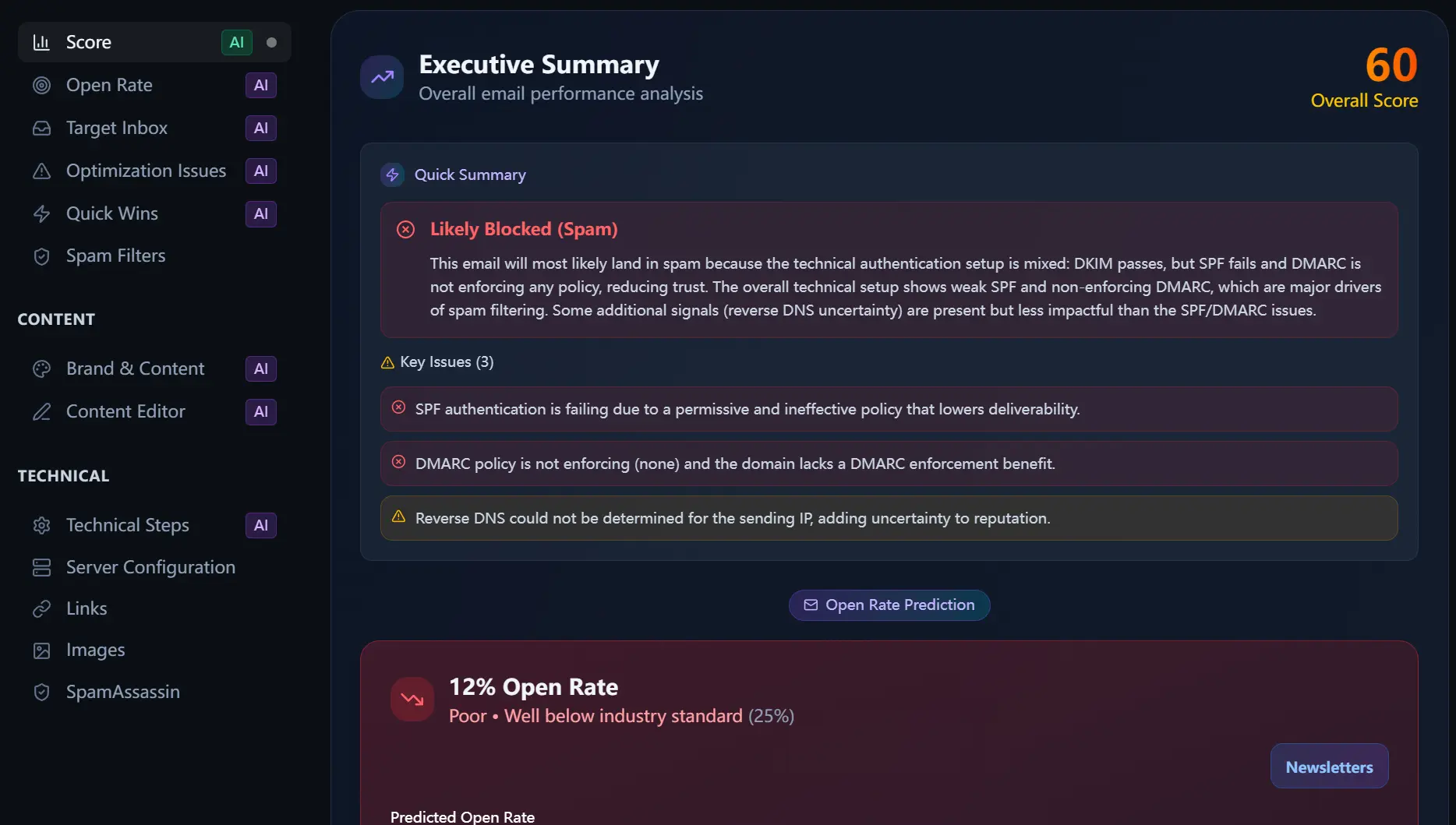
I ran a test on my “Webdev Weekly Newsletter” to see what the report looked like. The initial overall score was a 60, with a prediction that the email would likely be blocked or sent to spam.
The key issues identified were:
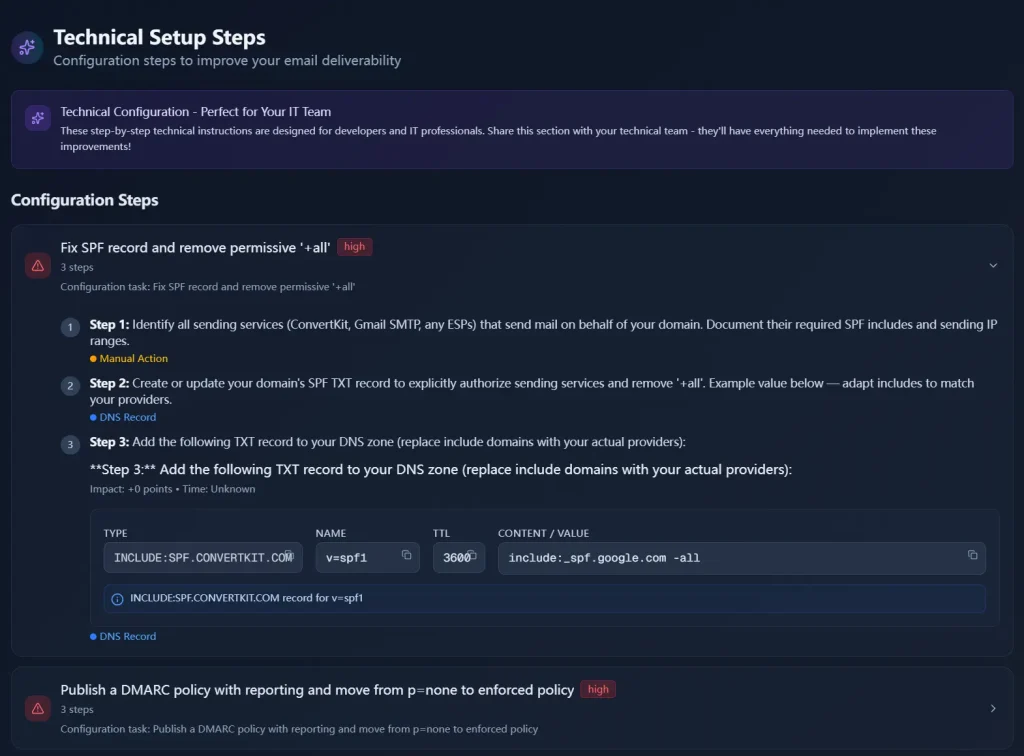
- Failing SPF authentication: The SPF record was too permissive, which can lower trust with email providers.
- Non-enforcing DMARC policy: The DMARC policy was set to “none,” which means it wasn’t providing any deliverability benefits.
- Uncertain Reverse DNS: The tool couldn’t determine the reverse DNS for the sending IP, which adds a layer of uncertainty to the sender’s reputation.
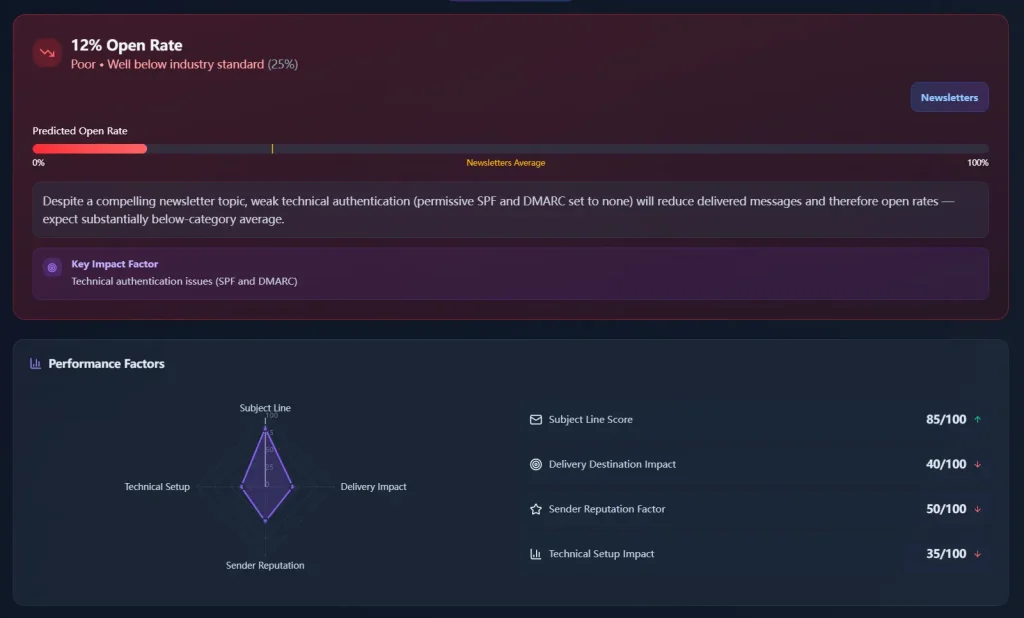
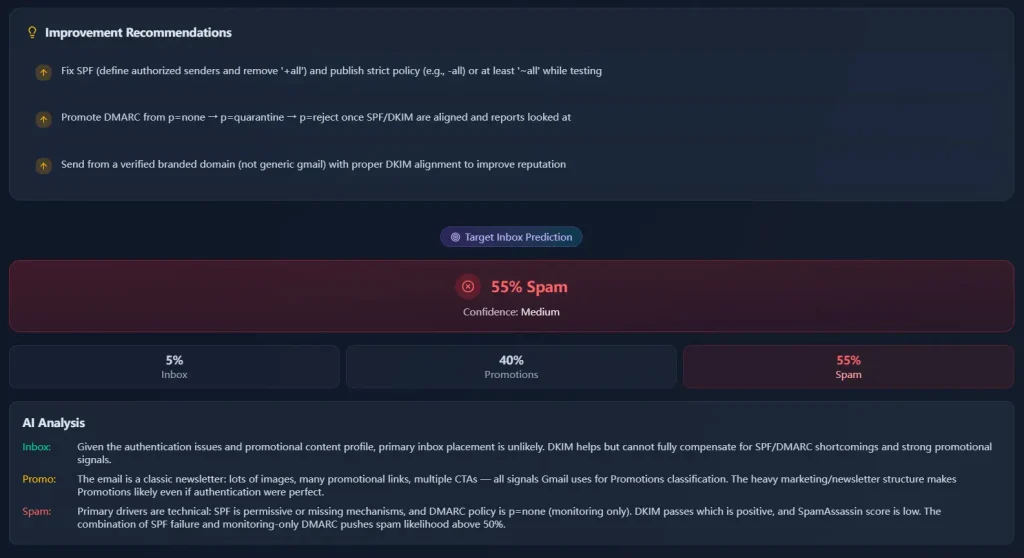
The report also gave an open rate prediction of 12%, which is well below the industry standard of 25%. The AI analysis predicted a 55% chance of landing in spam, a 40% chance of going to the promotions tab, and only a 5% chance of hitting the primary inbox.
The tool provided specific, actionable recommendations to fix these issues. For the SPF record, it recommended defining authorized senders and using a stricter policy. For DMARC, the suggestion was to move from a “none” policy to “quarantine” and then “reject” after monitoring reports. It also recommended sending from a verified branded domain to improve reputation.
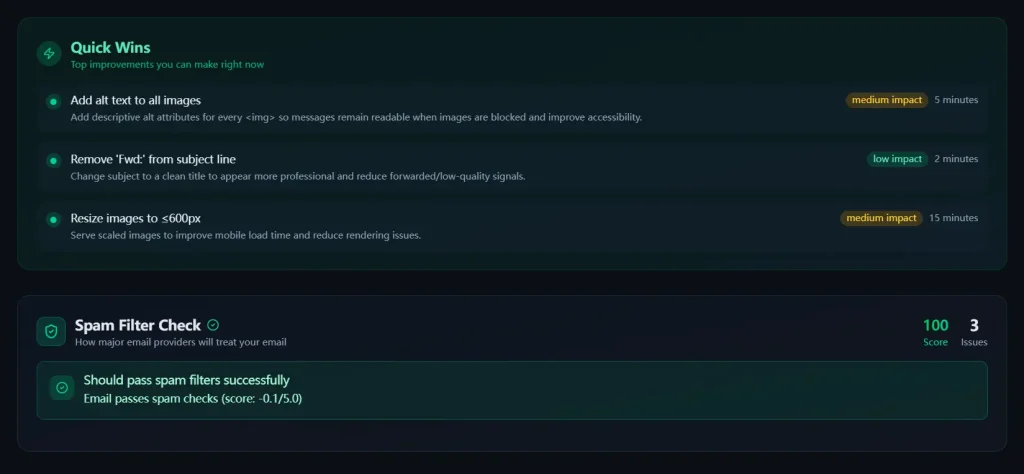
The report included a content analysis, which scored well in areas like mobile optimization and content structure. However, it did find some accessibility issues, such as missing alt text on images. The “Quick Wins” section offered simple fixes like adding alt text and resizing images for faster mobile loading.
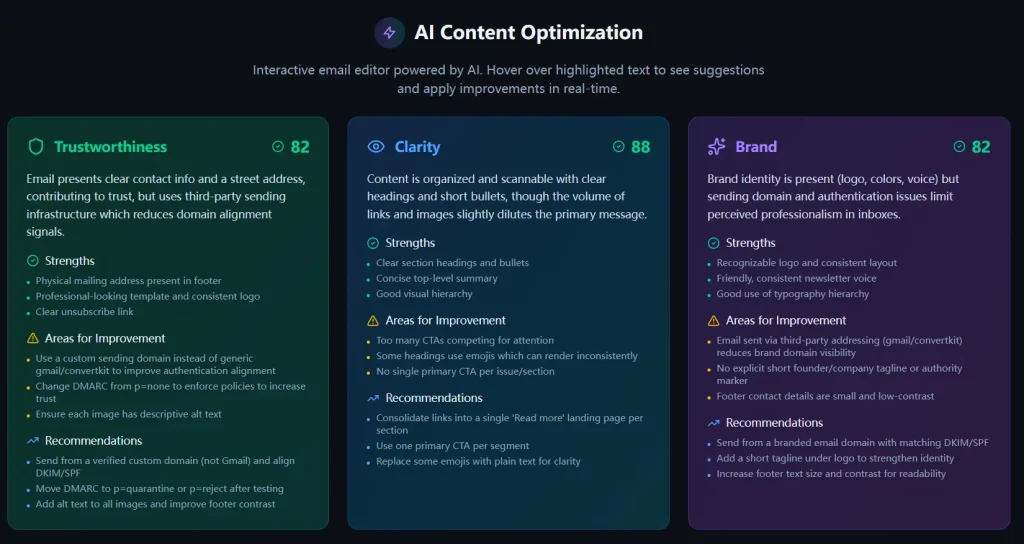
One of the most useful features was the AI Content Optimization editor. It highlighted specific parts of the email and offered suggestions for improvement. For example, it suggested using a custom sending domain instead of a generic Gmail address to improve brand alignment and trust.
The “Technical Setup Steps” section provided detailed, step-by-step instructions for fixing the DNS records, which is perfect for sharing with a developer or IT team.
How to Use It
1. Take any email you want to test and forward it to a unique email address provided by MailTester AI. It works with any email service provider, including Mailchimp, Substack, and ConvertKit.
2. The AI tool checks over 50 different factors, including your technical setup, content, links, and sender reputation.
3. You’ll see a free report including your overall score (0-100), spam prediction, and key technical issues. You’ll see which specific problems are hurting your deliverability, like “SPF authentication is failing due to a permissive and ineffective policy” or “DMARC policy is not enforcing (none) and the domain lacks a DMARC enforcement benefit.”
4. If you want the full AI analysis, you use your credits (you start with 100 free credits). The premium report adds AI-powered delivery predictions broken down by inbox/promotions/spam percentages, interactive content optimization, detailed brand and trustworthiness scores, and specific recommendations ranked by impact and implementation time.
5. Follow the step-by-step instructions to fix any issues with your DNS records or content.
Pros
- Free Tier is Generous: 100 credits and a free analysis every 14 days is enough for most small businesses and indie hackers to stay on top of their deliverability.
- Actionable, Not Just Analytical: Every issue comes with a clear “how to fix it” guide, often with the exact DNS record you need to add.
- Combines Technical and Content Analysis: Most tools do one or the other; this gives you the full picture in one place.
- Fast and Simple Workflow: Forwarding an email is far easier than pasting HTML or setting up complex integrations.
- Privacy-Focused: Emails are auto-deleted within 24 hours, so your campaign data stays safe.
Cons
- Credit-Based System: To unlock more reports, you need to use credits, which may not be ideal for users who need to test a high volume of emails.
- Focus on Individual Emails: The tool is designed for testing individual emails rather than providing ongoing monitoring of your domain’s reputation.
- Limited Historical Tracking: Each report is standalone. The platform doesn’t track your improvement over time or let you compare results across multiple tests easily
FAQs
Q: How accurate is your spam score compared to real email providers?
A: The analysis uses the same SpamAssassin engine that powers many major email providers, combined with proprietary AI models trained on millions of emails. MailTester.AI claims 94% accuracy compared to actual Gmail, Outlook, and Yahoo spam filtering decisions. That said, each provider has unique algorithms, so the tool provides a comprehensive score representing the average across all major providers rather than a guarantee for any single inbox.
Q: Will testing my email affect my sender reputation?
A: No. The testing is completely isolated and doesn’t impact your sender reputation in any way. The tool analyzes your email content and headers without actually sending emails through your domain or IP address. Think of it as a dry run that gives you insights without any risk to your deliverability. Your test emails go to MailTester.AI’s servers, not to real recipient inboxes.
Q: What’s the difference between this and other email testing tools?
A: Most tools only check basic authentication (SPF/DKIM/DMARC) or give you a simple spam score. MailTester.AI provides a comprehensive analysis that includes AI-powered content suggestions, technical header review, SpamAssassin testing, sender reputation checks, inbox placement predictions, and most importantly, specific actionable recommendations ranked by impact. The interactive content editor in premium reports is also unique among testing tools.
Q: How quickly can I see improvements after implementing your recommendations?
A: Most technical fixes like DNS record updates take effect within 24 to 48 hours. Content improvements are immediate since they apply to your next email. Sender reputation improvements can take two to four weeks of consistent good sending practices because reputation is built over time.
Q: Do you support all email service providers and platforms?
A: Yes. The tool works with emails from any platform including Mailchimp, Constant Contact, SendGrid, Mailgun, ConvertKit, Substack, Beehiiv, and custom SMTP setups. You simply forward any email to your unique test address, and the analysis works regardless of how the email was created or sent.
Q: Is my email data secure and private?
A: MailTester.AI automatically deletes emails from their servers within 24 hours. The company states they never store email content, recipient lists, or any sensitive information. The analysis is completely automated with no human access to your email content. That said, you should still avoid testing emails containing highly sensitive information until you’ve reviewed their privacy policy.
Q: What if I don’t understand the technical recommendations?
A: Every recommendation comes with step-by-step instructions written in plain English. For DNS changes, the tool provides the exact records to add with all necessary fields filled in. For content improvements, you get specific examples showing what to change.
Q: Can this help with emails that are already going to spam?
A: Yes. This is one of the most common use cases. If your emails are landing in spam folders, the analysis will identify exactly why and provide a prioritized action plan to fix it. Many users report seeing improvements within days of implementing the recommendations, particularly when the issues are technical (like broken SPF records) rather than reputation-based (which take longer to rebuild).