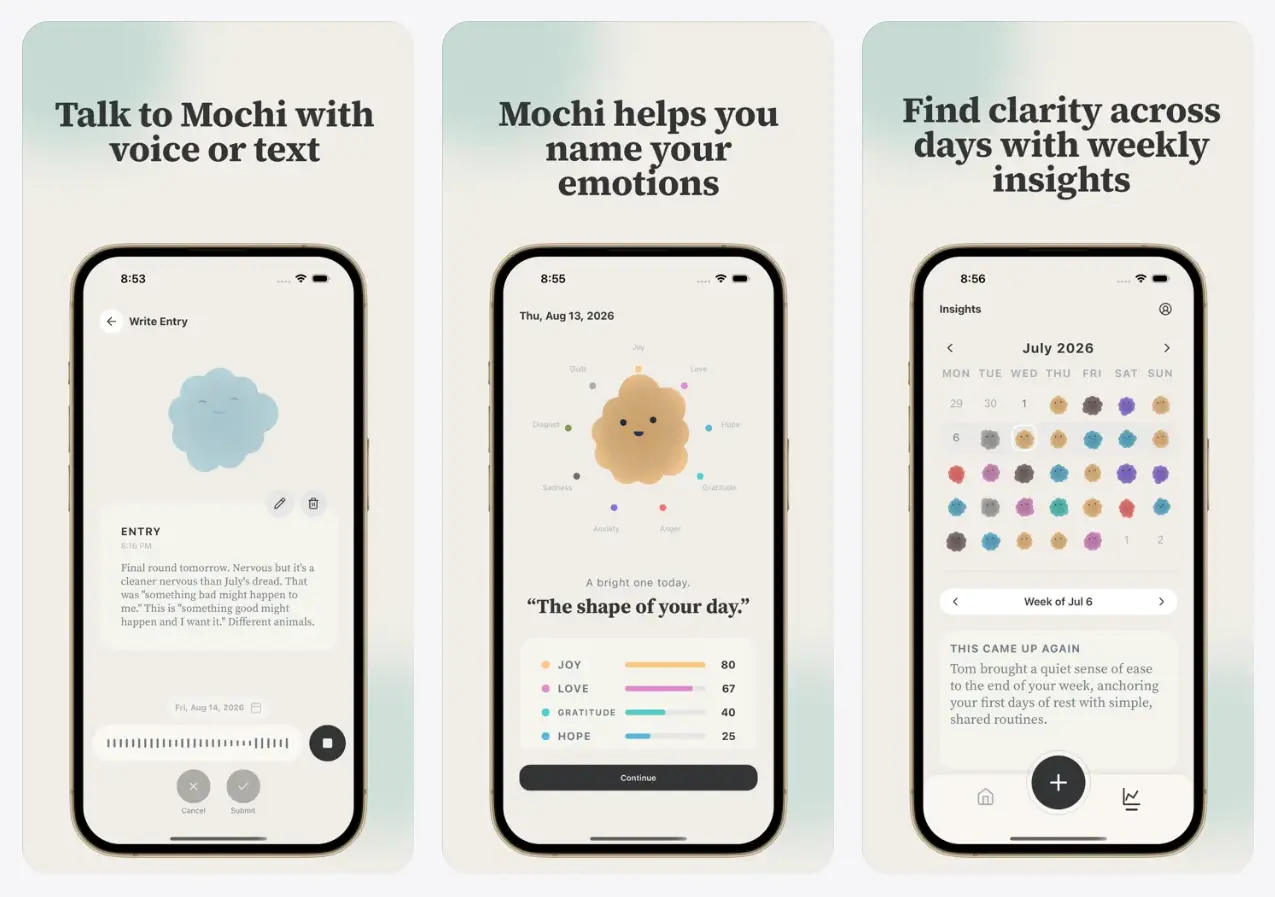
Emochi is an AI voice journal and mood tracker app that turns spoken reflections into editable diary entries and a character called Mochi.
You talk about your day, review the transcript, and see Mochi change its appearance in response to the emotions expressed in your entry.
Your reflections also become a record you can revisit. Emochi links entries about related subjects, identifies recurring feelings in weekly insights, and tracks emotional changes over 28 days.
After 25 reflection days, it unlocks a personal report about the themes in your journal.
Key Features
- Record voice journal entries, pause and resume, or record multiple times in one day.
- Correct the automatic transcript before saving your reflection.
- See Mochi change its form and expression to represent multiple emotions and their intensity.
- Log a brief mood check-in by selecting how you feel.
- Revisit related entries grouped into Threads about recurring subjects.
- Review recurring feelings and themes in weekly insights.
- Track emotion trends over 28 days and follow your journaling streak.
- Unlock a personal reflection report after 25 reflection days.
How Emochi Turns a Voice Note into a Mochi
Open a recording and talk naturally about something that happened, a conversation you keep thinking about, or how you feel. You can pause to collect your thoughts and continue later. You can make another recording later that day. The app transcribes your speech into editable text, where you can correct misheard words before saving the entry.
Mochi responds to the emotional content of the reflection. Its animated form, colors, and expressions change, with intensity indicators for the emotions represented. A single entry can contain several feelings at once. For example, talking about a difficult conversation could express sadness and relief together, and Mochi reflects that combination.
For a brief mood check-in, select how you feel and see Mochi respond. On iPhone, completed reflections can include a quotation from a public-domain literary work with its author credited. Some entries also include a small follow-up suggestion.
Threads, Weekly Insights, and Personal Reports
As you journal about an ongoing subject, Emochi groups related entries into Threads. A Thread lets you look back at reflections about that subject and follow how your thoughts and feelings have changed. The calendar view lets you revisit earlier entries and see how recorded emotions change over time.
Weekly insights identify feelings and themes that recur in your entries. A 28-day emotion view tracks changes across several weeks, and a reflection streak records how consistently you have journaled. These views draw on your accumulated journal entries.
After 25 reflection days, you can unlock a personal report that brings recurring themes and emotional changes into one account of your reflections. The report includes written insights and an option to listen to a narrated interpretation.
How to Start Journaling with Emochi
1. Open the app, complete the initial setup, and grant microphone permission when you want to make a voice entry.
2. Tap the microphone and speak about your day or something on your mind.
3. Pause and continue if necessary, or record another segment later that day.
4. Review the transcript and edit any words you want to correct before saving.
5. Finish the reflection to see Mochi’s changing appearance and emotion indicators.
Pros
- Voice recording and editable transcripts make it easier to capture a detailed reflection.
- Mochi represents multiple feelings from an entry through its changing appearance.
- Threads and emotion trends help you revisit topics across different days.
Cons
- The personal report requires 25 reflection days before it unlocks.
- Fully on-device processing has not been established for sensitive audio and journal content.
Related Resources
- Free AI Voice Journaling App for Mental Health – Rocket Journal
- Free AI Journaling App That Reveals Your Mood Patterns – Reflct