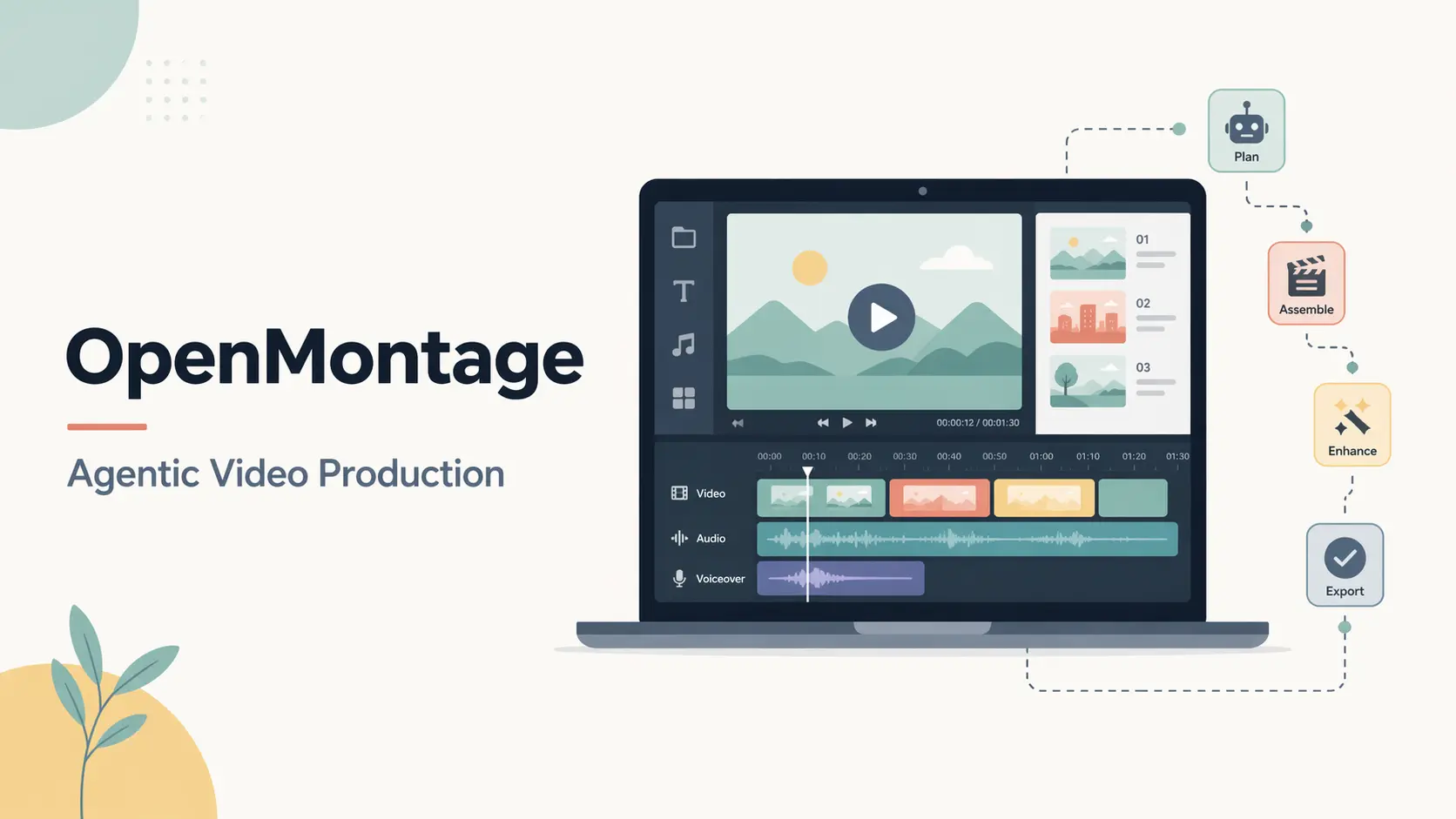
OpenMontage is an open-source agentic video production system for Claude Code, Cursor, Codex, GitHub Copilot, Windsurf, and other coding assistants that can read project files and run Python.
Install it in a local project and the coding assistant orchestrates research, scripting, asset work, editing, review, and rendering.
A production can begin with a plain-language brief, a reference video URL, local footage, a screen recording, a podcast, or an existing script and media library.
OpenMontage selects a pipeline, creates the required production artifacts stage by stage, pauses at creative gates, and renders a finished video on your machine.
How OpenMontage Works
The coding assistant is the orchestrator. It reads a YAML pipeline manifest for the selected production type, follows Markdown stage skills, discovers available providers, and calls the required Python tools. Pipeline manifests, stage skills, checkpoints, and decision logs keep the production state visible in project files.
- The agent matches the request to a production pipeline.
- Preflight discovers installed tools, configured providers, and the current capability envelope.
- The agent prepares a proposal with provider choices, estimated costs, and the production stages.
- Research, script, scene plan, assets, edit, and composition proceed through saved artifacts and approval checkpoints.
- Remotion, HyperFrames, or FFmpeg handles composition according to the selected visual treatment.
- Post-render review checks the file, sampled frames, audio levels, subtitles, and delivery requirements before presentation.
The full production sequence is: research → proposal → script → scene plan → assets → edit → compose → review → publish.
Features
- Runs 15-25 or more live searches across YouTube, Reddit, news sites, and academic sources before script writing.
- Scores providers across task fit, output quality, control, reliability, cost efficiency, latency, and continuity.
- Records provider, style, music, voice, renderer, fallback, confidence, and cost decisions in an append-only audit trail.
- Uses proposal, script, scene-plan, asset, and publishing checkpoints that require approval before the next gated stage.
- Analyzes YouTube videos, Shorts, Reels, TikToks, and local clips for transcript, pacing, scenes, keyframes, and style.
- Chooses Remotion for React-based scenes, HyperFrames for HTML/CSS/GSAP motion work, or FFmpeg for direct media assembly.
- Uses local video models such as WAN, Hunyuan, LTX, and CogVideo on supported NVIDIA CUDA hardware.
- Applies visual playbooks that define typography, color, motion, and audio treatment across a production.
- Exports 16:9, 9:16, 1:1, 4K, and 21:9 render profiles for major video platforms.
- Combines Piper TTS, open archives, stock libraries with free developer keys, Remotion, HyperFrames, and FFmpeg for low-cost local production.
- Estimates costs before execution and can pause, warn, or block spending above configured thresholds.
- Checks black frames, broken overlays, silent or clipped audio, missing subtitles, and unmet delivery requirements after rendering.
Inputs and Outputs
| Input | Processing | Typical output |
|---|---|---|
| Plain-language brief | Research, script, scene plan, assets, composition | Explainer, animation, trailer, or brand video |
| Reference video URL or local clip | Transcript, pacing, scene, keyframe, and style analysis | Original production concepts with a sample and cost estimate |
| Talking-head footage | Editing, captions, supporting visuals, audio treatment | Presentation, vlog, interview, or training video |
| Screen recording | Scene selection, pacing, callouts, narration, captions | Product demo or documentation video |
| Podcast or long recording | Transcription, segment ranking, reframing, captions | Short-form clip batch or podcast highlights |
| Existing script and media assets | Asset mapping, edit decisions, composition, review | Finished MP4 with platform-specific variants |
| Open and stock footage sources | Search, retrieval, indexing, timeline edit | Documentary montage or archival collage |
Official Demos
Use Cases
- Create narrated educational explainers with research, sourced visuals, captions, music, and platform-specific renders.
- Repurpose a long podcast or interview into ranked short clips for social distribution.
- Cut documentary montages from Archive.org, NASA, Wikimedia Commons, Pexels, Pixabay, and Unsplash footage.
- Build product launch films from screen captures, stock footage, narration, motion graphics, and generated scenes.
- Translate, subtitle, and dub an existing video through the Localization and Dub pipeline.
- Analyze a reference video and receive several original concepts before full asset generation.
- Polish screen recordings into product demos and documentation videos.
- Create rigged SVG character animation with local HyperFrames and GSAP rendering.
Costs, API Keys, and Local Models
OpenMontage does not require a paid video-generation API for every production. The base installation provides local composition, FFmpeg post-production, built-in subtitles, and Piper narration. Archive.org, NASA, and Wikimedia Commons supply open footage. Pexels, Pixabay, and Unsplash offer free developer access, but their stock integrations require account keys.
Cloud video, image, voice, music, and avatar providers charge according to their own plans. Your coding assistant may also require a subscription or API account. OpenMontage tracks provider costs separately and exposes configurable approval thresholds and budget caps.
| Production path | What it uses | Cost conditions |
|---|---|---|
| Packaged demos | Local dependencies installed by setup | make demo runs with zero API keys |
| Open-footage documentary | Open archives, stock services with free developer keys, FFmpeg | No paid video-generation model required |
| Image-based video | Static images, Piper, Remotion, local post-production | Local media, free developer keys, or paid providers |
| Local character animation | SVG rigs, GSAP, HyperFrames | Local compute and storage |
| Local AI video | WAN, Hunyuan, LTX, or CogVideo | NVIDIA CUDA GPU with model-specific VRAM |
| Cloud generation | Configured image, video, voice, music, or avatar APIs | Provider usage fees and account terms |
Get Started
Prerequisites
- Python 3.10 or later
- FFmpeg
- Node.js 18 or later for the base setup
- Node.js 22 or later for HyperFrames production paths
- Claude Code, Cursor, GitHub Copilot, Windsurf, Codex, or another coding assistant that can read files and execute Python
Base composition, FFmpeg post-production, and Piper narration can run on the CPU. HyperFrames also runs on the CPU but requires Node.js 22 or later. Local AI video and local diffusion require an NVIDIA CUDA GPU with enough VRAM for the selected model.
How to Install OpenMontage
git clone https://github.com/calesthio/OpenMontage.git
cd OpenMontage
make setup
On macOS or Linux, use the manual setup command when make is unavailable:
python3 -m venv .venv && source .venv/bin/activate && python -m pip install -r requirements.txt && cd remotion-composer && npm install && cd .. && python -m pip install piper-tts && cp .env.example .envWindows PowerShell uses this setup:
py -3 -m venv .venv
.\.venv\Scripts\Activate.ps1
python -m pip install -r requirements.txt
cd remotion-composer
npm install
cd ..
python -m pip install piper-tts
Copy-Item .env.example .env
If npm install fails on Windows with ERR_INVALID_ARG_TYPE, run:
npx --yes npm installVerify the Installation
Check the core runtimes before starting a production. The HyperFrames diagnostic confirms its Node.js, FFmpeg, and browser-rendering dependencies.
python --version
node --version
ffmpeg -version
npx --yes hyperframes doctor
If make is available, you can render the packaged demos before adding provider credentials:
make demoChoose a Production Pipeline
Every production goes through a pipeline. Match the source material and intended output to one of these routes before configuring providers.
| Pipeline | Output | Primary use |
|---|---|---|
| Animated Explainer | Researched explainer with narration, visuals, and music | Education and tutorials |
| Animation | Motion graphics, kinetic typography, and animated sequences | Social and product content |
| Avatar Spokesperson | Avatar presenter or lip-sync video | Training and announcements |
| Character Animation | Rigged SVG character acting with GSAP | Local cartoon animation |
| Cinematic | Trailer, teaser, or mood-driven edit | Brand films and promos |
| Clip Factory | Ranked short clips from one long source | Content repurposing |
| Documentary Montage | Edited montage from searchable stock and archival footage | Video essays and real-footage pieces |
| Hybrid | Source footage with generated support visuals | Footage enhancement |
| Localization and Dub | Subtitled, dubbed, and translated variants | Multilingual distribution |
| Podcast Repurpose | Podcast highlights and derivatives | Podcast promotion |
| Screen Demo | Polished screen recording | Product demos and documentation |
| Talking Head | Footage-led speaker edit | Presentations, vlogs, and interviews |
OpenMontage API Keys and Local Setup
OpenMontage reads provider credentials from .env. Add only the services required by the chosen production path. Open archives and local tools handle basic footage, narration, composition, subtitles, and post-production. Stock services require free developer keys, while cloud generation services apply their own account terms and usage fees.
| Key | Provider | Capabilities |
|---|---|---|
PEXELS_API_KEY | Pexels | Free stock images and footage |
PIXABAY_API_KEY | Pixabay | Free stock images and footage |
UNSPLASH_ACCESS_KEY | Unsplash | Free stock images |
FAL_KEY | fal.ai | FLUX and Recraft images; Kling, Veo, MiniMax, and WAN video |
ATLASCLOUD_API_KEY | Atlas Cloud | Multi-model image and video gateway |
KLING_API_KEY | Kling | Official video, image, TTS, avatar, and lip-sync API |
SUNO_API_KEY | Suno | Song and instrumental generation |
ELEVENLABS_API_KEY | ElevenLabs | TTS, music, and sound effects |
OPENAI_API_KEY | OpenAI | TTS and GPT Image generation |
XAI_API_KEY | xAI | Grok image and video generation |
GOOGLE_API_KEY | TTS, Imagen, music, Gemini video, and Veo | |
HEYGEN_API_KEY | HeyGen | Avatar video and multi-model video gateway |
RUNWAY_API_KEY | Runway | Runway video generation |
Enable Local GPU Video Generation
Install the local GPU stack on a supported NVIDIA CUDA machine:
make install-gpuEnable local generation and select a model in .env:
VIDEO_GEN_LOCAL_ENABLED=true
VIDEO_GEN_LOCAL_MODEL=wan2.1-1.3b
Model requirements vary. WAN 2.1 1.3B and CogVideo 2B require at least 6 GB of VRAM, LTX-2 requires 8 GB, CogVideo 5B requires 10 GB, Hunyuan 1.5 requires 12 GB, and WAN 2.1 14B requires 24 GB.
Budget Controls
Configure spending behavior in config.yaml:
| Mode | Behavior |
|---|---|
observe | Tracks spend and records actual costs |
warn | Logs overruns for review |
cap | Enforces a hard spending limit |
The default total budget cap is $10. The default per-action approval threshold is $0.50. You can change both values.
Check Available Capabilities
Run the capability audit after configuring the production path. These commands report the tools, providers, and render options available under the current setup:
python -c "from tools.tool_registry import registry; import json; registry.discover(); print(json.dumps(registry.support_envelope(), indent=2))"
python -c "from tools.tool_registry import registry; import json; registry.discover(); print(json.dumps(registry.provider_menu(), indent=2))"
How to Run Your First OpenMontage Video
Open the project directory in your coding assistant and enter a production request:
"Make a 60-second animated explainer about how neural networks learn"For a real-footage production, state the footage and narration requirements directly:
"Make a 75-second documentary montage about city life in the rain. Use real footage only, no narration, elegiac tone, with music."The agent identifies the pipeline, runs preflight, and presents a proposal before consequential or paid work begins. Review the provider, model, render runtime, production plan, sample scope, and estimated cost. The agent then works through the script, scene plan, assets, edit, and composition. It pauses for approval at each creative gate.
Start from a Reference Video
Paste a YouTube video, TikTok, Reel, Short, or local clip into your coding assistant with a request:
"Here's a YouTube Short I love. Make me something with similar pacing about quantum computing."The agent examines the transcript, pacing, scenes, keyframes, and style before presenting original concepts, provider choices, cost estimates, and a sample.
Monitor and Approve the Production
Backlot opens automatically during a production and reads the saved project state. Its local board shows stage progress, scene assets, approval requests, provider decisions, and recorded spending. Open the project library or a specific production manually with:
python -m backlot open
python -m backlot open <project-id>
Review the Final Video
OpenMontage writes the finished video to projects/<project-name>/renders/final.mp4. Its post-render checks inspect the file, sampled frames, audio levels, subtitles, and delivery requirements. Before publication, review factual claims, visual continuity, media licenses, and the complete final cut.
Pros
- Twelve task-specific production pipelines.
- Real-footage documentary workflow.
- Local and cloud provider options.
- Human approval at creative gates.
- Cost estimates and spending caps.
- GNU AGPLv3 source code.
Cons
- Installation and routine operation require a local development environment.
- Cloud providers and some coding assistants charge usage or subscription fees.
- Local AI video generation requires NVIDIA CUDA and model-specific VRAM.
- Output quality varies with the coding assistant, providers, source material, and approvals.
Alternatives and Related Resources
- Open Generative AI: Free, Self-Hosted Image & Video Studio with 200+ Models
- Free Local AI Video Editor Powered by LTX-2.3 – LTX-Desktop
- BettaFish: An Open-source Multi-Agent Public Opinion Analysis Tool
- 10 Best AI Video Editors for Quick Professional Videos
- 10 Best CLI AI Coding Agents
FAQs
Q: Can I use videos made with OpenMontage for commercial work?
A: OpenMontage permits commercial output and adds no watermark. You must confirm the license and provider terms for every stock clip, music track, generated asset, and uploaded source used in the final video.
Q: What data can leave my computer?
A: Composition and rendering run locally. A cloud model, stock API, or coding-assistant service receives the prompts, files, or media you submit to that service. Use local providers and review your coding assistant’s data controls for material that must stay on your machine.
Q: Can OpenMontage resume an interrupted production?
A: Yes. Stage checkpoints save status, canonical artifacts, decisions, approvals, and cost snapshots. The agent can continue from the recorded production state after an interruption.
Last Updated: July 29, 2026