Codync is a free, open-source Grok Bot and Muse AI alternative that turns your local coding agents into persistent bots.
Each bot can use Claude Code, Codex, Cursor, Gemini, Copilot, OpenCode, Pi, Grok Build, or another ACP-compatible agent, with its own project folder, standing instructions, permission policy, memory, and ongoing chat.
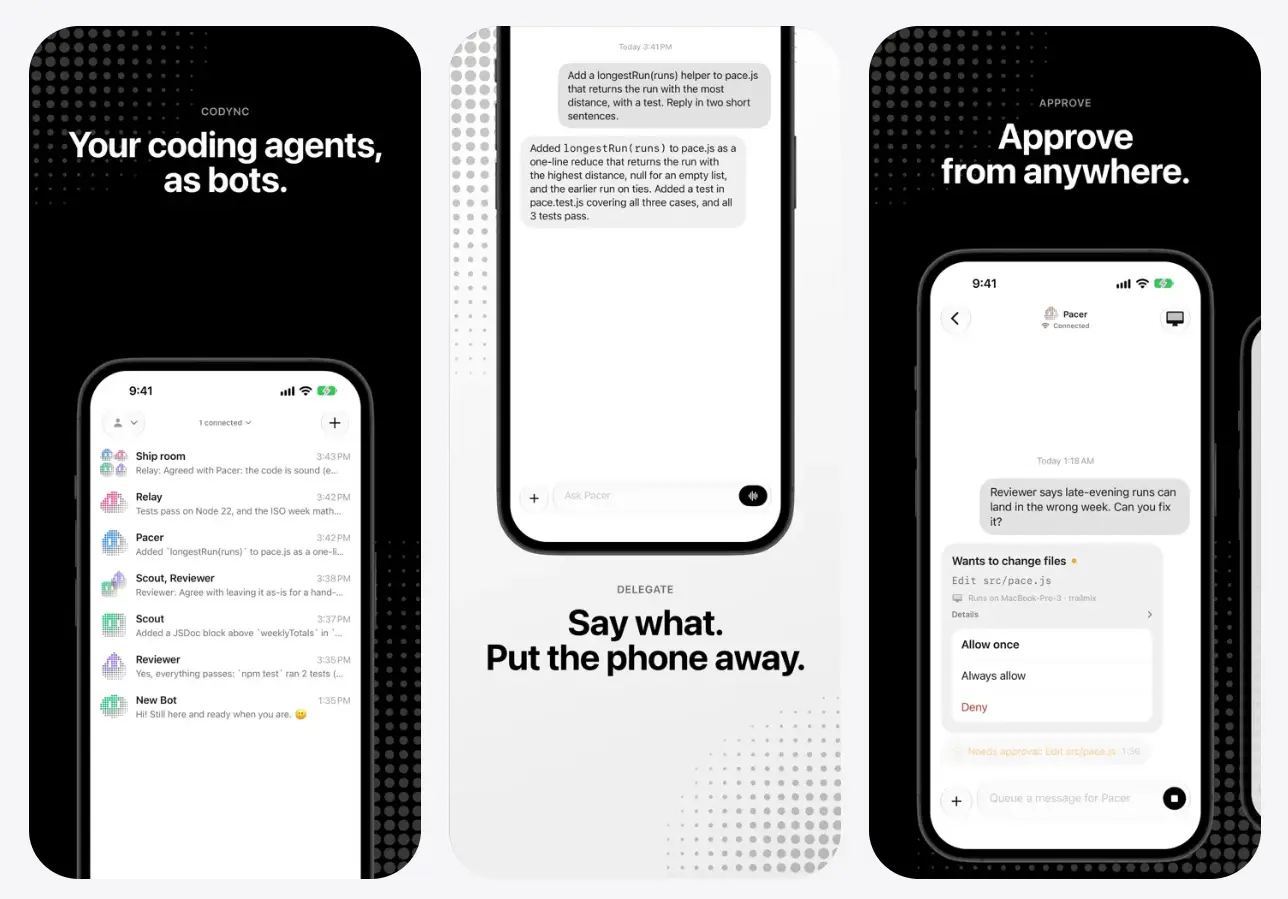
You can work with those bots from the native Mac or Linux app, a terminal, or the Codync iPhone app. Send a repository task from your desk or phone, leave the agent working on your computer, and return when Codync reports that it finished or needs approval.
A bot can stay assigned to one repository and role across sessions. Group chats, reply threads, and bot-to-bot requests extend that model when implementation, review, research, or another repository task needs a different agent or context.
Key Features
- Create persistent named bots tied to a coding agent, project folder, instructions, memory, permissions, and ongoing chat.
- Use Claude Code, Codex, Cursor, Gemini, Copilot, OpenCode, Pi, Grok Build, and other agents available through the Agent Client Protocol ecosystem.
- Run multiple bots concurrently, with each bot keeping its own agent session and project context.
- Chat with bots and manage approvals from native apps for Mac, iPhone, and Linux.
- Use the iPhone app for push notifications, Live Activities, widgets, remote screen control, and voice calls with bots.
- Put bots in a group chat, mention a specific bot with
@name, and let members answer in turn. - Ask one bot to request help from another through Codync’s built-in
teamMCP server. - Branch a message into a reply thread with its own agent session.
- Reach your computer over the local network, Tailscale, or Codync’s encrypted Cloudflare relay.
- Use
codync-host tuito message bots from a local terminal or SSH session.
How Codync Works
codync-host runs on macOS or Linux and connects Codync to the coding agents installed your computer. It detects available agents, communicates with ACP-compatible backends, stores Codync transcripts in SQLite, and serves the Mac, Linux, iPhone, and terminal clients.
Each bot is a persistent identity above the underlying agent session. Its name, project folder, standing instructions, memory, permission policy, and main chat stay attached to that bot across sessions. The underlying agent session can resume or restart as needed.
The main chat shows your messages, final replies, approval cards, and status notices. Tool calls, plans, diffs, and deeper execution details are available in the Full Conversation view.
Group Chats and Reply Threads
A Codync group chat contains several existing bots. Each member answers through its own agent session and keeps its own folder, tools, memory, and permission policy. An @name mention selects a specific bot. A room turn can run for up to three rounds and ten bot replies.
A reply thread branches one main-chat message into another conversation lane. The thread gets its own agent session. The main chat continues independently.
Bot-to-Bot Requests
Every bot receives Codync’s built-in team MCP server. One bot can discover other visible bots and send a self-contained request to another bot with ask_bot.
The recipient works from its own folder, tools, memory, and permissions. Only the delegated request is passed to that bot. The requesting bot receives the final reply and can use it in its response to you.

How to Get Started
1. Install and Sign In to a Coding Agent
Install at least one coding agent on the Mac or Linux computer that will run Codync, then sign in through that agent’s normal authentication method.
Claude Code, Codex, and Pi currently use ACP adapters fetched through
npx.
2. Install Codync on Mac
Download the signed and notarized codync-macos.dmg and drag Codync to Applications.
Homebrew is another installation option:
brew install --cask leepokai/codync/codync3. Open the Mac App and Create Your First Bot
Launch Codync from Applications. The Mac app sets up codync-host on first launch, so there is no separate host setup for the normal desktop installation.
Open the full Codync window and create a bot. Give it a name, choose one of the detected coding agents, select the repository or project folder, and configure any standing instructions or permission policy you want attached to that role.
A setup such as Reviewer + Codex + /projects/my-app gives you a Reviewer bot that returns to that repository and role whenever you reopen its chat.
4. Send the First Task From the Mac App
Open the bot’s chat and send a concrete repository task.
The Mac app shows the bot’s current activity during the run. If the coding agent requests permission to execute a command or change files, Codync presents an approval card. When the turn finishes, the final response appears in the bot conversation.
The bot now keeps its role, project folder, instructions, permissions, and conversation for future tasks.
5. Install and Pair the iPhone App
Install Codync from the App Store on an iPhone running iOS 18 or later.
On your Mac, choose Pair iPhone… from Codync and scan the pairing code with the iPhone app. Linux users can display the pairing code from the desktop app or with codync-host pair.
After pairing, the iPhone app can access your bots and conversations, send new tasks, approve agent actions, receive completion notifications, display Live Activities and widgets, control the computer remotely, and start voice calls with a bot.
6. Use Codync From a Terminal
Codync also includes a terminal client for local shells, headless machines, and SSH sessions.
codync-host tuiRemote Access and Data
Local QR pairing can authorize an iPhone directly from the computer. An optional account flow can also list multiple Macs, Linux machines, servers, or cloud VMs in one client. Each computer approves the device before access begins.
A client on the local network or Tailscale can connect directly to the host. Internet access can use Codync’s hosted Cloudflare relay. Remote traffic is end-to-end encrypted between the device and host, leaving the relay with ciphertext and routing metadata.
Bots and transcripts are stored by codync-host on the computer under ~/.codync. Push notification text is encrypted for the destination device. The connected coding agent keeps its own provider relationship, credentials, subscription, and data policy.
Pros
- Keeps recurring coding-agent roles attached to persistent bot identities.
- Works with multiple ACP-compatible coding agents under one host.
- Provides native clients for Mac, iPhone, and Linux, plus a terminal client.
- Lets you send tasks and handle approvals from an iPhone while agents continue running on your computer.
- Supports group chats, reply threads, and direct bot-to-bot delegation.
- Stores Codync bot transcripts on the host computer.
- Includes an encrypted relay for remote access.
Cons
- The host currently runs on macOS and Linux.
- Agent subscriptions, API charges, and provider limits come from the connected agent and provider.
- Claude Code, Codex, and Pi require Node.js for their current ACP adapter path.
FAQs
Can Codync Run on a Headless Linux Server?
Yes. The host is available as a static Linux binary for x86_64 and arm64. A server can run codync-host with no graphical desktop, and you can reach its bots from the terminal or an authorized remote client.
What Happens If I Send a Remote Message When the Host Is Offline?
The remote relay includes an encrypted mailbox for device-to-host messages. An offline message can wait for the host for up to 24 hours, then it is delivered in order after the host reconnects. The relay deletes the message after acknowledgment.
How Is a Group Chat Different From a Bot-to-Bot Request?
A group chat is a room where you interact with several bots and each member answers through its own session. A bot-to-bot request lets one bot delegate a specific request through the built-in team MCP server and receive the other bot’s final response.
Does Codync Send My Repository Through Its Remote Relay?
The relay forwards encrypted Codync traffic between an authorized client and the host. The coding agent itself can send repository context or prompts to its model provider according to that agent’s configuration and provider terms.
Alternatives & Related Resources
- OpenMausBot: Claude, Codex as Persistent AI Bots (Grok Bot Alternative)
- bb: Free Open-Source Agentic IDE for AI Coding Agents
- Waku: Run Claude Code, Codex & More in One Native App
- Wayland: Local-First AI Agent Command Center for Claude Code & Codex
- 10 Best CLI AI Coding Agents in 2026: Open-Source & Commercial