Survival LLM is a free, open-source, local-first desktop AI assistant that answers emergency and practical questions using a library downloaded to your computer.
Ask about food safety during a blackout, first aid, water purification, or equipment repair, and it searches stored reference articles to help form an answer.
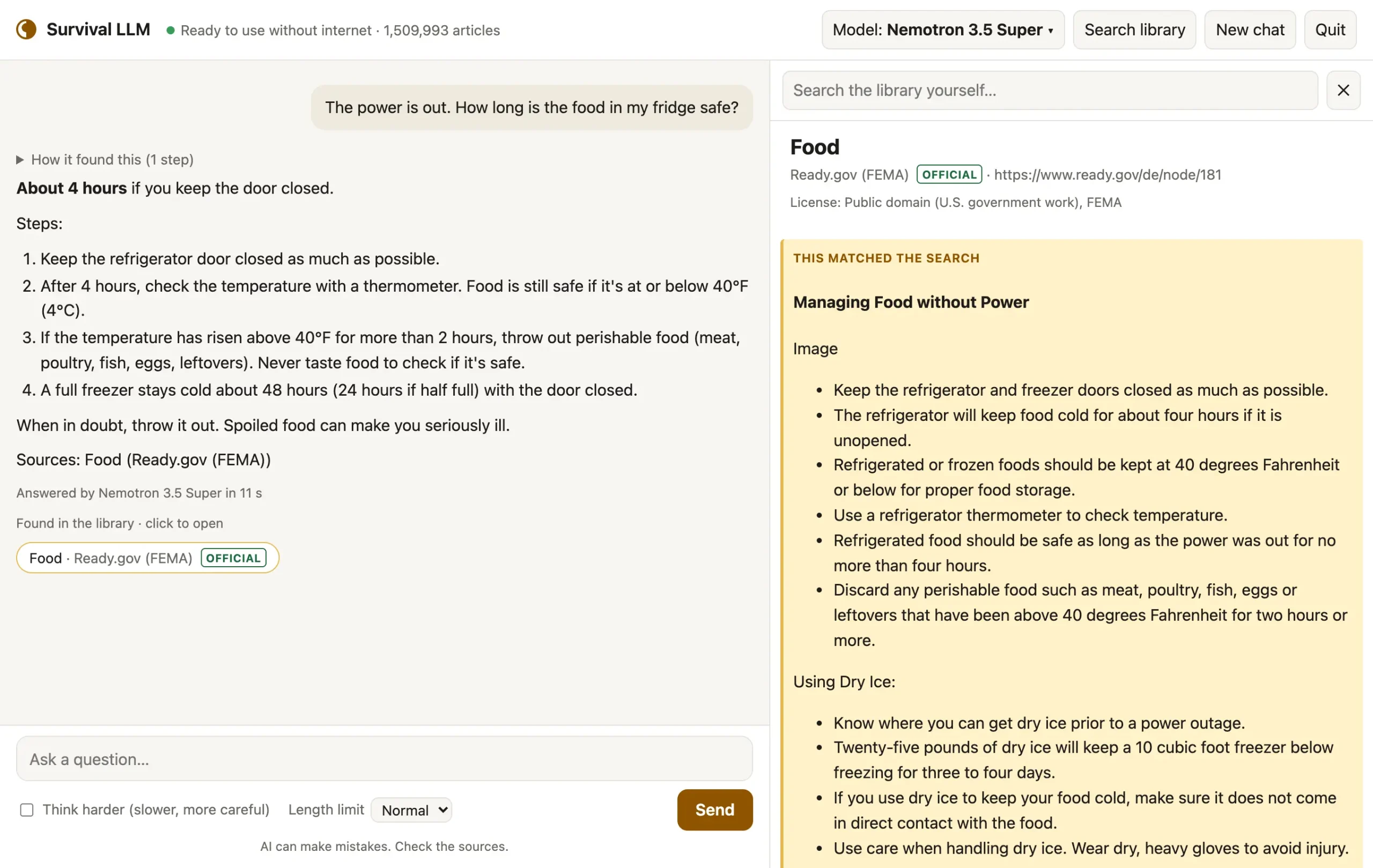
You can open the articles it used and read the relevant passages, highlighted beside the conversation.
The LLM and reference library run locally after setup, including when your internet connection is down.
The local AI assistant also searches manuals and emergency plans you add yourself, and it can remember household details for later conversations.
Key Features
- Ask emergency and everyday practical questions with a local AI model and downloaded reference library.
- Open the articles used in an answer, with relevant passages highlighted and source licenses visible.
- Search the offline library directly to find and read reference articles yourself.
- Install a library of about 1.5 million articles or a smaller collection of about 500,000.
- Add PDFs, Word documents, EPUB books, saved web pages, and text files to local search.
- Save household details as editable memory notes, review changes, and undo saved notes.
- Customize the assistant’s instructions and control the maximum answer length.
- Download app and library updates when internet access is available.
How Survival LLM Answers Questions
When you enter a question, the local AI model searches the downloaded library for relevant text and reads matching articles before writing its response. The search uses a full-text index, with higher ranking for official references such as government emergency guidance. The model runs through Ollama on your computer, and the search results supply information relevant to your question.
For example, you could ask what to do with refrigerated food after a power outage. Survival LLM can retrieve food-safety guidance, answer the question, and list the articles it consulted. Select a source to open its text alongside the chat, with the cited passage highlighted and the document’s license available.
Survival LLM checks the model’s source list against articles it accessed or encountered during search and replaces unsupported references with the articles it actually read. This reduces invented source names.
What Is in the Offline Library?
The Everything collection contains approximately 1.5 million articles, including about 930,000 of Wikipedia’s most-read entries. It also includes medical and emergency references from WikiMed, WikEM, MedlinePlus, Ready.gov, FEMA, the CDC, and U.S. military survival and first-aid manuals, WHO and international first-aid material, and the USDA home-canning guide.
For practical questions, the library contains wikiHow guides, iFixit repair information, Appropedia, Energypedia, and selected Stack Exchange discussions on household repairs and other subjects.
The smaller Essentials collection contains roughly 500,000 articles and excludes the large Wikipedia and iFixit collections. Both options include emergency and medical reference material.
Search Your Own Documents and Save Household Notes
Open Your files to add a PDF generator manual, Word document, EPUB, saved HTML page, or text file. Survival LLM indexes the document on your computer and includes it in searches alongside the downloaded library.
For information you want available across chats, Memory stores short notes such as the generator your household owns.
Open Memory to edit or remove notes. You can switch off automatic saving and continue using notes you have chosen to keep.
The Instructions control opens the assistant’s editable instructions, and Reset restores the defaults. The app adds the current date, the names of your files, and saved memory notes to its context. Length limit, beside Send, sets a maximum response length or turns the limit off. The Think harder option requests additional reasoning from supported models.
Pros
- Answers emergency questions using downloaded references even when internet access is unavailable.
- Opens the source passage and license for checking the material behind an answer.
- Searches personal manuals and remembers editable household notes across conversations.
- No cloud subscription or hosted-model API requirement.
Cons
- LLMs and the full library require significant memory, storage, and initial download time.
- No recommended chat model for 8 GB devices.
- Image-only scans and photographed pages cannot currently be searched as personal documents.
Alternatives & Related Resources
- Open Notebook: Private, Self-Hosted Gemini Notebook (NotebookLM) Alternative
- LM Studio: Run Local LLMs on Windows, Mac, and Linux
- Free, Private, Offline AI Chat for iPhone – Locally AI
- Free Offline AI Chatbot App for Complete Privacy – Private Mind