OpenWiki is an open-source CLI for AI coding agents that generates a structured documentation wiki for your codebase and refreshes that wiki as the code changes.
Install it with npm, point it at a repository, and OpenWiki writes an openwiki/ folder of markdown files. Your coding agent can then read those files for context on later tasks and skips scanning the entire project each time.
Coding agents perform better when they know where key logic lives, how modules connect, and which conventions a repository expects.
Getting that context into an agent usually means writing detailed docs by hand, then updating them every time a pull request changes the architecture. On a repository with frequent commits, hand-written docs fall behind within weeks.
OpenWiki runs openwiki --init once to generate the wiki, then a scheduled GitHub Action runs openwiki --update daily, diffs the commits since the last run, and opens a pull request with the documentation changes.
The CLI also edits your AGENTS.md or CLAUDE.md file so your coding agent knows to check the generated wiki before searching the codebase manually.
Features
- Generates initial documentation from a codebase scan with
openwiki --init. - Refreshes existing documentation from repository changes with
openwiki --update. - Appends prompting instructions to
AGENTS.mdandCLAUDE.mdfiles automatically. - Creates
AGENTS.mdorCLAUDE.mdif the file does not already exist in the repository. - Supports OpenRouter, Fireworks, Baseten, OpenAI, and Anthropic inference providers.
- Allows custom model ID specification for each supported inference provider.
- Supports OpenAI-compatible endpoints through a dedicated provider with a configurable base URL.
- Routes Anthropic provider requests to alternative Anthropic-compatible endpoints.
- Includes optional LangSmith tracing integration with a dedicated “openwiki” tracing project.
- Provides a GitHub Actions workflow for automated daily documentation update PRs.
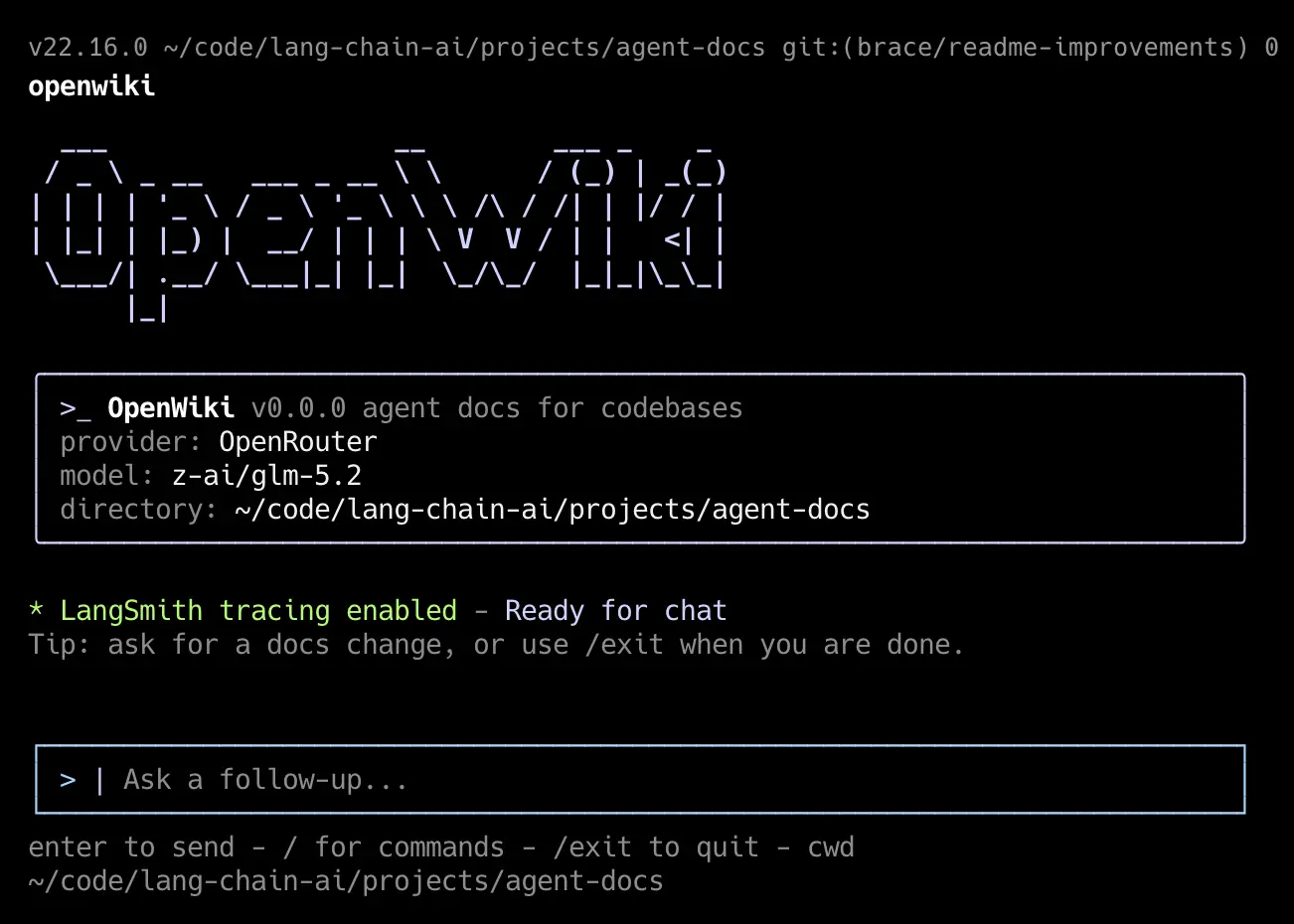
- Runs as an interactive Ink-based terminal app for chat with the OpenWiki agent.
- Exits automatically after successful
--initor--updateruns in interactive mode.
OpenWiki Use Cases
- Run a one-shot architecture request in the terminal when a technical handoff needs a concise project summary.
- Generate a repository wiki before onboarding someone to an unfamiliar service, package, or monorepo.
- Create a codebase summary before planning a refactor, migration, or major authentication change with an AI coding agent.
- Refresh documentation after merged code changes and review the resulting update pull request alongside the repository history.
- Give Claude Code or another agent a short instruction-file reference that points to deeper documentation stored in the repository.
How to Use OpenWiki
1. Install the package globally through npm.
npm install -g openwiki2. Run the initializer inside the repository you want documented.
openwiki --init3. The first interactive run asks you to pick an inference provider, enter an API key, and select a model. OpenWiki saves those choices to ~/.openwiki/.env on your machine, which keeps credentials out of your git history.
4. Pick Anthropic or OpenAI if you already pay for API access through one of those providers. Pick OpenRouter if you want to test a specific open model, such as GLM 5.3 or Kimi K2.7, through a single shared account.
5. After the initial run, OpenWiki writes the wiki into an openwiki/ folder and appends a short reference block to AGENTS.md or CLAUDE.md. Check that file into version control along with the wiki folder so every contributor and every agent session picks up the same context.
6. Set up the scheduled update next. Copy the example workflow into your repository.
cp examples/openwiki-update.yml .github/workflows/openwiki-update.ymlThe workflow calls openwiki --update on a schedule, which reads the commits since the last recorded run through openwiki/.last-update.json, then opens a pull request with the changed documentation files.
It never commits directly to your default branch. Review that pull request the same way you review a code change. An agent-generated diff can misread an ambiguous commit message or a renamed file.
7. Use the print flag for a quick one-off request that skips the interactive session.
openwiki -p "Summarize what you can do"8. Set the base URL alongside your key when you route Anthropic requests through a private gateway in place of the public API.
OPENWIKI_PROVIDER=anthropic
ANTHROPIC_API_KEY=your-key
ANTHROPIC_BASE_URL=https://your-gateway.example.com/anthropic
9. For any OpenAI-compatible gateway, such as a LiteLLM proxy fronting several upstream providers, set the compatible provider variables instead.
OPENWIKI_PROVIDER=openai-compatible
OPENAI_COMPATIBLE_API_KEY=your-gateway-key
OPENAI_COMPATIBLE_BASE_URL=https://your-gateway.example.com/v1
OPENWIKI_MODEL_ID=your-gateway-model-name
Alternatives & Related Resources
- Transforms GitHub Repos into Detailed Documentation – DeepWiki
- Code Wiki: Google’s AI-Powered Solution for Code Understanding
- Analyze GitHub Repos and Generate Instructions for Coding Assistant – Primer
- Generate Codebase-Aware AI Specs for Claude Code & Cursor – Shotgun CLI
- osgrep: Local Semantic Search for AI Coding Agents
- 7 Best CLI AI Coding Agents
- Claude Code Commands Cheat Sheet
Pros
- Generates documentation from a single command.
- Updates documentation incrementally from code changes.
- Automates daily updates through GitHub Actions.
- Supports multiple LLM providers.
- Stores credentials locally, not in the repository.
- Open source under MIT License.
- Runs entirely in the terminal.
Cons
- Requires an API key and paid LLM access.
- No static-site export built in.
- No web UI or dashboard.
- Limited to codebase documentation only.
- Requires npm and Node.js environment.
FAQs
Q: What happens if OpenWiki generates low‑quality documentation?
A: You can manually edit the Markdown files inside openwiki/. On subsequent --update runs, OpenWiki refreshes content from repository changes but does not blindly overwrite everything. It respects existing structure and only updates what changed. If the quality remains poor, try a different model, adjust your initial prompt, or add a .openwikirules file (if you create one) to steer the agent.
Q: Beyond GitHub Actions, how else can I automate documentation updates?
A: You can run openwiki --update from any CI system—GitLab CI, CircleCI, Jenkins, or even a cron job on a server. The key is to commit and push the changes back to the repository. You can adapt the provided GitHub Actions workflow file to other platforms by replicating the steps: checkout, install OpenWiki, set environment variables, run update, then create a commit and push.
Q: Is it safe to use OpenWiki with private repositories?
A: OpenWiki sends code snippets and file content to the LLM provider you choose. This means your source code leaves your local machine and travels to an external API. To minimize risk, use a provider with strong data privacy commitments (e.g., Azure OpenAI, or a self‑hosted gateway via openai-compatible). Never commit your ~/.openwiki/.env file. The GitHub Action also requires storing API keys as secrets, not in plaintext. Consider using on‑prem or local models via Ollama (through the openai-compatible endpoint) for highly sensitive projects.
Q: How does OpenWiki differ from traditional documentation generators like Docusaurus or MkDocs?
A: Traditional tools are designed for human readers, require manual content writing, and focus on styling and navigation. OpenWiki writes content automatically and maintains it through changes. It also produces output specifically optimized for AI agents.