Voice Clone Lab is a free, local-first, self-hosted voice cloning pipeline that fine-tunes Qwen3-TTS from a few minutes of clean speech and generates new speech from text.
It runs entirely on your own Linux with an NVIDIA CUDA GPU. No audio or transcripts leave your device.
What Makes Voice Clone Lab Different
Many local voice-cloning tools generate speech directly from a short reference clip. Voice Clone Lab adds a complete fine-tuning workflow around Qwen3-TTS.
Zero-shot mode accepts one reference recording and generates speech immediately. The training workflow processes several minutes of speech, creates a speaker-specific dataset, and saves reusable checkpoints under that speaker’s name.
The project also treats transcript correction as a normal stage of training. Automatic transcripts appear in an editable TSV file or web table before dataset preparation. Corrections feed back into the dataset before the model creates audio codes and starts fine-tuning.
This structure works best for repeated narration and voice production. A saved speaker checkpoint becomes a reusable local model rather than a reference clip that must accompany every generation request.
Key Features
- Fine-tunes Qwen3-TTS into a reusable personal voice model from 5–15 minutes of clean speech.
- Processes recordings through audio extraction, cleaning, splitting, transcription, transcript review, and dataset preparation.
- Accepts microphone recordings, local audio and video files, and supported media URLs.
- Displays automatic transcripts in an editable TSV file or web table before training.
- Stores audio, transcripts, datasets, checkpoints, and generated WAV files under separate speaker names.
- Generates speech immediately from a single reference clip through zero-shot mode.
- Saves individual epoch checkpoints for voice-quality comparison.
- Produces multiple WAV files from structured JSON input through batch generation.
- Exposes setup, data preparation, training, and generation through both a CLI and a local web UI.
- Blocks accidental file replacement until you explicitly enable overwriting.
Use Cases
Record 15 minutes of narration in a quiet room, run vcl run, proofread the auto-generated transcript, and train a checkpoint overnight on an RTX 4090. The next morning, vcl generate produces intro and outro lines in that voice without booking a new recording session.
Paste a YouTube link to a voice actor’s earlier work, and build a training dataset directly from that audio. You no longer need to re-record lines for a game character.
Script narration for a course by writing a JSON file of line IDs and text, then run vcl generate --spec lines.json --outdir out/ to produce every audio file in a single batch pass.
Voice Clone Lab System Requirements
| Requirement | Details |
|---|---|
| OS | Linux |
| GPU | NVIDIA GPU with CUDA |
| Training memory | 24 GB VRAM minimum |
| Recommended training memory | 32 GB or more |
| Generation from a checkpoint | Approximately 8 GB VRAM |
| Python | Python 3.10+ |
| Additional software | Git and FFmpeg |
| Base model download | Approximately 4 GB |
Install Voice Clone Lab
Clone the repository and enter its directory:
git clone https://github.com/tetsuo-ai/voice_clone_lab.git
cd voice_clone_lab
Install the core package and Gradio web interface:
pip install -e '.[ui]'Download the patched Qwen3-TTS dependency and the 1.7B base model:
vcl setup --downloadCheck the GPU, dependencies, and model files:
vcl checkTrain a Personal Voice
Prepare the Recording
Record 5–15 minutes of clean speech in a quiet room. Use one microphone, one speaker, and a natural reading pace. Music, overlapping speakers, room echo, and changing microphone distance weaken the training material.
Build the Speaker Dataset
Assign a name to the voice and pass the recording to the pipeline:
vcl run --speaker alex --input ~/recordings/alex.wavA URL works as the input when the optional URL dependencies are installed:
vcl run --speaker alex --input "https://www.youtube.com/watch?v=..."The command extracts the audio, cleans it, splits it into clips, transcribes the speech, and writes the dataset under data/voices/alex/.
Only use remote recordings that feature your own voice or a speaker who supplied explicit permission.
Correct the Transcript
Create an editable transcript review file:
vcl transcribe --speaker alex --reviewEdit this file:
data/voices/alex/transcripts/transcripts_review.tsvApply the corrected transcript:
vcl transcribe --speaker alex --apply-review --forceNames, abbreviations, technical terms, numbers, and misheard words deserve close attention. Transcript errors enter the training data and often appear later as unstable pronunciation.
Prepare and Train the Model
Add the required Qwen audio codes:
vcl prepare --speaker alexStart training:
vcl train --speaker alexUse a smaller batch size on a 24 GB card:
vcl train --speaker alex --batch-size 2Generate Speech
Generate a WAV file from the newest checkpoint:
vcl generate \
  --speaker alex \
  --text "Hello, this is my cloned voice."
Generated files appear under:
outputs/generated/alex/Open the Web UI
Launch the local interface:
vcl uiOpen http://127.0.0.1:7860 in a browser.
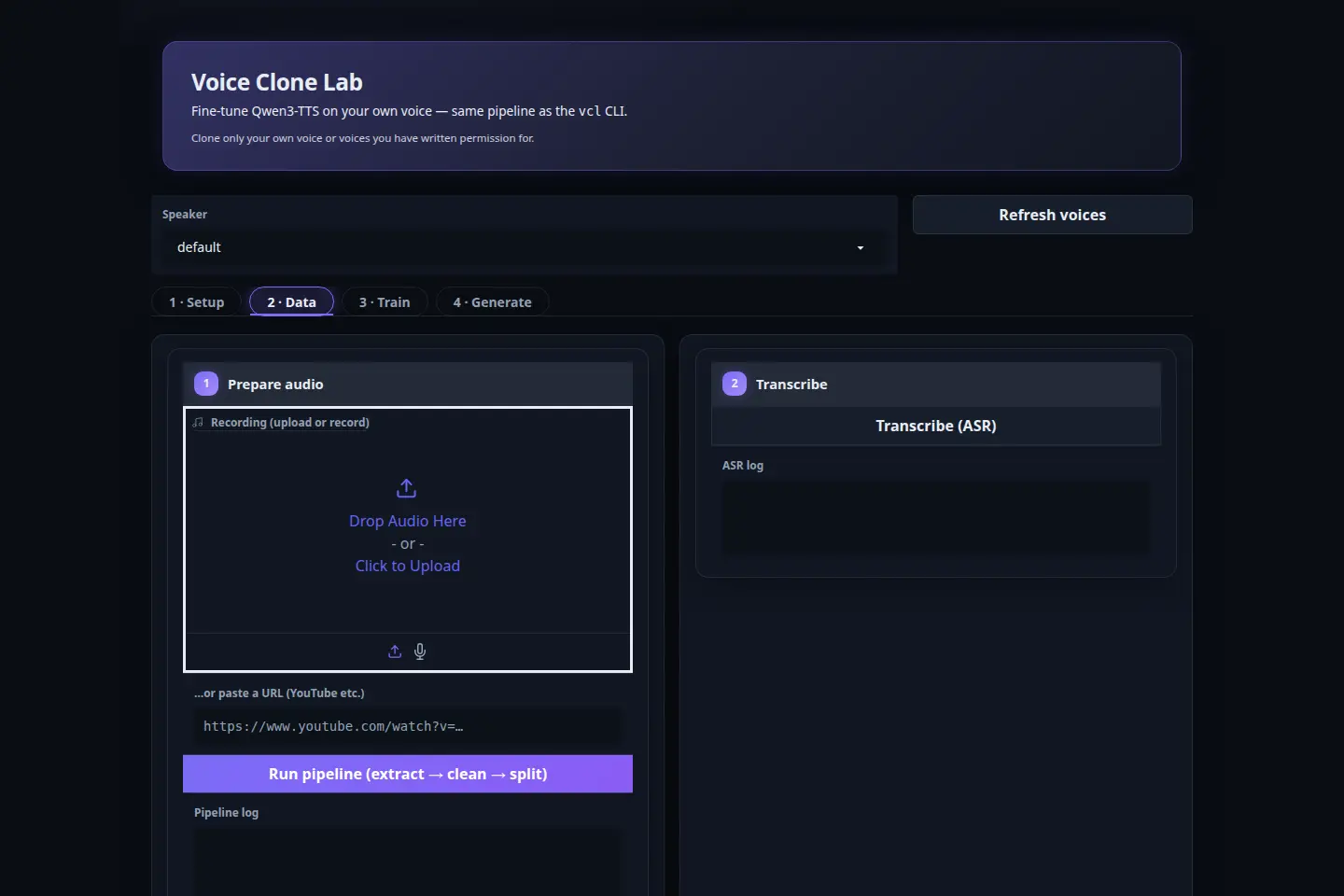
The web UI contains four main tabs:
- Setup: Checks the system and model installation.
- Data: Imports recordings or URLs, runs the data pipeline, and edits transcripts.
- Train: Configures training parameters and displays the live log.
- Generate: Selects a speaker, checkpoint, and generation settings for playback.
Zero-shot mode generates speech from one reference recording and skips the training process. This mode provides a fast compatibility check before preparing a full dataset. The trained workflow creates persistent checkpoints for repeated generation.
vcl generate \
  --zeroshot \
  --ref clip.wav \
  --text "This sample uses zero-shot voice cloning."
Batch Speech Generation
Voice Clone Lab accepts a JSON file containing multiple identifiers and text lines:
[
  {
    "id": "intro",
    "text": "Welcome to the first chapter."
  },
  {
    "id": "chapter-one",
    "text": "The story begins on a quiet morning."
  }
]
Run the batch:
vcl generate --spec lines.json --outdir generated-lines/Clone Lab Compared With Other Local Options
| Tool | Workflow | Hardware Profile | Best Fit |
|---|---|---|---|
| Voice Clone Lab | Fine-tune Qwen3-TTS voice models | Linux and NVIDIA; 24 GB VRAM for training | Reusable personal voice checkpoints |
| Voicebox | Desktop voice studio with several TTS engines | Multiple GPU and CPU paths | Voice generation, dictation, transcription, and audio projects |
| MOSS-TTS-Nano | Zero-shot multilingual voice cloning | Four-core CPU | Lightweight local generation |
| NeuTTS Air | Short-reference on-device voice cloning | CPU or GPU | English voice cloning on lower-end hardware |
Pros
- Local training and generation
- Reusable speaker checkpoints
- Editable transcript review
- CLI and web UI
- Zero-shot testing mode
- Batch WAV generation
Cons
- Linux-only
- NVIDIA CUDA dependency
- 24 GB training requirement
- Manual transcript correction
Alternatives & Related Resources
- dots.tts: Free Open-Source Voice Cloning With 24-Language Support
- Free CPU-Based Text-to-Speech Tool with Voice Cloning – Pocket TTS
- 7 Best Free AI Voice Cloning Tools
- Discover More Free AI Voice Cloning Tools
FAQs
Q: Does Voice Clone Lab require model training?
A: No. Zero-shot mode generates speech directly from a reference clip. Model training creates a reusable speaker checkpoint from a larger collection of corrected recordings.
Q: Which languages does Voice Clone Lab support?
A: The Qwen3-TTS 1.7B Base model supports Chinese, English, Japanese, Korean, German, French, Russian, Portuguese, Spanish, and Italian.
Q: Does Voice Clone Lab manage several voices?
A: Yes. Each speaker name receives separate audio, transcript, dataset, checkpoint, and generated-output directories. Use a unique --speaker value for each authorized voice.
Q: Does Voice Clone Lab require an internet connection after installation?
A: No. The tool operates offline once the base model weights and dependencies are downloaded.