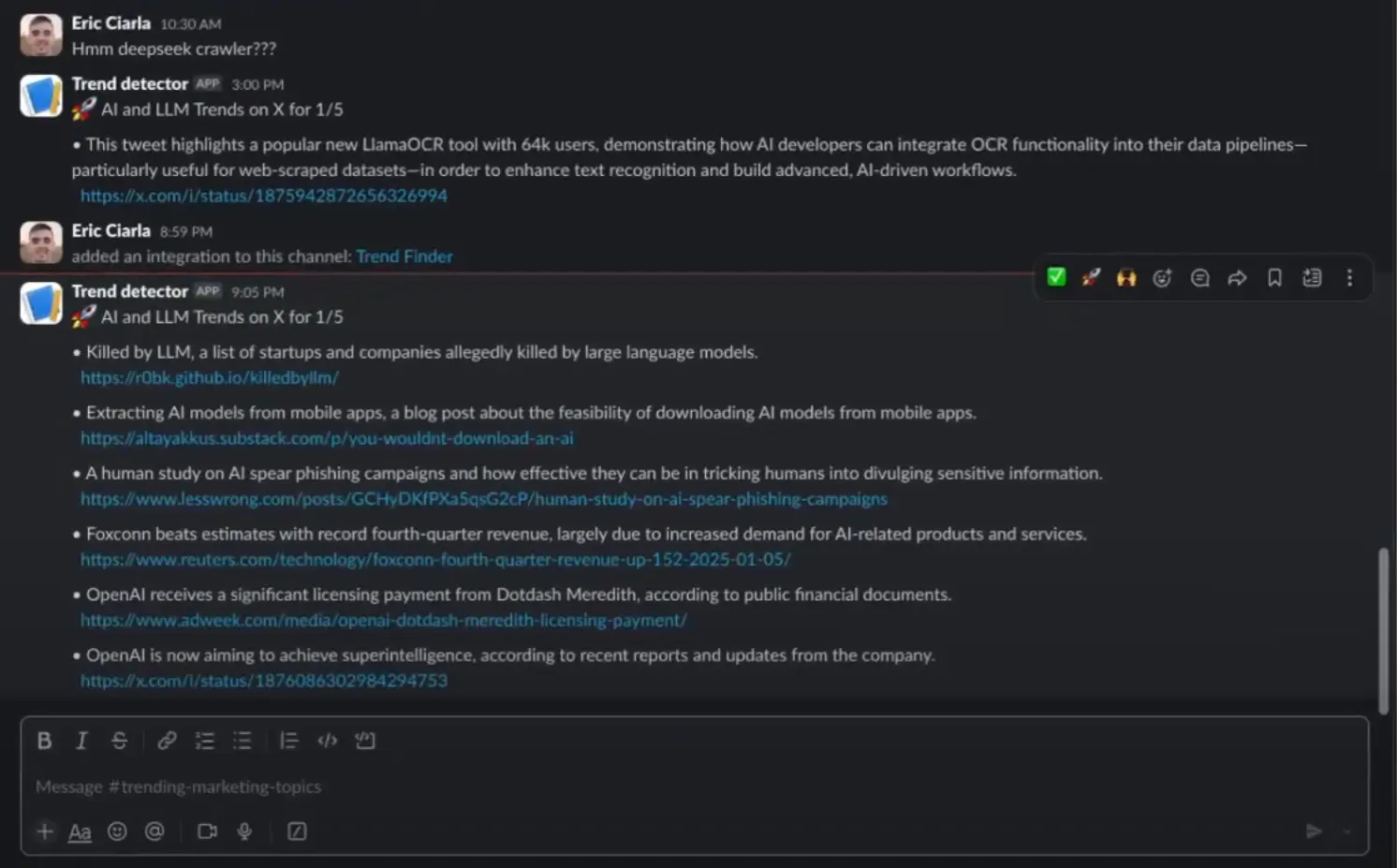
Trend Finder is an open-source tool that uses AI to monitor and analyze social media posts and web content, identifying emerging trends and product launches in real time. The tool pulls data from influential social media accounts and websites, processing the information through advanced AI to spot meaningful patterns and developments.
Social media professionals often struggle to stay current with rapidly shifting online conversations and industry changes. Manual monitoring across multiple platforms takes hours, yet missing key trends can impact campaign performance. Trend Finder transforms this process by automatically collecting and analyzing content, then sending instant Slack notifications when it detects significant trends.
The tool runs on Node.js and integrates with Twitter/X API for social monitoring, Firecrawl for web content analysis, and Together AI for trend detection. The system delivers notifications through Slack webhooks based on customizable schedules.
Features
- AI-Driven Trend Analysis: Leverages Together AI to process information and identify significant trends.
- Social Media Monitoring: Integrates with the Twitter/X API to track posts from selected influencers. Note that the free X API plan has limitations on monitoring frequency.
- Website Monitoring: Employs Firecrawl’s
/extractfunctionality to detect new releases and news on specified websites. - Slack Notifications: Delivers instant alerts to your Slack workspace when noteworthy trends are detected.
- Scheduled Monitoring: Utilizes cron jobs to automate data collection and analysis at set intervals.
Use Cases
- Identify Emerging Marketing Opportunities: Discover trending topics relevant to your industry, allowing for timely campaign adjustments or content creation.
- Track Product Launches and Industry News: Monitor competitor websites or news sources for new product announcements and important industry updates.
- Understand Public Sentiment: Analyze the sentiment associated with emerging trends to gauge public opinion and tailor communication strategies.
- Real-Time Conversation Monitoring: Stay informed about current discussions and engage in relevant conversations as they unfold.
- Efficient Content Planning: Inform your content calendar with data-backed trending topics to increase engagement and relevance.
How To Use It
1. Clone the Repository: Begin by cloning the Trend Finder repository to your local machine using the command: git clone https://github.com/ericciarla/trendFinder.git followed by navigating into the project directory: cd trend-finder.
2. Install Dependencies: Install the necessary packages by running npm install in your terminal.
3. Configure Environment Variables: Copy the .env.example file to .env using the command cp .env.example .env. Then, open the .env file and input your API keys for Together AI, Firecrawl (if used), and Twitter/X (if used), along with your Slack webhook URL.
# Required: API key from Together AI for trend analysis (https://www.together.ai/)
TOGETHER_API_KEY=your_together_api_key_here

# Required if monitoring web pages (https://www.firecrawl.dev/)
FIRECRAWL_API_KEY=your_firecrawl_api_key_here

# Required if monitoring Twitter/X trends (https://developer.x.com/)
X_API_BEARER_TOKEN=your_twitter_api_bearer_token_here

# Required: Incoming Webhook URL from Slack for notifications
SLACK_WEBHOOK_URL=https://hooks.slack.com/services/YOUR/WEBHOOK/URL
4. Run the Application:
- For development with automatic updates, execute
npm run start. - To build for production, use the command
npm run build.
5. Using Docker (Optional):
- Build the Docker image with
docker build -t trend-finder .. - Run the container using
docker run -d -p 3000:3000 --env-file .env trend-finder.
6. Using Docker Compose (Optional):
- Start the application using
docker-compose up --build -d. - Stop the application with
docker-compose down.
Pros
- Saves Time: Automates the time-consuming process of manual trend research.
- Real-Time Insights: Provides up-to-date information on emerging trends and discussions.
- Rapid Response: Facilitates quick reactions to new opportunities and industry shifts.
- Centralized Notifications: Delivers alerts directly to Slack for easy team awareness.
- Cost-Effective: Offers a free solution for staying informed about trending topics.
Cons
- X API Rate Limits: The free Twitter/X API has limitations on monitoring frequency.
- Configuration Required: Setting up API keys and environment variables is necessary.
- Technical Setup: Requires familiarity with command-line tools and potentially Docker.
FAQs
Q: What type of trends can Trend Finder identify?
A: Trend Finder identifies emerging topics, product launches, and news based on the content shared by monitored influencers and websites.
Q: How frequently does Trend Finder check for new trends?
A: The frequency depends on the cron job schedule you configure. Note the Twitter/X API free tier limits monitoring to once every 15 minutes per account.
Q: Can I monitor trends from other social media platforms?
A: Currently, Trend Finder supports monitoring of Twitter/X. Website monitoring is also supported.
Resources