AI Humanize is a free online tool that rewrites AI-generated text using four humanization methods to bypass all major AI detectors, including Turnitin, GPTZero, Originality.ai, and Copyleaks.
The AI humanizer restructures sentences, varies vocabulary, and adjusts predictability patterns so the text passes detection scans while keeping the original message intact.
This tool is released under the MIT License. You can deploy it on your own device for full privacy.
Features
- Rewrites AI-generated text using four distinct humanization methods.
- Runs a detection-guided feedback loop that checks output against multiple AI classifiers and re-processes passages that still trigger detection.
- Replaces 30+ AI vocabulary signal words identified as common detection markers.
- Adjusts sentence rhythm by merging short sentences and breaking uniform-length patterns.
- Supports 80+ languages on the Lynote.ai web version, including Spanish, French, German, Chinese, Japanese, and Korean.
- Accepts PDF, DOC, DOCX, and TXT file uploads.
- Preserves keywords in rewritten output for SEO compatibility.
- 3 bypass modes: Simple, Standard, and Enhanced.
- Supports self-hosting via the GitHub repository.
Use Cases
- Rewrite AI-assisted blog drafts before manual editing and publication.
- Improve awkward AI text in product descriptions, emails, and social posts.
- Compare humanization methods for research, writing tools, or detector-focused experiments.
My Test
I tested this tool using a passage generated in ChatGPT 5.5. The original described a free iPad and Apple Watch mockup set for UI presentations. It read cleanly but had a uniform sentence structure and repeated formal phrasing that marks AI-generated copy.
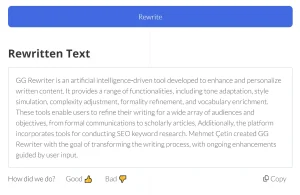
After I ran the text through the tool, the output restructured most sentences and swapped vocabulary. The rewritten version mixed shorter phrases with longer ones, dropped some formal transitions, and introduced minor inconsistencies that read more naturally.
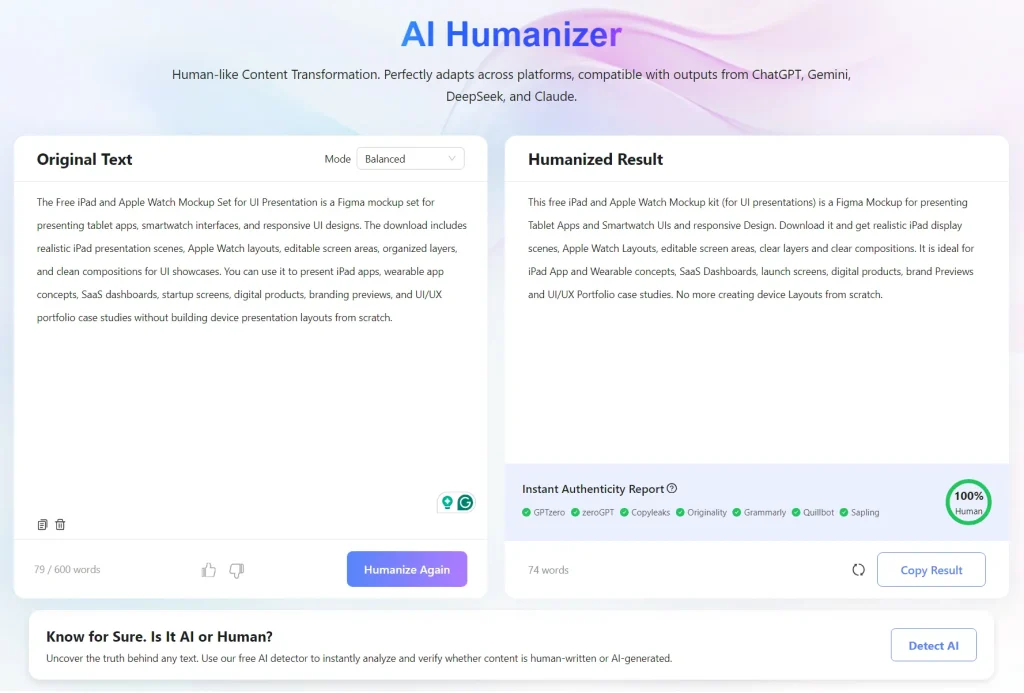
The tool reported that the new copy passed GPTZero, ZeroGPT, Copyleaks, Originality.ai, Grammarly, Quillbot, and Sapling.
I was skeptical, so I manually pasted the humanized text into GPTZero directly. GPTZero rated it at 57% human likelihood. That counts as a pass by GPTZero’s threshold.

In my previous test of 10 free AI humanizer tools, not one passed GPTZero. Every output came back at 100% AI. This tool was the first I encountered that produced a verifiable pass on that platform.
How It Works
The open-source version implements four distinct methods. Each runs independently. Lynote.ai combines all four automatically and selects the best method per text passage.
Method 1: Multi-Language Translation Chain
Text routes through a sequence of distant language pairs, for example English to Chinese to Japanese to Finnish and back to English. The structural differences between these languages force a natural reconstruction of sentence patterns. Four NMT engines power this method: Google Translate, Niutrans, MyMemory, and Apertium. Three processing tiers are available: Standard, Advanced, and Focus.
Multi-Turn LLM Rewriting
The system sends text to DeepSeek API at high temperature settings between 1.1 and 1.3 and runs 2 to 3 rewriting rounds. Each round adjusts sentence rhythm, vocabulary diversity, and structural variety with cross-round context awareness. Prompts target burstiness, which is deliberate variation in sentence length and complexity.
Method 3: Detection-Guided Feedback Loop
A closed-loop system rewrites text, runs it through four detection signals, and re-processes passages that still trigger detection. The four signals are: Binoculars GPT-2 dual-model perplexity, a RoBERTa classifier, statistical features, and diversity metrics. The system also replaces 30+ AI vocabulary signal words and adjusts sentence rhythm at the document and sentence level.
Method 4: Mixed-Engine Translation
The method combines outputs from multiple NMT architectures in a single pass. Each NMT engine introduces different structural biases. Mixing engines avoids single-model fingerprint patterns and works best on short-to-medium content.
Open-Source Version vs. Web Version
| Feature | Open-Source (GitHub) | Web Version |
|---|---|---|
| Text length | Short text only | Ultra-long articles |
| Usage limit | Limited calls | Free and unlimited |
| Speed | Basic | High-speed batch processing |
| Detection optimization | Basic | Optimized for Turnitin and GPTZero |
| Extra features | None | AI summary, grammar correction, multi-style rewriting |
| Setup | Python and local GPU for detection models | Browser-based, no setup |
| Languages | Depends on engine configuration | 10+ languages |
Alternatives and Related Resources
- 7 Best Free AI Content Detectors: Real Accuracy Data & Rankings
- Browse More Free AI Humanizer Tools on ScriptByAI
- 10 Best Free AI Writing Tools
Pros
- Free with no signup on the web version.
- Four humanization methods.
- Self-hosting option for data privacy.
- Supports 80+ languages on the web version.
- Accepts PDF, DOC, DOCX, and TXT uploads.
Cons
- Open-source version limited to short text.
- Limited usage calls on the open-source version.
- Detection feedback loop requires a local GPU.
- Rewritten output still needs proofreading.
FAQs
Q: Do I need to sign up to use the tool?
A: No. The Lynote.ai web version works with no registration. High-volume users can access premium plans with higher word limits.
Q: Can I run this on my own server?
A: Yes. The open-source version on GitHub includes self-deployment instructions.
Q: Is the humanized text plagiarism-free?
A: The tool uses structural rewriting across all four methods, not just synonym replacement. The rewritten text can also pass plagiarism tools such as Copyscape and Turnitin’s plagiarism check.
Q: Is AI Humanize Text good for SEO content?
A: AI Humanize Text can improve readability and reduce robotic phrasing in AI-assisted SEO drafts. You still need human editing for accuracy, search intent, originality, examples, and brand voice.