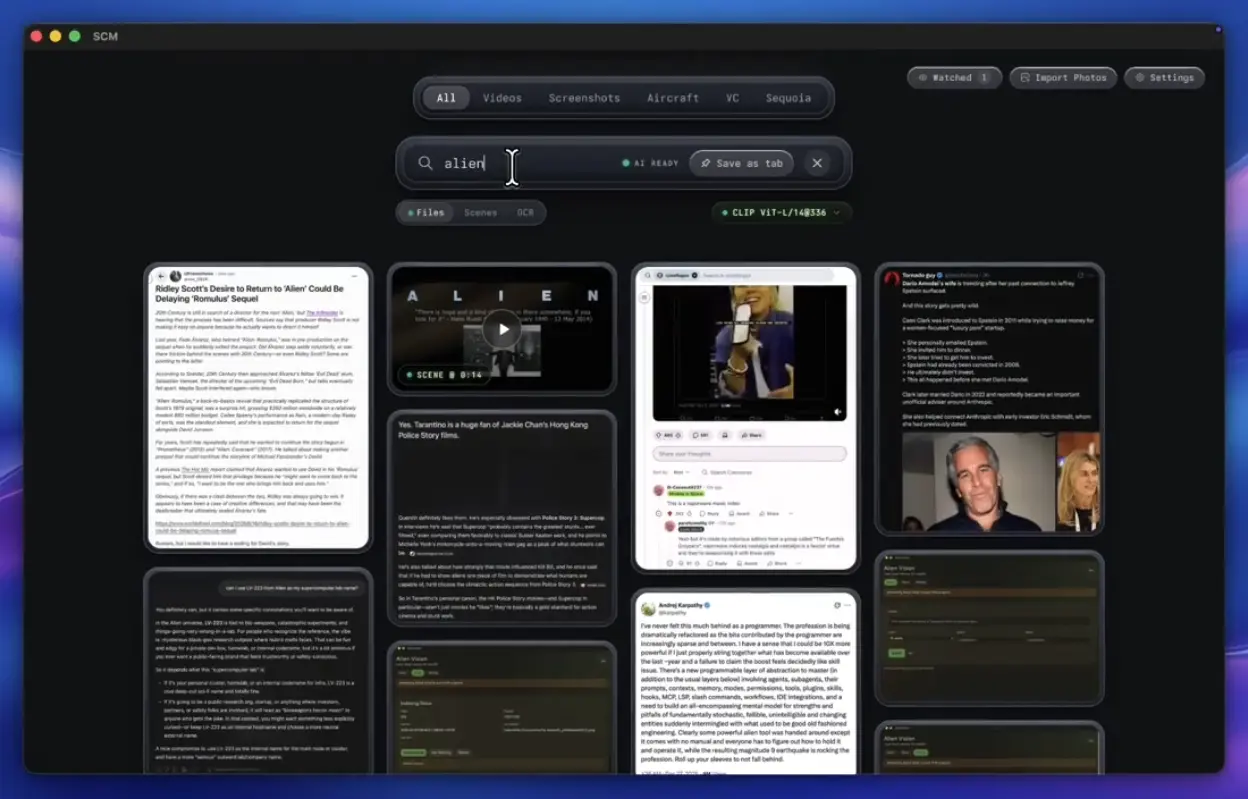
SCM (Screen Memories) is an open-source, local model-powered macOS app that turns folders of photos and videos into a searchable local media library.
You can describe what you remember, search text visible inside an image, quote spoken dialogue, or look for a scene inside a video. AI inference runs entirely on your Mac.
For video, SCM searches individual scene segments. It indexes representative frames and returns matching shots with timecodes. Open a result to jump to that moment.
You can also use the app for semantic photo search, OCR, dialogue retrieval, and optional local chat.
Key Features
- Search photos and whole videos from a plain-language description of their content.
- Find individual scenes inside videos and open a matching result at its timecode.
- Search visible text through local OCR and highlight the matching words in images and frames.
- Find exact spoken lines and word groups from local Whisper transcripts.
- Ask questions about extracted dialogue, OCR text, and filenames through an optional local LLM chat mode with clickable citations.
- Save recurring queries as tabs and keep searches scoped to Videos, Screenshots, Email, or a custom saved view.
- Watch imported folders for changes and deduplicate renamed files through SHA-256 content hashes.
- Switch among local vision models when you need a different balance of indexing speed and image detail.
See It in Action
How SCM Searches Photos and Videos
Files and Scenes use vision embeddings for meaning-based search. OCR looks for literal text. Dialogue searches Whisper transcripts. The LLMs mode is an optional chat layer over text SCM has already extracted.
| Mode | What It Finds |
|---|---|
| Files | Whole photos and videos ranked by visual meaning, with filename and phrase signals included in ranking |
| Scenes | Individual moments inside videos, returned with a poster frame and timecode |
| OCR | Literal text visible in images and sampled video frames |
| Dialogue | Exact spoken phrases and word groups from Whisper transcripts |
| LLMs | Local answers grounded in extracted dialogue, OCR text, and filename matches |
Scene Search Jumps to the Moment You Remember
SCM uses ffmpeg to detect shot boundaries and build a segment plan for each video. A representative midpoint frame from each segment receives a vision embedding and poster image. A scene query scores those segments and returns the closest matching shots with timecode badges.
Search density is configurable under Video Search. Eco samples more sparsely, Balanced is the default at 30 seconds per point, and Detailed, Ultra, and Ultra Pro use progressively denser sampling. Denser settings create more segments for SCM to process and store.
Dialogue uses a separate Whisper transcript. Exact line looks for a contiguous phrase in one utterance. Exact words accepts all query words in one utterance or a short window. Words spoken looks across the video for all requested words. Opening a dialogue result seeks to the matching line.
OCR, Screenshots, and Saved Search Tabs
OCR runs separately from the vision model and matches literal query tokens against recognized text. English is always available, and 35 additional language packs can be enabled. Matched words are highlighted in the result.
The Screenshots view classifies screenshots from a manual override, localized filename patterns, image metadata, and source-folder hints. The Email view finds addresses recovered from OCR text, including common OCR errors in punctuation and spacing.
You can pin a Files, Scenes, OCR, or Dialogue query as a custom tab. SCM stores up to 20 saved tabs and restores each query with its search mode. Selecting Videos, Screenshots, Email, or a saved tab also scopes later searches to that view.
Importing and Storing a Media Library
You can import media with ⌘I, drag files into the app, or import a folder. SCM watches folder imports for changes and resyncs when SCM launches again. It hashes each file before copying it into the managed library. Content hashes prevent renamed copies from becoming duplicate items.
SCM stores its managed media, index data, embeddings, scene data, transcripts, thumbnails, and posters under ~/Library/Application Support/scm by default. Large photo or video collections need enough local disk space for the copied media plus generated search data.
Vision, Speech, and Chat Models
The active vision model is selected per library. Changing it starts a background re-embedding pass for the library. Filename search continues during that work.
| Vision Model | Main Role | Download |
|---|---|---|
| CLIP ViT-L/14@336 | Default model for general media and scene search | ~435 MB |
| SigLIP-2-B/16 | Faster bulk indexing | ~412 MB |
| SigLIP-2-L/16@256 | Higher-detail search for small objects, signs, and on-screen text | ~850 MB |
| SigLIP-B/16@384 | Higher-detail alternative | ~214 MB |
Speech and Chat Models
Dialogue transcription uses Whisper tiny.en by default at about 150 MB, with base.en available at about 300 MB. Changing the Whisper model retranscribes the video library.
Local chat is opt-in. When enabled, SCM runs a llama.cpp sidecar on loopback and answers from evidence already extracted from dialogue, OCR text, and filename matches. Qwen3 1.7B is the default chat model at about 1.1 GB, and Llama 3.2 3B is available at about 2 GB.
How to Install SCM and Get Your First Search Result
The app currently requires Apple Silicon and macOS 12 Monterey or later. Homebrew handles the app install. You only need Bun when you run the project from source.
1. Install Homebrew.
2. Run the SCM tap and cask commands:
brew tap allenv0/scm
brew trust allenv0/scm
brew install --cask allenv0/scm/scm
3. Open SCM and import a small folder with ⌘I for the first test.
4. Let the default vision model download and wait for initial indexing to produce results.
5. Enter a description in Files mode. Switch to Scenes when you want a specific video moment, OCR for visible text, or Dialogue for spoken words.
6. Open a scene or dialogue result and confirm that the video seeks to the matching timecode.
Pros
- Searches photos, video scenes, visible text, and spoken dialogue from one local library.
- Opens scene and dialogue matches at the relevant video timecode.
- Runs media inference locally after the required model assets are installed.
- Watches imported folders and deduplicates renamed files by content hash.
- Saves recurring searches as reusable tabs.
Cons
- Requires an Apple Silicon Mac running macOS 12 or later.
- Dense scene indexing, OCR, transcription, and model changes can create substantial background processing.
- Changing the vision model re-embeds the library, and changing the Whisper model retranscribes video.
Alternatives & Related Resources
- LUCI Desktop: Local Screen & Meeting Memory for AI Agents
- Annotate: Free macOS App Turns Screen Recordings into AI Agent Prompts
- Free AI Subtitle Generator for Local Videos – subvid.app