ZCode is Z.ai’s open-source coding agent for coding tasks that span project files, terminal commands, Git changes, browser checks, and multiple agent turns.
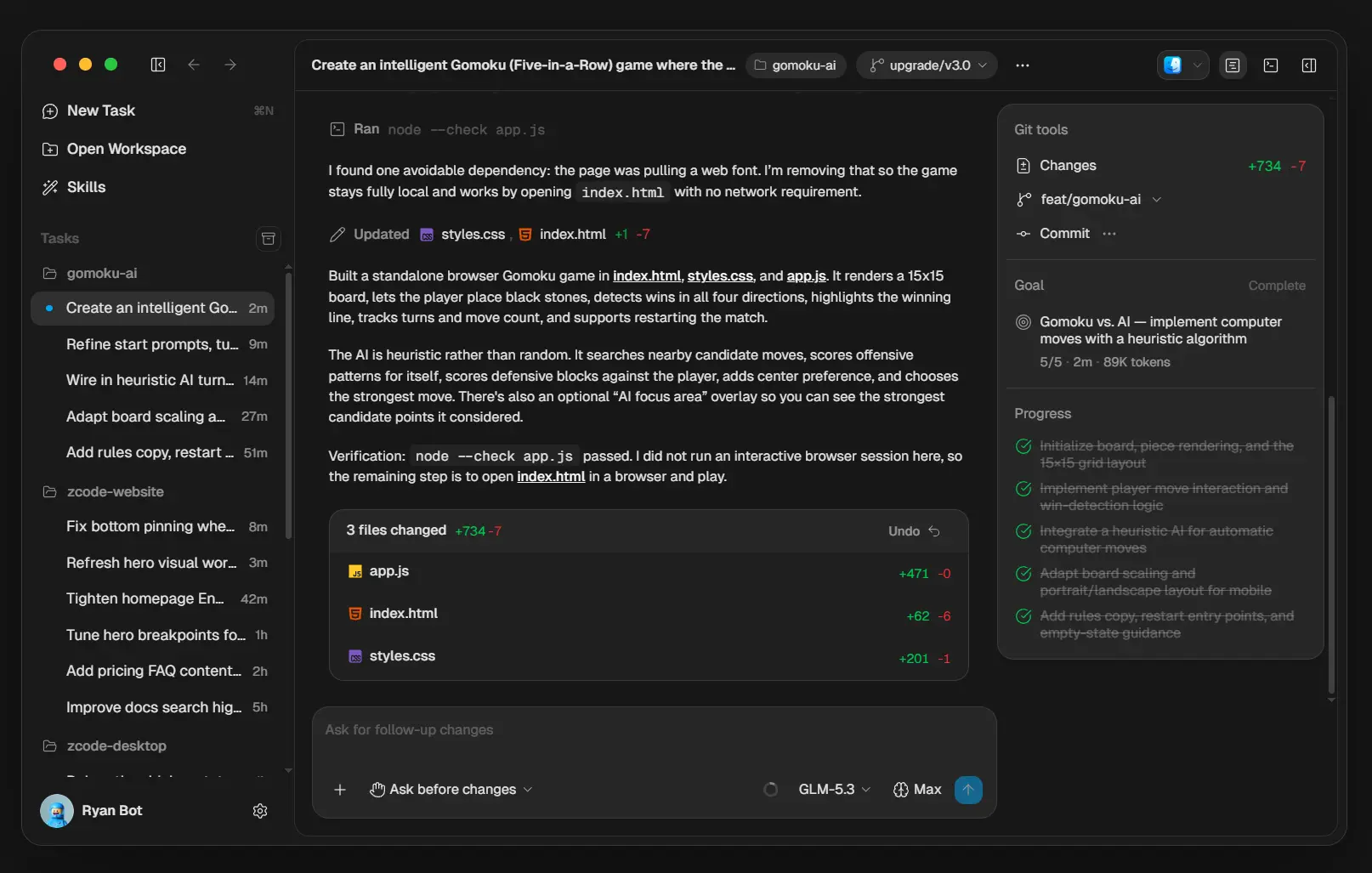
Describe the task, choose a model and execution mode, and the ZCode Agent works inside your current project with the task history and project context attached to that session.
ZCode is designed for multi-step coding tasks. Goal Mode can keep a task moving across repeated rounds until a defined objective passes its checks, and desktop ZCode can open its built-in browser to inspect frontend changes.
Larger jobs can delegate research or implementation to subagents or use dynamic multi-agent workflows.
Z.ai open-sourced ZCode in September 2026. It currently includes the desktop app, Web client, backend services, shared packages, Agent CLI, TUI, and runtime source.
The release also puts the agent, permission, remote-execution, and model-connection code under public review after Z.ai’s recent Codebase Indexing security incident and remediation.
Key Features
- Work across project files, terminal commands, Git state, and browser checks in one ZCode task.
- Use Goal Mode to keep a long task running across repeated rounds until the objective is verified or the run budget ends.
- Switch among Ask before changes, Edit automatically, Plan, and Full access execution modes.
- Open and test local or live web pages through browser automation in desktop ZCode.
- Run projects locally or inside SSH, WSL, and Docker environments.
- Delegate research or implementation to built-in and custom subagents.
- Build dynamic multi-agent workflows and adjust workflow concurrency during a run.
- Install Plugins, Skills, Commands, MCP servers, and Hooks for reusable instructions and external integrations.
- Connect GLM Coding Plan, Z.ai or BigModel APIs, Anthropic, OpenAI, OpenRouter, Moonshot, MiniMax, Xiaomi MiMo, or compatible custom endpoints.
How ZCode Works
A ZCode task keeps the conversation, project references, branch state, tool output, and permission state attached to one piece of work.
ZCode Agent can read and edit files, run terminal commands, inspect Git changes, use configured tools, and review results as the task progresses.
The execution mode controls how much approval the agent needs before it changes files or runs commands.
- Ask before changes requests confirmation before each file edit or command and is the default mode.
- Edit automatically applies file edits while commands continue to require confirmation.
- Plan analyzes the project and waits for approval before implementation begins.
- Full access reduces confirmation prompts for trusted tasks.
Goal Mode for Long Tasks
Goal Mode adds a completion condition to the current session. A command such as /goal make pnpm test pass gives ZCode Agent an objective it can check after each round. If work remains, the agent begins another round.
The run stops when verification passes, you pause or clear the goal, or the configured usage budget is reached.
Browser Checks, Remote Projects, and Multi-Agent Work
Desktop ZCode includes browser automation through its built-in browser panel.
ZCode Agent can open a local development server or live page, click controls, fill forms, scroll, and capture screenshots.
A frontend task can move from editing code to checking the rendered page inside the current ZCode task.
Remote Development moves file access, terminal commands, Git operations, and agent execution into an SSH host, WSL distribution, or local Docker environment. The desktop client continues to handle your account, model configuration, and task controls.
Subagents handle bounded pieces of larger jobs with their own context. ZCode includes general-purpose and Explore subagents, and custom or plugin subagents can define their own instructions and model settings.
Dynamic workflows can coordinate multiple subagents from one workflow definition and control how many model requests run concurrently.
Plugins, Skills, MCP, Commands, and Hooks
ZCode has several extension points for project-specific instructions and external services.
A plugin can package Skills, Commands, subagents, MCP servers, and Hooks. Skills use SKILL.md files for reusable procedures such as code review or release-note generation, and Commands save shorter prompt-driven actions.
MCP servers connect ZCode Agent to external capabilities through stdio, HTTP, or SSE. ZCode can import MCP configuration from Claude Code, Codex CLI, and OpenCode. Hooks can run local processes around events such as session startup, prompt submission, tool use, permission requests, failures, and task completion.
Your team can keep extensions at user or workspace scope. Remote SSH and WSL projects also support manual syncing for selected Skills, MCP configuration, and Plugins.
Desktop, Terminal, Web, and Source Builds
The desktop app is the main ZCode client and is available for macOS, Windows, and Linux. It contains the file tree, task list, terminal, Git controls, Review, built-in browser, remote workspace controls, and model settings.
The codebase also contains a unified command-line distribution. The zcode command opens the terminal UI, and zcode --web starts the local Web client. These clients use the ZCode Agent runtime and backend from the public repository.
Models and Pricing
The ZCode app is free and open source. Model access is billed or limited by the account, Coding Plan, API key, or third-party service connected to ZCode.
ZCode Agent is closely tuned for GLM-5.3 and GLM-5.3-Flash through Z.ai and BigModel. You can also configure Anthropic, OpenAI, OpenRouter, Moonshot, MiniMax, Xiaomi MiMo, and custom services that implement Anthropic-compatible or OpenAI-compatible APIs.
A Z.ai or BigModel Coding Plan can be connected through account authorization or its coding-specific API endpoint. API-key setups can use provider billing directly. Z.ai also gives new ZCode accounts a limited trial for its built-in models.
Open Source and Data Privacy
Z.ai open-sourced ZCode after developers reported that its Codebase Indexing feature packaged local workspace data and uploaded encrypted archives to Alibaba Cloud object storage.
Z.ai apologized, said the reported issue had been remediated, and moved the client code into a public Apache-2.0 repository for community review.
Anyone using ZCode with private repositories should review the selected model provider, execution mode, enabled extensions, remote-host trust, and the data handling required by each feature.
Pros
- Persistent task context for long coding work
- Goal-based execution with completion checks
- Built-in browser verification on desktop
- Local, SSH, WSL, and Docker project execution
- Open-source desktop, Web, CLI, and runtime code
- Full access mode reduces confirmation prompts
Cons
- Model access is billed by the connected provider
- Browser automation requires desktop ZCode
- Remote sync can transfer sensitive configuration
Alternatives & Related Resources
- 10 Best CLI AI Coding Agents: Open-Source & Commercial
- AI Coding Plan Comparison: Prices, Limits, and Features
- bb: Free Open-Source Agentic IDE for AI Coding Agents
- Kimi Code CLI: Open-Source AI Coding Agent with Skills & MCP Support