Ollaya is an open-source runtime for running Jev-style decision models on your own device.
Give a model text or JSON plus typed questions, and it returns structured answers with calibrated probabilities for classification, routing, scoring, screening, and other bounded decisions.
The experience borrows familiar ideas from Ollama: one binary manages the local server, model downloads, CLI commands, named models, Modelfiles, and a REST API.
Ollaya focuses on decision models that return choice, score, or noul answers. Your code receives a result it can use directly for the next action.
Ollaya also implements TypeSafe’s System One API format. Existing TypeSafe and Jev integrations can point at a local Ollaya server and run open decision models through their existing request and response structure.
Key Features
- Run open decision models locally from a CLI, desktop app, REST API, or Docker container.
- Ask
choice,score, andnoulquestions and receive probabilities with each decision. - Pull, run, list, inspect, unload, copy, and create models through Ollama-style commands.
- Use TypeSafe-compatible
/v1/systemone,/v1/decisions, and/v1/modelsendpoints. - Connect Claude Code, Claude Desktop, Cursor, VS Code, and other MCP clients through ollaya MCP.
- Store reusable question sets and calibration settings in Modelfiles.
- Route English and multilingual requests through the
layamodel alias. - Run CPU inference across the listed platforms and use supported GPU runtimes for selected models.
- Require bearer authentication when exposing the local server beyond its default loopback address.
How Ollaya Works
A decision starts with a state. That state can be a message, support ticket, email, JSON object, or another piece of data your code needs to evaluate. You attach one or more questions that define the allowed decision space.
A choice question selects from declared options and returns the probability for each one. A score question evaluates ordered levels and returns an expected score plus the probability distribution. A noul question returns the probability that a statement is true.
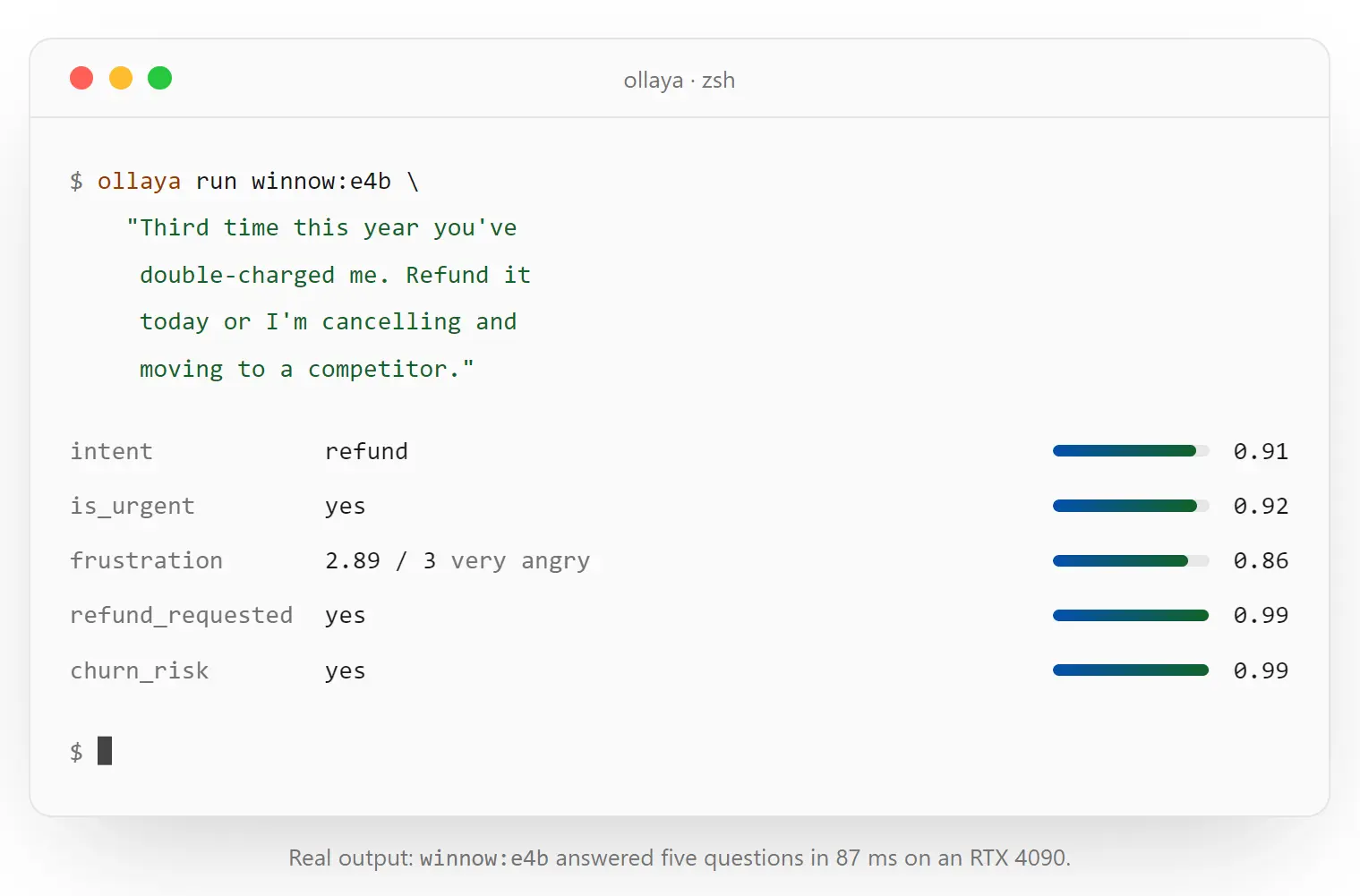
For example, a support request can be evaluated for department, urgency, refund intent, and churn risk in one request. The model returns structured probabilities. Your application can route the ticket, request human review, or trigger another action according to its own rules.
Ollaya runs decision models in a local server at 127.0.0.1:11435 by default. The CLI talks to this server and starts it automatically for local commands when needed. You applications can call the native /api/decide endpoint or the TypeSafe-compatible /v1 API.
Run Your First Local Decision
Install ollaya.
# Linux and macOS
curl -fsSL https://ollaya.dev/install.sh | sh
# Windows PowerShell
irm https://ollaya.dev/install.ps1 | iex
# Run a local triage decision
ollaya run laya --preset triage "I was charged twice for my subscription this month and want a refund."
Choosing a Model
Ollaya is a runtime for multiple decision-model families, and the model determines context length, hardware requirements, latency, language handling, and decision quality.
laya is a router that sends English text to laya:en and other detected languages to laya:multilingual. Its small encoder checkpoints are suitable for local CPU inference, and Laya plus nli:modernbert-large can use MLX acceleration on Apple silicon.
winnow:e4b is the recommended starting point when you want a model closer to Jev’s typed-decision behavior and have suitable GPU resources.
Ollaya also includes Decider, Kev, Decision, NLI, GLiClass, Von, Qwen3Guard, and other checkpoints with different context lengths and model architectures.
Use Ollaya With TypeSafe and Jev Code
Ollaya implements the System One wire format used by TypeSafe. The official TypeSafe Python SDK can connect to the local server after its base URL, API key, and default model are configured.
export TYPESAFE_BASE_URL=http://localhost:11435
export TYPESAFE_API_KEY=local
export TYPESAFE_DEFAULT_MODEL=winnow:e4b
export NO_PROXY=localhost,127.0.0.1
Compatibility Has Model-Level Limits
API compatibility does not make an Ollaya model equivalent to Jev. The open checkpoints have their own context lengths, calibration, accuracy profiles, languages, and hardware requirements.
This distinction becomes important with long input. TypeSafe’s hosted model accepts a larger context than smaller Laya checkpoints. If a request exceeds an Ollaya model’s available context, the TypeSafe-compatible API returns 422 STATE_TRUNCATED. The native /api/decide endpoint can truncate the state and reports the result through state_truncated.
The TypeSafe-compatible API also keeps Ollaya-specific controls out of the wire format. Runtime details such as keep_alive, routing metadata, and timing fields belong to the native API.
Connect Ollaya to AI Agents With MCP
ollaya mcp exposes local decision models through the MCP. Claude Code can register the server directly:
claude mcp add ollaya -- ollaya mcpOllaya also comes with an ollaya-decisions Agent Skill for AI coding agents. It contains guidance for selecting a model, writing typed questions, using presets, and working with probability thresholds.
npx skills add ollaya-dev/ollaya --skill ollaya-decisionsCreate Reusable Decisions With Modelfiles
A Modelfile lets you attach a question set to a base model and run that configuration under its own name. It can also store calibration, precision, description, and license information.
This is useful when your application repeatedly asks the same questions. A support triage model, for example, can carry its department, urgency, and escalation questions as part of the model configuration.
FROM laya
QUESTIONS ./triage.json
PARAMETER precision fp32
DESCRIPTION Support ticket triage
ollaya create triage -f Modelfile
ollaya run triage "I cannot log in and I have a customer demo this afternoon."Pros
- Local typed decisions with structured probability output.
- TypeSafe-compatible endpoints for existing System One integrations.
- Ollama-style model management through one CLI.
- Multiple open decision-model families in one runtime.
- CLI, REST API, desktop, Docker, MCP, and Agent Skill access.
- CPU execution with GPU acceleration for supported platform and model combinations.
- Reusable question sets and calibration through Modelfiles.
Cons
- Decision quality and calibration vary by model and task.
- Context capacity differs between checkpoints.
- Larger models require substantial memory or GPU resources.
Alternatives & Related Resources
- 9 Best Open-Source Jev Alternatives to Run Locally
- The Ultimate Jev Resource List: SDKs, Agents, MCP Servers & More
- 10 Jev Use Cases: Real Projects & Demos