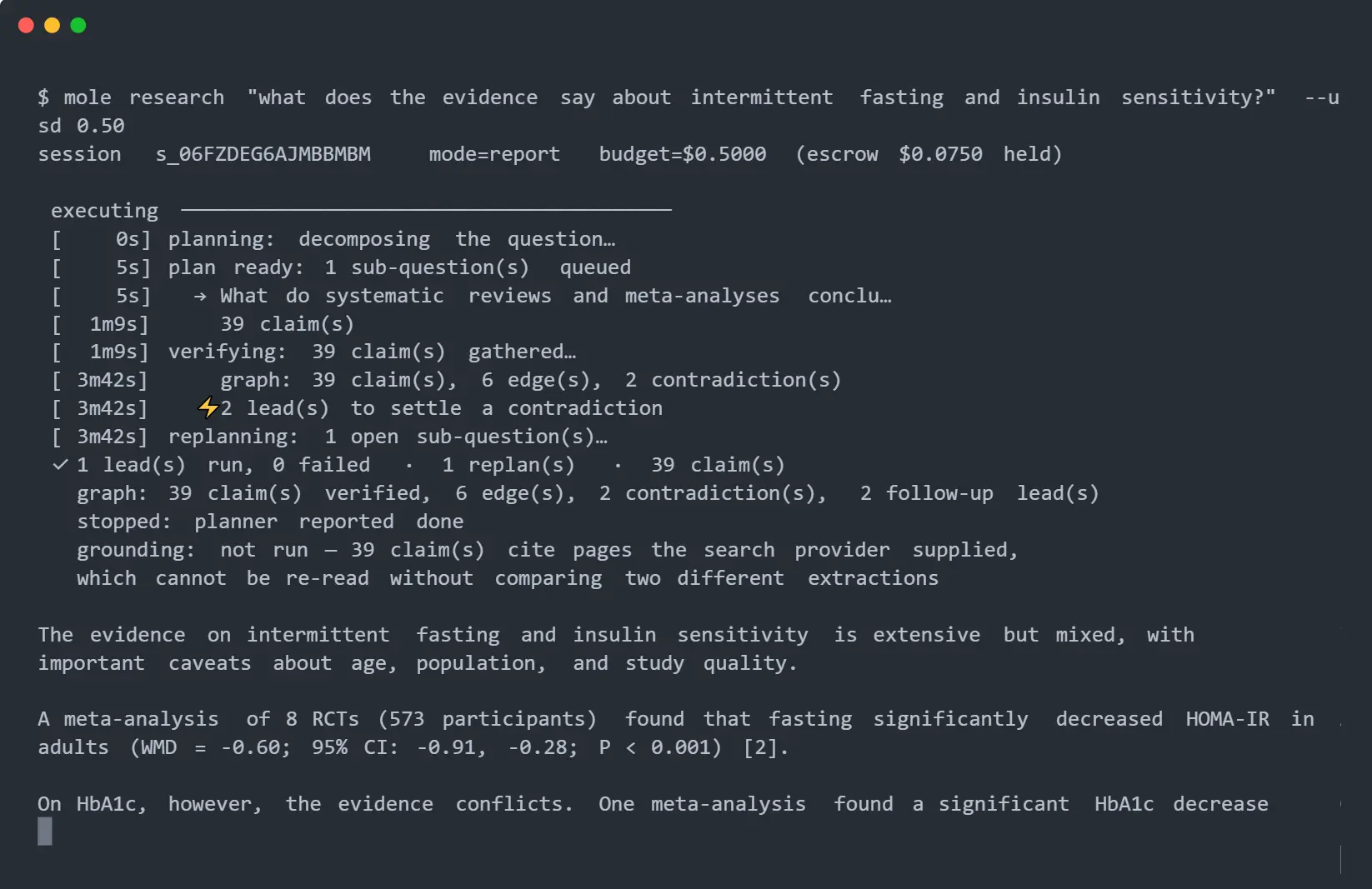
Mole is an open-source deep-research agent that runs locally and produces cited answers from the web, academic sources, or registered local data.
Ask a question and specify a dollar or token budget, and it plans the research, searches and reads sources, extracts claims, checks each stored quote against its source text, examines conflicting claims, and writes the answer from the evidence it kept.
Its main controls are budget accounting, claim-level evidence, and a local-data boundary. Every model call is reserved against the session budget before execution.
Stored claims carry source URLs and verbatim quotes. Local CSV, TSV, JSON, and JSONL analysis runs through deterministic SQL, with approved aggregates crossing the model boundary.
You can run mole from the CLI, expose it as an MCP server, or start toolkit mode for coding agents such as Claude Code or Qwen Code.
Features
- Require a dollar or token budget for each research run.
- Verify stored claim quotes against the source text.
- Search web pages and academic databases through dedicated research actors.
- Compare related claims and record contradictions in the evidence graph.
- Build structured datasets with source counts and contested fields.
- Analyze registered local files through aggregate-only SQL operations.
- Expose research functions through a local MCP server.
- Let coding agents drive retrieval and evidence operations in toolkit mode.
- Record session costs, timing, fetch failures, and data crossings.
See it in Action

How mole Researches a Question
mole starts with a required budget and a research question. Dollar mode tracks priced model and search activity. Token mode sets a token ceiling for model usage. You can also set source and depth limits, request JSON output, or ask a follow-up from evidence already stored in a completed session.
The research pipeline plans sub-questions, processes research leads, mines claims from retrieved material, verifies each stored quote against its source text, compares related claims, and synthesizes the surviving evidence into the final answer.
The academic actor can query Crossref, OpenAlex, arXiv, and PubMed, deduplicate papers by DOI, and prefer open-access full text. For example:
mole research "how much electricity does the bitcoin network use?" --usd 0.50
mole research "your research question" --tokens 200000
mole research "your research question" --usd 0.50 --max-sources 8 --max-depth 3
mole research "your research question" --usd 0.50 --json
mole ask <session-id> "what did the Cambridge estimate say?"
Budget Control and Evidence Tracking
mole requires one budget type for each research run. Dollar and token budgets cannot be active in the same run.
Before a model call starts, mole reserves its estimated usage against the available budget. The reservation is settled after the provider returns usage data. The project reports 0% budget overshoot across its own test corpus.
Each stored claim carries a source and a verbatim quote. Quotes that fail the initial source-text check are discarded before answer generation. mole can also re-read stored claims against their sources during later verification and mark unsupported claims in the report.
Build Structured Research Datasets
Dataset mode returns structured records for research tasks that need rows and fields. The schema defines each field, and ! marks the field used to identify a row. mole can merge similar entity names found across sources.
CSV output stores one value per field, includes a source count, and identifies contested fields. JSON retains the different values reported by individual sources.
mole research "largest UK supermarket chains and their revenue" \
  --mode dataset \
  --schema 'company:text!,revenue:number=annual revenue in GBP,employees:number' \
  --usd 0.50
mole dataset <session-id> --format csv > chains.csv
mole dataset <session-id> --format json
Analyze Local Data
Register a local file or directory before using the local_compute actor. The model receives the selected analysis template and column names. mole renders the SQL statement and executes it on your machine.
The output gate permits approved aggregates such as counts, means, statistical test results, and buckets that contain at least five records. mole crossings records the information that crossed the local-data boundary.
mole connect add sales ./exports/sales.csv
mole connect add exports ./exports
mole research "how does spend differ between regions?" \
  --actors local_compute \
  --usd 0.30
mole crossings <session-id>
Use mole Through MCP
mole serve starts the MCP service on a Unix socket inside a private directory. The mole-mcp shim connects an MCP client to that daemon. API credentials stay in ~/.config/mole/config.json; the MCP configuration only needs the shim command.
Toolkit mode exposes additional mole.* operations for sessions, retrieval, evidence, local data, claim graphs, and datasets. Your coding agent can use its existing model access for reasoning and call mole for deterministic research operations.
mole serve
mole serve --toolkit
{
"mcpServers": {
"mole": {
"command": "mole-mcp"
}
}
}Install mole
# Linux and macOS installer
curl -fsSL https://raw.githubusercontent.com/lajosdeme/mole/main/install.sh | sh
# Homebrew
brew install lajosdeme/mole/mole
# Arch Linux
yay -S mole-research-bin
yay -S mole-research
# Debian or Ubuntu
curl -fsSLO https://github.com/lajosdeme/mole/releases/latest/download/mole_amd64.deb
sudo dpkg -i mole_amd64.deb
# Build from source with Go 1.25+
go install github.com/lajosdeme/mole/cmd/mole@latest
go install github.com/lajosdeme/mole/cmd/mole-mcp@latest
Configure Search and Model Providers
Autonomous research needs a search provider and a model provider. mole works with Tavily or Brave for search. Model access can use Anthropic or an OpenAI-compatible endpoint.
OpenAI-compatible configuration accepts a custom base URL for services such as DeepSeek and local servers based on Ollama, llama.cpp, or vLLM. A model served from localhost is assigned zero dollar cost inside mole; use a token budget to limit that local run.
Credentials are stored in ~/.config/mole/config.json with file mode 0600. mole doctor checks the configuration.
mole config set search.provider tavily
mole config set search.tavily-key <your-key>
mole config set llm.provider anthropic
mole config set llm.api-key <your-key>
mole config set llm.model <model-name>
# OpenAI-compatible example
mole config set llm.provider openai-compatible
mole config set llm.base-url https://api.deepseek.com/v1
mole config set llm.model deepseek-chat
mole doctor
Inspect Sessions and Evaluation Results
mole records recent sessions, per-call timing and cost information, and fetch failures. mole eval generates a scorecard for a completed session.
The official evaluation reports 0% budget overshoot across its test corpus, 100% claim integrity, 100% citation accuracy, an 80% grounding rate for re-read claims, 70% contradiction precision with the confirmation pass, and 1.000 precision and recall on its constructed merge ground truth.
mole sessions
mole trace <session-id>
mole stats --fetch
mole eval <session-id>
Pros
- Restrict dollar or token budgets
- Claim-level quote verification
- Aggregate-only local-data boundary
- CLI and MCP access
- Structured dataset output
- Session-level cost tracing
Cons
- Hidden reasoning token accounting gap
- External provider setup for autonomous research
- No Parquet input
- Unsigned macOS release binaries
FAQs
Can mole use DeepSeek or local models?
Yes. Configure the openai-compatible provider and set a custom base URL. The project documents DeepSeek and local servers based on Ollama, llama.cpp, and vLLM.
How does mole handle local CSV or JSON data?
mole registers the file locally and uses deterministic SQL for analysis. The model selects an approved analysis template and column names. Only aggregates that pass the local-data gate cross the model boundary.
What happens when research sources disagree?
mole compares related claims and records relationships in its claim graph. Dataset JSON retains different source values, while CSV output flags fields with conflicting values.
Can mole use my Claude Code or Qwen Code model access?
Yes. Toolkit mode lets the coding agent handle the reasoning and exposes mole operations for search, fetching, quote verification, claims, datasets, and local aggregation.
Does the budget ceiling always match provider billing?
Budget accuracy depends on the usage data returned by the provider. A known issue with Gemini’s OpenAI-compatible endpoint undercounts hidden reasoning tokens, which can also understate cost in mole’s budget ledger.
Alternatives & Related Resources
- Open Deep Research MCP Server
- MiroThinker: Open-Source AI Research Agent for Deep Information Discovery
- Open Deep Research: Free Alternative to Gemini Deep Research