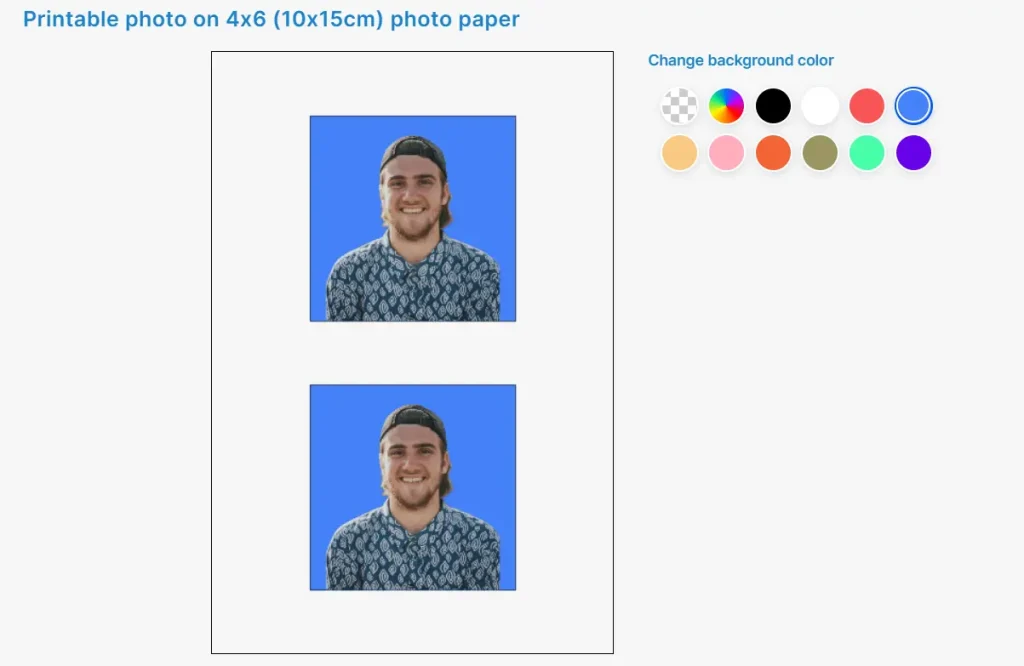
Passport Maker AI is a convenient online tool that allows users to create high-quality passport, visa, and other official document photos from home.
After uploading a headshot, the AI auto-centers and resizes to the required dimensions. It also removes the background for a uniform white or customizable color backdrop per document regulations.
How to use it:
1. Visit the Passport Maker AI website.
2. Select the type of document you need a photo for:
- Citizenship (51 x 51 mm)
- DV lottery (51 x 51 mm)
- Employment Authorization (51 x 51 mm)
- Green card (51 x 51 mm)
- NY Gun License (1.5 x 1.5 inch)
- NY MTA Metrocard for Seniors (1.5 x 2 inch)
- Passport (51 x 51 mm)
- Visa (51 x 51 mm)

3. Upload a well-taken self-portrait. Ensure your head is centered and your face is clear of obstructions like glasses and hats.
4. Choose a standard white or blue background, or customize as needed. Then, download your photo as a single file or a photo sheet.