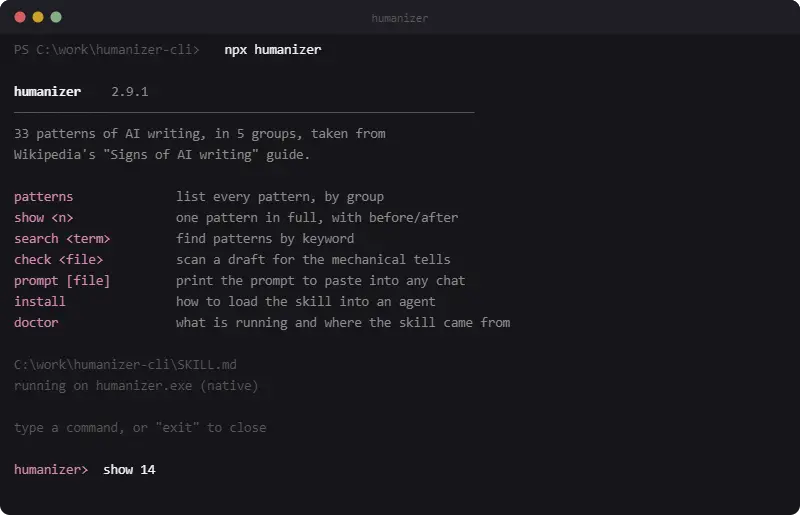
Humanizer is a free CLI that checks your article draft against 33 signs of AI-generated writing and prints the matches with line numbers.
The tool packages the Humanizer agent skill built by blader, itself drawn from Wikipedia’s “Signs of AI writing” guide and the observations of WikiProject AI Cleanup.
You can run humanizer check draft.md to flag mechanical signals such as em dashes, emoji headings, hedging, padded phrases, chatbot leftovers, flattery, and rhetorical openings in your text.
Fixed rules cover 13 patterns. The remaining 20 depend on context and editorial judgment, and the CLI includes numbered explanations with before-and-after examples.
Note that the CLI only reports rule matches and supplies editorial reference material. It does not calculate an AI authorship score or rewrite the draft automatically.
You can use the prompt command to prepare the skill instructions, rewriting rules, and source text for use in your preferred AI assistant or AI coding agent.
Humanizer CLI v.s. AI Detectors & AI Humanizer
Humanizer CLI performs a rule-based editorial audit. AI content detectors estimate authorship probability, while AI humanizers generate replacement text.
A detector score does not explain every writing flaw. A rewriter can change facts, terminology, or tone. humanizer keeps the original text intact and points the editor toward specific patterns.
| Primary result | Appropriate use | |
|---|---|---|
| Humanizer CLI | Pattern matches, rule explanations, and examples | Reviewing style habits in a local draft |
| AI content detector | Human or AI probability score | Checking how a classification system interprets text |
| AI text rewriter | A rewritten version of the source | Producing alternate wording for manual review |
Key Features
- Lists all 33 writing patterns by category.
- Opens individual patterns with complete explanations and examples.
- Searches the pattern catalog by keyword.
- Scans draft files for 13 mechanically detectable habits.
- Reports the line and matching fragment for each result.
- Copies the complete skill prompt and draft to the clipboard.
- Accepts another skill file.
- Writes output to a file.
How to Use Humanizer CLI
Install the package, then launch it:
npm install -g .
humanizer
Or run it without installing anything globally:
npx humanizerOn first run on Windows, the CLI unpacks sources/humanizer.zip into sources/humanizer.exe automatically.
See the full pattern catalog:
humanizer patternsCheck a specific draft:
humanizer check draft.mdLook up one pattern by number:
humanizer show 14Search for patterns matching a keyword:
humanizer search hedgingGet a rewrite without an API key: run humanizer prompt draft.md --copy, then paste the clipboard content into any chat tool for the manual rewrite.
The interactive prompt keeps a session open for repeated commands:
humanizer> show 14
humanizer> check draft.md
humanizer> search hedging
humanizer> exit
Use --out to save generated output to a file:
humanizer prompt draft.md --out rewrite-prompt.txtHumanizer CLI Reference
| Command | What it does |
|---|---|
patterns | Lists every pattern, grouped by section |
show <n> | Prints one pattern in full, with before and after |
search <term> | Filters patterns by keyword |
check <file> | Scans a draft for the 13 mechanically detectable patterns |
prompt [file] | Prints or copies the full skill prompt, ready to paste into a chat |
install | Shows how to load the skill into an agent |
doctor | Reports what is running and where SKILL.md came from |
Flags: --copy, --out <file>, --skill <path>, --no-color.
SKILL.md resolves in this order: the path given to --skill, a file named SKILL.md in the current directory, a copy next to the binary, and finally a compiled-in fallback baked into the executable.
The patterns, show, and search commands work even if the local SKILL.md file goes missing.
Troubleshooting
The native executable has no code signature. Windows SmartScreen can display a warning when it runs for the first time.
Some antivirus products quarantine unsigned executables. Confirm the repository and file origin before restoring the binary.
Use Windows Terminal when box-drawing characters render incorrectly. The following command switches an older console to UTF-8:
chcp 65001Alternatives & Related Resources
- AI Humanizer: Free Open-Source AI Rewriter to Bypass GPTZero
- SuperHumanizer Review: Free AI Humanizer, Limits & Rewrite Test
- I Tested 10 Free AI Humanizers: All Failed GPTZero Detection
- 7 Best Free AI Content Detectors: Real Accuracy Data & Rankings
- Free AI Content Detector & Humanizer: Analyze & Optimize Your Text
Pros
- No API key or account required
- Run fully offline
- Free and open source under MIT
- 87 KB binary with zero runtime dependencies
Cons
- Only 13 of 33 patterns auto-detected
- No automatic rewriting
- Unsigned binary triggers SmartScreen warnings
FAQs
Q: Does the check command catch every sign of AI writing?
A: No. The fixed rules in check catch 13 of the 33 catalogued patterns: things like dashes, emoji, curly quotes, and stock phrases. The other 20, including inflated significance and claims that sound fair on the surface, need a human reader working through the patterns or show output by hand.
Q: What happens if antivirus software removes the binary?
A: Restore it from quarantine, or run the install again to re-extract humanizer.exe from sources/humanizer.zip.
Q: Can a team use its own list of patterns instead of the built-in 33?
A: Yes. Point the --skill flag at a modified SKILL.md file, and every command reads that file instead of the compiled-in default.
Q: Can humanizer rewrite my draft?
A: No. The tool detects patterns and can export a skill prompt for an LLM to perform a rewrite, but it does not alter text on its own.
Q: Will it flag my genuinely human writing?
A: Yes, especially the mechanically detected patterns. An em-dash, a bolded list lead, or the word “delve” in genuinely human prose will still trigger a flag.
Q: Does the beacon phone home with my drafts?
A: No. The optional usage ping (beacon.js) is disabled by default and does not transmit file contents, draft text, or any personal data. You can remove or ignore the file.
Q: Can I use it on macOS or Linux?
A: No. The core checker is a native Windows binary.
Q: How is this different from an AI detector?
A: Detectors estimate whether a text was generated by AI. humanizer lists specific writing habits associated with AI output. You use a detector to answer “was this written by AI?” and humanizer to answer “what makes it sound like AI, and how do I fix it?”
Q: Does it support languages other than English?
A: No. The 33 patterns target English prose.