One missed minus sign can change an algebra answer. In a word problem, the first challenge is often turning its wording into an equation. Seeing the working helps you find a mistake and understand how to continue.
These seven free AI math solvers handle photographed worksheets, typed algebra and calculus, and questions you want to discuss with a tutor. Read on to find one for the homework in front of you, with the free steps and usage limits spelled out before you start.
Compare the free AI math solvers
| Tool | Free homework help |
|---|---|
| Photomath | Scan notebook or textbook questions on a phone. Basic includes worked steps. |
| MathSolver.io | Type an equation or word problem, or upload a photo. Unlimited free step-by-step solves. |
| MathGPT.app | Type or photograph a question. No signup, with a shared daily AI capacity limit. |
| SightSolve | Capture homework in Chrome. Free Quick screenshots cost 1 credit from a 60-credit weekly allowance. |
| Teachoo AI | Enter or photograph homework and work through one guided hint at a time. |
| Gemini Guided Learning | Ask about a word problem or your own attempt. Free Google account with usage limits. |
| ChatGPT Study Mode | Paste your working and get hints, feedback, and practice questions on a free account. |
The best free AI math solvers
Photomath
Photomath turns a photo of a notebook equation into a worked solution on iPhone or Android. Scan the question and follow the operations on the screen.
For an algebra exercise, compare the displayed steps with your notebook to locate the first incorrect operation.

Features
- Read printed and handwritten questions, including some word problems.
- Correct misread symbols or type expressions with the math keypad.
- View alternative solving methods for questions that offer them.
- Work through arithmetic, fractions, algebra, geometry, trigonometry, and calculus.
Free access. Basic includes step-by-step solutions. Photomath Plus adds visual teaching aids and more detailed explanations.
MathSolver.io
MathSolver.io accepts a word problem in plain language as well as a typed equation. It returns numbered steps and lets you ask why an operation was used.
A mixed assignment of equations and word problems can stay in one conversation, with the explanation beside each answer.

Features
- Explain a particular calculation step in a follow-up question.
- Upload photos, drawings, and PDFs.
- Generate similar problems and short practice quizzes.
- Use graphing and topic calculators for algebra, calculus, and statistics.
- Read answers in one of 16 interface languages.
Free access. Typed step-by-step solutions are unlimited without an account. The free tier includes 5 image, PDF, or drawing scans, 1 practice quiz, and 2 video lessons per day.
MathGPT.app
MathGPT.app has a math keyboard for fractions, roots, and exponents, as well as a plain-text input.
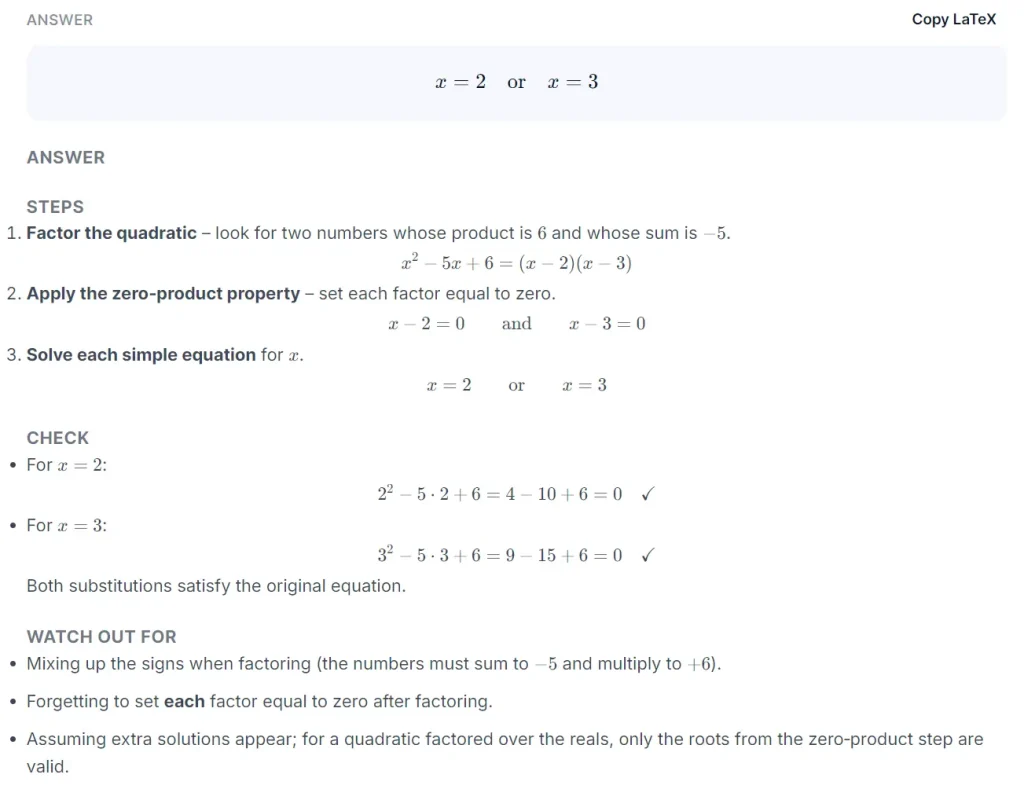
Upload a photo and it displays an editable reading of the question so you can correct a misread symbol before solving. The solution then shows each step and checks the answer.
Features
- Use Check My Work to review calculations you have already written.
- Ask for practice questions on the same topic after seeing a solution.
- Switch between Solve, Explain, and Practice tasks.
- Open topic-specific solvers for algebra, calculus, and word problems.
- Look up formulas and worked examples in its math reference pages.
Free access. Text and photo solving work without an account, payment card, or per-user credit counter.
SightSolve
SightSolve is a Chrome extension for questions already on your screen.
Press Ctrl+Shift+S, drag a box around a problem in a worksheet or PDF tab, and read the worked explanation in an overlay.
Features
- Capture equations, diagrams, graphs, and word problems displayed in Chrome.
- Use it on browser-based course pages and PDFs opened in a tab.
- Choose Quick or Sharp capture when the image needs a different level of detail.
- See the method and final answer in the same result card.
Free access. The free extension needs no account. It gives 60 credits per week, capped at 20 per day. Quick capture costs 1 credit and Sharp capture costs 2.
Teachoo AI
Teachoo guides you through a problem one question at a time.
Type a quadratic such as x² − 5x + 6 = 0, or upload a picture of the worksheet. It can start by asking which two numbers multiply to 6 and add to −5.
Answer the question, read the feedback, and use Bigger hint or I’m Stuck if you need help with the next step.

Features
- Upload or photograph handwritten and printed homework.
- Ask for a video explanation of the question.
- Use live graphs and diagrams for visual problems.
- Review flashcards and track completed sessions and progress.
- Ask questions in English or other languages, including Spanish, Hindi, and Arabic.
Free access. Teachoo currently offers guided text and photo tutoring for free.
Gemini Guided Learning
In Gemini, open Guided Learning from More tools and enter a math question or the part of your answer that is confusing.
For a distance problem, ask it to identify the unknown quantity and explain how to form the first equation.
You can continue asking about that equation in the same conversation, or request another example before moving on.

Features
- Learn through questions, hints, and explanations.
- Discuss algebra, geometry, calculus, and word-problem setups.
- Request diagrams and practice questions.
- Add a worksheet image or document when uploads are available to your account.
Free access. Guided Learning is available with a free Google account. Free accounts have model usage limits shown in Settings -> Usage Limits.
ChatGPT Study Mode
ChatGPT Study Mode can work through the reasoning behind your own attempt.
Open ChatGPT, select Study, and paste the problem with the lines you have tried. Ask for the first step that needs attention, or request a hint before seeing the full solution.

Features
- Ask questions about algebra, geometry, calculus, and word problems.
- Get step-by-step hints and explanations in a conversation.
- Practice with fresh questions and quiz-style reviews.
- Discuss a worksheet photo or PDF when your Free upload allowance permits it.
Free access. Study Mode is free after sign-in. Free text chats have no fixed daily problem quota. Photo and PDF uploads have their own limits.
Which free math solver should you try first?
If the question is on paper, start with Photomath. For a long set of typed exercises or word problems, open MathSolver.io. MathGPT.app can check the steps you have already written, and SightSolve can capture an exercise directly from a Chrome tab.
If you want the next hint before the answer, Teachoo AI guides you through your attempt. For a longer discussion of the method or more practice questions, open Gemini Guided Learning or ChatGPT Study Mode.
Related Resources
- 10 Best Free AI Study Tools for Students
- Teachoo AI: Free Homework Tutor With Step-by-Step Video Explanations
- Free AI Math Solver: Instant Step-by-Step Solutions
- More Free AI Math Solvers on ScriptByAI