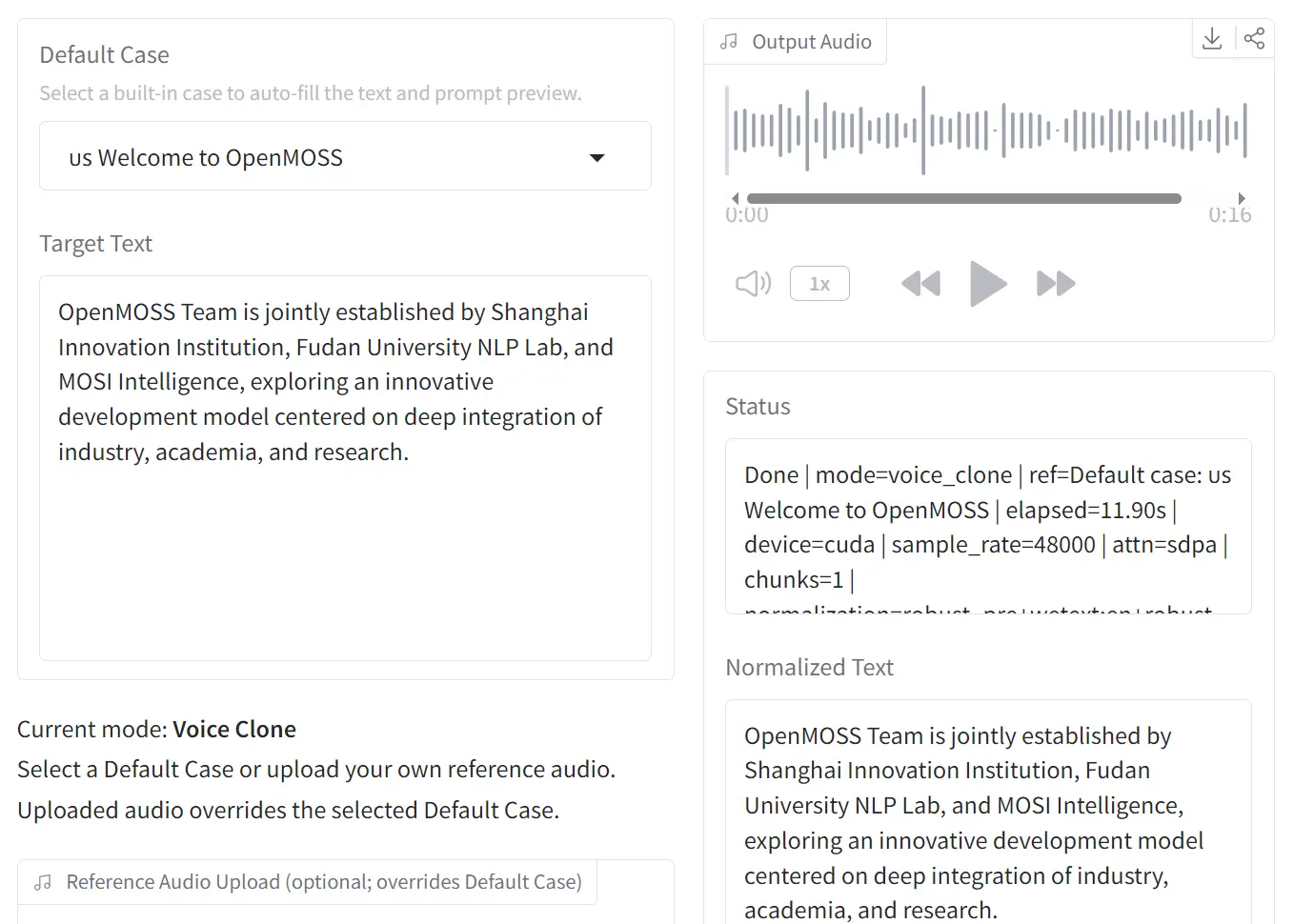
MOSS-TTS-Nano is a free, open-source text-to-speech model with 0.1B parameters from the OpenMOSS team and MOSI.AI.
It generates 48 kHz stereo audio, supports 20 languages including Chinese, English, Arabic, and Japanese, and runs streaming inference on a standard 4-core CPU.
The model is ideal for scenarios where GPU access is unavailable or cost-prohibitive: local voice prototypes, lightweight API endpoints, and edge environments where multi-billion-parameter TTS systems are not practical.
Features
- Has only 0.1B parameters, so disk footprint, RAM usage, and model load time stay low.
- Outputs native 48 kHz, 2-channel stereo audio.
- Covers 20 languages: Chinese, English, German, Spanish, French, Japanese, Italian, Hungarian, Korean, Russian, Persian (Farsi), Arabic, Polish, Portuguese, Czech, Danish, Swedish, Greek, and Turkish.
- Uses a pure autoregressive Audio Tokenizer + LLM pipeline.
- Streams audio output with low first-audio latency.
- Accepts long text input and processes it through automatic chunked voice cloning.
- Three entry points:
infer.py,app.py, and themoss-tts-nanoCLI.
Example Output
Use Cases
- Build a local voice cloning prototype that runs on a regular CPU server.
- Add multilingual speech output to an internal tool, kiosk, or browser app that cannot depend on a GPU stack.
- Generate narrated content in one of 20 supported languages for education, demos, or product walkthroughs.
- Turn long scripts into chunked speech files through the CLI text file path.
How to Use It
Online Demo Options
There are 2 browser-based options let you evaluate the model before a local install:
- Online Demo: openmoss.github.io/MOSS-TTS-Nano-Demo/
- Hugging Face Space: huggingface.co/spaces/OpenMOSS-Team/MOSS-TTS-Nano
Environment Setup
MOSS-TTS-Nano requires Python 3.12. A Conda environment is the recommended setup path.
conda create -n moss-tts-nano python=3.12 -y
conda activate moss-tts-nano
git clone https://github.com/OpenMOSS/MOSS-TTS-Nano.git
cd MOSS-TTS-Nano
pip install -r requirements.txt
pip install -e .
The pip install -e . step registers the moss-tts-nano CLI command in the active Conda environment. The code auto-loads OpenMOSS-Team/MOSS-TTS-Nano and OpenMOSS-Team/MOSS-Audio-Tokenizer-Nano from Hugging Face by default.
WeTextProcessing sometimes fails during pip install -r requirements.txt. Install it manually in that case:
conda install -c conda-forge pynini=2.1.6.post1 -y
pip install git+https://github.com/WhizZest/WeTextProcessing.git
Running Inference with infer.py
Voice cloning is the primary recommended workflow. Pass a reference audio file with --prompt-audio-path and the target text with --text:
python infer.py \
  --prompt-audio-path original.wav \
  --text "Your Text Here"
Output writes to generated_audio/infer_output.wav by default.
Launching the Local Web Demo
app.py starts a local FastAPI server for browser-based testing:
python app.pyOpen http://127.0.0.1:18083 in any browser. The same server starts through the CLI:
moss-tts-nano servemoss-tts-nano serve keeps the model loaded in memory and exposes both the browser UI and HTTP generation endpoints.
CLI Command Reference
After pip install -e ., the moss-tts-nano CLI is available in the active environment. The table below covers all documented commands and flags.
| Command / Flag | Description |
|---|---|
moss-tts-nano generate | Run voice cloning and write output to disk |
--prompt-speech <path> | Path to the reference audio file (alias for --prompt-audio-path) |
--text "<string>" | Inline text to synthesize |
--text-file <path> | Path to a plain-text file for long-form synthesis |
moss-tts-nano serve | Launch the local FastAPI web demo (forwards to app.py) |
Default output path for moss-tts-nano generate: generated_audio/moss_tts_nano_output.wav.
Example:
moss-tts-nano generate \
  --prompt-speech original.wav \
  --text "Your Text Here"
Pass --text-file with a plain-text file path for inputs too long for inline entry, or for batch synthesis.
Pros
- Runs entirely on CPU with a 4-core requirement
- Generates 48 kHz stereo audio, a specification that exceeds many larger cloud-based TTS offerings.
- Supports 20 languages in a single 0.1B model.
- Loads quickly and generates audio with low latency.
- Deploys locally without API keys or network calls.
Cons
- Audio quality prioritizes real-time speed over studio-grade fidelity.
- Local setup depends on Conda, Python 3.12+, and package installation steps.
Related Resources
- MOSS-TTS-Nano GitHub Repository: Full source code, installation steps, and architecture documentation.
- MOSS-Audio-Tokenizer Repository: Documentation for the Cat (Causal Audio Tokenizer with Transformer) architecture that powers MOSS-TTS-Nano’s audio encoding layer.
- MOSS-TTS Technical Report (arXiv 2603.18090): The research paper covering the full MOSS-TTS model family, architecture decisions, and evaluation benchmarks.
- MOSI.AI Model Blog: Release announcements and updates for the OpenMOSS model family.
- Free TTS: Discover more free & open-source text-to-speech models and tools at scriptbyai.com.
- OpenWebTTS: Privacy-First Local Text to Speech App.
- 7 Best Free AI Voice Cloning Tools
FAQs
Q: Does MOSS-TTS-Nano require a GPU?
A: No. The model runs streaming inference on a 4-core CPU.
Q: How does voice cloning work in MOSS-TTS-Nano?
A: You supply a WAV reference audio file and the model captures speaker identity from the reference and applies it to the synthesized output for the provided text.
Q: What audio format does the model output?
A: MOSS-TTS-Nano outputs 48 kHz, 2-channel (stereo) WAV files.
Q: Can MOSS-TTS-Nano handle long text?
A: Yes. The model processes long inputs through automatic chunked voice cloning.
Q: How does MOSS-TTS-Nano compare to the full MOSS-TTS model?
A: MOSS-TTS-Nano has 0.1B parameters and targets CPU inference with low latency. The flagship MOSS-TTS has 8B parameters and targets higher-fidelity synthesis. Both models share the MOSS-Audio-Tokenizer-Nano as their audio encoding backbone.
Q: Is MOSS-TTS-Nano free for commercial use?
A: The repository is published under the Apache-2.0 license, which permits commercial use, modification, and distribution with attribution.