Talorys is an open-source personal AI assistant that runs in your own Cloudflare account.
You can chat with it, save details for future conversations, organize tasks and notes, and schedule reminders from a password-protected web app.
Ask Talorys to remember a preference or create a task for tomorrow, and you can review or edit the saved record later. Reminders run on a schedule even after you close the browser.
The AI assistant is designed for one person, with Cloudflare handling hosting, storage, and AI responses.
Key Features
- Chat with an AI assistant that streams replies and shows tool activity.
- Save personal memories and edit or delete them whenever needed.
- Create tasks, notes, and projects through chat or directly in the web app.
- Schedule one-time reminders, recurring routines, and daily task digests.
- Receive scheduled notifications in the app, even when the browser was closed at the scheduled time.
- Sign in from your phone or computer with one owner account.
- Export personal records to a JSON backup and import them later.
- Continue managing tasks, notes, and reminders when the AI allowance runs out.
Chat, Memory, and Reminders
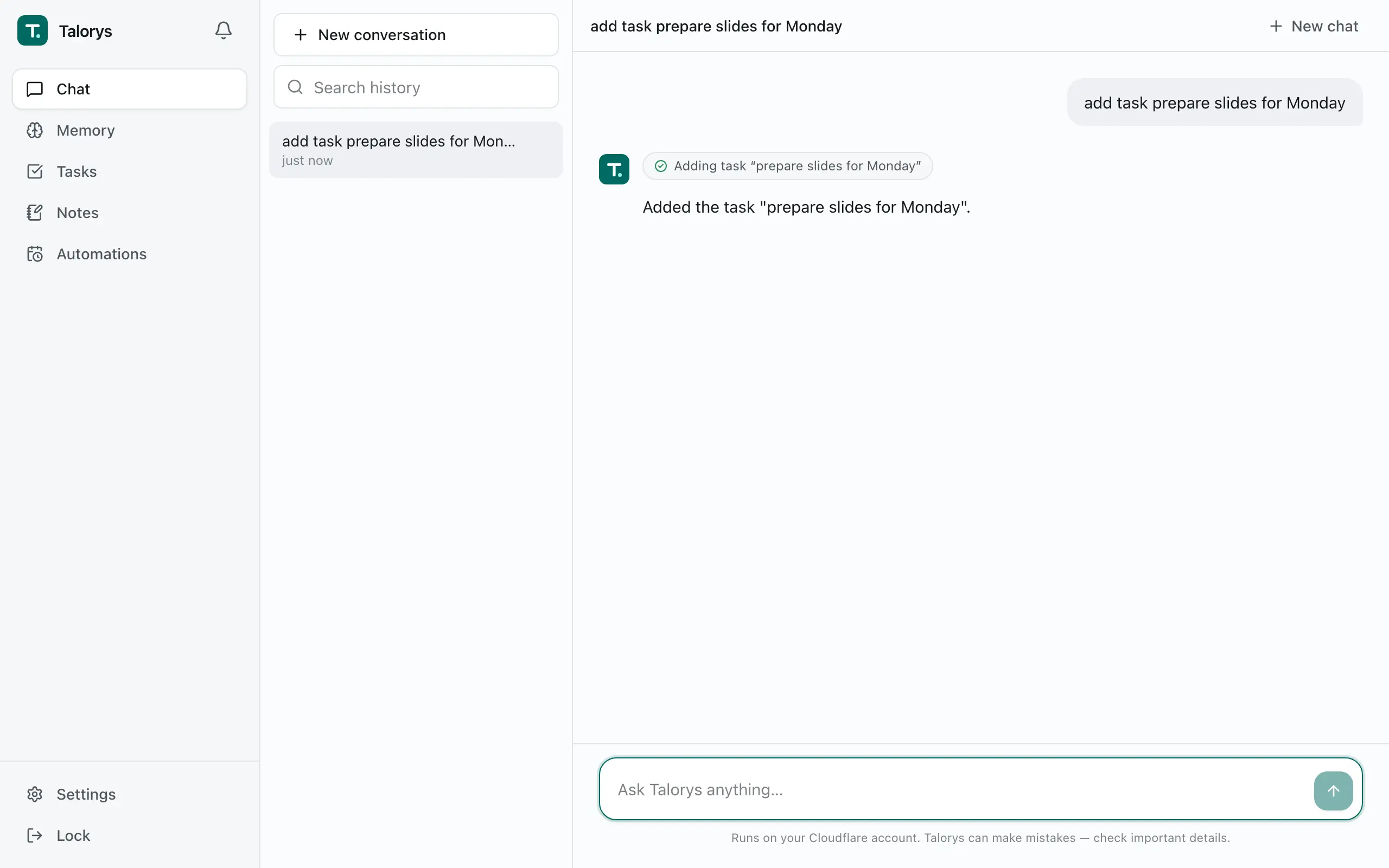
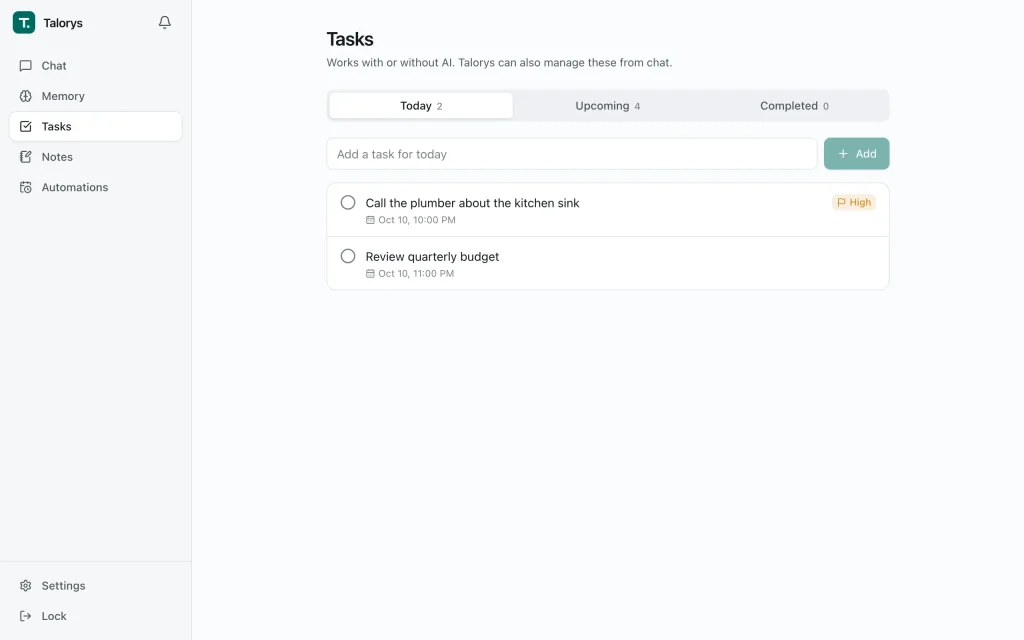
In chat, you can ask Talorys to create a task, then open Tasks to update its details or mark it complete. Notes and projects are available through their own views. You can manage those records directly when you do not need an AI response.
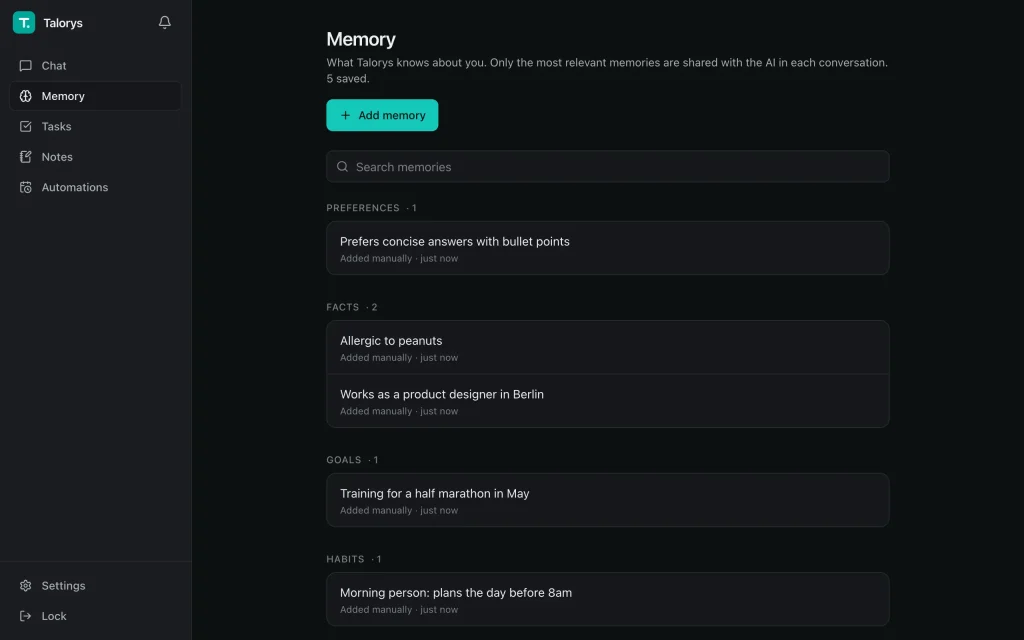
Memory works across conversations. Save recurring preferences or important project details, and Talorys can retrieve relevant memories when preparing a later answer. You can inspect, correct, and delete individual memories. The model receives the memories selected as relevant to the current request.
For something that needs your attention later, schedule a reminder or a recurring task digest. Cloudflare runs the schedule even after your browser closes, and Talorys records the result in its in-app notification center. Optional AI routines can also work on a schedule, with read-only access to stored information and permission to notify you.
How Talorys Works on Cloudflare
Open Talorys through the Cloudflare Pages address created during installation. The browser app sends requests to a private Cloudflare Worker, and a SQLite-backed Durable Object stores conversations, memories, tasks, notes, and schedules in your account. The Worker has no separate public workers.dev address. Authentication is enforced on the Worker.
AI conversations use Cloudflare Workers AI. The default model is @cf/zai-org/glm-4.7-flash. In Settings → AI, you can select a compatible Workers AI model and configure limits on AI requests, context size, and scheduled AI activity. Talorys keeps ordinary reminders and task management available independently of AI inference.
Talorys focuses its built-in actions on your personal records and schedules. It has no built-in shell execution, general web browsing, or arbitrary external API automation. Destructive chat actions require explicit confirmation.
How to Install Talorys
Run the installation command in the folder where you want to keep its local deployment files.
You need a Cloudflare account and Node.js 20.18 or newer on the computer used for installation.
The installer opens Cloudflare’s browser authorization flow, asks you to select an account and create an owner password, then deploys the web app, private Worker, and storage. It checks the deployment and prints your pages.dev address.
npx create-talorys@latestSign In and Create Your First Task
Open the pages.dev URL printed by the installer and sign in with the owner password. In the chat, enter Add a task to review my project tomorrow.
Talorys creates the task, and you can find it in Tasks to edit the details or mark it complete. You can also create a scheduled reminder and view the notification in Talorys after it runs.
Installation creates a local talorys/ directory containing the deployment configuration. Keep it for updates and password recovery.
If installation is interrupted, rerun the installation command from the original location to continue the deployment.
Free Access and AI Limits
Talorys is MIT-licensed and has no subscription fee. Its default deployment uses Cloudflare Pages, Workers, Durable Objects, and Workers AI. These services have free-plan allowances.
Cloudflare currently includes 10,000 Workers AI Neurons per day at no charge, shared across usage in the account. The number of conversations depends on the model and the size of your requests. See Cloudflare Workers AI pricing for current billing and model restrictions.
When the AI allocation is exhausted, chat pauses until the daily reset. You can continue using existing tasks, notes, memories, and ordinary reminders. Under a paid Cloudflare plan, usage above included allowances can incur charges.
Talorys also has adjustable daily AI request limits, and its Usage screen displays estimates. Check the Cloudflare dashboard for the account’s actual Neuron consumption.
Privacy and Security
Your Talorys records reside in storage deployed to your Cloudflare account. The project has no developer-operated user-account service, backend, or telemetry code. Cloudflare processes the data required to host the assistant and run AI inference, including your chat prompts and relevant memories. Your assistant is cloud-hosted, not a local offline model.
The installer hashes your password locally and stores the hash as a Worker secret. You sign in through a password-protected Pages site, and the private Worker checks authorization before accessing personal data.
Active sessions can be reviewed under Settings → Security.
Backups and Updates
Back Up Your Personal Data
Choose Settings → Privacy → Download backup to export conversations, memories, tasks, notes, projects, settings, and automations in talorys-backup.json.
Talorys can validate and import this file, merging the saved records with your current data.
Update an Existing Installation
Keep a recent backup before updating an assistant that holds important personal information.
From the original talorys/ directory, run the update command. The installer redeploys the app and Worker to the existing resources, retaining your stored data and owner password.
npx create-talorys@latest updatePros
- One-command deployment to your Cloudflare account.
- Persistent memory, tasks, notes, and scheduled reminders.
- Scheduled reminders continue after the browser closes.
- JSON backups and direct control of saved records.
Cons
- Requires a Cloudflare account and relies on Cloudflare services.
- Designed for one owner.
- AI chat depends on Workers AI model availability and quotas.
- No built-in shell, browser automation, or general external API actions.
FAQs
Can Talorys use OpenAI, Claude, or local AI models?
The standard deployment uses Cloudflare Workers AI. The app does not include a general API-key connection for OpenAI, Claude, or local model servers.
Can I access Talorys from more than one device?
Yes. Open your Cloudflare Pages URL in a browser on your computer or phone and sign in as the owner. Each device accesses your existing conversations and personal records.
How do I reset a forgotten owner password?
Open a terminal in your saved talorys/ installation directory and run the password reset command. It replaces the owner password and signs out existing sessions.
npx create-talorys@latest reset-passwordAlternatives & Related Resources
- OpenClaw: Self-Hosted Personal AI Assistant for Chat & Automation
- Hermes Agent: Free Self-Improving AI Agent with Memory & Bot Mode
- Moltis: Personal AI Agent for Secure Local Automation (OpenClaw Alternative)
- Nanobot: Lightweight Open-source AI Assistant Inspired by OpenClaw
- 7 Best OpenClaw Alternatives for Safe & Local AI Agents (2026)