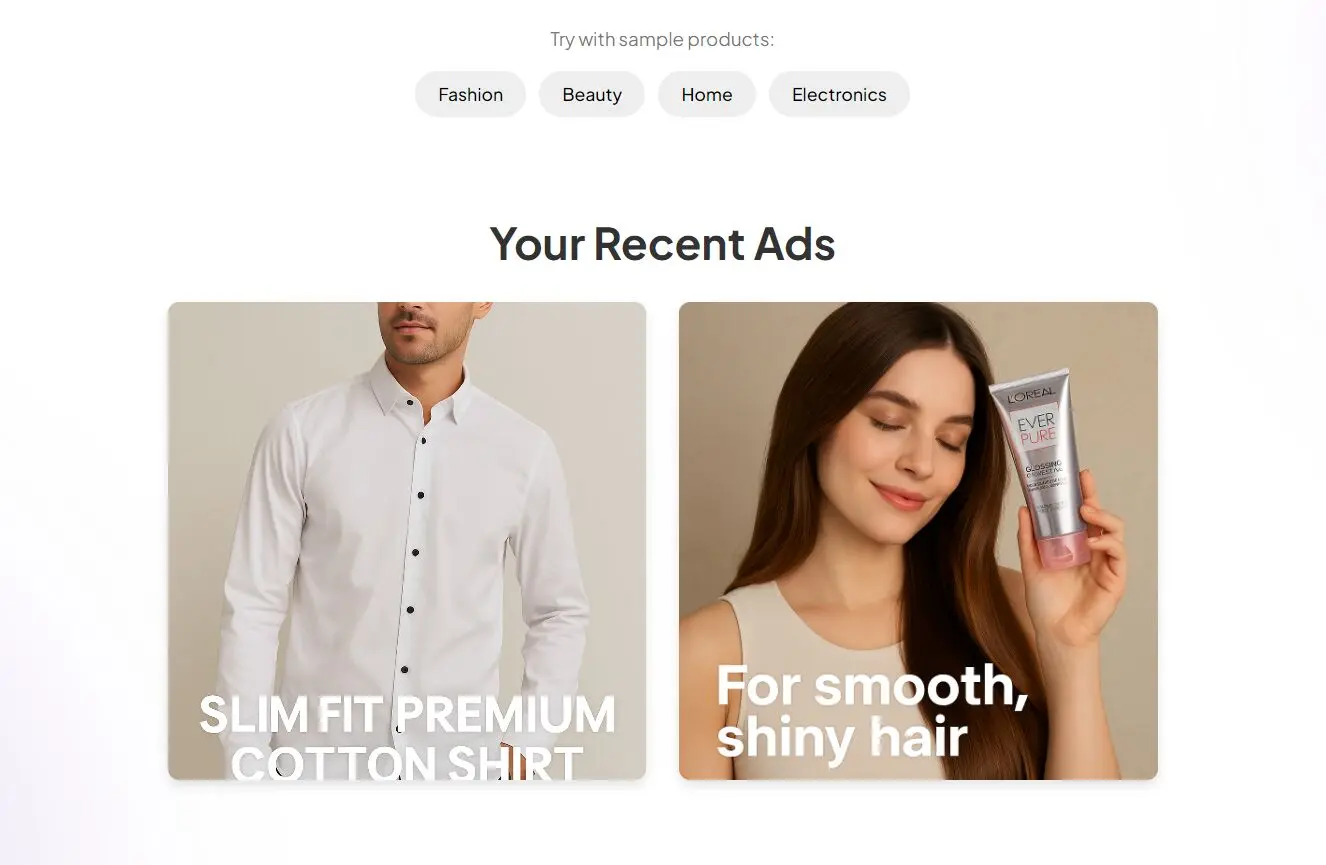
Create.ad is a free AI tool that takes an e-commerce product page URL and converts it into a User-Generated Content (UGC) style image ad. Think static social media posts – an image featuring the product, held by a person, with a simple text overlay.
You don’t upload assets, write detailed prompts, or fiddle with design settings. You just paste a product link (or use their neat URL trick), hit generate, and get an image.
Features
- URL-to-Image Generation: The core function. Feed it an e-commerce product URL, and it generates a relevant image.
- AI-Powered UGC Style: The AI attempts to create images that look like authentic user photos, often including AI-generated people holding or interacting with the product.
- Automatic Text Overlay: It analyzes the product page (presumably title/description) to add a short, relevant text snippet onto the image.
- One-Click Process: Minimal input needed beyond the URL.
- Optional Free Account: You can use it without signing up, but an account lets you track your generated images and might speed things up slightly.
- URL Shortcut: Add
create.ad/before a product page URL in your browser for instant generation.
Use Cases
- Rapid Ad Creative Testing: Generate multiple visual variations quickly to see what resonates on platforms like Facebook or Instagram without investing heavily upfront.
- Supplementing UGC Campaigns: Mix these AI-generated images with actual customer photos to increase content volume.
- Quick Social Media Posts: Need a simple product visual for a social post now? This is faster than designing from scratch.
- E-commerce Product Mockups: Get a quick idea of how a product might look in a lifestyle setting.
- Budget Content Creation: When resources for photoshoots or hiring creators are tight, this offers a free alternative for basic visuals.
Case Study
I tested this using a L’Oreal EverPure Glossing Shampoo page from Amazon (https://www.amazon.com/LOreal-Paris-Glossing-Glycolic-Smoothness/dp/B0DKGC2FBN).
- Pasted the URL into Create.ad.
- Clicked “Generate Ad”.
- Waited maybe 15-20 seconds.
The result was an image of an AI-generated woman holding the shampoo bottle. The AI added a text overlay saying “for smooth, shiny hair,” which clearly pulled from the product’s benefits listed on the page.

Was it perfect? No, AI generation always has its quirks, but it was surprisingly relevant and usable for zero effort beyond copy-pasting a link.
How To Use It
- Go to the Create.ad website.
- You can create a free account to save your generated images and speed up the image generation process. It’s not strictly required to try it out.
- Find an e-commerce product page link. Paste it into the input field on Create.ad. Note that it must be a specific product page. A homepage or blog post URL won’t work – the tool needs product details to function. I tried a non-product URL (
ScriptByAI.com), and it correctly identified it wasn’t a product page and stopped. - Hit the “Generate Ad” button.
- The AI image will appear shortly.
The Faster Way (URL Trick):
- Navigate to the e-commerce product page in your browser.
- Go to the address bar.
- Type
create.ad/directly before theyourwebsite.com/product/...part of the URL. - Hit Enter. This redirects you through their service and generates the image automatically. Example:
create.ad/https://www.amazon.com/LOreal-Paris-Glossing-Glycolic-Smoothness/dp/B0DKGC2FBN
Pro Tip: The quality and relevance heavily depend on the source product page. Pages with clear images, good titles, and concise descriptions will yield better results.
Pros
- Speed: It’s incredibly fast. Generating an image takes seconds.
- Simplicity: Almost zero learning curve. Paste link, get image.
- No Design Skills Needed: Completely bypasses manual design work.
- Free: It doesn’t cost anything to use.
- UGC Aesthetic: Creates visuals that mimic the popular user-generated content style.
Cons
- E-commerce Only: Strictly limited to product page URLs. Won’t work for blog posts, services, general websites etc.
- Limited Customization: You get what the AI gives you. No options to tweak the image, text, layout, or models.
- Potential for Generic Output: Like many AI tools, results can sometimes be generic or slightly ‘off’.
- Requires a Good Product Page: The AI needs clear info from the URL to work well. Poorly structured pages might yield poor results.
- Static Images Only: Doesn’t create video ads, which some other AI ad tools focus on.
FAQs
Q: What kind of URLs work best?
A: Direct links to product pages on e-commerce platforms (like Amazon, Shopify stores, Etsy, etc.) work. The AI needs to identify product images, titles, and descriptions. General website homepages, blog articles, or category pages will likely fail.
Q: Can I edit the generated image or text?
A: No, Create.ad doesn’t appear to offer any editing capabilities. It’s purely a generator. You’d need to use a separate image editor if you wanted to modify the output.
Q: Why do I need an account if it’s optional?
A: An account primarily serves to save your generation history, making it easy to find images you’ve created previously. The site suggests it might also speed up generation, perhaps by prioritizing logged-in users slightly.
Q: How does it compare to other AI ad generators?
A: Create.ad is highly specialized for static UGC-style images from product URLs. Many other AI ad tools focus on generating ad copy, video ads from text or URLs, or offer more customization and broader template options. Create.ad’s strength is its extreme simplicity and speed for its specific niche.