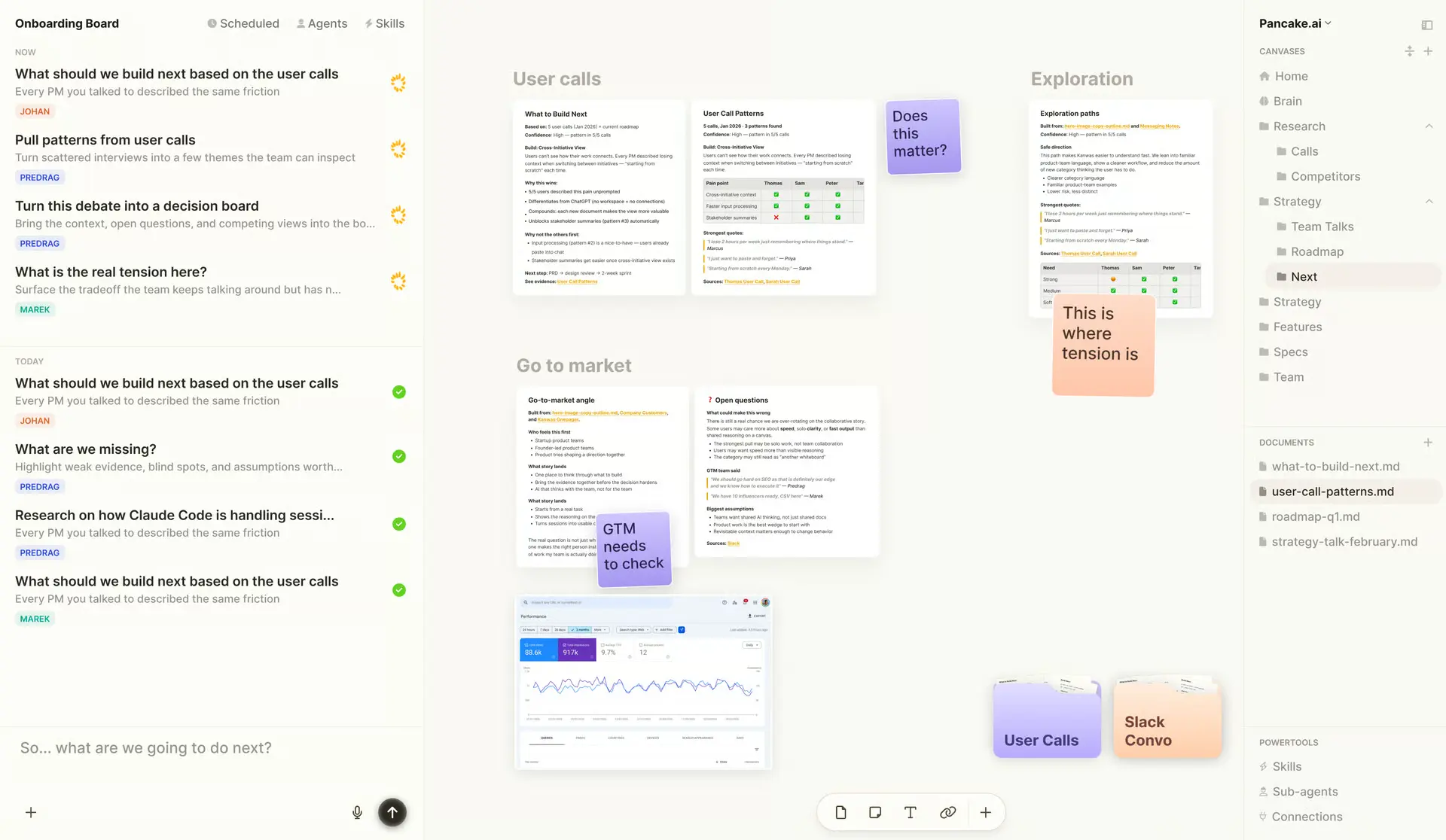
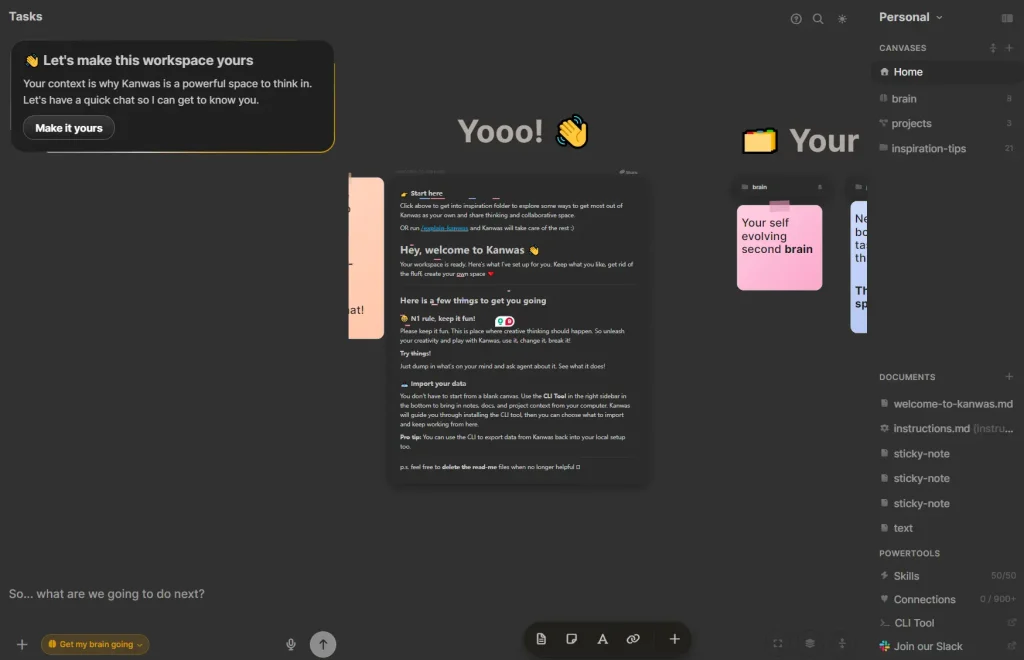
Kanwas is a free, open-source multiplayer workspace where product teams and AI agents share the same context. Documents, decisions, research, and agent outputs live on one board, visible to every team member and accessible to the AI on every run.
AI models reason well but produce generic outputs because they have no access to your product’s history, your market constraints, or your team’s decisions.
Kanwas builds a shared context layer as your team works. Every note added, decision logged, or PRD drafted feeds into that layer and makes agent outputs more specific on the next run. The context compounds with use rather than rotting like a forgotten Google Doc.
The tool runs on a Git-backed markdown filesystem, supports any AI model (Claude, GPT, Gemini, etc), connects to over 1,000 external tools, and includes a CLI for local editing and CI integration.
An open-source self-hosted version is available on GitHub, and the cloud version requires no setup.
Features
- Canvas supports code, docs, tasks, embeds, and iframes in one unified workspace.
- Context graph accumulates boards, notes, tasks, and decisions into a shared knowledge base over time.
- Agent follows custom rules, workflows, and skills you define so it works inside your team’s existing processes.
- Model-agnostic runtime runs Claude, GPT, Gemini, or any other model your team prefers.
- Terminal-grade agent runs from within the canvas so team members skip the terminal entirely.
- Git-backed markdown filesystem stores every document as a plain
.mdfile with full version history. - Real-time collaboration lets multiple teammates work on the same board simultaneously with access controls per board.
- CLI tool syncs workspace files with your local filesystem for editor-based editing, bulk imports, and CI/CD use.
- Over 1,000 integrations pull context from Slack, Linear, Notion, codebases, and other tools your team already uses.
- Files stay in a transparent filesystem that your team owns.
Use Cases
- Turn customer interviews, tickets, competitor screenshots, and product notes into a research board.
- Generate a PRD from research notes, decisions, tradeoffs, and implementation constraints.
- Convert a product spec, design context, and research board into developer tasks and acceptance criteria.
- Plan a launch campaign with positioning notes, copy variants, asset lists, and timelines.
- Build a reusable sales account board with research, communications, stakeholders, and proposal drafts.
How to Use It (Online Version)
The cloud version runs in a browser. Registering at kanwas.ai creates a free account with immediate access to the canvas and agent.
- Create a free Kanwas account.
- Create a workspace for a product, research sprint, launch plan, implementation project, or sales account.
- Add project material such as customer interview notes, product specs, competitor screenshots, tickets, code notes, meeting summaries, and decision logs.
- Place related items on the same canvas so humans and agents can see the relationship between facts, questions, assumptions, and deliverables.
- Add teammates through workspace sharing and permission controls.
- Add agent instructions, workflow rules, reusable skills, and team preferences.
- Ask the agent for a structured output such as a PRD, stakeholder update, launch plan, task breakdown, research brief, or proposal draft.
- Review the streamed timeline so you can inspect tool calls, progress, and generated artifacts.
- Keep final decisions and outcomes in the workspace so later boards inherit stronger context.
How to Use It (Self-Hosted Version)
1. Clone the repository from Github:
git clone https://github.com/kanwas-ai/kanwas.git
cd kanwas
2. Copy the environment file templates and fill in your API keys, APP_KEY, and other required variables:
cp .env.example .env
cp backend/.env.example backend/.env
cp yjs-server/.env.example yjs-server/.env
cp frontend/.env.example frontend/.env
3. Start the full application stack. The workspace runs at http://localhost:5173. Hot reload setup and an architectural walkthrough appear in docs/SYSTEM_OVERVIEW.md in the repository.
docker-compose --profile app upCLI Tool
1. Install the CLI globally via npm:
npm install -g @kanwas/cli2. Authenticate. This opens a browser tab for authorization. Credentials store in ~/.kanwas/config.json.
kanwas login3. After the first kanwas pull, the current directory binds to that workspace via a .kanwas.json file. Subsequent pull and push commands reuse the binding automatically. All commands accept --id or --name flags to skip the interactive picker. This makes them safe to call from CI pipelines or wrapping agents.
4. CLI Commands
| Command | Description |
|---|---|
kanwas login | Authenticate via browser |
kanwas pull | Download workspace files into the current directory (interactive picker) |
kanwas push | Upload local changes back to the workspace |
kanwas import ./notes | Import all .md files from a local directory (interactive workspace picker) |
kanwas import ./notes --name "My Workspace" | Import without interactive picker, by workspace name |
kanwas import ./intro.md --id <uuid> | Import a single file to a workspace by ID |
kanwas import ./notes --dest research | Place imports under a subfolder in the workspace |
kanwas import ./notes --overwrite | Import and replace files that already exist |
kanwas workspaces | List all workspaces |
kanwas workspaces --json | Output workspace list as JSON for scripting |
kanwas pull --id <uuid> | Pull a specific workspace by ID, non-interactive |
kanwas pull --name "<name>" | Pull a specific workspace by exact name |
Pros
- Free cloud version.
- Open-source with full self-hosting support.
- Git-backed markdown files with complete version history.
- No vendor lock-in.
- Context compounds with every use.
- Supports Claude, GPT, Gemini, and other models.
- Real-time multiplayer on every board.
- CLI supports CI/CD and agent scripting.
- Over 1,000 external tool integrations.
- No terminal required for agent workflows.
Cons
- Self-hosting requires Docker setup and API key configuration.
- Agent output quality depends on how much context the team has added.
- Heavy agent use may accumulate significant API token costs.
- No offline mode in the cloud version.
Related Resources
- Kanwas GitHub Repository: Source code, system architecture docs, and self-hosting instructions for the open-source version.
- Anthropic Claude API Documentation: API key setup and Claude model reference for teams running Kanwas with Claude as the model backend.
- OpenAI API Documentation: API reference for teams using GPT models with Kanwas.
FAQs
Q: Is Kanwas free?
A: Yes. The cloud version is free and requires no download or API key. The self-hosted version is free and open-source, though it requires Anthropic or OpenAI API keys to run the AI agent.
Q: How is Kanwas different from using Claude or ChatGPT directly?
A: AI chatbot generic outputs because the model has no access to your team’s specific history, constraints, or decisions. Kanwas maintains a shared context layer built from your documents, decisions, and research. The agent reasons against that layer on every run, so outputs reflect your actual product situation.
Q: What does the CLI tool do?
A: The kanwas CLI syncs workspace files with your local filesystem. Teams use it to edit workspace notes in any text editor, bulk-import existing markdown files from disk, and connect workspace access to CI pipelines or other agents.