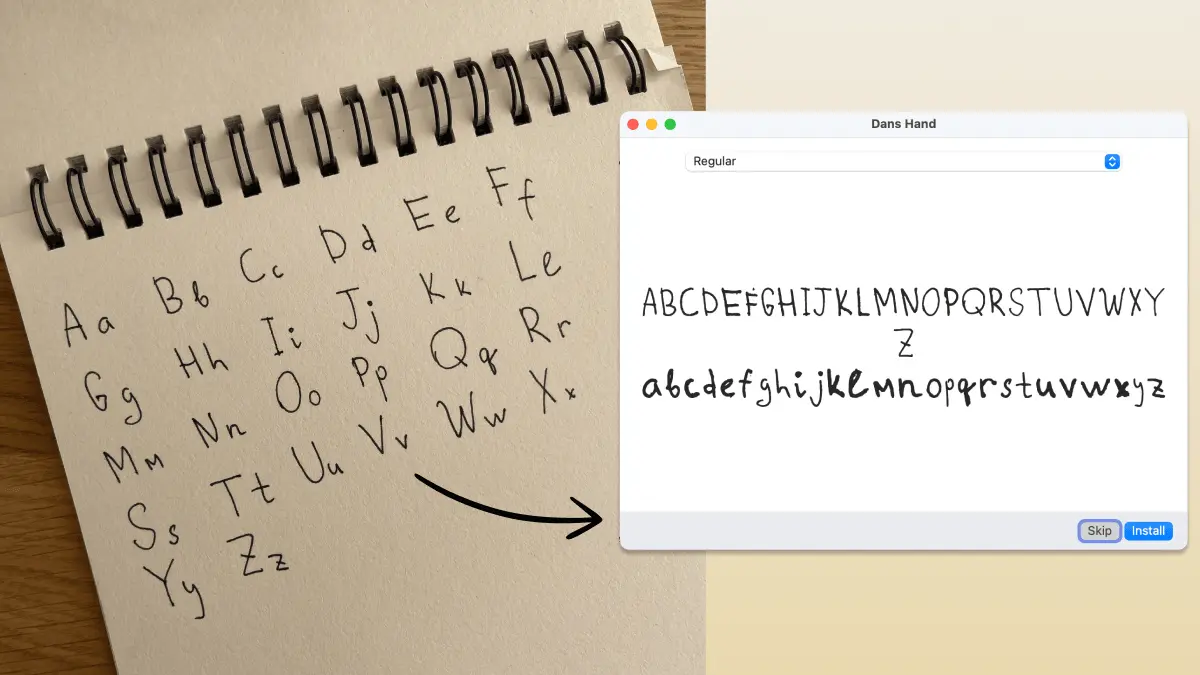
draw-your-font is a free, open-source font maker that converts a photo of handwritten characters into installable TTF, WOFF, and WOFF2 files.
Its image-processing pipeline separates letters, converts each character into vector outlines, assigns font metrics, and assembles the result as a standard font file.
The Claude Code skill handles visual labeling and quality review, while the CLI performs the font construction.
This workflow is ideal for developers, designers, creators, and website owners who want a personal handwriting font with control over the files and conversion process.
Key Features
- Converts handwriting photos into TTF, WOFF, and WOFF2 fonts.
- Processes freeform writing and printable template pages.
- Runs the conversion pipeline through a Node.js CLI.
- Packages the workflow as an installable Claude Code skill.
- Generates an A4 handwriting template from the terminal.
- Adjusts stroke thickness with the
--weightoption. - Smooths rough character outlines with
--smooth. - Creates a CSS file with an
@font-facedeclaration. - Renders custom previews for visual and legibility checks.
- Runs on macOS, Linux, and Windows with Node.js 18 or later.
draw-your-font vs Calligraphr
draw-your-font is designed as a free and open-source alternative to Calligraphr.
It is great for a local developer workflow and produces webfont files directly, while Calligraphr offers more powerful manual glyph editing and advanced handwriting features such as ligatures, spacing controls, and multiple character variants.
| draw-your-font | Calligraphr | |
|---|---|---|
| UI | CLI, Claude Code skill, and browser demo | Browser-based font editor |
| Input method | Freeform photos or printable templates | Customizable printable templates |
| Local workflow | CLI process files locally | Free-plan font data stays in the browser |
| Output formats | TTF, WOFF, WOFF2, and CSS | TTF and OTF |
| Character editing | Rebuilds from detected crops and labels | Visual editor for individual characters |
| Stroke refinement | Weight and smoothing controls | Character editing, baseline, size, and spacing tools |
| Character variants | One glyph version per character | Up to two variants on Free and fifteen on Pro |
| Ligatures | Not included | Included with Pro |
| System requirement | Node.js 18+ | Modern web browser |
How to Use draw-your-font with Claude Code
Install the agent skill from the terminal:
npx skills add danilo-znamerovszkij/draw-your-fontOpen Claude Code and invoke the skill:
/draw-your-font "Create a font from this handwriting photo."Drag the handwriting image into the terminal session. The skill segments the image, identifies the characters, creates the font, and renders previews.
Follow-up instructions control the output:
Make the letters slightly bolder.Smooth the outlines.Show me the crop used for the lowercase g.Export TTF, WOFF, WOFF2, and CSS.Check the font for confusing character pairs.The skill stores the detected crops during the current build. Weight and smoothing changes reuse those crops, so most refinements do not require another photograph.
How to Use the Standalone CLI
Create a font from a freeform photo when the character order is known:
npx draw-your-font make handwriting.jpg \
  --chars "ABCDEFGHIJKLMNOPQRSTUVWXYZabcdefghijklmnopqrstuvwxyz" \
  --name "My Handwriting"
Generate a printable template:
npx draw-your-font template \
  -o handwriting-template.pdf \
  --charset minimal
Complete the template, photograph the pages, and build the font:
npx draw-your-font make page1.jpg page2.jpg \
  --charset minimal \
  --name "My Handwriting"
Export desktop and web formats:
npx draw-your-font make page1.jpg page2.jpg \
  --charset minimal \
  --name "My Handwriting" \
  --formats ttf,woff,woff2,css
Adjust the outlines:
npx draw-your-font build \
  -d work \
  --labels work/labels.json \
  --name "My Handwriting" \
  --smooth 1.5 \
  --weight 1
CLI Commands
| Command | Purpose |
|---|---|
template | Creates a printable A4 character grid |
segment | Detects letters and produces crops, contact sheets, and blob data |
build | Converts labeled character crops into font files |
make | Runs segmentation and font construction in one command |
preview | Renders custom text with the generated font |
Output Refinement
The quality of the source writing controls the final character shapes. The project offers several adjustments after segmentation.
Use --weight 1 or --weight 2 for faint or thin strokes. Negative values create lighter outlines:
--weight=-1Use --smooth 1.5 to reduce jagged edges:
--smooth 1.5A misidentified letter requires an edit to labels.json followed by another build. A broken, filled, or incomplete shape usually requires a clearer source character.
The preview command renders custom text for inspection:
npx draw-your-font preview \
  -d work \
  --text "The quick brown fox jumps over the lazy dog"
A legibility preview should include pairs such as rn, m, cl, d, I, l, 1, O, and 0. These combinations reveal common handwriting ambiguities.
Pros
- Free and open source
- Accepts freeform handwriting photos
- Produces installable font files
- Exports website-ready WOFF2
- Includes generated CSS
- No system font tools required
- Supports local non-AI processing
- Conversational refinement
Cons
- Full workflow requires Node.js
- No kerning controls
- No ligature generation
- One variant per character
- Touching letters cause detection problems
- Freeform baselines need correction
Alternatives & Related Resources
- The Ultimate Claude Code Resource List 2026: Agents, Skills, Plugins & More
- 10 Best Agent Skills for Claude Code & AI Workflows in 2026
- 370+ Most Popular Agent Skills on GitHub for Coding Agents
- Redesign: Free AI Carousel Builder for LinkedIn and Instagram
- Free AI Tool Extracts Design System (Design.md) from Any Website