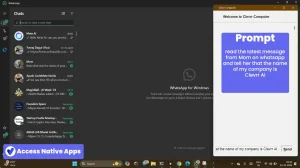
ClickClickClick transforms how you interact with your devices. This open-source Python framework enables autonomous control of Android devices and computers using large language models (LLMs).
It connects popular LLMs (like GPT-4, Gemini, Llama, and local models through Ollama) and executes complex tasks on your devices without manual intervention.
Features
- Autonomous Task Execution: Enables end-to-end automation of tasks on Android and computers using natural language prompts.
- LLM Flexibility: Compatible with various LLMs, including local options via Ollama (Llama 3.2-vision), as well as cloud-based models like Gemini and GPT-4o.
- Configurable Models: Allows users to specify different LLMs for planning and execution, optimizing performance based on model strengths (e.g., GPT-4o for planning, Gemini Pro for finding).
- Cross-Platform Support: Operates on both Android and OSX platforms.
- CLI Tool: Offers a command-line interface for direct interaction and task execution.
- Script Integration: Can be integrated into Python scripts for more complex automation workflows.
- API Access: Provides an API endpoint for executing tasks programmatically.
Use Cases
Automated Email Drafting: Compose and prepare emails with specific content and recipients using simple voice or text commands.
For example, you can instruct ClickClickClick to “Create a draft gmail to [email protected] and ask them if they are free for lunch on coming Saturday at 1PM. Congratulate on the baby.”
Hands-Free Navigation: Perform tasks within mapping applications, such as finding specific locations or points of interest. Imagine saying, “Find bus stops in Alanson, MI,” and ClickClickClick navigates Google Maps to provide the answer.
Application Interaction: Launch and interact with various applications on your device. You could tell ClickClickClick to “start a 3+2 game on lichess,” and the tool will open the app and initiate the game.
How To Use It
1. Install Prerequisites: Make sure you have adb (Android Debug Bridge) installed on your machine and USB debugging enabled on your Android phone. You’ll also need Python version 3.11 or higher.
2. Clone the Repository: Download the ClickClickClick code from GitHub:
git clone https://github.com/BandarLabs/clickclickclick
cd clickclickclick
3. Set Up a Virtual Environment (Recommended): Create an isolated environment for the project’s dependencies:
python3 -m venv venv
source venv/bin/activate  # On Windows use `venv\Scripts\activate`
4. Install Dependencies: Install the required Python packages:
pip install -r requirements.txt5. Configure Model Settings: Edit the config/models.yaml file to specify your preferred LLMs and their configurations.
6. Export API Keys: Set your API keys for services like OpenAI and Gemini as environment variables. For example:
export OPENAI_API_KEY="your_openai_key"
export GEMINI_API_KEY="your_gemini_key"
* Note that Gemini Flash offers a limited number of free API calls.
Using ClickClickClick as a CLI Tool:
1. Install the CLI Tool:
pip install https://github.com/user-attachments/files/18163076/click3-0.2.0.tar.gz2. Run Commands: Execute tasks using the click3 run command followed by your task prompt:
click3 run open uber appUsing ClickClickClick as a Script:
1. Configure Defaults (Optional): Modify config/models.yaml to change the default planner and finder models.
2. Run Tasks: Execute tasks using the main.py script:
python main.py run "Open Google news" --platform=android --planner-model=openai --finder-model=geminiAvailable options include --platform (android or osx), --planner-model (openai, gemini, or ollama), and --finder-model (openai, gemini, or ollama).
Using ClickClickClick as an API:
1. Start the API Server:
uvicorn api:app2. Send POST Requests: Use a tool like curl to send requests to the /execute endpoint. For example:
curl -X POST "http://localhost:8000/execute" -H "Content-Type: application/json" -d '{
  "task_prompt": "Open uber app",
  "platform": "android",
  "planner_model": "openai",
  "finder_model": "gemini"
}'
The request body accepts task_prompt, platform, planner_model, and finder_model. The API will return a JSON response indicating success or failure.
Pros
- Multiple LLM Support: Flexibility to choose between different language models
- Cross-Platform Operation: Works on both Android and OSX
- Natural Language Interface: No programming knowledge required
- Open Source: Free to use and modify
Cons
- Experimental Status: Code base still evolving
- API Key Requirements: Needs access to commercial LLM services
- Platform Dependencies: Requires ADB installation
- Technical Setup: Some technical knowledge needed for initial configuration
Wrapping It Up
ClickClickClick represents a significant advancement in device automation.
Its ability to translate natural language commands into device actions makes it valuable for developers, automation engineers, and tech enthusiasts looking to streamline their device interactions.
The framework shines in scenarios requiring complex multi-step processes, though you should be mindful of its experimental nature.
Try ClickClickClick today and join the community in advancing device automation. Share your experiences and contribute to its development on GitHub.