Slack Moji is a free AI emoji generator that turns short text prompts into custom pixel-art emoji for Slack.
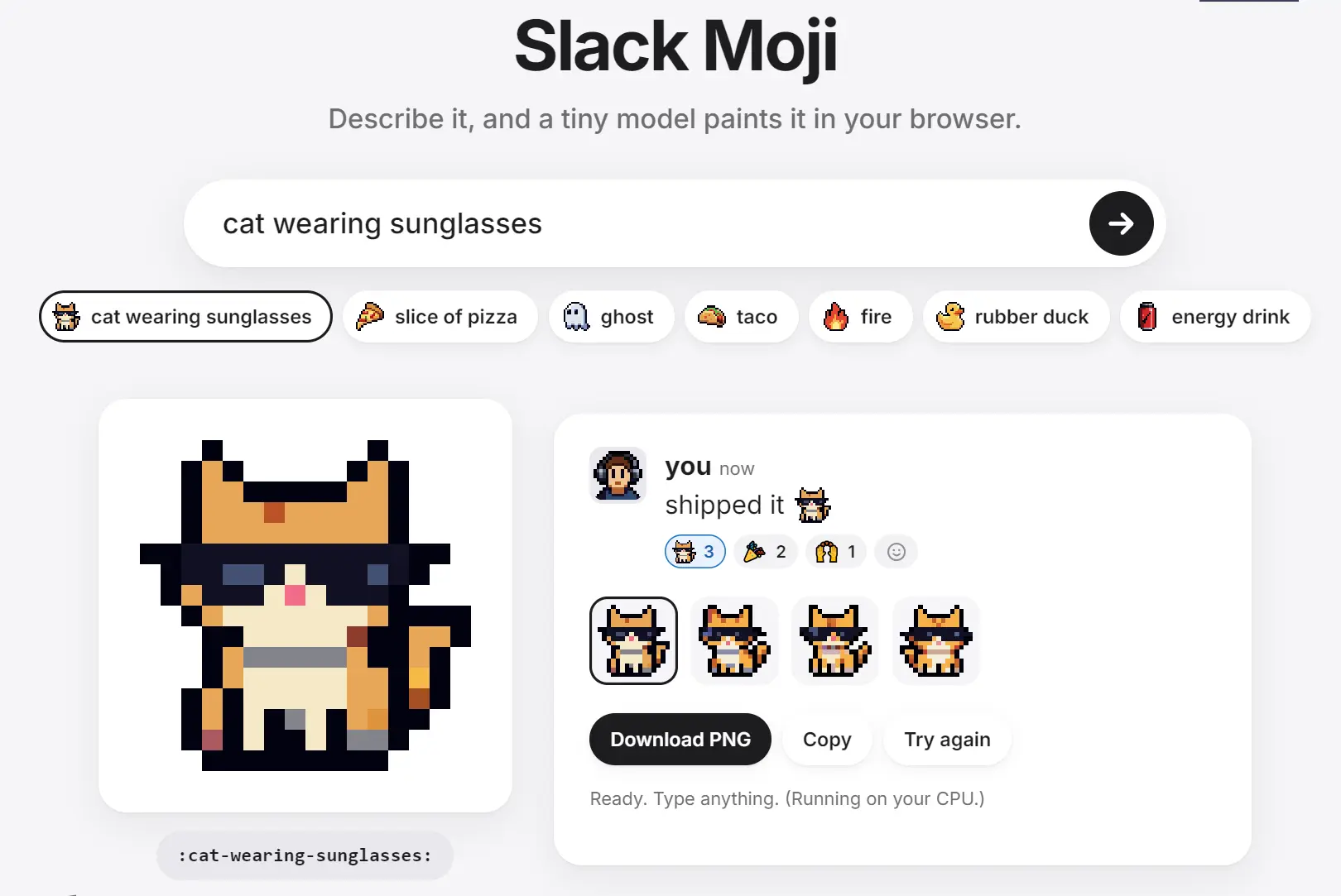
Describe a character, object, or reaction, and the tool creates four variations for you to choose from.
The app runs Tessera-small, a 47.6-million-parameter diffusion model, directly in your browser.
Your prompt stays on your device as the model draws each emoji on a 16×16 pixel grid.
Try Slack Moji in the playground below.
Key Features
- Watch the pixels fill in during image generation.
- Preview the selected emoji in a sample chat message and as a reaction.
- Export PNG images with sharp pixel edges and transparency.
- Copy the emoji image or its suggested Slack shortcode to your clipboard.
How to Use Slack Moji
- Open Slack Moji on Hugging Face.
- Wait for the model to load. The first visit requires a download of about 115 MB of model weights. Later visits reuse the weights as long as the browser cache contains them.
- Enter a description of up to 120 characters, such as “cat wearing sunglasses” or “golden crown,” and click the arrow beside the input field.
- Choose one of the four generated emoji to preview it in the sample chat. Click Try again to generate a new set from your prompt.
- Click Download PNG to save your favorite at 128×128 pixels. The Copy button copies the image to the clipboard or saves the PNG if clipboard access fails.
Adding Your Custom Emoji to Slack
Slack Moji suggests a shortcode below the large preview, such as :cat-wearing-sunglasses:. Click it to copy the code.
To add the emoji to Slack, click the smiley face in the message field on your desktop to open the emoji picker. Select Add Emoji, click Upload Image, and choose your PNG.
Enter the emoji name without the surrounding colons (cat-wearing-sunglasses in this example) and click Save. You can now type the shortcode in a message or select your new emoji as a reaction.
How Slack Moji Runs on Your Device
A CLIP text encoder processes your description. Tessera-small starts with all 256 pixels masked and predicts their colors over 16 steps, using a 512-entry palette that includes transparency.
Slack Moji runs the text encoder and diffusion model through ONNX Runtime Web. With WebGPU, it generates all four variations in one batch. The app switches to the CPU through WebAssembly if WebGPU is unavailable or the GPU fails a correctness check.
CPU mode generates one emoji at a time, with an on-screen estimate of about 10 seconds for each. Press the square stop button to end the batch after the current emoji finishes.
Alternatives & Related Resources
- Generate and Edit Pixel Art With Free AI – Tessera Pixel Studio
- Turn Text into Slack Emojis with the Emoji Gen AI Tool
- Create Custom Emojis from Text and Images Free – AIEmojify