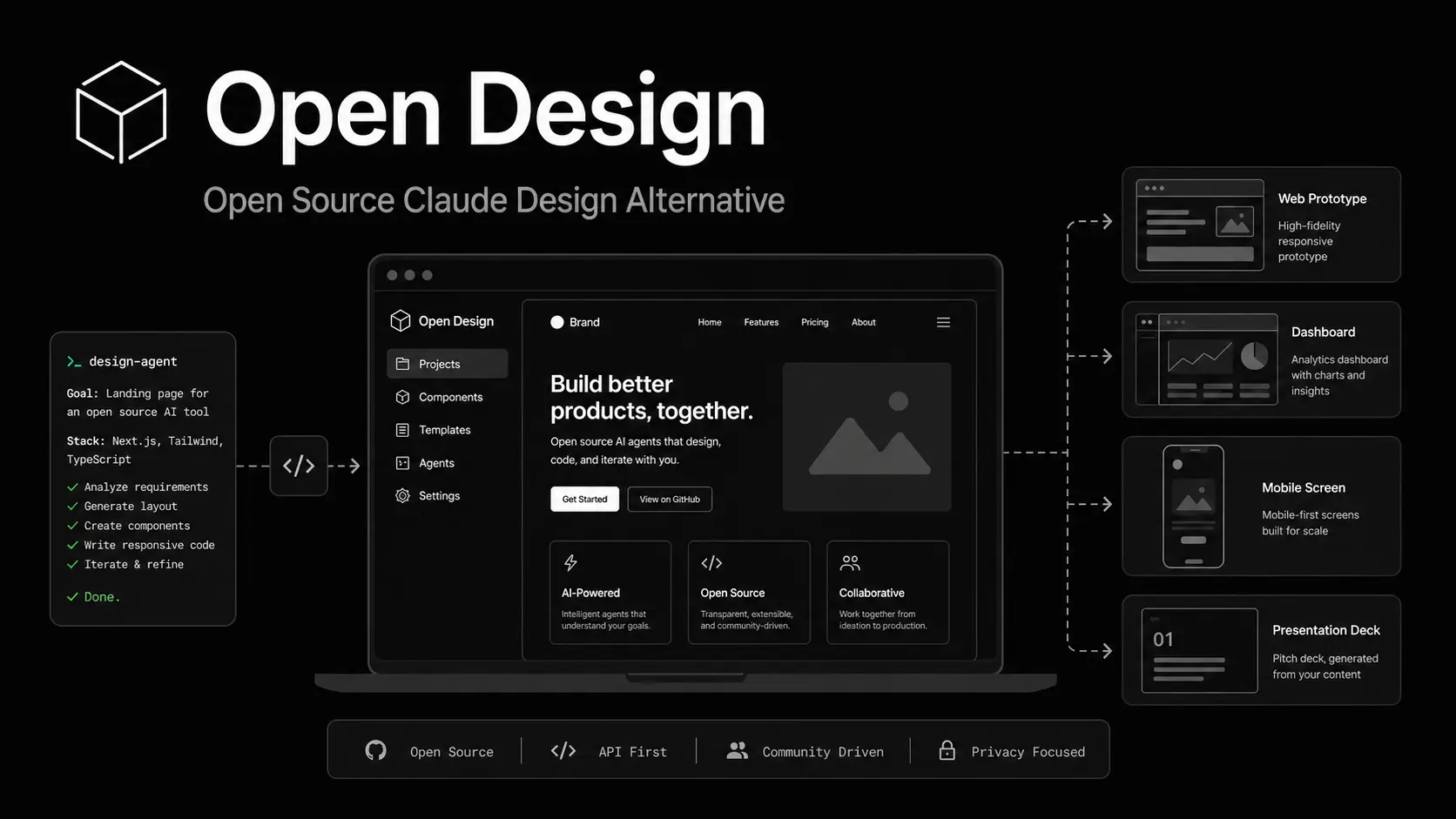
Open Design is a free open-source AI design tool that turns existing AI coding agents (Codex, Claude Code, etc) into generators for prototypes, decks, dashboards, mobile screens, documents, and marketing pages.
It runs as a web app plus a local Node daemon, reads 19+ file-based Agent skills and 70+ Markdown design systems, and renders finished artifacts in a sandboxed browser preview.
The tool currently supports 8 popular coding agents: Claude Code, Codex CLI, Cursor Agent, Gemini CLI, OpenCode, Qwen Code, GitHub Copilot CLI, and a direct Anthropic API fallback for users with no CLI installed.
The daemon scans the system PATH on boot, picks whichever agent it finds, and routes all design work through it. No configuration file is required.
Open Design works best for developers, product designers, and technical founders who need AI-assisted design output grounded in real brand systems, structured quality gates, and local file access.
Features
- Auto-detects Claude Code, Codex CLI, Cursor Agent, Gemini CLI, OpenCode, Qwen Code, GitHub Copilot CLI, or the Anthropic API on daemon boot.
- 19 agent skills across two categories: design surfaces (web prototype, SaaS landing, dashboard, pricing page, docs, blog, mobile app, simple deck, guizang-ppt magazine deck) and document templates (PM spec, weekly update, meeting notes, engineering runbook, finance report, HR onboarding, invoice, kanban board, team OKRs).
- 71 DESIGN.md-format design systems, including AI platforms (Claude, Cohere, Mistral, ElevenLabs, xAI), developer tools (Linear, Vercel, Cursor, Supabase, PostHog, Sentry), fintech (Stripe, Coinbase, Revolut, Wise), e-commerce (Shopify, Airbnb, Nike), media (Spotify, Meta), automotive (Tesla, BMW, Ferrari), and two hand-authored starters.
- Presents an interactive discovery question form at the start of every session to lock in surface, audience, tone, brand context, scale, and constraints before the agent writes any code.
- 5 deterministic visual directions (Editorial Monocle, Modern Minimal, Tech Utility, Brutalist, Soft Warm) for users with no brand spec.
- Runs a silent five-dimensional self-critique across philosophy, hierarchy, execution, specificity, and restraint before emitting any artifact.
- Streams the agent’s live task plan as a progress card with real-time
in_progressandcompletedstate updates you can interrupt mid-run. - Renders every artifact in a sandboxed
srcdociframe with in-place editing via the file workspace panel. - Exports artifacts as HTML with inline assets, PDF via browser print, PPTX, ZIP archive, and Markdown.
- Includes pixel-accurate device frames for iPhone 15 Pro (with Dynamic Island and status bar SVGs), Pixel, iPad Pro, MacBook, and Browser Chrome, shared across all mobile and desktop skills.
- Stores projects, conversations, messages, and open tabs in a local SQLite database.
- Accepts new skills as a folder drop into
skills/. - Deploys to local dev, Vercel, or single-process production.
Use Cases
- Generate a magazine-style HTML pitch deck for a seed round by typing a plain-language brief, completing the discovery form, and selecting a visual direction.
- Prototype a three-screen mobile app onboarding flow using the
mobile-onboardingskill with pixel-accurate iPhone 15 Pro chrome rendered from the shared device frame assets. - Produce a SaaS marketing landing page with hero, features, pricing table, and CTA sections using the
saas-landingskill against a Linear or Vercel design system for accurate brand tokens. - Build a gamified mobile app prototype across three frames (cover, quest list with XP ribbons and level bar, and quest detail) for investor demos or user-testing sessions.
- Draft a PM specification document, OKR scoresheet, or incident runbook using the document template skills. The agent reads the active design system and applies real brand typography and spacing to the output.
Open Design vs Claude Design
Claude Design is Anthropic’s visual creation workspace for designs, prototypes, slides, one-pagers, landing pages, product mockups, and other polished visual outputs. It turns a prompt, uploaded context, codebase, or existing design material into a working canvas that users can refine through chat, inline comments, direct edits, and export options.
Open Design is not a direct clone of Claude Design. It follows the same artifact-first category but uses a different architecture. Claude Design centers the workflow inside Claude and Anthropic’s hosted product environment. Open Design uses a web app, local daemon, coding agent adapters, Skills, design systems, device frames, and a sandboxed preview loop.
This makes Open Design a great, free alternative to Claude Design for users who want to inspect the code, self-host the interface, bring their own model keys, reuse local coding agents, and keep design projects closer to their development environment.
| Feature | Open Design | Claude Design |
|---|---|---|
| Access model | Free and open-source software | Available through eligible Claude subscription plans |
| Source model | Open codebase under Apache-2.0 | Closed-source Anthropic Labs product |
| Main workflow | Local-first AI design workflow with a web app and local daemon | Hosted design workspace inside Claude |
| AI engine | Works through supported coding agents and BYOK model access | Powered by Claude, including Claude Opus 4.7 in the research preview |
| Supported agents | Claude Code, Codex CLI, Cursor Agent, Gemini CLI, OpenCode, Qwen Code, GitHub Copilot CLI, and Anthropic API fallback | Claude-native workflow |
| Design system support | Includes 71 built-in design systems and 5 curated visual directions | Can use an organization’s design system after setup |
| Skills and templates | Includes 19 composable Skills for prototypes, decks, mobile screens, dashboards, pricing pages, docs, blogs, landing pages, and work documents | Generates designs, prototypes, presentations, one-pagers, marketing assets, and other visual work |
| Runtime model | Local daemon spawns the selected CLI in the user’s project folder | Cloud product tied to Claude’s hosted environment |
| Preview model | Sandboxed iframe preview for generated artifacts | Canvas-based visual editing and iteration |
| Exports | HTML, PDF, PPTX, ZIP, and Markdown workflows are part of the open design loop | Supports sharing, folder export, Canva export, PDF, PPTX, and standalone HTML files |
| Handoff | Design artifacts stay close to the local project and coding agent workflow | Can package designs for Claude Code handoff |
| Best fit | Developers, indie hackers, technical founders, open-source users, and teams that want local control | Designers, product managers, marketers, founders, and teams already using Claude plans |
| Main limitation | Setup depends on local tooling, agent availability, and model quality | Access depends on Claude subscription availability and Anthropic’s product limits |
How to Use It
Table Of Contents
Installation
Prerequisites: Node.js, pnpm, and at least one supported agent CLI on your PATH. A direct Anthropic API key works as a browser-based fallback if no CLI is installed.
Clone the repository from GitHub.
git clone https://github.com/nexu-io/open-design.git
cd open-designSelect the Node version from the project configuration.
nvm useEnable Corepack.
corepack enableInstall dependencies.
pnpm installStart the daemon and the Vite app.
pnpm dev:allOpen the local app.
open http://localhost:5173The first launch detects available agent CLIs on PATH, loads 19 skills and 71 design systems, opens the Anthropic key dialog for BYOK fallback, and creates the local .od runtime folder.
Starting a design session
1. Pick an Agent skill from the skill picker (for example: saas-landing, mobile-app, or guizang-ppt).
2. Select a design system from the 71-system library. Each system shows its four-color signature in the picker. Click any entry to view the full DESIGN.md, swatch grid, and live showcase.
3. Type your brief in the chat composer and hit Send.
4. Complete the discovery question form that appears before the agent writes any code. The form captures surface, audience, tone, brand context, scale, and constraints.
5. If no brand specification is included in the brief, select one of five visual directions from the direction picker. Each direction binds a complete OKLch palette and font stack into the artifact’s :root.
6. Watch the live todo card stream agent progress. Type a new instruction at any point to redirect mid-run.
7. Review the rendered artifact in the sandboxed iframe. Edit in place using the file workspace panel.
8. Download the output using the export controls: HTML (inline assets), PDF (browser print), PPTX, or ZIP.
Adding a custom skill
Drop a folder containing SKILL.md and an assets/ subdirectory into the skills/ directory. Restart the daemon. The new skill appears in the picker automatically. The extended od: frontmatter supports mode, platform, scenario, preview, and design_system fields. The full frontmatter schema is documented in docs/skills-protocol.md.
Supported AI Coding Agents
| Agent | Binary | Streaming Format |
|---|---|---|
| Claude Code | claude | --output-format stream-json (typed events) |
| Codex CLI | codex | Line-buffered |
| Cursor Agent | cursor-agent | Line-buffered |
| Gemini CLI | gemini | Line-buffered |
| OpenCode | opencode | Line-buffered |
| Qwen Code | qwen | Line-buffered |
| GitHub Copilot CLI | copilot | --output-format json (typed events) |
| Anthropic API (BYOK) | n/a | SSE direct (browser fallback) |
Available Agent Skills
web-prototype: Creates prototype mode web artifacts.saas-landing: Creates marketing pages with hero, feature, pricing, and CTA sections.dashboard: Creates admin and analytics interfaces.pricing-page: Creates standalone pricing and comparison pages.docs-page: Creates three column documentation pages.blog-post: Creates editorial long form pages.mobile-app: Creates phone frame screens.simple-deck: Creates minimal horizontal swipe decks.guizang-ppt: Creates magazine web PPT decks from the bundled guizang PPT skill.pm-spec: Creates product management specification documents.weekly-update: Creates team weekly update documents.meeting-notes: Creates decision log notes.eng-runbook: Creates incident and operations runbooks.finance-report: Creates executive finance summaries.hr-onboarding: Creates role onboarding plans.invoice: Creates single page invoices.kanban-board: Creates board snapshots.mobile-onboarding: Creates multi screen mobile onboarding flows.team-okrs: Creates OKR scorecards.
Available DESIGN.md Design Systems
Each DESIGN.md system follows a nine section schema for color, typography, spacing, layout, components, motion, voice, brand rules, and anti patterns.
- AI and LLM systems:
claude,cohere,mistral-ai,minimax,together-ai,replicate,runwayml,elevenlabs,ollama,x-ai. - Developer tool systems:
cursor,vercel,linear-app,framer,expo,clickhouse,mongodb,supabase,hashicorp,posthog,sentry,warp,webflow,sanity,mintlify,lovable,composio,opencode-ai,voltagent. - Productivity systems:
notion,figma,miro,airtable,superhuman,intercom,zapier,cal,clay,raycast. - Fintech systems:
stripe,coinbase,binance,kraken,mastercard,revolut,wise. - E-commerce systems:
shopify,airbnb,uber,nike,starbucks,pinterest. - Media systems:
spotify,playstation,wired,theverge,meta. - Automotive systems:
tesla,bmw,ferrari,lamborghini,bugatti,renault. - Other systems:
apple,ibm,nvidia,vodafone,sentry,resend,spacex. - Starter systems:
defaultfor Neutral Modern andwarm-editorialfor Warm Editorial.
Pros
- Full source access under Apache 2.0.
- No lock-in to any single AI provider.
- The skill-driven workflow generates far more consistent results than free-form AI prompting.
- 70+ DESIGN.md systems feed the coding agent real brand tokens for every artifact.
- The mandatory question form and 5-dimension self-critique block most AI-generated slop.
- Local-first architecture keeps all data private and projects restartable.
Cons
- No all-in-one installer or packaged binary.
- The local daemon hard-codes the
.od/path relative to the repo root. - BYOK fallback requires an Anthropic API key.
Related Resources
- QUICKSTART.md: Full run, build, and deployment guide with environment troubleshooting steps.
- Claude Design: A Anthropic Labs product that lets you collaborate with Claude to create polished visual work like designs, prototypes, slides, one-pagers, and more.
- Claude Code Skills Documentation: The SKILL.md convention that Open Design’s skill system follows verbatim.
- 10 Best Agent Skills for Claude Code & AI Workflows
- 7 Best CLI AI Coding Agents
- 7 Best & Open-source Claude Cowork Alternatives
- The Ultimate Claude Code Resource List(Agents, Skills, Plugins, and more)
FAQs
Q: Does Open Design require an Anthropic subscription?
A: No. The daemon auto-detects Claude Code, Codex CLI, Cursor Agent, Gemini CLI, OpenCode, Qwen Code, or GitHub Copilot CLI on your PATH and uses whichever it finds.
Q: What is a skill in Open Design?
A: A skill is a folder under skills/ containing a SKILL.md file and an assets/ subdirectory. The SKILL.md defines the output format, device target, default design system, and the reference files the agent reads before generating any artifact.
Q: What are the 71 design systems and how do they affect output?
A: Each design system is a DESIGN.md file covering color, typography, spacing, layout, components, motion, voice, brand identity, and anti-patterns for a specific product (Linear, Stripe, Vercel, Airbnb, Notion, Apple, Tesla, Spotify, and 63 others). Open Design injects the active design system into the agent’s prompt stack for every artifact. The agent reads those tokens and uses them in the generated CSS.
Q: Can I add my own design system?
A: Yes. Drop a DESIGN.md file following the 9-section schema into the design-systems/ directory. The daemon loads it alongside the 71 bundled systems on the next restart.
Q: What makes Open Design different from a normal prompt template?
A: Open Design combines a local daemon, a browser app, file based skills, DESIGN.md systems, question forms, visual direction choices, live todo progress, iframe previews, and export tools. A prompt template usually gives the model instructions but does not manage project files, agent adapters, previews, or artifact exports.
Q: Can Open Design replace Claude Design?
A: Open Design can replace Claude Design for technical users who want local control, open-source access, custom agents, and self-hostable workflows. Claude Design remains better for users who want a hosted product with built-in Claude access, organization sharing, inline comments, and managed design system setup.