OpenResearch is an open-source, local-first workspace from alphaXiv that turns Claude Code, Codex, OpenCode, and Cursor into research agents.
You can use those agents to review literature, develop hypotheses, change code, run experiments, inspect results, and create research artifacts from one project.
Its core structure is a Git-native experiment tree. Each research direction can use an isolated worktree, and each run stays tied to the code revision, logs, files, and results that produced it.
Projects and research records live on your machine by default. Experiments can run on local hardware, remote SSH machines, cluster backends, or OpenResearch-managed compute. The local workspace keeps the experiment history together.
Key Features
- Run independent research directions in isolated Git worktrees.
- Track code variants and results in a Git-native experiment tree.
- Let autoresearch agents propose, run, inspect, and iterate on experiments.
- Use Claude Code, Codex, OpenCode, or Cursor as the research agent.
- Send experiment runs to local, SSH, Slurm, Kubernetes, Ray, Hugging Face Jobs, Modal, Tinker, or managed OpenResearch compute.
- Connect LM Studio, oMLX, Ollama, or another OpenAI-compatible local endpoint through OpenCode.
- Save projects, conversations, experiments, runs, logs, code, and artifacts on your machine by default.
- Use the
orxCLI to inspect projects, launch experiments, read logs, search literature, and manage compute.
How OpenResearch Organizes Research Experiments
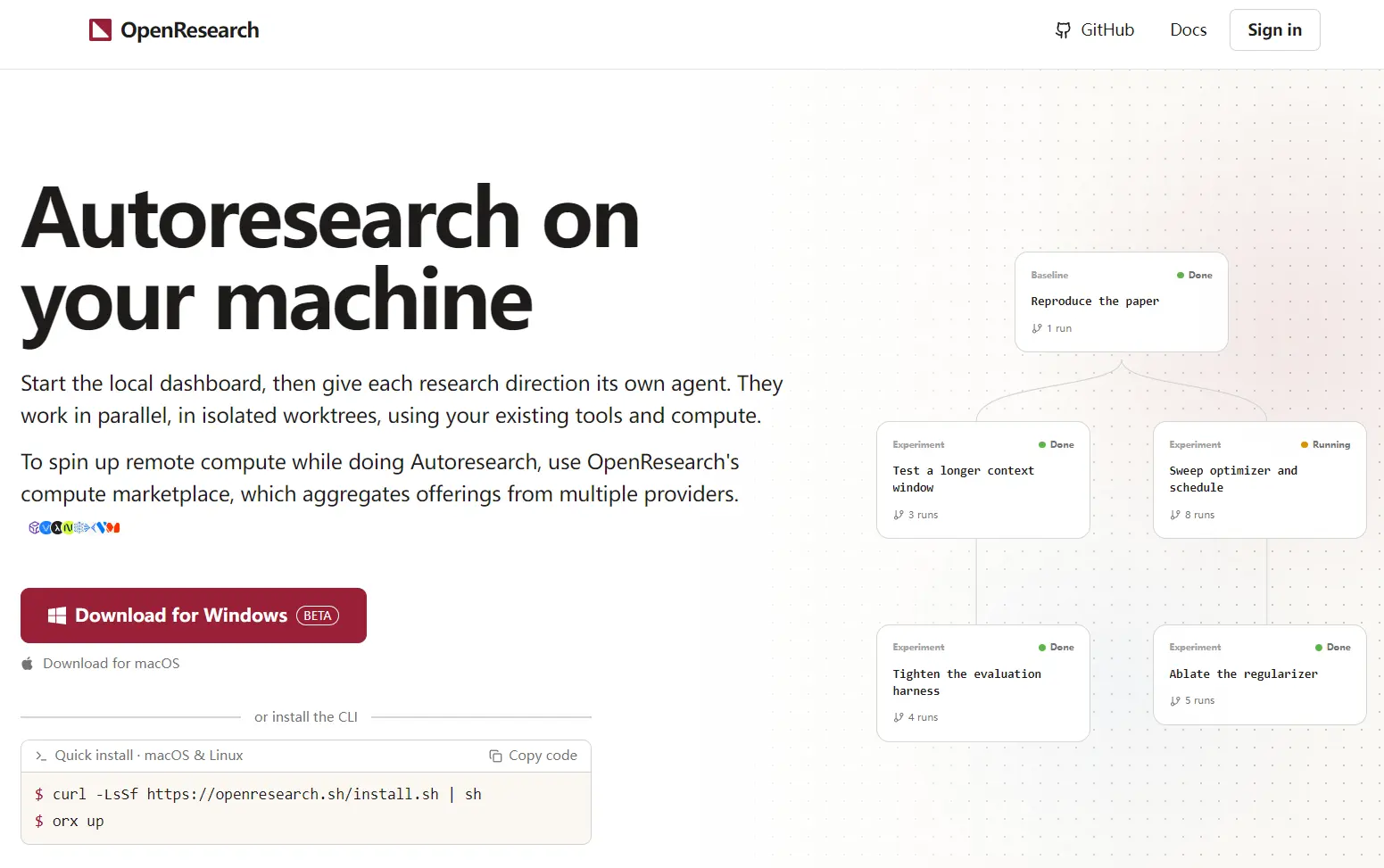
An OpenResearch project starts from a Git repository. The initial project state acts as the baseline, and each hypothesis or code change can become a child experiment with its own branch and worktree.
This structure is designed for research that needs repeated comparisons. One agent can test a longer context window, another can change an optimizer, and another can alter the evaluation code. Their changes and runs stay attached to their own experiment nodes.
When OpenResearch launches a run, it records the committed source snapshot used for that experiment. Logs, files, results, and other artifacts stay connected to that run. A result can be traced back to the code that produced it.
Autoresearch
Autoresearch can run an iterative research loop from a defined goal. The agent can propose an idea, edit the project, launch an experiment, inspect the evidence, and use the result to decide what to test next.
OpenResearch can run several research directions in parallel. The experiment tree records how each branch developed from the baseline and which later experiments came from earlier results.
The project also publishes research templates with working baselines and run commands. Current examples include nanochat and Qwen reinforcement-learning projects for GRPO, MaxRL, VPO, and DAPO.
Coding Agents and Local Models
OpenResearch uses your existing coding agents as research agents, including Claude Code, Codex, OpenCode, and Cursor. The harness and model are selected per session, and OpenResearch supplies the project, experiment, run, and evidence structure around the agent.
Local model connections currently run through OpenCode. OpenResearch can discover models served by LM Studio, oMLX, Ollama, or another OpenAI-compatible endpoint such as vLLM.
Using a local LLM does not make every research action offline. Paper searches, GitHub operations, downloads, connected services, and commands executed by the agent can access the network.
Run Experiments on Local, Remote, and Managed Compute
Experiment runs can execute on your computer or on external compute. The OpenResearch workspace can stay local. Current backends include SSH, Slurm, Kubernetes, Ray, Hugging Face Jobs, Modal, Tinker, and OpenResearch-managed compute.
For an existing SSH machine, orx up --remote user@host runs the OpenResearch service near the remote hardware and tunnels the dashboard back to your computer. SSH aliases and custom ports are available for existing server configurations.
Managed compute is a hosted service connected to OpenResearch accounts and organizations. The web dashboard and orx CLI can compare GPU or CPU offers, register SSH keys, create instances, inspect running machines, and terminate them.
How to Install OpenResearch
On macOS, you can download the desktop app or install the CLI. Linux uses the CLI installer. Running orx up opens the local dashboard at http://127.0.0.1:4791.
curl -LsSf https://openresearch.sh/install.sh | sh
orx up
Windows
Windows support is currently beta. Git for Windows is required as well.
powershell -ExecutionPolicy Bypass -c "irm https://github.com/alphaXiv/OpenResearch/releases/latest/download/openresearch-cli-installer.ps1 | iex"Install the OpenResearch Agent Skills
The CLI can install OpenResearch skills into compatible coding agents.
orx install-skillsUseful orx Commands
The CLI exposes the main project, run, experiment, literature, and compute actions from the terminal.
orx projects
orx project view <project-id>
orx runs <project-id>
orx logs <run-id>
orx exp run <experiment-id>
orx discover keyword <query>
orx paper <arxiv-id-or-doi>
orx compute
orx instance list <orgId>
Cost and Account Requirements
OpenResearch is open source under the MIT License. Local projects and self-managed compute do not require payment to OpenResearch. Your coding agent, model provider, cloud service, or hardware can create its own costs.
An OpenResearch account is required for service-owned functions such as organizations and managed compute. Hosted compute uses a prepaid organization balance and is billed at the underlying provider rate with no OpenResearch markup. Charges accrue while the provider machine is running.
Self-managed machines are billed by their own providers and do not spend your OpenResearch balance.
Privacy, Local Data, and Telemetry
OpenResearch runs its local dashboard on 127.0.0.1 and stores local state in SQLite. Creating a local project or launching a run does not publish your repository. Projects, conversations, experiments, runs, logs, code, and artifacts stay on your machine by default.
Official release builds send opt-out usage analytics tied to a random installation ID. Those events do not include code, prompts, file contents, file paths, repository names, tokens, email addresses, or project and experiment identifiers. Source and development builds do not send those analytics.
You can disable telemetry for the installation or for an individual command.
orx telemetry off
orx telemetry status
orx <command> --no-telemetry
Pros
- Isolated worktrees for parallel research agents
- Traceable experiment and run lineage
- Claude Code, Codex, OpenCode, and Cursor integration
- Local, remote, cluster, and managed compute options
- Local model connections through OpenCode
- MIT-licensed open-source codebase
Cons
- Requires an external coding agent
- Model and compute costs
- Windows support is beta
- Local models currently depend on OpenCode
FAQs
Does OpenResearch replace Claude Code, Codex, OpenCode, or Cursor?
No. OpenResearch uses those coding agents as the agent layer for research work. It manages projects, experiment branches, runs, evidence, and compute around the agent you select.
Can I keep model inference on my own device?
Yes. Local model connections run through OpenCode and can use LM Studio, oMLX, Ollama, or another OpenAI-compatible endpoint. Network access can occur when the research task uses paper search, GitHub, downloads, connected services, or network-capable commands.
What should I know before using remote-host mode on a shared machine?
The remote OpenResearch service binds to loopback and has no application-level authentication. Other people with access to that host can reach the service, so a shared server needs operating-system and account-level access controls that match your research data.
Alternatives & Related Resources
- AI Researcher: Multi-agent AI System for Autonomous ML Experiment
- OpenScience: AI Agent for Scientific Research
- The Ultimate Claude Code Resource List: Agents, Skills, Plugins & More
- The Ultimate Codex Resource List: Skills, Plugins, MCP, SDKs & More