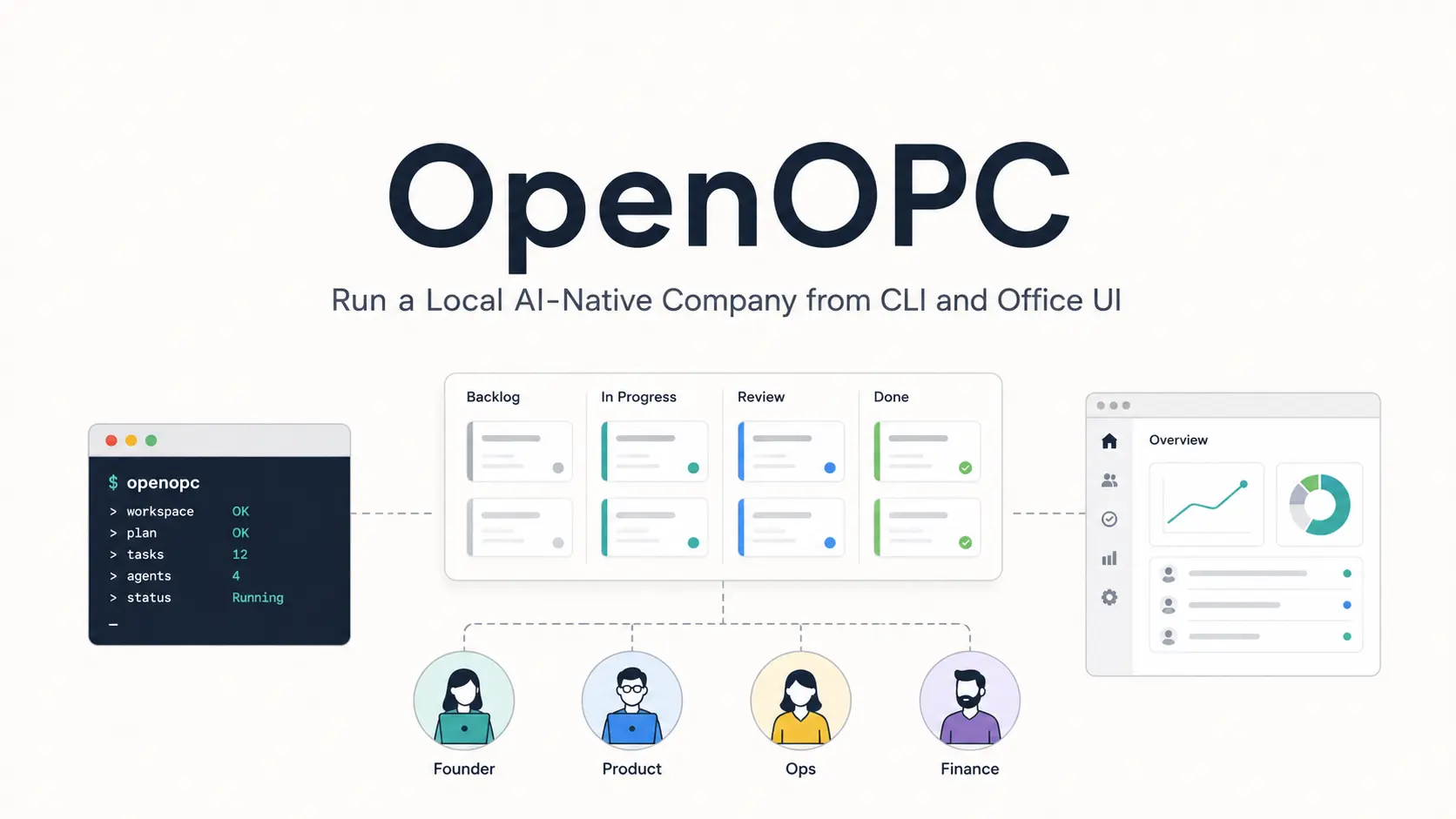
OpenOPC is an open-source project from HKUDS (University of Hong Kong) that assembles role-based AI agents into a runnable company for complex projects, research work, coding tasks, and operations workflows.
It runs locally on Python 3.10+, uses a browser-based Office UI and a CLI, and connects to your own execution agents like Claude Code, Codex, Cursor, and OpenCode.
Point OpenOPC at a goal, let it draft an org chart, and it hands sub-tasks to a manager that decomposes, assigns, and reviews across a dependency graph.
A dozen AI roles (recruiter, PM, developer, reviewer, etc) actually collaborate toward a finished deliverable, with you as the owner who only steps in when escalation hits a genuine deadlock.
Features
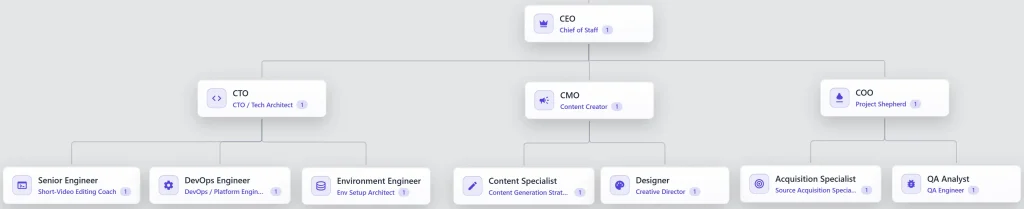
- Drafts an org chart automatically from a stated goal, or lets you build one manually in the Org tab with roles and reporting lines
- Runs a recruiter agent that chooses between reusing an experienced employee shaped by prior projects and onboarding a fresh hire from the talent pool
- Decomposes work into a dependency graph so independent items run in parallel and dependent items wait on prerequisites
- Gives a manager role five actions per work item: execute, delegate, review, integrate, and rework
- Delegates concrete execution to Claude Code, Codex, Cursor, OpenCode, or its own native runtime
- Escalates blockers to you only after a role-scoped inbox message fails to resolve them within the team
- Distills each role’s completed tasks into a private experience profile, then promotes recurring lessons into shared playbooks new hires inherit
- Attributes feedback to only the specific role that owned the affected work item
- Registers local stdio or remote HTTP/SSE MCP servers under
mcp_serversinsystem_config.yaml - Connects to Feishu, Slack, Discord, Telegram, DingTalk, Matrix, QQ, WhatsApp, and email as task entry channels
- Exports a full company, a single role, or a talent template as a shareable
.opcpkgpackage
Use Cases
A repo lands in your lap with no documentation and a demo booked for three days out. A Company Mode run assembles a small team of roles that read the codebase, draft the docs, and review each other’s output.
Your video channel needs a script, a storyboard, and three platform-specific cuts from the same raw footage, and you’d normally hand each piece to a different tool with no shared context between them. OpenOPC’s Content & Media roles pull from the same brief and the same organizational memory, so the storyboard actually matches the script that came before it.
A blocker shows up mid-run that no role has the authority to resolve, maybe a budget decision or an ambiguous requirement, and the runtime pauses that work item and routes the question straight to you through the Comms tab.
You’ve been running the same kind of investment memo or due diligence package by hand every quarter, copying research into a template and formatting it the same way each time. A saved company architecture for that workflow turns the whole quarterly pass into a single opc chat --mode company --company-profile <your-profile> call.
How to Use OpenOPC
Install uv and create the Python environment.
cd /path/to/OpenOPC
uv python install 3.12
uv venv --python 3.12
source .venv/bin/activate
Install OpenOPC into the environment. R
uv pip install -e .Install Chromium for browser tools if agents need to browse pages during a task.
uv run python -m playwright install chromiumInitialize local state. This creates the .opc/ structure, local configuration, memory folders, project folders, and workspace folders.
uv run opc initAdd your model configuration. Edit .opc/config/llm_config.yaml, then set the model, API base, API key, token limit, or an environment variable name for the key.
llm:
  default_model: "openai/gpt-5.4"
  api_base: "https://openrouter.ai/api/v1"
  api_key: "sk-or-v1-..."
  max_tokens: 32768
Launch the Office UI. The web UI opens at http://localhost:8765 by default.
uv run opc uiStart a direct chat session from the CLI. This is the fastest way to confirm that the project, model config, and runtime all work.
uv run opc chat -p demoRun a one-shot Task Mode command. Pick an execution agent such as native, codex, claude_code, cursor, or opencode after you configure the corresponding external CLI.
uv run opc chat -p demo --mode task --agent codex "Refactor this module and run focused tests"Run a Company Mode command. The built-in Corporate architecture gives OpenOPC a default organization for planning, delegation, review, and delivery.
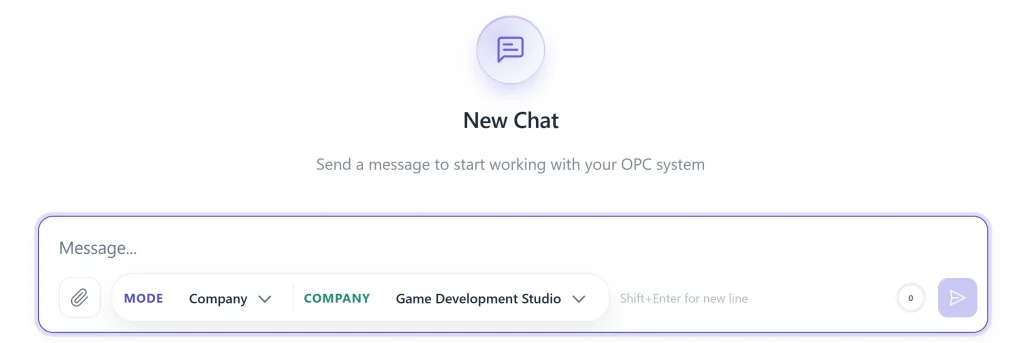
uv run opc chat -p demo --mode company --company-profile corporate "Plan, implement, review, and document this feature"Use the UI for longer work. Create or select a project, click New Chat, choose Task or Company, select the agent or organization, and send the brief. After the first message, that chat locks its mode and task agent.
Office UI Reference
| Page | What it controls |
|---|---|
| Workspace | Sessions, Kanban board, chat, task details, role progress, communications, and team cockpit |
| Office | Visual office map, agent characters, seats, current task, current tool, and runtime activity |
| Org | Company architecture, saved organizations, role editing, hiring, presets, import, and export |
| Chat tab | Parent conversation, progress cards, checkpoint replies, stop, continue, done controls, and work-item links |
| Agents tab | Active, waiting, pending, and done roles with current tools and work items |
| Info tab | Status, assignees, role identity, employee assignment, selected execution agent, timing, and developer details |
| Comms tab | Role inboxes, sent messages, meetings, decisions, and communication failures |
| Team tab | Runtime cockpit, seats, approvals, unread communication, recovery state, and stop controls |
| Kanban board | Task cards in Task Mode and company work items in Company Mode |
| Org Team | Role graph, role table, inspector, roster, saved org selector, export flow, and employee deployment |
| Org Runtime | Runtime teams, seats, final decider, delegation strategy, and runtime policy |
| Org Architecture | Built-in architecture presets, package preview, package install, and YAML import/export |
| Org Employees | Talent search, employee details, hiring, and staffing |
Configuration Reference
| File | Purpose |
|---|---|
.opc/config/llm_config.yaml | Default model, API base, API key, environment-variable key mapping, routing, fallback, temperature, and token limit |
.opc/config/system_config.yaml | Runtime behavior, browser tools, native runtime, compaction, verification, permissions, sandbox, and safety settings |
.opc/config/agent_config.yaml | External agent command paths, preferred order, model flags, session modes, timeouts, approval modes, and native subagent profiles |
.opc/config/channel_config.yaml | External messaging providers and credentials |
.opc/config/company_corporate_config.yaml | Built-in corporate company architecture |
.opc/config/company_orgs/org_<id>_config.yaml | Saved custom company architectures |
.opc/config/org_index.yaml | Active saved company architecture selector |
Execution Modes and Agents
| Item | Practical meaning |
|---|---|
| Task Mode | A direct single-agent workspace for one-off work |
| Company Mode | A role-based runtime that turns one brief into company work items |
org selector | Compatibility path for saved organization architectures |
native | OpenOPC’s native execution agent |
codex | External Codex execution path |
claude_code | External Claude Code execution path |
cursor | External Cursor execution path |
opencode | External OpenCode execution path |
auto role strategy | Lets a Company Mode role use the configured automatic strategy |
native role strategy | Keeps a role on OpenOPC Native |
external role strategy | Sends a role to a preferred external agent |
Pros
- Local open-source Python project.
- CLI and Office UI.
- Task and Company modes.
- Role-based work-item tracking.
- External coding-agent adapters.
- Local memory and config files.
- Talent import and hiring.
- Shareable organization packages.
Cons
- Requires Python environment setup.
- Requires model API configuration.
- External agents need separate installs.
Alternatives & Related Resources
- 7 Best CLI AI Coding Agents
- Manaflow: Run Multiple AI Coding Agents in Parallel VS Code Workspaces
- agmsg: Cross-Agent Messaging for AI Coding Agents
- Wayland: Local AI Agent Command Center for Claude Code and Codex
- Claude Code Resource List
- OpenClaude: Multi-Model AI Coding Agent CLI
More Projects From Data Intelligence Lab@HKU
- DeepTutor: Open-Source, Multi-agent AI Learning Assistant
- Nanobot: Lightweight Open-source AI Assistant Inspired by OpenClaw
- Open-source Self-Evolving Engine for AI Agents – OpenSpace
- Free AI Paper to Presentation Generator with RAG Support – Paper2Slides
FAQs
Q: Do I need Claude Code, Codex, Cursor, or OpenCode installed to use OpenOPC?
A: No. OpenOPC ships its own native runtime, and Task Mode defaults to that if you don’t select an external agent. External CLIs are optional adapters for people who already have a preferred coding agent and want OpenOPC’s org and kanban layer on top of it.
Q: How is this different from just giving Claude Code a longer, more detailed prompt?
A: A single agent session holds one thread of context and does one thing at a time, however long the prompt. OpenOPC splits a goal across roles with separate sessions, memory, and review authority, then runs independent pieces in parallel and blocks dependent ones until prerequisites clear. That structure matters once a goal genuinely spans more than one skill. For a task one agent can already finish in one pass, the split just adds coordination overhead.
Q: Is OpenOPC the same as a coding agent?
A: No. A coding agent usually works as one executor inside a terminal or editor workflow. OpenOPC sits above that level and adds organization structure, role assignment, work-item tracking, review steps, communication state, and UI inspection.
Q: Does OpenOPC run fully locally?
A: The project runs from a local Python repository and stores config, memory, runtime state, UI state, and workspaces in local files. Model calls still depend on the LLM provider or API base you configure in llm_config.yaml. Browser tools also need Playwright Chromium when agents browse pages.
Q: Can I use local models instead of paid APIs?
A: The configuration supports any LiteLLM-compatible endpoint, so if you point api_base and default_model to a local server (Ollama, vLLM, LM Studio) you can run everything on local hardware. The quality of multi-role coordination will depend heavily on the model’s instruction-following and reasoning ability; smaller open models may struggle with the more complex delegation and review patterns.