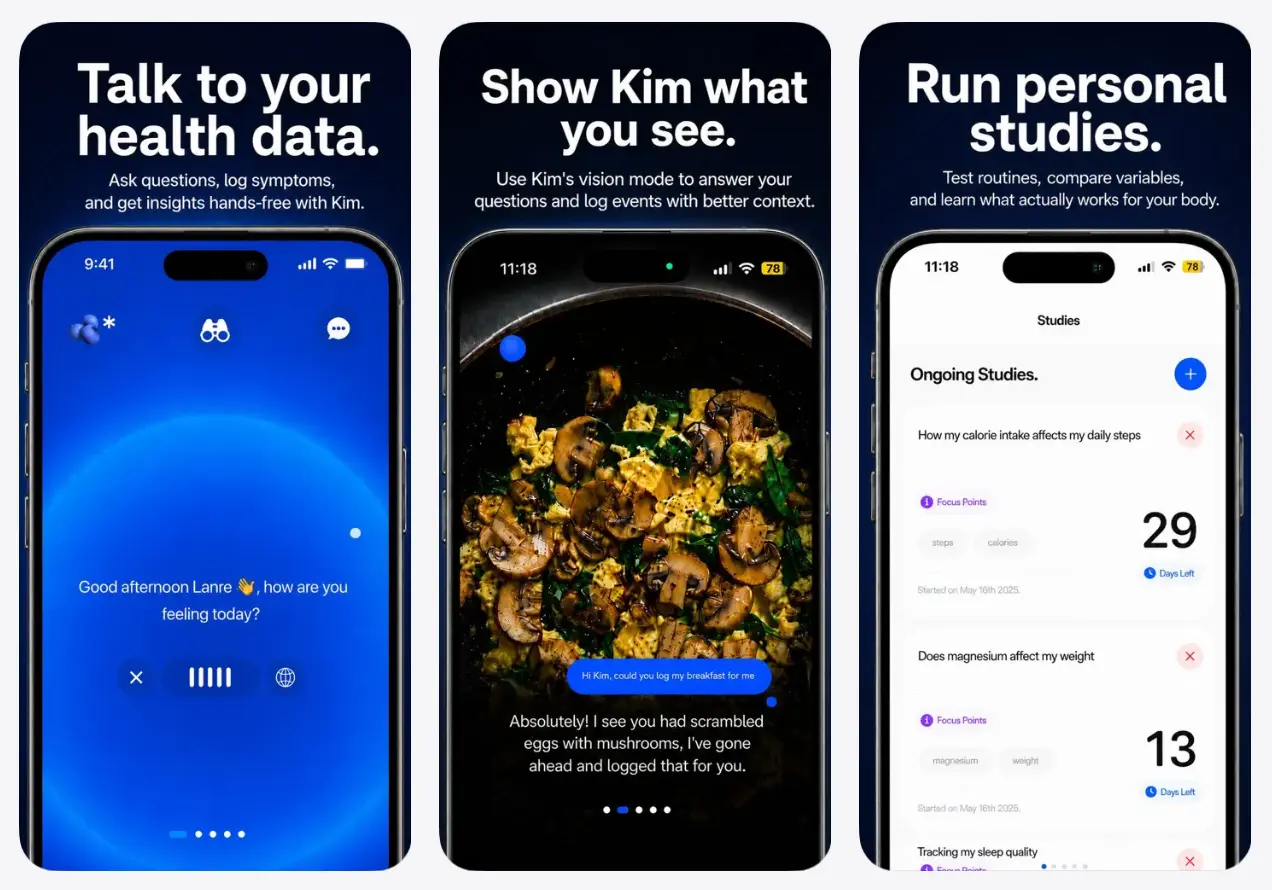
Kim Personal Health Assistant is a free AI-powered iOS app that answers health, nutrition, and fitness questions using your own Apple Health data, manual logs, and uploaded lab results.
You can talk to Kim by voice or chat, and the app connects wearables like Apple Watch, Oura, Whoop, and Garmin through Apple Health.
Apple Health collects steps, sleep stages, resting heart rate, and workout data, but it rarely answers open-ended questions such as whether your late dinner explains the next morning’s heart rate variability dip or whether magnesium timing correlates with deep sleep.
Kim processes that data stream alongside food, mood, supplement, and symptom logs so you can surface patterns without building charts or exporting files.
The app also reads uploaded bloodwork PDFs and flags when your markers sit inside a lab’s “normal” range but fall outside optimal zones for your age, sex, and goals.
Features
- Connects to Apple Health and reads only the data types you choose to share.
- Uses Apple Health as the bridge for wearable data from Apple Watch, Oura, WHOOP, Garmin, Fitbit, and other compatible apps.
- Supports voice chat and text chat for questions about sleep, energy, food, mood, workouts, supplements, recovery, and wellness routines.
- Logs meals from food photos, voice input, or typed text.
- Estimates approximate calories and macros from meal photos.
- Logs supplements and connects them with wellness trends over time.
- Tracks mood, sleep, exercise, workouts, food, supplements, and daily habits.
- Runs personal wellness experiments around supplements, habits, nutrition changes, sleep, recovery, mood, or energy.
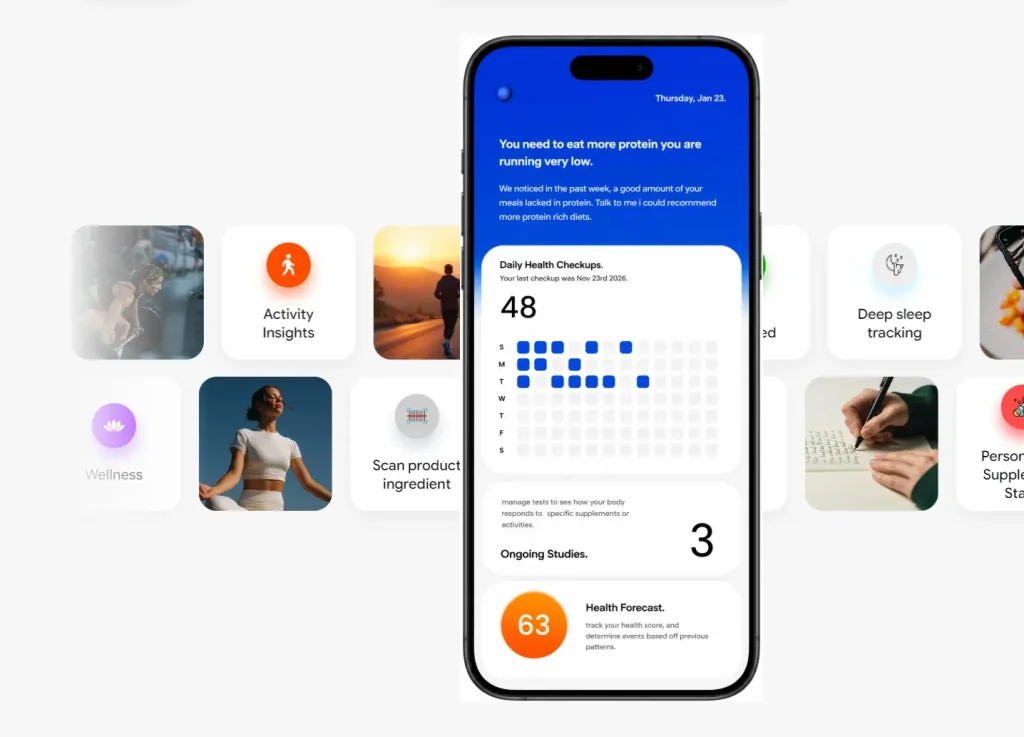
- Creates recovery forecasts from daily logs, activity, nutrition, and Apple Health trends.
- Generates morning briefings, weekly reports, dashboards, and wellness trend estimates.
- Uses web search for selected wellness questions and can include source links inside answers.
- Uses Anthropic Claude for conversational AI, wellness analysis, and food photo analysis.
- Uses Inworld for voice transcription, voice processing, and AI voice features.
- Requests consent before personal or health data goes to third-party AI providers for AI wellness insights.
Use Cases
- Review trending bloodwork values across multiple lab draws before a follow-up appointment.
- Ask whether your morning supplement timing conflicts with other items in your current stack, given your recent bloodwork.
- Snap a restaurant meal photo to get an approximate calorie and macro count for a meal you did not prepare yourself.
- Run a multi-week experiment logging creatine supplementation and compare the period against HRV and recovery scores from your wearable.
- Pull a weekly body report to check whether the deep sleep percentage improved after changing sleep timing or nutrition.
How to Use Kim
1. Get Kim from the App Store on an iPhone running iOS 16.4 or later. The app is 77.5 MB.
2. Kim asks for your age, sex, health goals, and any relevant health context. This shapes how the app compares your data against optimal ranges.
3. Grant Apple Health permissions for the categories you want Kim to read, covering activity, heart rate, sleep, HRV, and any others you choose. Kim requests only what you authorize. Wearable devices connected to Apple Health share their available data from that point forward.
4. Go to the bloodwork section and upload a PDF from any standard blood panel. Kim parses the values, compares them to optimal ranges for your profile, and flags anything worth attention. Upload future labs to track trends across draws.
5. Start a voice or text chat. Ask what your HRV drop over the past week might indicate, whether your current vitamin D level aligns with your stated goal, or what your last lab upload suggests about iron status. Specific questions produce more useful answers than general ones.
6. Take a photo of a meal, describe it by voice, or type it out. The photo option estimates calories and macros. Treat photo-based estimates as approximations. Results vary depending on portion size and preparation method.
7. Enter your current supplements and ask Kim whether timing or interaction issues exist based on your bloodwork and goals. Kim does not prescribe dosing or treatment. The analysis is educational context based on your recorded data.
8. Name the variable you want to test, set a start date, and log the relevant behavior consistently. After several weeks, review the correlation report to see how the tracked variable relates to sleep, recovery, mood, or energy across your wearable and log data.
9. The weekly body report summarizes what changed across sleep, recovery, nutrition, and biomarkers. Use it to decide what to adjust the following week.
Related Resources
- Kim Website: Open the product page, FAQ, and download links.
- Kim Terms of Use: Review medical limits, AI limits, HealthKit use, and account rules.
Pros
- Free download and use.
- Apple Health integration.
- Voice and text chat.
- Food photo logging.
- Supplement tracking.
- Weekly body reports.
- Personal experiment tracking.
Cons
- iPhone only.
- AI answers need judgment.
- No medical diagnosis.
- Sensitive data involved.
FAQs
Q: Does Kim require Apple Health?
A: Kim can be used through conversation and daily logs, but Apple Health gives the app more personal context. Sleep, workouts, heart rate, steps, HRV, and activity data only reach Kim when you choose to share those categories.
Q: What wearables does Kim support?
A: Kim reads wearable data through Apple Health. Apple Watch, Oura, WHOOP, Garmin, Fitbit, and other devices can contribute data when their metrics sync into Apple Health and you approve access.
Q: Does Kim need bloodwork?
A: Kim does not require bloodwork. Bloodwork can add deeper context, but the app can still use Apple Health data, food logs, supplement logs, mood logs, symptoms, habits, and chat questions.
Q: Can Kim diagnose health problems?
A: No. Kim is a wellness and fitness tracking app for self-reflection and educational context. It does not diagnose, treat, cure, prevent, or monitor disease, and it does not replace professional medical care.
Q: Can Kim recommend supplements or dosages?
A: Kim can log supplements and discuss general wellness context, but it does not prescribe supplements, determine dosages, or recommend starting, stopping, or changing medication or supplement routines.
Q: Does Kim use personal health data to train AI models?
A: Kim states that personal and health data are not used to train or improve the underlying AI service providers. Selected AI features still send relevant data to third-party AI providers after consent.
Q: What data can Kim collect?
A: Kim may process health and fitness data, Apple HealthKit data, food and nutrition logs, supplement logs, mood logs, exercise logs, photos, voice recordings, chat content, account information, device data, and app diagnostics.