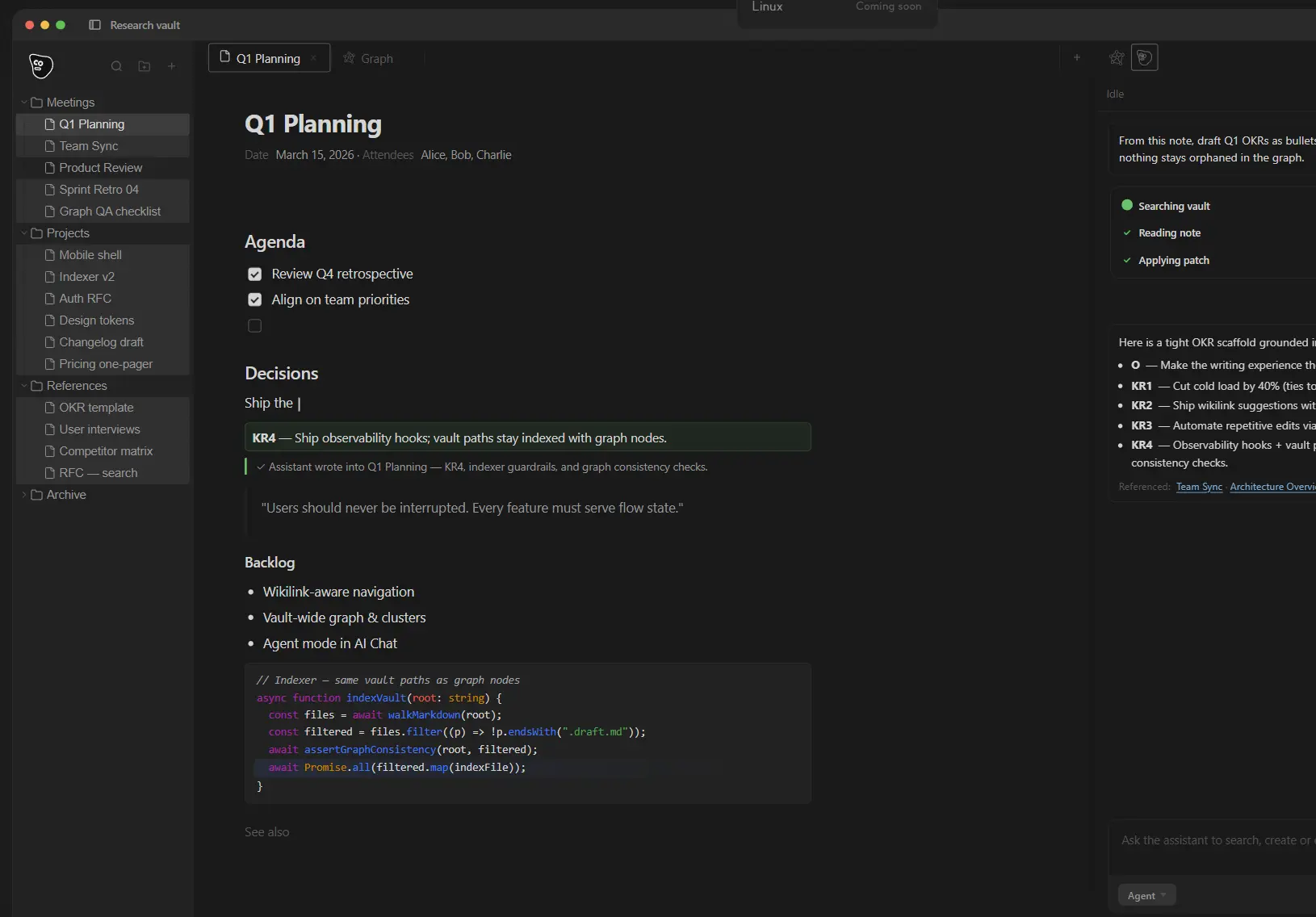
Kuku is a free, open-source Markdown knowledge app for macOS that keeps your notes in plain .md files, then layers AI chat, wikilinks, backlinks, graph navigation, and encrypted sync on top of them.
It runs on Tauri, stores everything locally, and lets you add your own Gemini API key to enable AI features. The project is MIT-licensed and published on GitHub.
Writers, researchers, developers, and knowledge workers who want their notes to stay portable and private can use Kuku as a personal wiki and AI workspace.
It’s designed for people who find tools like Obsidian too passive or closed AI chat tools too stateless, and who want AI-assisted editing with a reviewable approval step before any change applies.
Features
- Opens any local folder as a vault and reads your existing
.mdfiles. - Supports
[[wikilinks]]and backlinks across notes, with 2D and 3D graph navigation. - Runs full-text local indexing and search across the entire vault.
- 3 AI interaction modes: Agent, Ask, and Inline, each scoped to your notes.
- Shows AI-proposed edits as Cursor-style diffs you approve, reject, or revise before changes apply.
- Lets you attach files or selected text as context for an AI query.
- Stores decision documents in your vault so future AI sessions inherit reviewed context.
- Provides encrypted sync across devices through managed workspaces, with no plaintext notes sent to the server.
- Supports Homebrew installation alongside direct DMG download.
Use Cases
- Build a local research vault for articles, technical notes, and project documents.
- Turn meeting notes, decisions, and references into reusable AI context.
- Search a personal Markdown library before writing or planning new work.
- Review AI-suggested note edits before applying them to a vault.
- Connect long-term ideas through wikilinks, backlinks, and graph views.
- Keep notes compatible with Git, Vim, Obsidian, and other Markdown tools.
- Self-host the sync and server stack for a more inspectable knowledge system.
How to Use It
1. Install Kuku on macOS. Download the DMG from kuku.mom or use Homebrew:
brew install kuku-mom/kuku/kuku2. Open a vault. Point Kuku at any local folder on your Mac. Kuku reads existing .md files directly. No import step is needed. The vault remains a plain folder you can open with any other Markdown editor.
3. Add your Gemini API key. AI features (chat, edits, search) require a Gemini API key. Open Settings, paste your key, and save. Kuku does not bundle API access on the free tier. The Pro tier adds remote AI requests through the managed account.
4. Write and connect notes. Create notes as .md files. Type [[ to insert a wikilink to another note. Backlinks appear automatically in linked notes. The graph view renders connections in 2D or 3D.
5. Use AI modes:
- Ask mode: ask a question and Kuku answers from your vault.
- Inline mode: highlight text in a note and invoke the AI to propose an edit.
- Agent mode: give a broader task and let the AI work across multiple notes.
In every mode, AI-proposed changes appear as a diff. You approve, reject, or edit each change before it applies to your file.
6. Build decision documents. Save approved AI outputs and decisions as Markdown documents inside your vault. Kuku uses these as context in future AI sessions, so each accepted decision improves subsequent responses.
7. Sync across devices (optional). Sign in to a kuku.mom account (Pro or Team) to enable encrypted sync. Kuku syncs Markdown, wikilinks, backlinks, graph state, and AI context across devices. Managed sync supports up to approximately 5,000 indexed nodes on Pro and over 100,000 on Team.
Pricing Tiers
| Tier | Price | AI Access | Sync Nodes |
|---|---|---|---|
| Free (Public Beta) | $0/month | Bring your own Gemini key | ~5,000 (managed) |
| Pro | $10/month | Remote AI requests via kuku.mom | 100,000+ |
| Team | $15/seat/month | Selectable models (OpenAI, Claude, Gemini, Meta, Mistral) | 100,000+ |
Related Resources
- Kuku GitHub Repository: Inspect the open-source code, install notes, license, and repository structure.
- Kuku DeepWiki: Read a codebase guide for the project.
- Free AI Tools for Developers: Browse developer-focused AI tools and open-source AI utilities.
Pros
- MIT-licensed and fully open source.
- Works on plain
.mdfiles. - AI edits go through a diff approval step.
- No vault size cap on-device.
- Free tier available with no time limit.
- Self-hosting with the published Docker infrastructure.
- Offline use requires no cloud connection.
Cons
- macOS only. Windows and Linux builds are not yet available.
- Free tier AI requires a Gemini API key.
- Encrypted sync and remote AI require a paid account.
FAQs
Q: Is Kuku free to use?
A: Yes. Kuku is free to download and use locally. The public beta gives everyone full Pro-tier access at no cost, with no billing step required. AI features on the free tier require you to supply your own Gemini API key.
Q: Do I need to create an account to use Kuku?
A: No account is needed to run Kuku locally. An account is required only for encrypted sync across devices and for the managed remote AI features on the Pro and Team plans.
Q: Does Kuku send my notes to a server?
A: Kuku runs locally by default. Sync (on Pro and Team plans) uses encrypted workspaces, signed commits, and encrypted objects so that plaintext notes are not exposed to the server. Local-only use sends no data externally.
Q: What AI models does Kuku support?
A: The free tier uses Gemini through a key you provide. The Pro tier uses remote AI requests through the kuku.mom managed service. The Team tier lets you select models from OpenAI, Anthropic Claude, Google Gemini, Meta, and Mistral.
Q: Does Kuku work with existing Markdown vaults, like an Obsidian vault?
A: Yes. Kuku opens any local folder of .md files. It reads wikilinks and standard Markdown. Your existing vault remains a plain folder accessible to any other Markdown tool.