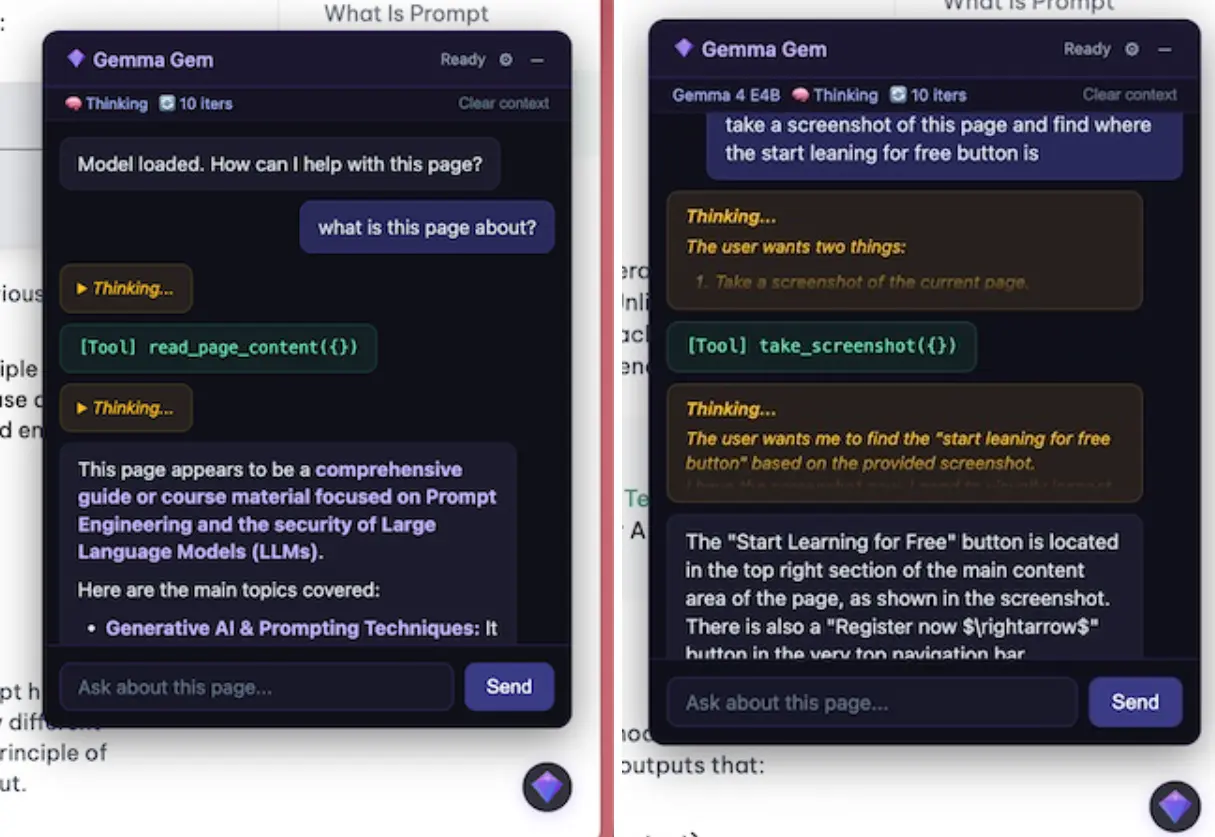
Gemma Gem is a free, open-source Chrome extension that runs Google’s Gemma 4 model on your device through WebGPU. A great privacy-preserving alternative to Google Chrome’s ‘Ask Gemini’.
It works as an in-page AI agent capable of reading page content, clicking buttons, filling forms, scrolling, executing JavaScript, and answering questions about any site the user visits.
Features
- Runs the Gemma 4 model locally with no account or API key required.
- Two model variants: the E2B at approximately 500MB and the E4B at approximately 1.5GB.
- Supports a 128K token context window on both model variants with q4f16 quantization.
- Reads page text and HTML by CSS selector or full-page scope.
- Captures the visible page as a PNG screenshot.
- Clicks page elements by CSS selector.
- Types into input fields by CSS selector.
- Scrolls the page up or down by pixel amount.
- Executes arbitrary JavaScript in the page context with full DOM access.
- Toggles native Gemma 4 thinking mode on or off.
- Caps agent tool call loops per request.
- Persists the selected model and per-site disable preferences across sessions.
Use Cases
- Extract structured data from a long research article and ask follow-up questions.
- Automate repetitive form filling on internal tools by describing target fields and values to the agent.
- Inspect the DOM structure of a web page by asking the agent to read specific CSS selectors and report their content.
- Run ad hoc JavaScript directly in the page context to probe or manipulate page state during development or debugging.
- Summarize full-length documentation pages on demand.
How to Use It
1. Clone the repository and install dependencies:
pnpm install2. Run the development build:
pnpm build3. Open chrome://extensions in Chrome, enable developer mode, click “Load unpacked,” and select the .output/chrome-mv3-dev/ directory.
4. Once the extension is installed and activated, you will see a gem icon appear in the bottom-right corner of any page. Click it to open the chat overlay. Ask questions about the page or issue action commands once the model finishes loading.
5. Access all settings via the gear icon in the chat header.
| Setting | Options | Notes |
|---|---|---|
| Model | E2B (~500MB) / E4B (~1.5GB) | Selection persists across sessions |
| Thinking | On / Off | Toggles native Gemma 4 thinking mode |
| Max iterations | Integer | Caps tool call loops per request |
| Clear context | Action | Resets conversation history for the current page |
| Disable on this site | Toggle | Disables extension per hostname, persisted |
6. Available Agent tools:
| Tool | Description | Execution context |
|---|---|---|
read_page_content | Reads text or HTML of the page or a CSS selector | Content script |
take_screenshot | Captures the visible page as a PNG | Service worker |
click_element | Clicks an element by CSS selector | Content script |
type_text | Types into an input field by CSS selector | Content script |
scroll_page | Scrolls up or down by pixel amount | Content script |
run_javascript | Executes JS in the page context with full DOM access | Service worker |
Pros
- Zero data leaves the device.
- No API key or subscription is required.
- The 128K context window handles full-length articles and long documentation pages in a single request.
Cons
- Chrome and WebGPU are mandatory.
- First run needs a large local model download.
- Local inference speed depends on available hardware.
Related Resources
- Gemma 4: Model cards and technical documentation for the Gemma 4 model family.
- WebGPU Browser Support Table: Check GPU and browser support status before attempting installation.
- PokeClaw: Free on-Device AI Agent for Android phone. Based on Gemma 4.
FAQs
Q: What is the difference between the E2B and E4B models?
A: E2B is a 2-billion-parameter variant requiring approximately 500MB of disk space. E4B is a 4-billion-parameter variant requiring approximately 1.5GB. The E4B model generatess higher-quality output on tasks that need more contextual reasoning.
Q: Can Gemma Gem automate actions on any website?
A: It can click elements, type into inputs, scroll, and execute JavaScript on any page where the extension is active. Sites with strict Content Security Policies may restrict JavaScript injection.
Q: Can I use Gemma Gem on a device without a discrete GPU?
A: Yes, WebGPU can leverage integrated graphics or fall back to CPU execution. Performance on lower‑end hardware may be slower. At least 8GB of system RAM is recommended for smooth operation with the larger E4B model.
Q: Is the model permanently stored offline after the first download?
A: The model is cached by the browser and remains available for offline use as long as the browser cache is not cleared. Subsequent sessions do not require an internet connection.