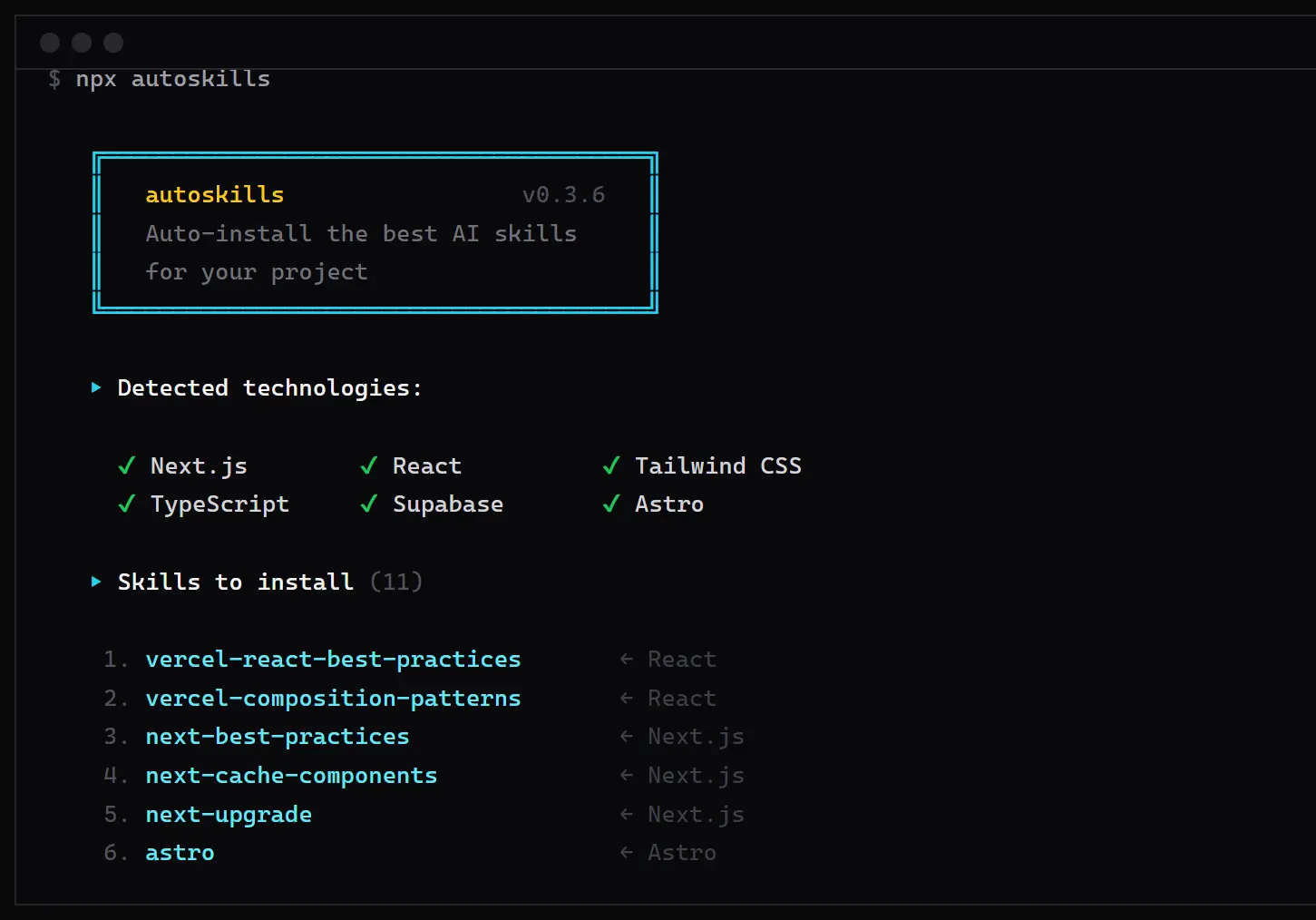
autoskills is a CLI tool for AI coding agents that scans your project root, detects the active tech stack from package.json and config files, and installs matched Agent Skills from a curated, SHA-256-verified registry.
Most developers who use Claude Code or Codex load agent skills manually or download/copy them from GitHub repositories. That process demands time and introduces supply-chain risk.
Browse popular & open-source agent skills at The Ultimate Claude Code Resource List.
autoskills replaces that manual hunt with automatic stack detection and a reviewed, hash-verified registry so you get project-appropriate skills faster and with a clear audit trail.
Features
- Downloads only the selected skill files for the detected stack.
- Checks downloaded files against recorded SHA-256 hashes before writing them locally.
- Writes a
skills-lock.jsonentry with the installed source and bundle hash. - Supports targeted installs for agent targets such as Cursor and Claude Code.
- Runs a dry preview through
--dry-runbefore local files change.
Use Cases
- Add stack-specific skills to a Claude Code project after cloning a repository.
- Preview AI agent skill matches before writing new files to an existing codebase.
- Set up Cursor or Claude Code skills across frontend, backend, mobile, and cloud projects.
- Use the same skill install command across teams that manage many JavaScript, TypeScript, and framework stacks.
- Audit installed agent-skill bundles through
skills-lock.json.
How to Use autoskills
autoskills works best after your project already has its normal dependency and config files in place. Run it after framework setup, package installation, lint configuration, test configuration, and deployment files exist.
1. Start inside the project root. The dry-run output gives you the safest first look at matched skills. Check the detected frameworks, runtimes, databases, test tools, and deployment targets before you install anything. A missing match usually means the registry does not contain a skill for that part of your stack yet, not that your project setup is broken.
npx autoskills --dry-run2. Run the installer after the preview looks correct. autoskills will ask for confirmation before it writes selected skill files. Keep the confirmation prompt on during the first run in an existing repository.
npx autoskills3. Use the yes flag only in a trusted setup flow, such as a fresh project template or a repeatable internal bootstrap script.
npx autoskills --yes4. Target a specific AI coding agent when the repository uses more than one agent environment. This keeps the generated skill files focused on the assistant that will actually read them.
npx autoskills --agent claude-codenpx autoskills --agent cursor5. Review the installed files before you rely on them for coding tasks. Agent skills can influence how an assistant edits code, follows project conventions, and chooses commands, so the installed instructions deserve the same review as config files, prompts, and automation scripts.
6. Check skills-lock.json after installation. The lock file records the installed source and bundle hash, which helps teams track what changed across machines, pull requests, and setup sessions.
7. Use verbose mode when autoskills fails or returns an unclear error.
npx autoskills --verboseautoskills CLI flags:
| Flag | Description |
|---|---|
-y, --yes | Skip the confirmation prompt |
--dry-run | Show matched skills without installing |
-v, --verbose | Show error details on failure |
-a, --agent | Install for a specific IDE only (e.g., cursor, claude-code) |
-h, --help | Show the help message |
Alternatives and Related Tools
- 10 Best Agent Skills for Claude Code & AI Workflows: Curated breakdown of the top reusable skill packs available for AI coding agents.
- Claude Code Commands Cheat Sheet: Complete reference for Claude Code slash commands, setup steps, and agent configuration.
- skills.sh: The registry autoskills pulls from, browseable directly for manual skill inspection or installation.
Pros
- One-command skill setup.
- Curated skill registry.
- SHA-256 file checks.
- Dry-run preview.
- Agent-targeted installs.
- Local lock record.
Cons
- Node.js requirement.
- CLI-only workflow.
- No GUI onboarding.
- Skills still need review.
FAQs
Q: Is autoskills free to use?
A: autoskills is free to run via npx autoskills. The tool carries a CC BY-NC 4.0 license, which covers non-commercial use. Commercial projects need to verify whether that license permits their specific development workflow before adopting it.
Q: Does autoskills require a signup or account?
A: No signup or account is required. Run npx autoskills in any project root and the tool detects the stack, fetches skills from the registry, verifies hashes, and writes files locally.
Q: What Node.js version does autoskills require?
A: Node.js 22 or higher. Check the current version with node --version. Projects on older runtimes need to upgrade or switch using a version manager such as nvm before running the tool.
Q: How does autoskills decide which skills to install?
A: It reads package.json and config files in the project root to identify active technologies, matches them against entries in the autoskills registry, and installs the corresponding curated skill files. Technologies with no registry entry are skipped.
Q: What is the security model behind autoskills?
A: Skill files are not downloaded directly from upstream GitHub repositories at install time. Maintainers sync skills into the autoskills registry, scan each file for prompt-injection and supply-chain risks, and record SHA-256 hashes in a manifest. Every file is verified against that manifest before it is written locally. A skills-lock.json entry records the installed source and bundle hash for auditing.
Q: What happens if a technology in my project has no skills in the registry?
A: autoskills skips it and installs skills only for technologies that have registry entries. Express, AWS, PostgreSQL, React Router, and Electron are among the technologies listed as having no skills yet. The tool completes the install for everything else and silently bypasses gaps.