Lathe is an open-source Go CLI and local web UI for generating hands-on technical tutorials through LLM skills in Claude Code, Cursor, or Codex. It stores tutorials on your machine, opens them in a browser-based reader, and uses slash-command style skills for tutorial generation, extension, questions, tagging, and verification.
A Lathe session starts inside an interactive coding-agent chat. You ask for a project-style tutorial, then open Lathe from the terminal and read the generated material in a local library. The model structures the lesson. You still type through the project by hand.
Lathe treats the LLM as a tutor, not a code autopilot. A normal coding agent tries to complete the task for you. Lathe turns the same model access into a learning path with tutorial parts, side notes, exercises, provenance records, local storage, writing voices, and opt-in verification.
Features
- Generates hands-on technical tutorials from natural-language prompts.
- Creates single-part tutorials and multi-part tutorial series.
- Runs through LLM skills inside Claude Code, Cursor, or Codex.
- Opens generated tutorials in a local browser UI through
lathe serve. - Stores tutorial files and metadata under
~/.lathe/tutorials/. - Records the prompt, model, voice, consulted URLs, tool versions, and tutorial status when available.
- Includes search, sorting, and filtering across the local tutorial library.
- Displays tutorial navigation through a table-of-contents sidebar.
- Adds side notes and reader exercises inside generated tutorials.
- Installs bundled skills into Claude Code, Cursor, Codex, or all supported agents.
- Answers tutorial questions through
/lathe-ask. - Extends existing tutorial series through
/lathe-extend. - Verifies tutorial steps through
/lathe-verifywhen the required toolchain exists locally. - Ships with
plainspokenandcompaniontutorial voices. - Creates custom writing voices through
/lathe-voice. - Runs as a self-contained local binary.
Use Cases
- Learn an unfamiliar programming topic through a project tutorial.
- Generate a hands-on starting path for a niche technical domain.
- Build a local library of coding tutorials across languages and tools.
- Ask follow-up questions about a generated tutorial part.
- Extend a single tutorial into a longer series.
- Check whether a tutorial compiles and runs inside a scratch directory.
- Create a guided learning path from a prompt inside Claude Code, Cursor, or Codex.
Best Workflow
Lathe makes the most sense when you want to learn by typing through a project. The project may involve a niche language, a young framework, a low-documentation domain, or a build-your-own style topic where normal tutorials are hard to find.
- Pick a technical topic you want to learn through implementation.
- Ask
/lathefor a hands-on tutorial in Claude Code, Cursor, or Codex. - Open the tutorial in the local Lathe reader.
- Type through the project manually.
- Use
/lathe-askwhen a step looks suspicious or unclear. - Use
/lathe-extendwhen the first part creates a useful base. - Run
/lathe-verifywhen the local toolchain exists and correctness matters.
How to Use Lathe
Table Of Contents
Basic Usage
Install the lathe binary first. macOS users can install it through Homebrew.
brew install devenjarvis/tap/latheLinux users can use the install script.
curl -sSf https://raw.githubusercontent.com/devenjarvis/lathe/main/install.sh | shGo users can install it through go install. This path requires Go 1.25 or newer.
go install github.com/devenjarvis/lathe@latestSource builds use the repository directly.
git clone https://github.com/devenjarvis/lathe
cd lathe
go build -o lathe
Install the bundled skills after the binary becomes available on your PATH. The default command installs the skills into the current project for Claude Code.
lathe skills installA user-level install makes the skills available across projects.
lathe skills install --userCursor users can install the skills as Cursor commands.
lathe skills install --agent cursorCodex users can install the skills into the Codex agent skills directory.
lathe skills install --agent codexInstall every supported agent path if you use multiple coding environments.
lathe skills install --agent allList the bundled skills when you need to confirm what Lathe installed.
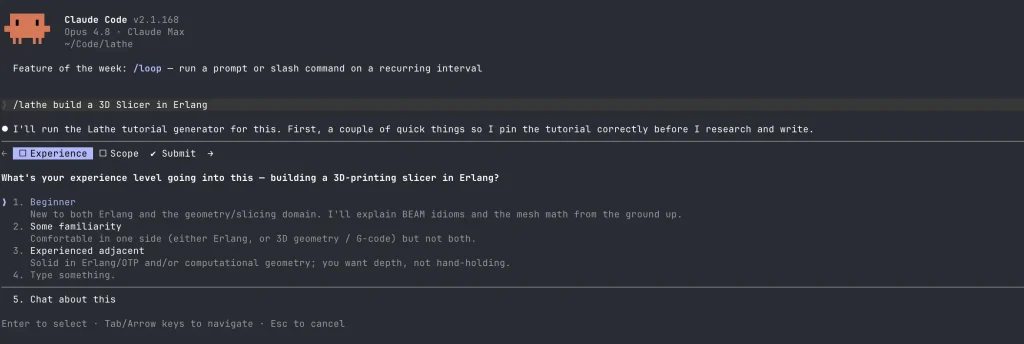
lathe skills listOpen Claude Code, Cursor, or Codex in an interactive session. Ask Lathe to generate a tutorial with a slash command.
/lathe build a 3D Slicer in ErlangStart the local Lathe reader from any terminal.
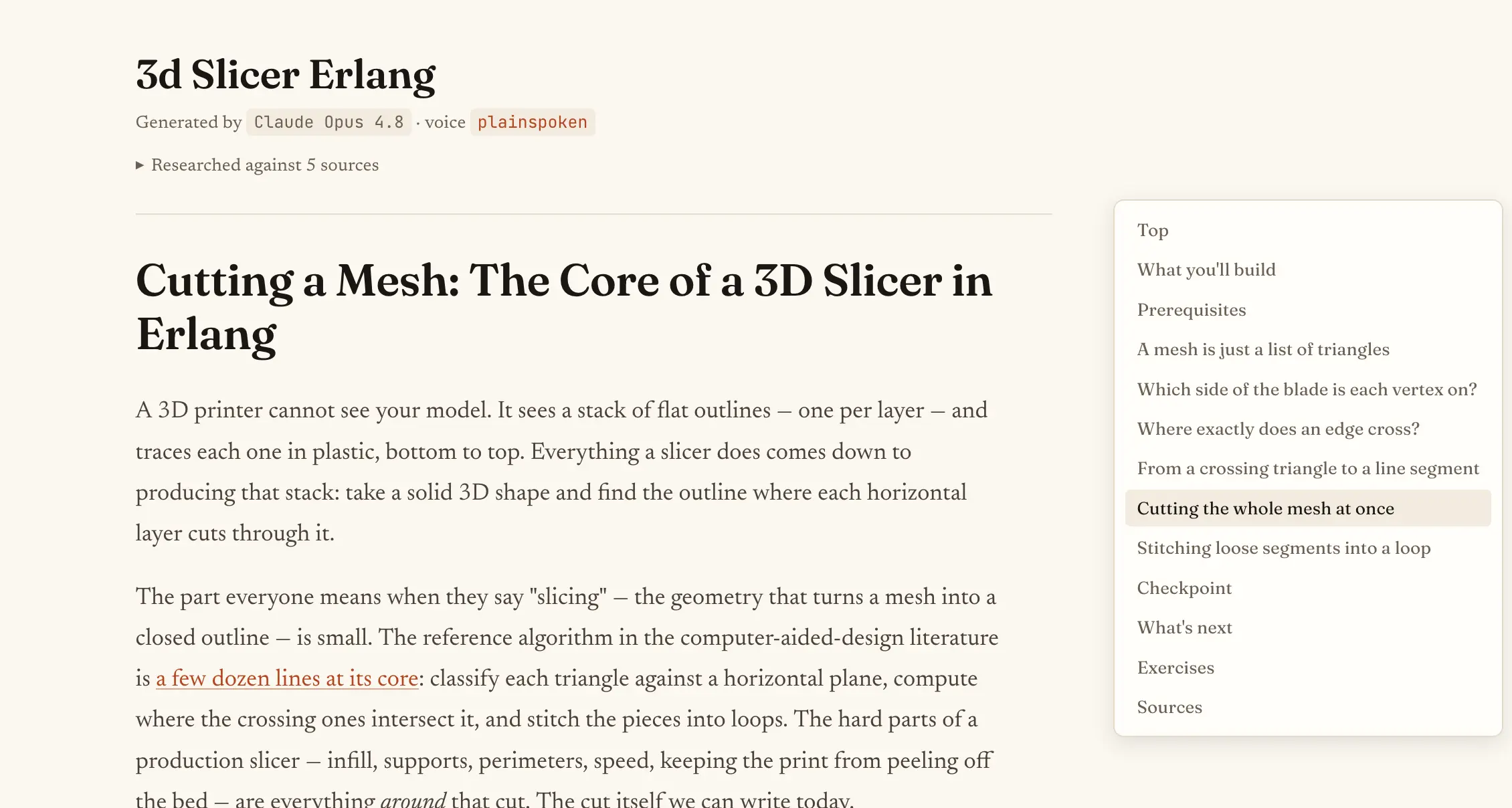
lathe serveLathe starts a local server, opens the browser, and displays the tutorial library. The default local address is:
http://localhost:4242Open the tutorial from the library page and read it like a project guide. The UI includes tutorial navigation, side notes, exercises, status metadata, and library controls.
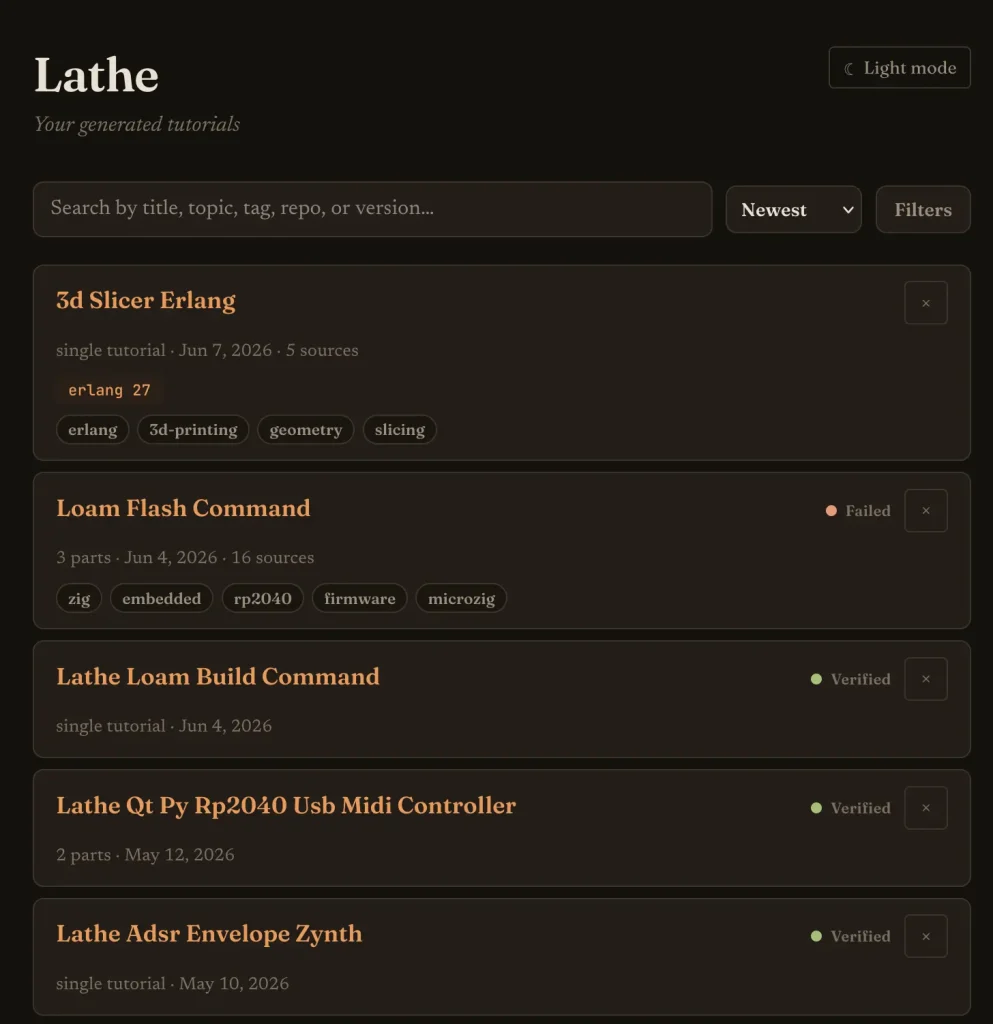
The UI buttons can hand you commands for tutorial questions, extension, or verification. Paste the command into Claude Code, Cursor, or Codex to run that next action inside your interactive LLM session.
Skill installation commands
| Task | Command |
|---|---|
| Install skills into the current Claude Code project | lathe skills install |
| Install skills at user level | lathe skills install --user |
| Install Cursor commands | lathe skills install --agent cursor |
| Install Codex agent skills | lathe skills install --agent codex |
| Install all supported agent targets | lathe skills install --agent all |
| List bundled skills | lathe skills list |
LLM skill commands
| Command | Purpose |
|---|---|
/lathe | Generates and stores a tutorial. |
/lathe-extend | Adds the next part to a tutorial series. |
/lathe-verify | Works through a tutorial and records a verification result. |
/lathe-ask | Answers questions about a tutorial part. |
/lathe-tag | Adds search tags to existing tutorials. |
/lathe-voice | Creates a custom tutorial voice. |
Voice commands
| Task | Command |
|---|---|
| List voices | lathe voice list |
Show the companion voice spec | lathe voice show companion |
Set companion as the default voice | lathe voice set-default companion |
| Add a custom voice from standard input | lathe voice add <name> --file - |
Lathe includes two built-in voices. plainspoken is the default voice. It uses precise prose and avoids invented persona claims. companion uses a warmer first-person style. Custom voices can change the prose register, person, and humor, but Lathe wraps them with fixed rules against impersonation, fabricated credentials, and denial of LLM authorship.
Storage and verification commands
| Command | Purpose |
|---|---|
lathe store | Copies a generated tutorial into the local library. |
lathe store --source <url> | Stores a consulted URL with the tutorial. |
lathe store --verify | Stores a tutorial and starts the verification handoff. |
lathe verify <slug> | Prints the verification command to use in the LLM session. |
lathe verify-result | Records the verification result. |
lathe extend-start | Marks a tutorial as being extended. |
lathe extend-commit | Commits a new tutorial part. |
lathe extend-commit --source | Adds consulted URLs during extension. |
Tutorial storage layout
Lathe stores tutorials globally under:
~/.lathe/tutorials/A multi-part tutorial may use a directory like this:
~/.lathe/tutorials/
  digital-synth-zig/
    metadata.json
    part-01.md
    part-02.md
    part-03.md
A single-part tutorial may use an index.md file.
~/.lathe/tutorials/
  database-from-scratch-go/
    metadata.json
    index.md
The metadata.json file can contain tutorial fields such as slug, title, topic, created date, status, tags, parts, tools, consulted URLs, voice, model, repository, and repository branch.
Tutorial status values
| Status | Meaning |
|---|---|
unverified | Lathe stored the tutorial, but no verification has run. |
verifying | Verification has started. |
verified | Verification completed successfully. |
failed | Verification found a failure. |
skipped | Verification could not run in the current environment. |
extending | Lathe is adding a new tutorial part. |
Alternatives and Related Resources
- Best CLI AI Coding Agents: Compare command-line AI coding tools before choosing a terminal-based workflow.
- OpenClaude: Review a CLI coding agent option related to Claude-style development workflows.
- SmallCode: Compare Lathe with a local small-model coding agent.
- OpenAI CLI: Review a CLI interface for OpenAI model workflows.
- Coddo: Browse a kanban-style UI for Claude Code projects.
- The Ultimate Claude Code Resource List: A curated list of 100+ free agents, skills, and plugins for Claude Code.
Pros
- Free MIT-licensed project.
- Local tutorial library.
- Claude Code skill support.
- Cursor command support.
- Codex skill support.
- Clear verification states.
- Useful provenance records.
- Searchable local UI.
- Custom tutorial voices.
Cons
- LLM hallucinations remain possible.
- Verification is opt-in.
- External LLM costs apply.
- Human tutorials remain better.
- Soft isolation only.
FAQs
Q: Is Lathe free?
A: Lathe is free under the MIT license. Claude Code, Cursor, Codex, and the model access behind those tools may have separate account requirements, subscriptions, or usage limits.
Q: Does Lathe include its own AI model?
A: Lathe does not include its own model or hosted LLM backend. It runs skills inside an interactive Claude Code, Cursor, or Codex session.
Q: Which platforms does Lathe support?
A: The release setup targets macOS and Linux on amd64 and arm64. The available install paths do not establish Windows support.
Q: Can Lathe verify generated tutorials?
A: Lathe can verify tutorials through /lathe-verify <slug>. Verification is opt-in and requires the tutorial’s target toolchain to exist on your machine.
Q: Are Lathe tutorials reliable?
A: Lathe tutorials can contain LLM mistakes. The verification flow, provenance records, side notes, and manual typing workflow reduce blind trust, but they do not guarantee correctness.
Q: Where does Lathe store tutorials?
A: Lathe stores tutorials in ~/.lathe/tutorials/. Each tutorial directory can include markdown parts, metadata.json, verification results, tool version data, consulted URLs, voice details, and model information.
Q: How is Lathe different from prompting Claude directly?
A: Lathe adds a local tutorial library, reader UI, metadata, provenance records, writing voices, extension flow, status tracking, and verification handoff. A plain chat prompt usually leaves the tutorial inside the chat session.