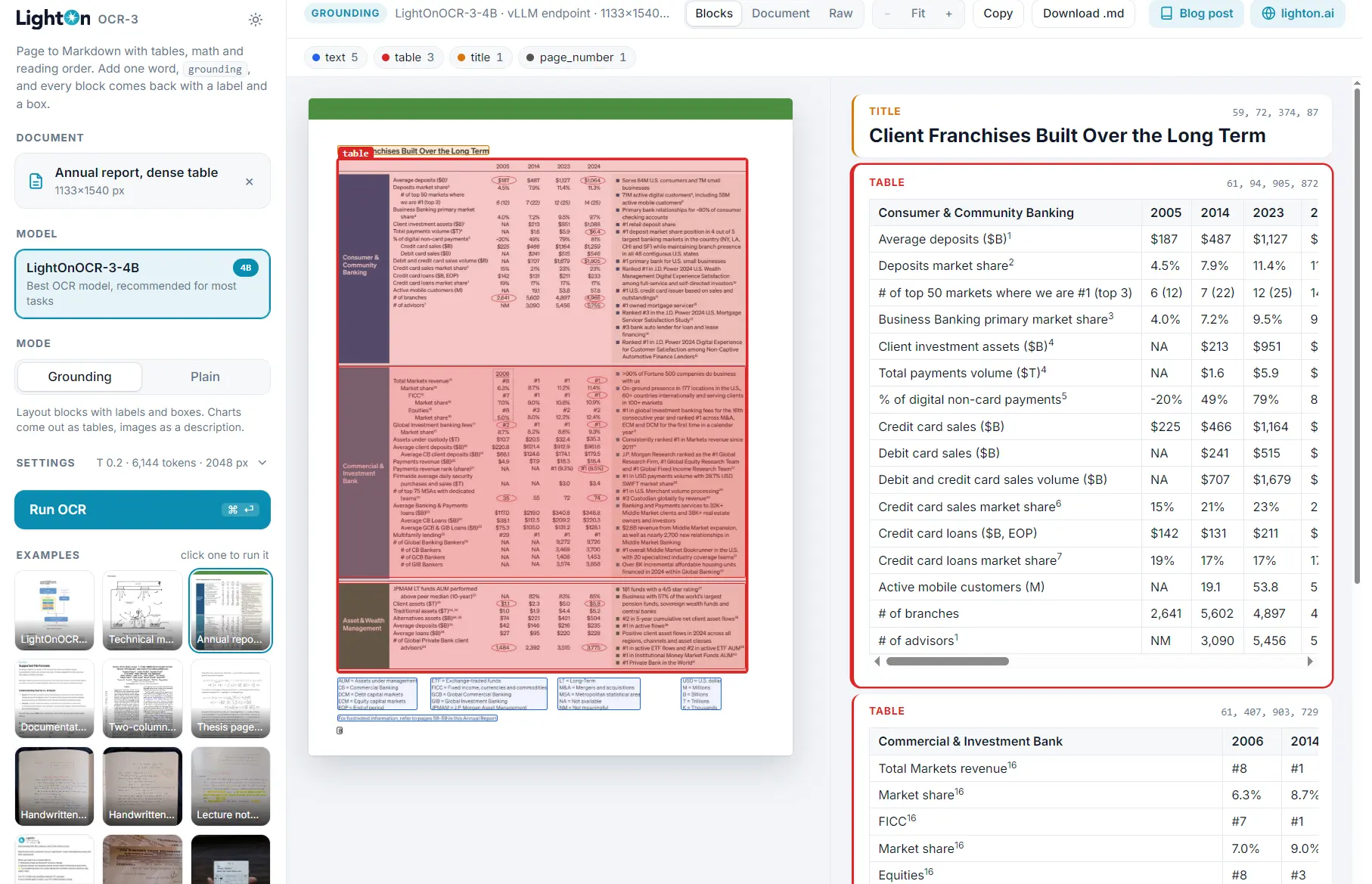
A free online OCR app that converts PDFs and document images into structured Markdown using the LightOnOCR-3 model.
It reads text from scanned pages and reconstructs headings, tables, mathematical expressions, and reading order in a form you can edit or index.
The app also lets you inspect the original page alongside the extracted content. Grounding mode identifies individual document regions, attaches labels and coordinates, describes images, and converts recognized chart data into HTML tables.
Hovering over a result block highlights its original position in the source document for a direct comparison on complex pages.
Features
- Convert uploaded PDFs and document images into Markdown.
- Recover headings, paragraphs, lists, tables, mathematical expressions, and reading order.
- Extract document regions with labels and bounding-box coordinates in Grounding mode.
- Generate brief image descriptions and HTML tables of recognized chart data.
- Inspect source pages beside Blocks, Document, and Raw output views.
- Hover over an extracted block to highlight its original position on the page.
- Copy or download the OCR result for editing, archiving, or document search.
- Run LightOnOCR-3 models locally.
Plain and Grounding Modes
LightOnOCR-3 processes a rendered page image and returns text in document order. In Plain mode, the image is the entire model prompt. The result is Markdown with heading structure, HTML tables, and LaTeX mathematical notation.
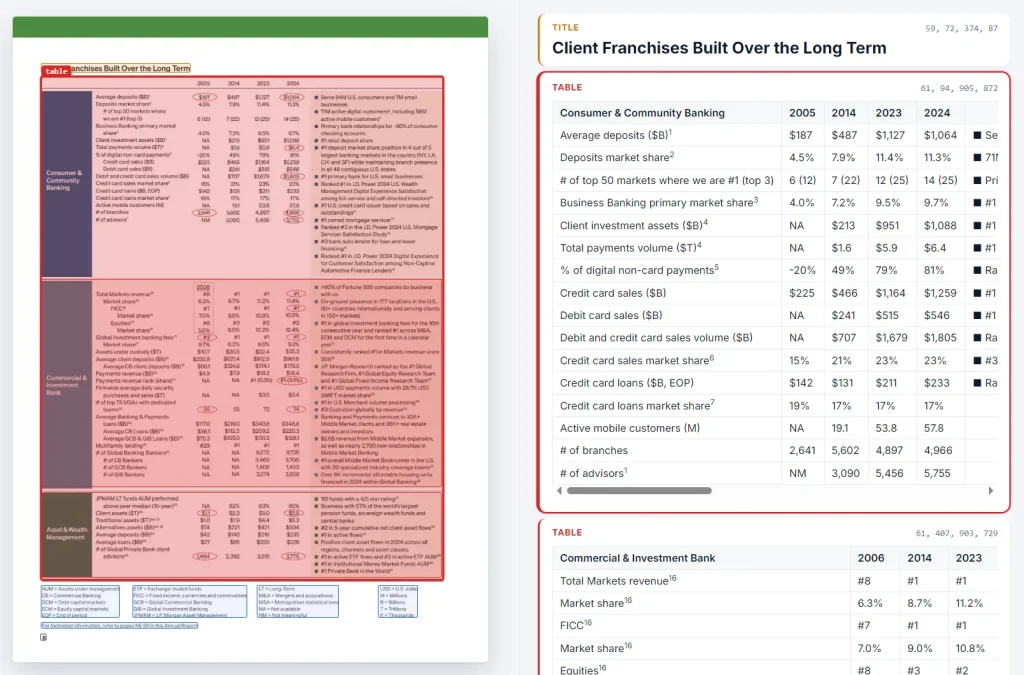
Grounding requests a richer representation by sending the page image with the single prompt word grounding. The model identifies content regions and inserts markers in the form .
A label identifies the region type, and four coordinates describe its position on the original page on a normalized 0–1000 scale. Grounding also writes short descriptions for detected images and HTML data tables for recognized charts.
| Mode | Result |
|---|---|
| Plain | Markdown transcription with reading order, tables, and math. |
| Grounding | Markdown plus region labels, location boxes, image descriptions, and chart tables. |
Inspecting Extracted Blocks
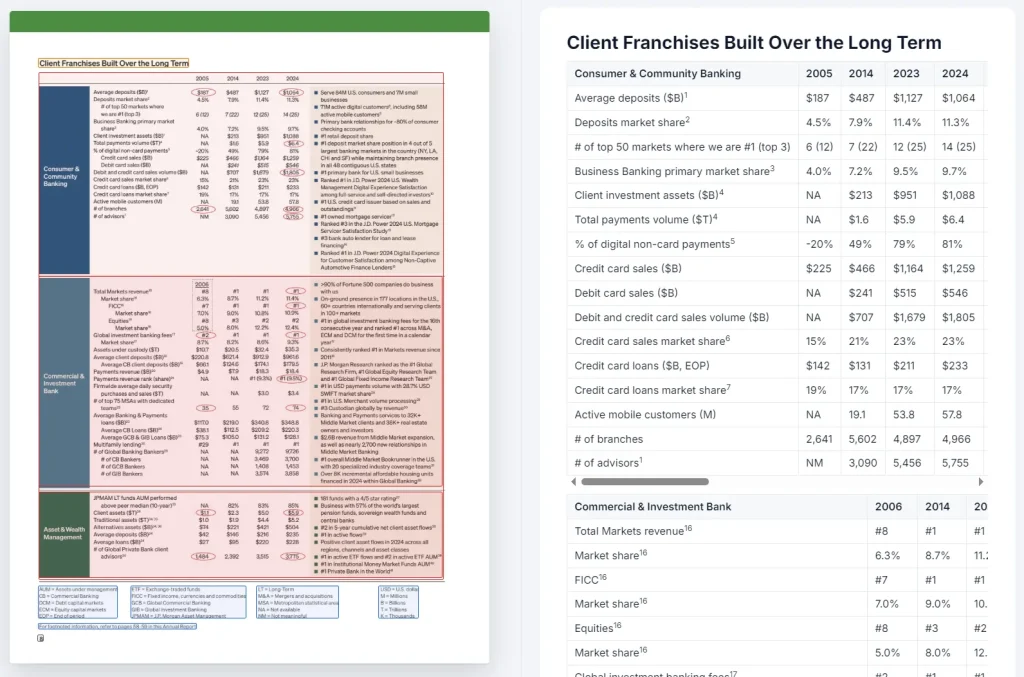
The app displays the source document beside the conversion result. Blocks presents individual extracted regions, and hovering over a block highlights the corresponding part of the original page. You can locate a paragraph, figure, equation, or table in the original scan.
Switch to Document for a continuous view of the reconstructed content or Raw to inspect the model output and Grounding markers. For a two-column research paper or a chart-heavy report, you can check whether the content follows the expected reading order and whether extracted values match the page.
How to Use It
1. Open the LightOnOCR-3 demo on Hugging Face and upload a PDF or document image.
2. Select Plain to extract Markdown text or Grounding to include labeled regions, image descriptions, and chart tables.
3. Open Settings if you need to adjust the inference settings for the page.
4. Click Run OCR to process the uploaded document.
5. Review the result in Blocks, Document, or Raw. Hover over an item in Blocks view to locate its source region.
6. Click Copy to use the result in another editor or Download to save the generated Markdown.
What Can You Do with the Extracted Content?
Work with scanned research papers. LightOnOCR-3 can recover section headings, multi-column text, equations, and tables from a scientific page. Markdown provides a working text version for editing or indexing. Grounding coordinates help locate a formula or citation in the original scan when you need to check it.
Extract information from reports. An annual report can contain paragraphs, financial tables, photographs, and charts within a single page. Grounding keeps these region types distinguishable and converts detected chart data into HTML tables. Review figures against the source before using extracted numbers in calculations or reports.
Prepare documents for a knowledge base. A local document-processing pipeline can collect page Markdown and parsed region data for search or retrieval-augmented generation (RAG). Headings and region labels provide structure for dividing content into meaningful blocks, and the bounding boxes provide coordinates for linking a retrieved passage to its original page.
LightOnOCR-3 Models and Local Processing
LightOnOCR-3 is a family of three downloadable models. All three generate Plain and Grounding output. The 0.8B and 4B variants use the Qwen3.5 vision-language architecture, while the 1B variant continues the earlier LightOnOCR architecture.
LightOn’s published olmOCR-Bench results place the 4B variant at 86.3 overall, the 0.8B at 85.5, and the 1B at 84.5. For most OCR tasks, LightOn recommends the 4B model. The 0.8B is a smaller alternative, and the 1B is relevant to integrations using the previous architecture.
| Model | Main consideration |
|---|---|
| LightOnOCR-3-0.8B | Smallest model, with a 2048 px default page edge in the official client. |
| LightOnOCR-3-1B | Earlier model architecture with a 1540 px default page edge. |
| LightOnOCR-3-4B | Highest overall score among the three in LightOn’s evaluation, with a 2048 px default page edge. |
Run LightOnOCR-3 Locally
The LightOnOCR GitHub repository provides a CLI, Python client, and browser-based viewer for models served through vLLM.
The example below uses the 1B model and the repository’s pinned dependencies. It requires Python tooling, a working uv installation, and a machine capable of serving the model with vLLM.
A CLI run saves a page image and Markdown for each processed PDF page in an out/<name>/ directory. Grounding runs also write a JSON file with parsed blocks for each page.
The viewer lets you browse the output, and the Python client exposes methods for Plain transcription, Grounding regions, and conversion of those regions into Markdown.
You can also send images to the local model through its OpenAI-compatible endpoint.
git clone https://github.com/lightonai/LightOnOCR.git
cd LightOnOCR
uv sync --extra vllm
source .venv/bin/activate
# Terminal 1: start the local model server.
vllm serve lightonai/LightOnOCR-3-1B \
  --limit-mm-per-prompt '{"image": 1}' --max-model-len 16384 \
  --mm-processor-cache-gb 0 --no-enable-prefix-caching --port 8010
# Terminal 2: from the LightOnOCR directory, activate the environment.
source .venv/bin/activate
lightonocr paper.pdf --mode grounding
lightonocr viewer
Pros
- Free app for PDF and document-image conversion.
- Markdown transcription preserves text structure, mathematical notation, and tables.
- Grounding connects extracted blocks to source-page positions and includes chart data.
- Downloadable models, local CLI, and Python integration under Apache 2.0.
Cons
- Chart-to-table extraction can misinterpret numerical values or plotted marks.
- Grounding markers need parsing when an editor expects ordinary Markdown.
Alternatives & Related Resources
- Free Accurate OCR for Complex Documents – Chandra OCR 2
- Turn Document Images into Markdown (92.94% Accuracy) – FireRed-OCR
- Multilingual OCR for PDFs and Images – Free Mistral OCR