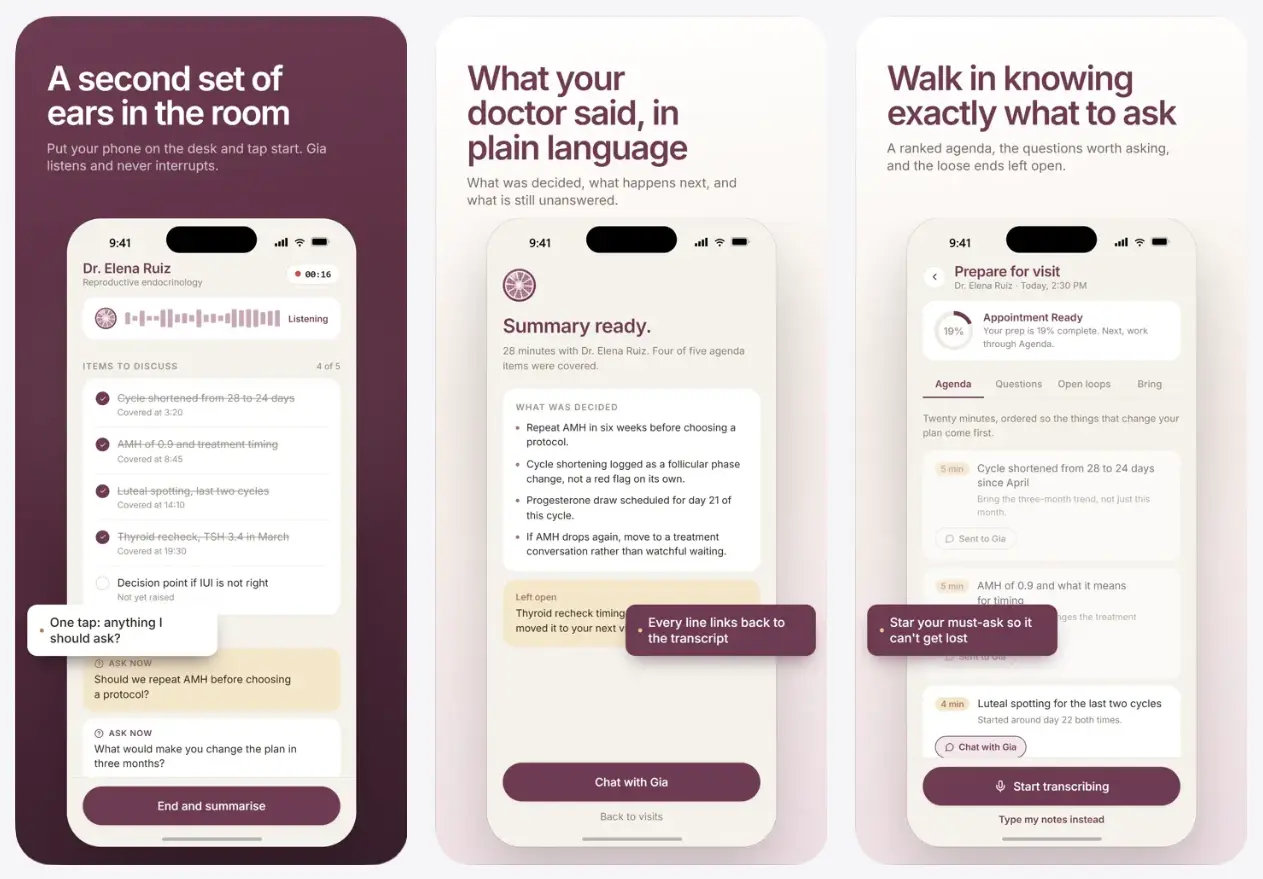
Gia Health is an AI women’s health companion that prepares questions for medical appointments, records consultations with your permission, and organizes what happens afterward. It draws on your symptoms, lab reports, medications, and earlier visits to create an agenda for your next conversation with a clinician.
During an appointment, you can follow your questions and record the discussion if everyone required has consented. Gia turns the recording into a transcript-linked summary of decisions, follow-up tasks, and concerns that need another conversation. That visit becomes part of the history Gia uses to prepare for future appointments.
Key Features
- Builds a prioritized appointment agenda from your health history and the reason for your visit.
- Keeps essential questions available during an appointment and identifies topics needing follow-up.
- Records medical conversations only after you explicitly start a consent-based recording.
- Produces visit summaries with decisions, action items, and links to the relevant transcript moments.
- Extracts information from photographed lab reports, prescriptions, and discharge notes.
- Tracks lab results over time alongside symptoms and other health information.
- Reads selected sleep, heart rate, HRV, cycle, and activity data from Apple Health and Oura.
- Recognizes upcoming visits through Apple Calendar and Outlook connections.
- Answers questions about your own records through chat or voice, with source references on relevant health explanations.
How Gia Works Before, During, and After a Doctor’s Visit
Gia builds each visit around the questions you want answered and the information already recorded from previous consultations. The appointment agenda, in-room notes, and post-visit summary all feed into your ongoing health history.
Prepare questions before the visit
Tell Gia which clinician you’re seeing and what you want to discuss. The app reviews relevant symptoms, medical records, lab values, and questions left open at earlier appointments. It turns that context into a ranked agenda. You can star essential questions about changes in symptoms, test results, medications, or referrals.
For example, someone visiting a gynecologist after an endocrinology appointment can bring up a previous lab finding and the follow-up the endocrinologist requested. Gia keeps that information available in the agenda for the new appointment.
Follow the agenda during the conversation
Keep the agenda open while you speak with your clinician. Gia tracks topics already discussed and flags questions that need attention. When you want help during the visit, you can ask what to clarify or what you have missed.
Recording is optional. If you choose to record, you explicitly start the session after confirming the necessary consent. Gia captures the conversation quietly, shows a recording indicator, and lets you stop it with a tap. The appointment agenda and notes-only option are available for a visit where you do not record audio.
Review the visit summary and next steps
After a recorded appointment, Gia generates a plain-English summary of what was discussed, what was decided, and what comes next. Follow-up items identify actions for you and, when mentioned, tasks for the clinic, including tests, referrals, or another appointment. Unanswered questions stay in your history for later visits.
Each summary point links to the relevant moment in the transcript. If you need to check the wording of a medication instruction or an agreed follow-up, you can return to the original conversation. Gia also lets you flag AI-generated information that looks incorrect.
Organize Lab Reports, Symptoms, and Wearable Data
Your health record in Gia extends beyond recorded visits. Photograph a laboratory report, discharge note, or prescription, and the app reads and files the information. When you import later test results, Gia displays values over time, alongside the symptoms and appointments that provide context for the discussion.
You can also connect Apple Health or an Oura Ring and authorize the categories of information you want to share. Sleep, heart rate, heart rate variability (HRV), menstrual-cycle records, and activity are among the supported measurements. Apple Calendar and Outlook connections help Gia recognize upcoming doctor visits.
Ask Gia about information already in your record through text or voice. For example, you can ask about the difference between two recorded thyroid test results or what questions were left open at your previous appointment. Gia also refreshes an AI-generated health insight approximately every 24 hours. Relevant medical explanations have expandable source references, including medical and public-health organizations. These insights help prepare questions for a clinician. Gia does not determine diagnoses or treatments.
Women’s Health Situations Gia Helps You Prepare For
Gia is designed around hormonal and reproductive health concerns that often require multiple tests and appointments. Its records and visit agendas are useful for situations including:
- PCOS and irregular cycles: Review symptom changes, cycle history, and earlier test results before discussing an evaluation or follow-up.
- Endometriosis and painful periods: Track pain severity, previous assessments, and questions about a referral or further investigation.
- Fertility and trying to conceive: Keep cycle notes, fertility-related lab results, and decisions from successive consultations together.
- Thyroid and metabolic concerns: Bring previous laboratory panels, medication changes, and symptom notes into a discussion about ongoing care.
- Perimenopause: Prepare a history of cycle changes and other concerns before a consultation.
- Changes in energy, weight, skin, or hair: Record when symptoms appeared and what questions need to be raised during the appointment.
How to Get Started with Gia Health
1. Download Gia from the Apple App Store.
2. Enter your health concerns. Describe your symptoms, current medications, and the reason for an upcoming visit. This gives Gia enough context to prepare your first agenda.
3. Import records if you have them. Photograph a recent lab report or another medical document. Apple Health, Oura, and calendar connections are optional and request authorization for the information they use.
4. Create an appointment agenda. Tell Gia whom you’re seeing and why. Review its ranked questions and star anything you particularly want to discuss.
5. Use Gia during the visit. Follow the agenda on your phone. To capture the conversation, confirm the required consent and start recording yourself. You can use notes when recording is inappropriate.
6. Review the result. Open the post-visit summary, check its transcript references, and keep any unfinished questions in your record for the next appointment.
Privacy, Recording Consent, and Medical Limits
Gia handles sensitive information from medical documents, appointments, connected health services, and recordings. Health-data connections are optional, and the app asks for permission before sending relevant information to external AI services.
The app identifies Microsoft Azure and Anthropic as AI processing providers. You can withdraw AI-sharing consent from Profile → Settings → Privacy and data → AI data sharing, which stops new authorized transfers and disables AI features until consent is restored. Disconnecting Apple Health, Oura, or a calendar stops future syncing.
The App Store’s privacy disclosure identifies health data, audio, account identifiers, and usage information among data that can be linked to your identity. It also lists your name as contact information that may be used for developer advertising or marketing. Gia states that it does not sell health information or use health information for advertising. For the detailed data controls and retention terms, see Gia’s privacy policy.
Visit recording never begins automatically. You choose when to start and stop it, and a visible indicator appears during recording. Confirm the clinician’s and any other legally required consent before recording an appointment. Audio recordings are deleted after seven days by default. Transcripts and summaries stay in your record until deleted. Gia’s account-deletion process includes a 30-day recovery period before personal records are permanently removed, subject to limited access-audit records. You can lock the app with Face ID.
Gia is an appointment and health-record companion, not a medical device. It does not diagnose conditions, prescribe medication, or replace decisions made with a licensed clinician. AI-generated summaries and insights can contain errors, particularly when details of a medical conversation are unclear.
Pros
- Carries questions and follow-up actions across successive appointments.
- Links recorded-visit summaries to the source transcript.
- Reads lab documents and connects optional health and wearable data.
- Free to download on iPhone and iPad.
Cons
- No official Android version is listed.
- Authorized health information is processed by external AI providers.
- Audio recording requires appropriate consent.
Alternatives & Related Resources
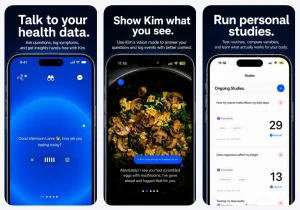
- Free AI Personal Health Assistant for Apple Health – Kim App
- Free AI Doctor Available 24/7 – Doctronic
- Get AI-Powered Health Insights With Ubie’s Symptom Checker