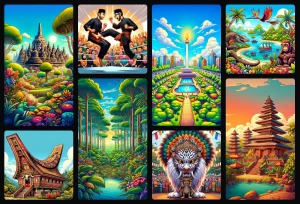
GPT-4o Ghibli At Home is an open-source, self-hosted AI photo stylizer you can run locally on your own computer.
It uses the latest FLUX.1-Kontext-dev model to transform your photos into a wide range of artistic styles, from animation to oil paintings, while making your images remain private on your machine.
This tool is for people who want the power of AI image generation without uploading their photos to a third-party service. It gives you full control over the creative process, with no logins or subscriptions required.
Features
- Advanced Model Pipeline: Utilizes FLUX.1-Kontext-dev enhanced with DFloat11 for superior image quality and processing efficiency
- Extensive Style Library: Dozens of pre-configured style profiles organized by categories including Animation, Artistic, Vintage, and Cyberpunk themes
- Custom Profile Management: Create, save, and organize your own style configurations for consistent results across projects
- Complete Privacy: All processing occurs locally on your machine. No data leaves your system
- Professional Controls: Fine-tune inference steps, guidance scales, seeds, and prompts for precise artistic control
- Undo/Redo History: Iterate through different style variations without losing previous work
- Automatic VRAM Optimization: Intelligent memory management allows operation on consumer-grade graphics cards
- Background Processing: Asynchronous task queue prevents system overload during intensive operations
- Persistent Storage: Generated images are automatically saved with configurable cleanup schedules
Use Cases
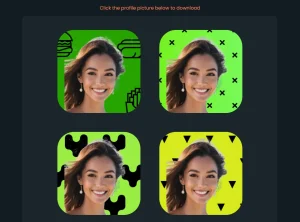
- Creating Custom Avatars: Turn your portrait into a unique avatar in a comic book, cyberpunk, or animated style for social media profiles.
- Artistic Photo Editing: Give your travel photos a new look by transforming them into oil paintings or vintage film stills before sharing them.
- Concept Art and Inspiration: Artists and designers can quickly generate different stylistic versions of a concept to explore visual ideas without starting from scratch.
- Privacy-Focused Fun: Stylize photos of family and friends without the privacy concerns that come with using public AI image generators.
How To Use It
1. Clone the project from GitHub.
git clone https://github.com/TheAhmadOsman/4o-ghibli-at-home.git
cd 4o-ghibli-at-home
2. Set Up a Virtual Environment:
- Using
uv(recommended):uv venv - Using standard Python:
python3.11 -m venv .venv
3. Activate the environment you just created.
- On Windows:
.venv\Scripts\activate - On macOS/Linux:
source .venv/bin/activate
4. Install all the necessary Python libraries.
- Using
uv:uv pip install -r requirements.txt - Using
pip:pip install -r requirements.txt
5. Configure Your Settings. The application uses a .env file for configuration. Rename the template file .env_template to .env. You can open this file in a text editor to adjust settings like where to save images. For most users, the default settings are fine to start.
# .env configuration file for the Flask Image Generation App
#
# Copy this file to .env in the root directory and modify the values as needed.
# Lines starting with # are comments. Do not use quotes around values.

# --- Application & Queue Settings ---

# Maximum number of jobs that can be waiting in the queue.
# Prevents the server from being overloaded with requests.
# Default: 10
MAX_QUEUE_SIZE=10

# Maximum allowed size for uploaded image files in megabytes (MB).
# This helps prevent denial-of-service attacks using large uploads.
# Default: 10
MAX_UPLOAD_MB=10


# --- Job & File Management ---

# How long to keep job results (including generated images) in memory and on disk.
# Value is in seconds.
# Default: 600 (10 minutes)
JOB_RESULT_TTL=600

# How often the cleanup worker runs to remove expired jobs and files.
# Value is in seconds.
# Default: 300 (5 minutes)
CLEANUP_INTERVAL=300

# The name of the folder where generated images will be saved.
# This folder will be created if it doesn't exist.
# Default: "generated_images"
RESULTS_FOLDER=generated_images


# --- Model & Hardware Settings ---

# The PyTorch device to use for model inference.
# The script will auto-detect CUDA if available. Use this to override.
# Options: "cuda" (for NVIDIA GPUs), "cpu"
# Note: Running on CPU will be extremely slow.
# Default: (auto-detects cuda, falls back to cpu)
PYTORCH_DEVICE=cuda
6. Start the local server with a single command. The first time you run it, the app will download the AI models, which can take some time depending on your internet connection.
python3.11 app.py7. Once the server is running, open your web browser and go to http://127.0.0.1:5000. You can now upload an image and start applying different styles.
Pros
- Complete Privacy: Your data never leaves your machine.
- No Cost to Use: The tool is free, and since it runs locally, there are no processing credits or subscription fees.
- Highly Customizable: You can create and save your own styles.
- Simplified Setup: For a local AI tool, the architecture is quite simple, avoiding common complexities like database or message queue setup.
- VRAM Optimization: The automatic CPU offloading is a thoughtful feature that makes it accessible to users who don’t have top-of-the-line, high-VRAM GPUs.
Cons
- Requires Technical Setup: You need to be comfortable using the command line and installing Python packages.
- High VRAM is Still Better: While it has optimizations, the tool performs best with a powerful NVIDIA GPU, preferably with around 21GB of VRAM for optimal speed.
- CPU Performance is Slow: The application can fall back to using your CPU, but it’s significantly slower than using a GPU.
- Non-Commercial License: Commercial use is not permitted without a separate license.
FAQs
Q: What is FLUX.1-Kontext-dev?
A: FLUX.1-Kontext-dev is a powerful, open-weight image editing model developed by Black Forest Labs. It’s known for its ability to edit images based on context and maintain character consistency, which is what gives this tool its high-quality output.
Q: How does the quality compare to ChatGPT’s built-in image generation?
A: The tool uses an advanced FLUX.1-Kontext-dev model that produces higher-quality results than many cloud services. The ability to fine-tune parameters and use custom styles can result in superior output, though processing time may be longer.
Q: Can I modify the existing style profiles or create new ones?
A: Yes, the application includes a custom profile management system that allows you to save, modify, and organize your own style configurations. You can also adjust parameters of existing profiles to suit specific needs.