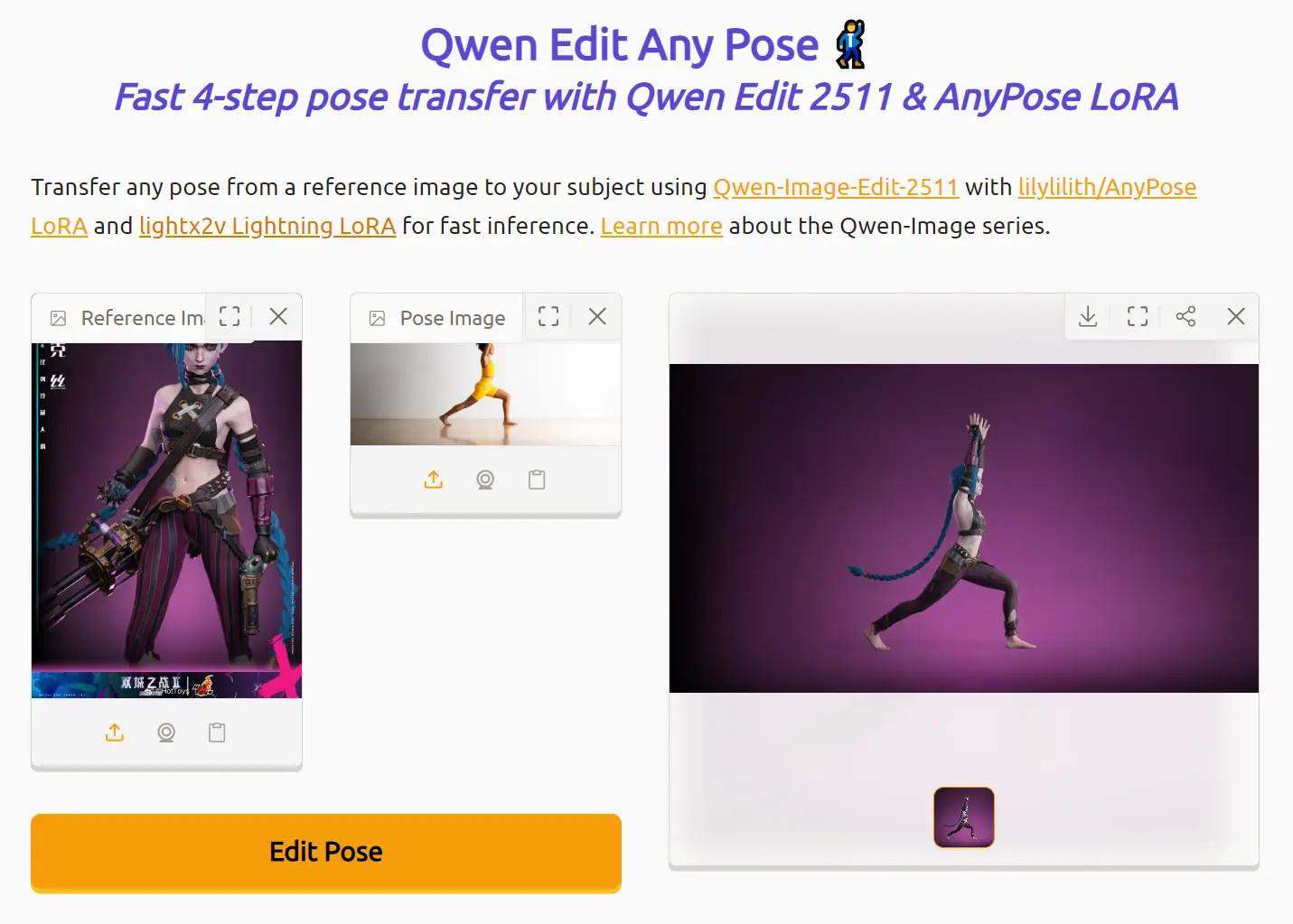
Qwen Edit Any Pose is a free AI-powered image editing tool that transfers poses from one image to another person or subject. It combines Qwen-Image-Edit-2511 with AnyPose LoRA and lightx2v Lightning LoRA to complete pose transfers in just 4 inference steps.
You can manipulate complex poses, such as handstands, bridges, and unusual body positions, that traditional image editing methods struggle to replicate. The AI automatically fills in missing body parts and adapts backgrounds to match your reference image.
Features
- Fast 4-Step Inference: The Lightning LoRA reduces processing from 40 steps to just 4 steps (approximately 10x faster).
- No ControlNet Required: The AnyPose LoRA handles pose transfer without additional control net configurations.
- Complex Pose Support: The model handles difficult poses, including handstands, bridges, bends, and unconventional body positions.
- Automatic Missing Area Fill: The system fills in body parts not visible in the original image (like lower body portions).
Use Cases
- Character Animation Pre-vis: Animators can test different character poses quickly before committing to final animation frames.
- Social Media Content Creation: Influencers and content creators can generate multiple pose variations from a single photoshoot.
- Fashion Photography Mockups: Fashion designers can visualize how garments look in various poses without scheduling additional model sessions.
- Digital Art Reference: Digital artists can generate pose references for character illustrations and concept art.
- Fitness Form Demonstration: Fitness instructors can create proper form demonstrations by transferring correct poses to different body types.
How To Use It
1. Upload the image containing the person or subject you want to edit. The tool works best when the full body and the surrounding environment appear in the frame. Partial body shots can work, but may produce inconsistent results as the AI fills in missing areas.
2. Upload a second image that contains the target pose you want to transfer. This image can feature any person or 3D model in the desired position. The tool extracts only the pose structure, not the appearance.
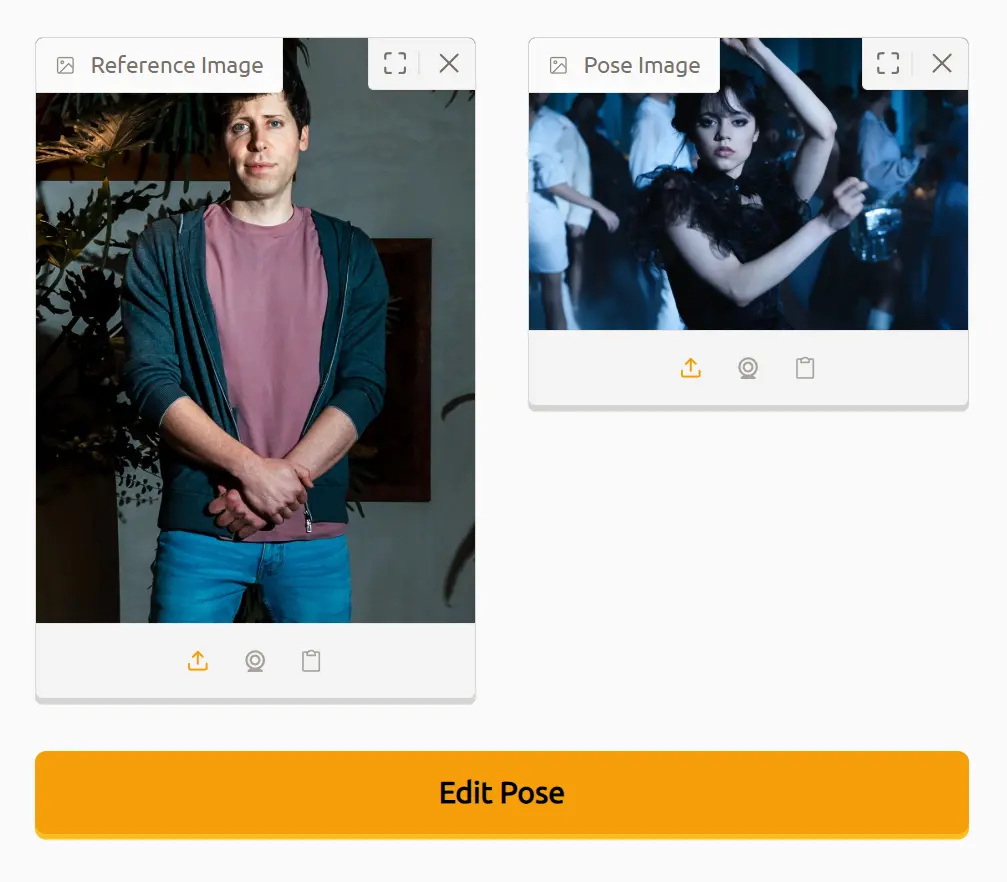
3. Click “Edit Pose” to initiate the transfer process. The Lightning LoRA completes the operation in approximately 4 inference steps. Processing time depends on the current server load and image resolution.
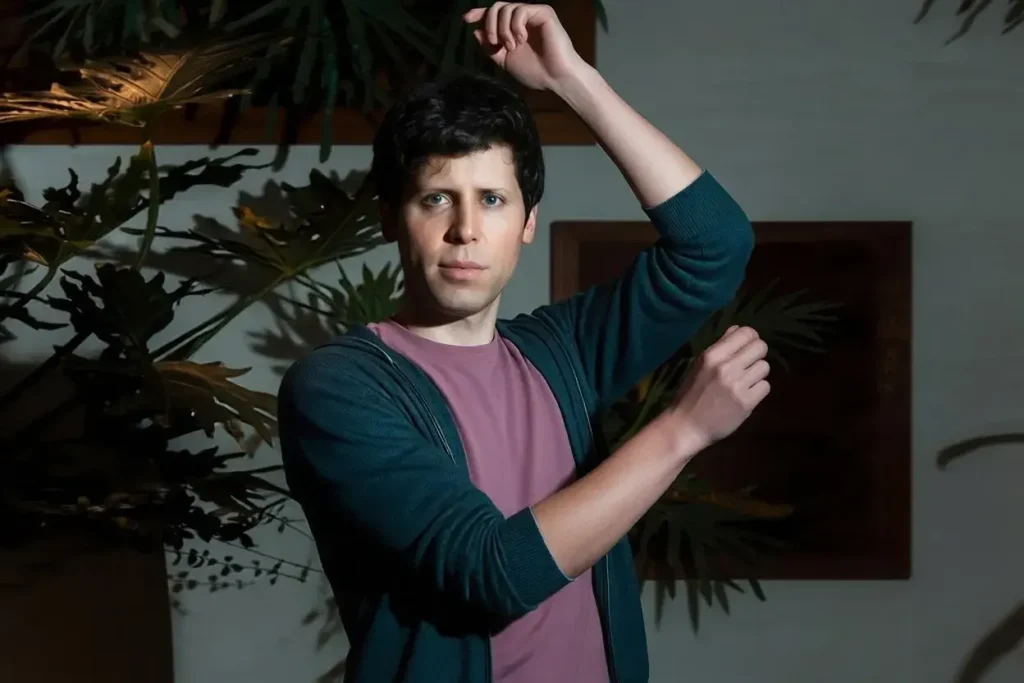
4. Wait for the generation to complete. The output will appear in the result window on the right.
Pros
- Speed: Lightning LoRA acceleration delivers results in seconds.
- Free Access: You can use the tool without payment or API costs.
- Flexible Pose Options: You can transfer any pose, including positions that traditional editing tools struggle to create.
Cons
- Full Body Requirement: Partial body shots produce unpredictable fill-in results that may not match your subject’s actual appearance.
- ZeroCPU Limitations: HuggingFace’s free tier may experience slowdowns or queue times during peak usage.
Related Resources
- Qwen-Image-Edit-2511: Access the base model for local installation and custom implementations.
- AnyPose LoRA: Download the pose transfer LoRA weights for integration into your own workflows.
- lightx2v Lightning LoRA: Get the acceleration LoRA that reduces inference steps from 40 to 4.
FAQs
Q: Why does my output have a different background than my reference image?
A: The model sometimes inherits the pose image’s background instead of preserving the reference scene.
Q: What happens if my reference image only shows the upper body?
A: The model fills in missing body parts based on its training data. These generated areas might not match your subject’s actual appearance, clothing, or proportions. Upload full-body images for consistent results.
Q: How many poses can I transfer in one session?
A: The tool processes one pose transfer per run. You can upload new images and run multiple transfers sequentially.
Q: Does the tool work with animated characters or 3D models?
A: Yes. The AnyPose LoRA was trained using 3D character models posed in Blender. You can use pose references from games, animations, or 3D software as your source images.