SoulX-Singer is a free, open-source singing voice synthesis tool that clones any voice and applies it to a song. No training, no fine-tuning, no subscription required.
Upload a short audio clip of a voice, provide a target song, and the model outputs a new version of that song sung by the cloned voice. It runs as a web app on Hugging Face Spaces and as a locally installable Python package under an Apache 2.0 license.
The underlying SoulX-Singer model was developed by Soul AI Lab and released in February 2026. It was trained on over 42,000 hours of aligned vocal data across Mandarin, English, and Cantonese, a dataset scale that most open-source singing synthesis projects haven’t matched.
Features
- Zero-Shot Voice Cloning: SoulX-Singer generates a singing voice for any speaker from just a short reference audio clip.
- Melody Conditioning (F0 Control): The model accepts a target audio file and extracts its pitch contour (F0) to drive the output.
- Score Conditioning (MIDI): For users who work with MIDI, the model accepts MIDI note data as an alternative control signal for pitch and timing.
- Timbre Preservation Across Languages: The model separates timbre from linguistic content, so the cloned voice identity holds across Mandarin, English, and Cantonese outputs.
- Singing Voice Editing: Lyrics in the target audio can be modified while the model preserves the original prosody and phrasing.
- Long-Context Handling: The architecture handles longer vocal sequences without the quality degradation that shorter-context models exhibit.
- Humming-to-Singing Conversion: A hummed melody can serve as the target audio input, and the model will synthesize a full singing voice from it.
- Consumer Hardware Compatible: The model runs locally on under 8 GB VRAM with bf16 support.
See It In Action
Use Cases
- Vocal Demo Production: A songwriter without a singer on hand can record a reference melody—even a rough hum—and use SoulX-Singer to generate a clean vocal demo.
- Cross-Language Cover Generation: A producer working on a Mandarin track can apply the vocal timbre from an English reference recording. The model’s timbre disentanglement handles the language mismatch without degrading voice identity.
- Lyric Revision on Existing Recordings: If a vocal take is strong but one lyric line needs changing, the singing voice editing feature lets you modify specific lyrics while preserving the original prosody.
How to Use It
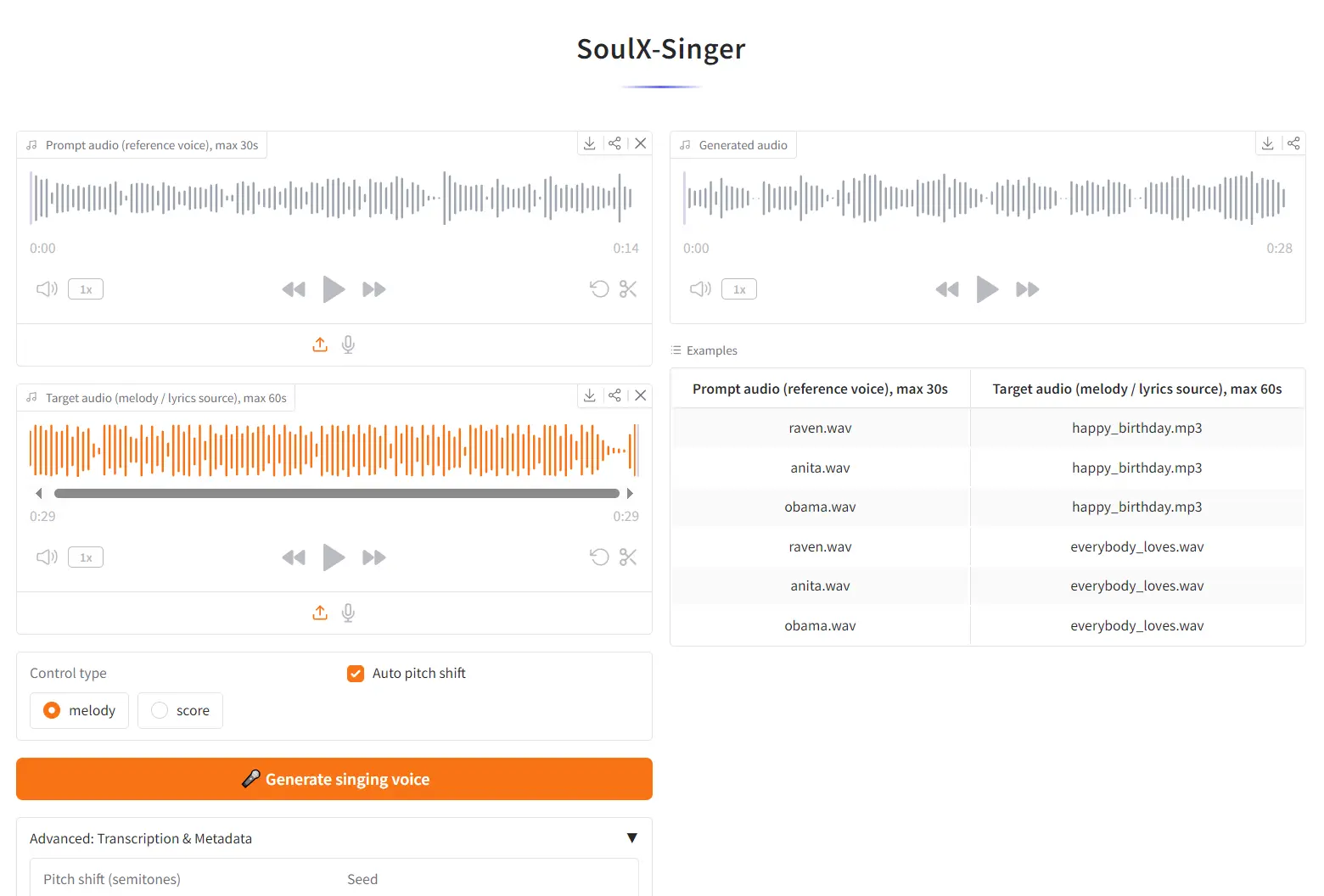
1. Visit the SoulX-Singer web UI at Hugging Face Space.
2. Upload your Prompt audio (the reference voice you want to clone). Maximum duration: 30 seconds. A clean, dry vocal recording without heavy reverb or background noise produces the best timbre transfer.
3. Upload your Target audio (the song whose melody and lyrics you want the cloned voice to sing). Maximum duration: 60 seconds.
4. Select your Control type:
melody— the model extracts the F0 pitch contour from the target audio.score— the model uses MIDI note data from the target audio for pitch and timing control.
5. Click 🎤 Generate singing voice. The model will output a new audio file where the vocals from the target song are replaced with the cloned voice from your reference audio.
Local Installation
For longer tracks, higher-quality outputs, or batch processing, running SoulX-Singer locally gives you full control.
1. Clone the repository from GitHub:
git clone https://github.com/Soul-AILab/SoulX-Singer.git
cd SoulX-Singer
2. Create and activate a Conda environment (Python 3.10):
conda create -n soulxsinger -y python=3.10
conda activate soulxsinger
3. Install dependencies:
pip install -r requirements.txt4. Install Hugging Face Hub and download pretrained models:
pip install -U huggingface_hub
# Download the SoulX-Singer SVS model
hf download Soul-AILab/SoulX-Singer --local-dir pretrained_models/SoulX-Singer
# Download preprocessing models
hf download Soul-AILab/SoulX-Singer-Preprocess --local-dir pretrained_models/SoulX-Singer-Preprocess
Preprocess your audio data before running inference. The inference script depends on metadata generated by the preprocessing pipeline (vocal separation, transcription). Follow the preprocessing instructions in preprocess/README.md before using your own audio.
5. Run the inference demo:
bash example/infer.shPros
- Open Source: The Apache 2.0 license allows you to modify and integrate the code freely.
- High Fidelity: The output audio is clear and lacks the metallic artifacts common in older SVS models.
- Efficiency: It runs on standard consumer GPUs (like an NVIDIA RTX 3060 or better).
- No Fine-Tuning: You get immediate results without spending hours training a LoRA or checkpoint.
Cons
- Duration Limits: The web demo restricts inputs to short clips (30s/60s) to manage server load.
- Hardware Dependency: Local installation requires an NVIDIA GPU with bf16 support for optimal performance.
Related Resources
- SoulX-Singer GitHub Repository: Official inference code, installation instructions, and preprocessing pipeline documentation.
- SoulX-Singer Hugging Face Model: Download the pretrained model weights directly from Hugging Face Hub.
- SoulX-Singer Technical Report: The arXiv-published paper detailing the model architecture, training methodology, and evaluation results.
- SoulX-Singer Eval Dataset: The official evaluation benchmark dataset on Hugging Face, useful for comparing SVS systems.
FAQs
Q: Can I use SoulX-Singer on voices of real, named artists?
A: Technically the model can process any reference audio. The project’s usage disclaimer explicitly prohibits impersonating individuals without their authorization or creating deceptive audio. If you’re working with a real artist’s voice, you need their permission.
Q: What’s the difference between melody mode and score mode?
A: Melody mode (F0 conditioning) extracts the pitch contour directly from an existing audio file. Score mode uses MIDI note data, which gives you precise, quantized pitch and timing control. If you’re starting from an audio recording, melody mode is the natural choice. If you’re working in a DAW with MIDI tracks, score mode integrates more cleanly.
Q: The online demo produced robotic-sounding output. What can I do?
A: Audio quality of the reference clip is the most common culprit. The model performs best with clean, dry vocals: minimal reverb, no background noise, no heavy compression artifacts. A 10–20 second reference clip with clear vocal presence generally outperforms a 30-second clip with poor audio quality.