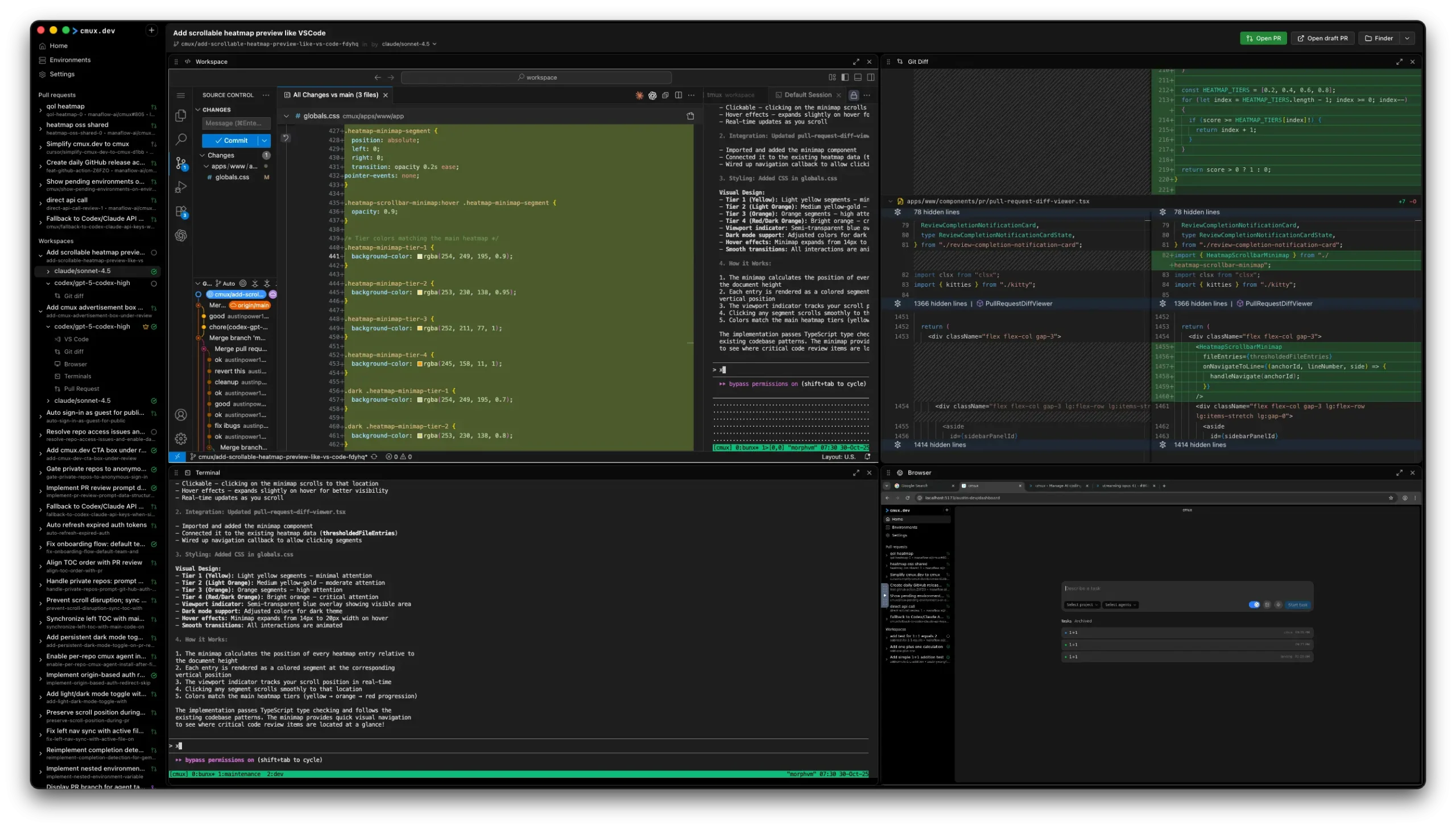
Manaflow is a free, open-source AI coding agent manager that lets developers run Claude Code, Codex CLI, Cursor CLI, Gemini CLI, Amp, Opencode, and other coding CLIs in parallel across multiple tasks.
Each agent gets its own isolated VS Code workspace, spun up in the cloud or in a local Docker container, complete with a git diff viewer, terminal, and live dev server preview.
The tool targets developers who already use AI coding agents but get slowed down by multiple terminals, scattered VS Code windows, and manual diff reviews across sessions.
Manaflow consolidates all of that into a single dashboard where you can launch agents, watch them work, inspect diffs, and ship pull requests.
Features
- Spawns Claude Code, Codex CLI, Gemini CLI, Amp, Opencode, and other coding agent CLIs simultaneously across multiple tasks.
- Gives each agent its own sandboxed VS Code instance with full source control, terminal access, and command history.
- Spins up a preview environment per agent with an embedded browser so you can visually verify UI, APIs, and workflows in real time.
- Presents a focused code diff for each agent’s changes with filter-by-agent navigation and test output alongside the review surface.
- Opens pull requests, squashes and merges, and surfaces GitHub Actions CI status directly from the Manaflow workspace.
- Displays each agent’s VS Code editor, terminal (TUI), and VNC browser preview in a single consolidated grid view.
- Highlights risky code changes with color-coded annotations to direct code reviews toward the lines that carry the most risk.
- Automatically selects the best agent run once all tasks complete, with the result available for manual review and override.
- Runs agents in Manaflow cloud sandbox mode (with repos or environments) or in local Docker containers.
- Accepts your own OpenAI and Anthropic subscriptions or raw API keys, so you control which models power each agent run.
Use Cases
- Prompt three different agents to build the same feature using different architectures. Let Claude Code try a React implementation, Codex attempt a Vue version, and Gemini explore a Svelte approach. Compare results side by side and pick the winner.
- When a bug appears across different parts of the codebase, assign each agent to investigate a separate area. One checks the authentication flow, another examines the database queries, a third looks at the frontend logic.
- Run multiple agents on a pull request simultaneously. One reviews for security vulnerabilities, another checks performance implications, a third suggests style improvements. Review their collective feedback before merging.
- Point different agents at legacy code sections and have each propose refactoring strategies. Compare their approaches, see which ones break tests, and pick the safest path forward.
- Have one agent write documentation while another tests those instructions in a clean environment. A third agent can verify the examples actually run.
How to Use Manaflow
1. Install Manaflow:
macOS native app (recommended for full feature access): Download directly from the Manaflow website.
https://www.manaflow.com/direct-download-macosWeb version (no install required): Access the dashboard from any browser.
https://cmux.sh/System requirements: macOS 13 or later. Docker must be installed for local container mode. Linux support is in public beta. Windows is on the waitlist.
2. Open the Environments page inside Manaflow. Link the repository you want to work on, or configure a new environment from scratch. Add any dev and maintenance scripts that agents should run during task execution. These configurations persist across runs so you don’t reconfigure each session.
3. On the task dashboard, select the target branches for your task. Choose which agents you want to run in parallel. Write your task prompt and launch the run. All selected agents start simultaneously, each in its own isolated container.

4. Each agent runs in its own VS Code instance. Switch between agent workspaces at any time to observe progress in real time. A green check appears on each task card when that agent finishes. The crown evaluator marks the best run once all agents complete.

5. Open the diff viewer for each agent. Review code changes, test output, and command results. The heatmap viewer surfaces lines flagged as high-risk. Launch the live preview environment to confirm the dev server renders correctly before committing to a PR.

Pros
- Each agent gets a clean container, its own VS Code, and its own git state, so parallel runs never cross-contaminate.
- Diff viewers, live previews, and heatmap annotations live inside the same workspace where you manage agents, so nothing requires a context switch.
- Claude Code, Codex, Gemini CLI, Amp, Opencode, and Cursor CLI all connect through the same interface.
- You control API spend and can switch models per run.
Cons
- Full support targets macOS 13+. Linux is in public beta, and Windows is not yet available.
- Local container runs require Docker to be installed and configured on your machine.
- Manaflow itself is free, but agent runs are not cost-free.
Related Resources
- Manaflow GitHub Repository: Source code, issue tracker, and contribution guide for the project.
- Claude Code: Official reference for Claude Code CLI, which Manaflow supports as a first-class agent.
- OpenAI Codex: Repository for the Codex CLI agent that Manaflow can orchestrate alongside Claude Code.
- Gemini CLI: Google’s coding CLI agent, available as a parallel agent option in Manaflow.
- Docker Desktop: Required for running Manaflow in local container mode on macOS or Linux.
- AI LLM API Pricing: The latest API pricing for popular AI models like GPT, Gemini, and Claude.
- Best AI Coding Agents: We tested dozens of open-source CLI AI coding agents and picked the 7 that genuinely work best for developers
FAQs
Q: Is Manaflow free to use?
A: Manaflow itself is free and open source under the MIT license. The dashboard costs nothing. You pay for the underlying model usage through your own Anthropic or OpenAI account, or you can connect an existing Claude Max or ChatGPT subscription.
Q: Can I run a single agent at a time?
A: Yes. Parallel execution is the main design goal, but you can run a single agent per task. The isolation, diff viewer, and live preview all apply to single-agent runs in the same way.
Q: What is the crown evaluator?
A: The crown evaluator is Manaflow’s built-in comparison system. After all selected agents finish their tasks, it analyzes the outputs and marks the best run. You can review its selection from the diff viewer and override it manually.
Q: Do I need Docker for every configuration?
A: Local mode requires Docker installed on your machine. Cloud sandbox mode runs in Manaflow’s infrastructure, so Docker is not required for that configuration.
Q: How is the macOS native app different from the web version at cmux.sh?
A: The web version allows you to access the core dashboard from any browser. The native macOS app adds a sidebar with vertical workspace tabs showing git branch, PR status, working directory, and listening ports per session. It also includes a scriptable in-app browser where agents can interact with your dev server directly, and a notification system that shows which agent is waiting for input with a blue ring indicator on the relevant tab.