2025 was a massive year for AI adoption. The release of Google’s Nano Banana Pro captured the world’s attention, dominating social media feeds and setting a new bar for speed within the Gemini ecosystem. It brought high-quality generation to the masses and shifted how we interact with AI models daily.
However, popularity on social networks doesn’t always equal sustained usage in professional workflows. While Nano Banana Pro made headlines, we wanted to know which platforms creators actually stick with for their projects.
Over the last six months, we analyzed the market to bring you the top 10 AI image generators ranked by user popularity and traffic. These are the tools that millions of users rely on right now to get the job done.
TL;DR – Quick Picks Table
| Name | Best For | Starting Price | Has Free Credits |
|---|---|---|---|
| Freepik AI | Marketers & Content Creators | $24.50/month | Yes |
| SeaArt | Anime & Artistic Styles | $2.99/month | Yes |
| Civitai | Open-Source Model Fans | Free (Credit-based) | Yes |
| Midjourney | Highest Quality Artistic Output | $10.00/month | No |
| Picsart | All-in-One Creative Suite | $6.50/month | Yes |
| DeepAI | Developers & Quick APIs | $4.99/month | Yes |
| PixAI | Anime and character-focused generation | $10.00/month | Yes |
| Kling AI | AI Video Generation | $10.00/month | Yes |
| Leonardo AI | Game Devs & Concept Artists | $12.00/month | Yes |
| Ideogram | Generating Images with Text | $8.00/month | Yes |
* The prices listed for each platform are starting prices based on basic subscription tiers. Pricing scales up depending on subscription level and features added. Since prices are subject to change by the platforms at any time, please check the official website for the most accurate and up-to-date pricing information.
The 10 Best AI Image Generators
Freepik AI
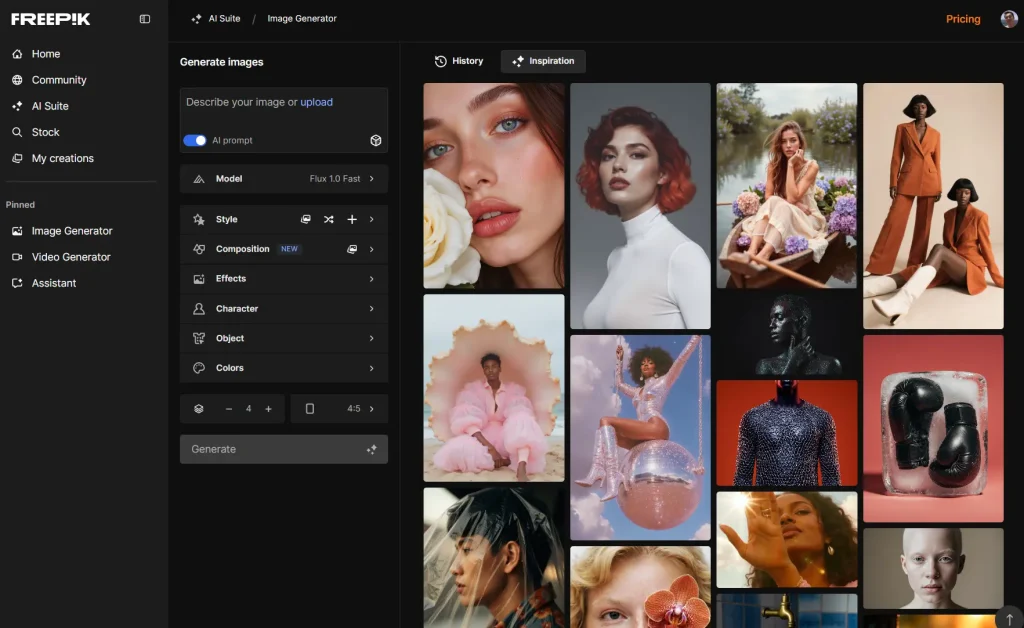
A professional-grade AI image generator that combines advanced AI models with an extensive stock photo library.
Key Features:
- Access to a huge suite of top-tier AI models, including Google Imagen 4, Flux, and Ideogram.
- A full creative suite that lets you generate, edit, upscale, and remove backgrounds all in one place.
- Reference images can be used to maintain a consistent style, which is great for branding.
- Offers an API to automate visual workflows for larger-scale production.
Pros:
- Incredible variety of AI models to choose from.
- All-in-one platform saves you from jumping between different tools.
- Generous free plan for daily use.
Cons:
- The sheer number of options can be a bit much for absolute beginners.
Pricing & Plans:
Freepik offers a Free version with a limit of 20 images per day and restricted styles. Paid plans include the Essential Plan ($5.75/month billed annually) and Premium Plan ($12/month billed annually), both offering 7,000 AI credits monthly.
The Premium+ Plan costs $24.50/month annually and includes 540,000 AI credits annually. A Teams Plan is also available with custom pricing. AI credits are used for various actions, with costs varying based on the tool and model.
Free Plan Limitations:
You can use their Flux 1.0 Fast model for free. Other advanced models like Flux Kontext, Flux 1.1, Runway, GPT, etc. require a subscription.
Who It’s Best For:
Graphic Designers and Marketers who need a versatile and integrated tool for creating consistent, high-quality visuals for campaigns and content.
SeaArt
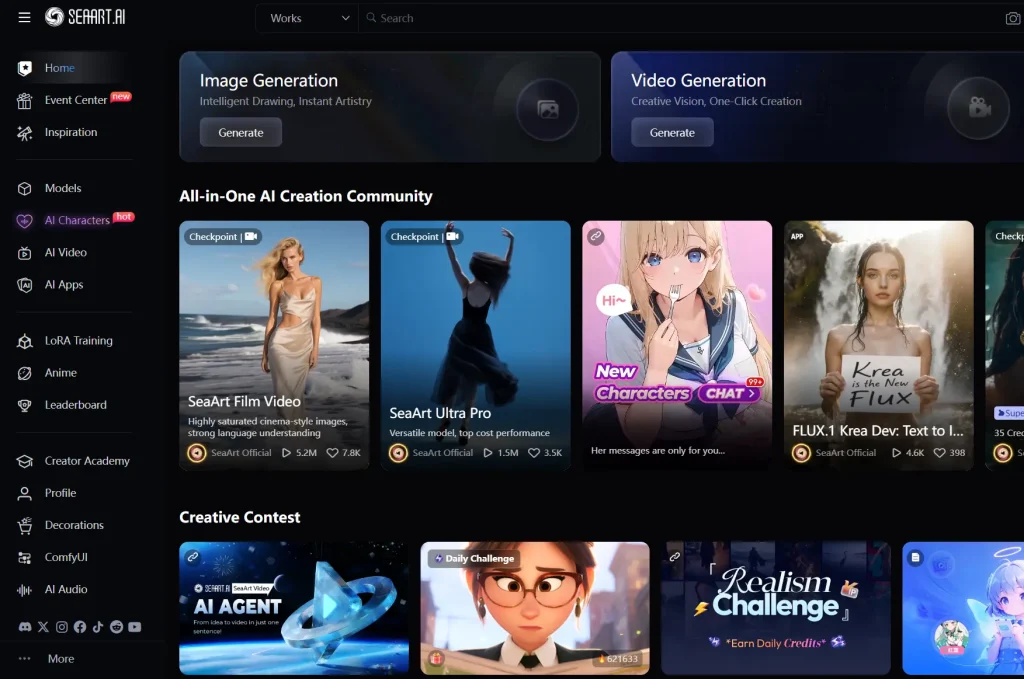
SeaArt is a community-focused AI art generator with a strong emphasis on anime and artistic styles.
Key Features:
- Text-to-Image Generation: Converts text descriptions into detailed, visually compelling artwork using sophisticated AI algorithms.
- AI Image Upscaler: Enhances image resolution and quality, making them suitable for printing and high-resolution displays.
- ComfyUI Workflow: Offers real-time fine-tuning and adjustments. This allows micro-control over the creative process for personalized outputs.
- AI Character Creation: You can design custom AI characters for use in games, chatbots, and digital art projects.
- Model Training: Enables you to train and fine-tune custom AI models to generate art in specific styles and meet unique creative needs.
- Additional Tools: Includes AI face swap, background removal, AI animation generation, image-to-video conversion, and editing features like AI eraser and colorization.
Pros:
- Produces highly detailed and stylistically diverse images, ranging from realistic portraits to anime and sci-fi themes.
- Accessible for both novice users and professionals due to its user-friendly interface and intuitive workflow.
- Supports real-time editing and multiple iterations for precise and personalized artwork.
- Offers a large model library and options for custom model training.
- Provides diverse AI tools beyond image generation, including video features and character creation.
- Includes free daily credits and reasonably priced subscription plans.
Cons:
- AI-generated images sometimes require prompt adjustments to better match user expectations.
- Some inappropriate content may bypass filters, raising ethical and moderation concerns.
- Limited advanced video editing capabilities despite video generation features.
Pricing & Plans:
- Free Plan: Provides 150 daily free standard credits for image generation, with limits on the number of requests.
- Beginner Plan: Approximately $2.99/month.
- Standard Plan: About $9.99 to $10/month.
- Professional Plan: Around $29.99/month.
- Master Plan: Around $49/month.
Free Plan Limitations:
- Users receive 150 daily free credits for standard image generation.
- There is a limit on the number of image generation requests within a 12-hour reset window.
- Some advanced tools and customization options can not be fully accessible on the free plan.
Who It’s Best For:
- Digital Artists and Illustrators: Those seeking to explore new artistic styles and create original digital artwork quickly.
- Game Developers: For creating characters, environments, and in-game assets with customizable styles.
- Content Creators and Marketers: To generate promotional graphics, social media visuals, and marketing materials efficiently.
- Designers: Looking for innovative ways to prototype and visualize products.
- Hobbyists and Beginners: Due to its friendly interface and available free plan credits.
CivitAI

CivitAI is an online platform and marketplace primarily focused on generative AI content, especially AI-generated images and models. It serves as a hub where developers, creatives, and AI enthusiasts can explore, create, share, and download a vast array of AI models.
Key Features:
- Tons of Models: Thousands of user-contributed Stable Diffusion models covering diverse styles such as anime, photorealism, and 3D renders.
- LoRA Models: Compact, efficient models that enable fine-tuning with minimal computational power.
- On-Site Image Generation: Web-based tool for generating images from text prompts using AI, accessible without powerful hardware.
- 3D and Video Generation: AI-driven creation of 3D models and videos from text prompts.
- Community and Social Engagement: Follow users, comment, like posts, and engage in community-driven activities.
- Marketplace: Buy, sell, and license AI assets within an integrated marketplace.
- Virtual Currency (“Buzz”): Used for generating images on the platform; can be earned or purchased.
- Open Source: The platform is open source, promoting transparency and extensibility.
Pros:
- Vast and diverse collection of AI models, unmatched in variety.
- Strong and active user community that fosters collaboration.
- Advanced customization capabilities for AI-generated outputs.
Cons:
- Generation speed can be slow with possible server downtime during peak times.
- Strict and sometimes changing content policies, especially around NSFW material.
- The open contribution model leads to variable quality of some models.
- Platform unavailability in some regions like the UK due to regulatory compliance challenges.
Pricing & Plans:
- Free Plan: No monthly cost; includes basic support, access to the platform’s features, including the Creator Program, ad-free browsing, and limited generation with “Buzz” credits that refresh daily.
- Bronze Plan ($10/month): 10,000 Buzz/month, bonuses on purchases, 8 images per job, 8 queued jobs, priority support, and a supporter badge.
- Silver Plan ($25/month): 25,000 Buzz/month, higher bonuses and rewards, more images and queued jobs, premium support.
- Gold Plan ($50/month): 50,000 Buzz/month, maximum bonuses and rewards, VIP support, animated supporter badge, and most extensive benefits.
Free Plan Limitations
- Limited number of images per generation job (e.g., 4 images/job).
- Limited queued jobs (e.g., 4 queued jobs).
Who It’s Best For
- AI enthusiasts, artists, and creators who want to explore and experiment with a wide variety of AI art models.
- Developers seeking access to a large library of models to integrate or customize.
- Those who prefer a community-driven platform with opportunities for sharing and collaboration.
- Hobbyists and professionals who require access to advanced, customizable, and varied AI art models.
Picsart
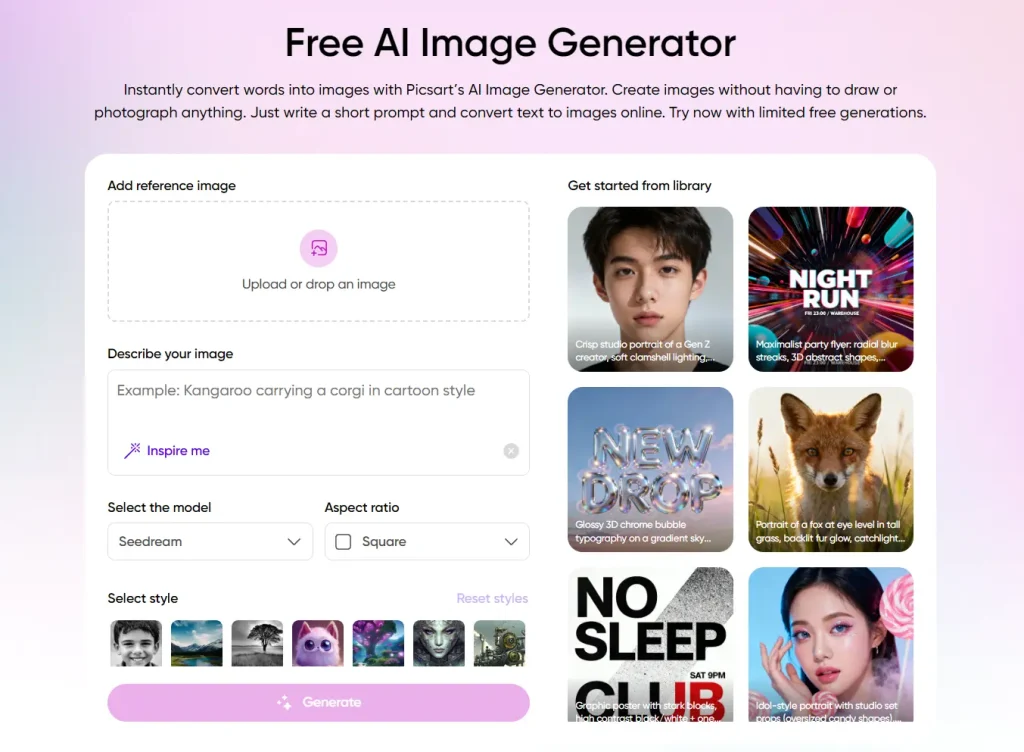
Picsart is an all-in-one creative platform for photo and video editing, graphic design, and content generation using AI-powered tools. It’s available on the web and as a mobile app, catering to both casual users and professionals looking to create engaging visual content for social media and marketing.
Key Features:
- AI-Powered Tools: Includes one-tap background and object removal, image enhancement (unblur and upscale), style transfer, and generative AI features like text-to-image, AI avatar, and logo makers.
- Photo and Video Editor: Offers a comprehensive suite of editing tools, including filters, effects, retouching tools, drawing capabilities, and basic video editing (trimming, merging clips, adding music/text).
- Vast Content Library: Provides millions of free-to-use stock photos, videos, templates, stickers, and fonts, many of which are premium options in the paid tiers.
- Collage Maker & Batch Editor: Allows users to create photo and video collages with customizable layouts and frames. The batch editor lets users apply edits (resize, crop, add watermarks) to up to 50 images simultaneously.
- User Community & Collaboration: Features a built-in social network (“Spaces”) where users can share creations, participate in editing challenges, and find inspiration.
Pros:
- User-friendly interface with an intuitive design. Accessible for beginners.
- All-in-one platform consolidating various editing needs into a single app.
- Powerful AI features that simplify complex tasks like background removal and image enhancement.
- Cross-platform availability (web, iOS, Android) with synced work across devices.
Cons:
- The free version has limitations and frequent ads, with many desirable features locked behind a paywall.
- Some users report occasional lagging or crashing, especially when working with large files or on lower-end devices.
Pricing & Plans:
- Free: Includes standard photo/video editing, a selection of free images/templates, 5 weekly AI generative credits, and 100 MB of cloud storage.
- Plus: (approx. $13/month or a cheaper annual plan) Offers everything in Free, plus premium content (templates, fonts, stickers, stock photos/videos), face retouching tools, 200 monthly AI credits, and 5 GB of cloud storage.
- Pro: (approx. $15/month or a cheaper annual plan) Includes everything in Plus, a full suite of AI tools (including object removal, image generator), 500 monthly AI credits, the batch editor, and 100 GB of cloud storage.
- Enterprise: Custom pricing plans are available for large organizations requiring advanced APIs, SDK integrations, and enterprise-grade support.
Who It’s Best For:
- Content creators and social media marketers who need to quickly produce eye-catching visuals (posts, ads, thumbnails) without extensive design knowledge.
- Small businesses and solopreneurs looking to create professional-looking marketing materials, logos, and product photos on a budget.
- Hobbyists and casual users who want a fun, easy-to-use platform to enhance personal photos, make collages, or experiment with AI art.
Midjourney
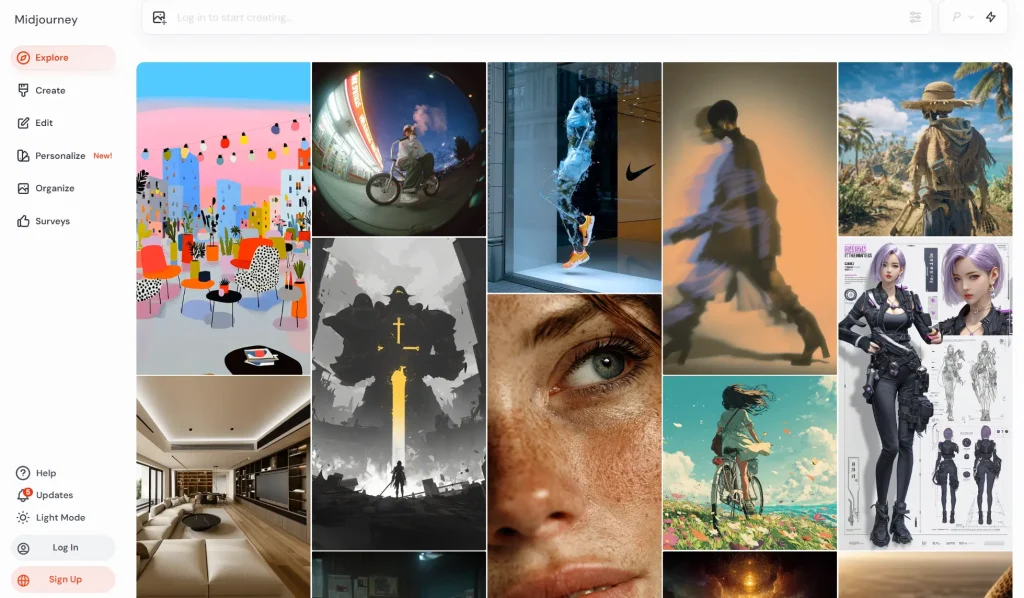
Midjourney is a popular AI image generator that creates images from text prompts (natural language descriptions). It was launched by Midjourney, Inc., an independent research lab based in San Francisco, in July 2022. It’s widely used by graphic designers, artists, marketers, content creators, and those interested in AI-generated art.
Key Features:
- High-Quality Image Generation: Creates realistic and detailed images based on prompts.
- Text-to-Image Synthesis: Translates textual descriptions directly into visual representations.
- Customization and Refinement: Offers various parameters and options for refining images, such as adjusting aspect ratio, quality, and chaos. You can generate variations of existing images or upscale images to enhance resolution and detail.
- Style Customization: You can refine and adjust the art style to fit their vision.
- Style Reference: Allows applying the visual style of an uploaded image to new creations.
- Character Reference: You can upload an image of a character, and the system uses it as a reference to generate similar characters in the output.
- Community and Collaboration: Features a strong community aspect where You can share creations and collaborate through platforms like Discord.
- Iterative Refinement: Allows generating multiple variations of a concept and using the best results as starting points for further development.
Pros:
- Ease of Use: Relatively easy to use, especially for those familiar with Discord.
- High-Quality Images: Produces high-quality, detailed, and vivid images.
- Versatility: Capable of generating images in various artistic styles, from photorealistic to abstract.
- Community Focus: Offers a dedicated online public showcase and Discord community for inspiration and collaboration.
- Time-Saving: Generates images quickly, making it efficient for concept brainstorming and creative exploration.
- Continuous Updates: The platform is frequently updated with new features and improvements.
Cons:
- Paid Subscription Required: Midjourney does not offer a free tier or trial period for new users; a paid subscription is necessary to generate images.
- Potential Inconsistency: Image quality can sometimes be inconsistent, requiring refinement and adjustments.
- Challenges with Specific Elements: May struggle with accurate representation of certain elements, like hands, feet, or text.
- Customer Support Issues: Some users have reported unsatisfactory customer support.
- Public Visibility (default): Generated images are publicly viewable by default (unless using Stealth Mode with Pro or Mega plans), raising privacy concerns for some projects.
- Copyright & Ethics Debates: The use of AI-generated art has raised ethical concerns regarding originality, copyright, and potential misuse like deepfakes.
Pricing & Plans:
Midjourney offers four subscription plans with monthly or annual billing options. Paying annually provides a discount.
| Plan | Monthly Price | Annual Price | Fast GPU Time | Relax GPU Time | Stealth Mode | Other Features |
|---|
| Basic | $10 | $96 ($8/month) | 3.3 hr/month | Not Available | No | General Commercial Terms |
| Standard | $30 | $288 ($24/month) | 15 hr/month | Unlimited Images | No | General Commercial Terms |
| Pro | $60 | $576 ($48/month) | 30 hr/month | Unlimited Images & SD Video | Yes | General Commercial Terms |
| Mega | $120 | $1152 ($96/month) | 60 hr/month | Unlimited Images & SD Video | Yes | General Commercial Terms |
Free Plan Limitations:
Midjourney used to offer a free trial that allowed you to generate a limited number of images, but this was paused in April 2023 due to high demand and server load. There may be brief promotional periods with free access, so staying updated on Midjourney announcements is recommended.
Who It’s Best For:
- Artists and Designers: To explore various art styles, generate concepts, and visualize ideas quickly and efficiently.
- Content Creators: For generating visuals for social media, blogs, videos, and other digital content.
- Marketers: To develop eye-catching visuals for campaigns and promotions.
- Game Developers: For quickly drafting concept art for characters and environments.
- Authors and Publishers: To create book covers and illustrations.
- Hobbyists: To experiment with AI-generated art and explore creativity.
- Those with Big Imaginations and Limited Technical Skills: Midjourney’s ease of use makes it accessible for bringing creative ideas to life visually.
DeepAI
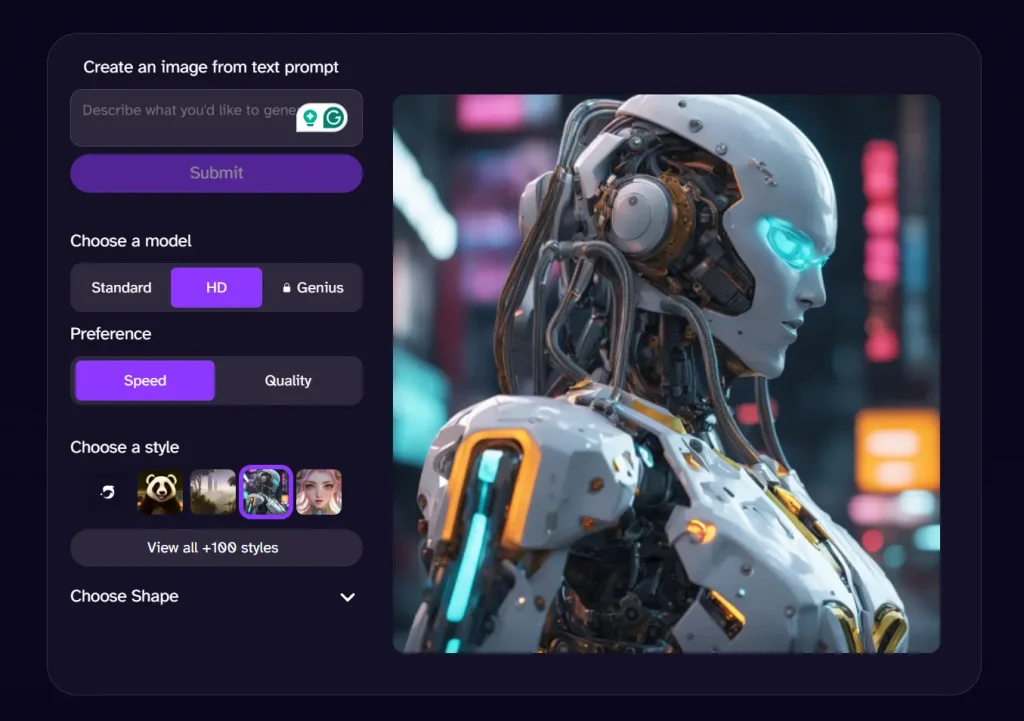
DeepAI positions itself as the all-in-one creative platform, and it does a good job of living up to that claim.
Key Features:
- A full suite of tools: AI Image Generator, AI Video Generator, AI Music Generator, and AI Chat.
- A collection of AI-powered photo editing tools, including a background remover, colorizer, and super resolution upscaler.
- Choose between different image models: Standard (basic), HD (sharper), and Genius Mode (detailed, Pro subscribers only).
- Developer-friendly API for easy integration into other products.
Pros:
- Incredibly affordable Pro plan.
- A wide range of creative tools beyond just image generation.
- You retain full ownership of everything you create.
Cons:
- The output quality, while good, may not be as artistic as specialized tools like Midjourney.
Pricing & Plans:
- Free Plan: Includes basic features and limited usage, such as approximately 100 AI image generations and 300 AI chat messages per day.
- Pay-As-You-Go: Starting at $5, it includes 100 AI Image Generator calls, 30 AI Video Generator calls, and 350 AI Chat messages.
- DeepAI Pro: Costs $4.99 per month and offers 500 AI Image Generator calls, 30 AI Video Generator calls, and 1,750 AI Chat messages monthly, along with additional benefits like ad-free browsing, private images, and access to Genius Mode.
- Genius Mode (Pro Feature): Offers higher-quality text and image generation with increased usage limits as part of the Pro plan.
- Free Plan Limitations:
- You can use the tools for free without an account, but usage is limited. The Pro plan is needed for higher volume.
Free Plan Limitations:
- Usage Limits: Restricted number of image generations, chat messages, and limited video generation capabilities.
- Advertisements: The free plan displays advertisements.
- Feature Limitations: Some features and advanced modes (like Genius Mode) are exclusive to paid plans.
- Output Quality: The quality of images generated on the free plan might be lower compared to paid tiers.
Who It’s Best For:
- Beginners and Casual Users: The ease of use, accessibility, and free plan make it ideal for those new to AI image generation or with occasional needs.
- Budget-Conscious Users: The affordable pricing and free tier make it a good option for individuals or small projects with limited budgets.
- Quick Prototyping and Conceptualization: DeepAI’s fast generation speed can be useful for quickly creating visual concepts or drafts.
- Users Exploring AI Creativity: DeepAI provides a straightforward way to experiment with the potential of AI-powered content creation across different media types (text, images, video, music).
PixAI

PixAI Image Generator is an AI-powered platform that specializes in creating high-quality anime-style and pixel art images.
Key Features:
- AI-Driven Art Generation: Uses advanced AI algorithms to create detailed, anime-inspired and pixel art images from text prompts or base images.
- Customizable Styles: Offers a variety of style options and themes, including anime and pixel art, to tailor the output.
- High-Resolution Outputs: Generates high-quality images suitable for digital or print use.
- Interactive Creation Process: Allows you to modify and refine images in real time, with tools like inpaint and outpaint.
- Model Market: Provides access to a wide selection of AI models, including exclusive ones like LoRA for different artistic results.
- Animation Tools: Converts still images into animated videos.
- Community Features: Includes an artists’ marketplace, gallery, and monthly contests fostering a creative community.
- Fast Processing: Enables quick generation for rapid iteration.
Pros:
- Scalable art dimensions for various project needs.
- Collaborative options for sharing and community engagement.
- Model marketplace and pre-existing image library.
- Real-time preview and customization tools.
- Supports various export formats.
Cons:
- Limited fine control over artistic details directly.
- Primarily focused on anime and pixel art styles, which may restrict diversity.
- Requires a stable internet connection; no offline functionality.
- Privacy considerations with image uploads.
- Occasionally generic output due to AI limitations.
- High-quality generation can be resource-intensive.
Pricing & Plans:
- Free Plan: Basic access with limitations on daily credits and restricted access to premium models.
- Tier 1: $10/month (or $8/month billed annually), includes 300,000 monthly instant credits, 2,000 daily claimable credits, ability to train 3 LoRA models monthly, upload up to 10 private models, and enhanced community features.
- Tier 2: $30/month (or $23/month billed annually), more credits (1,000,000 monthly), 10,000 daily claimable credits, train 5 LoRA models, and use up to 7 LoRAs per task.
- Tier 3: $50/month (or $40/month billed annually), highest credit allowance (2,000,000 monthly), and most advanced customization options.
Free Plan Limitations:
- Limited daily credits for image generation.
- Restricted access to premium AI models and customization tools.
- Fewer allowed private model uploads.
- Basic community features only.
Who It’s Best For:
- Anime artists and illustrators seeking quick, high-quality image generation.
- Game developers needing pixel art assets for retro or indie projects.
- Social media content creators wanting unique, stylized anime visuals.
- Digital artists and enthusiasts experimenting with AI-driven creativity.
- Anyone looking to create anime-style images without advanced drawing skills.
Kling AI
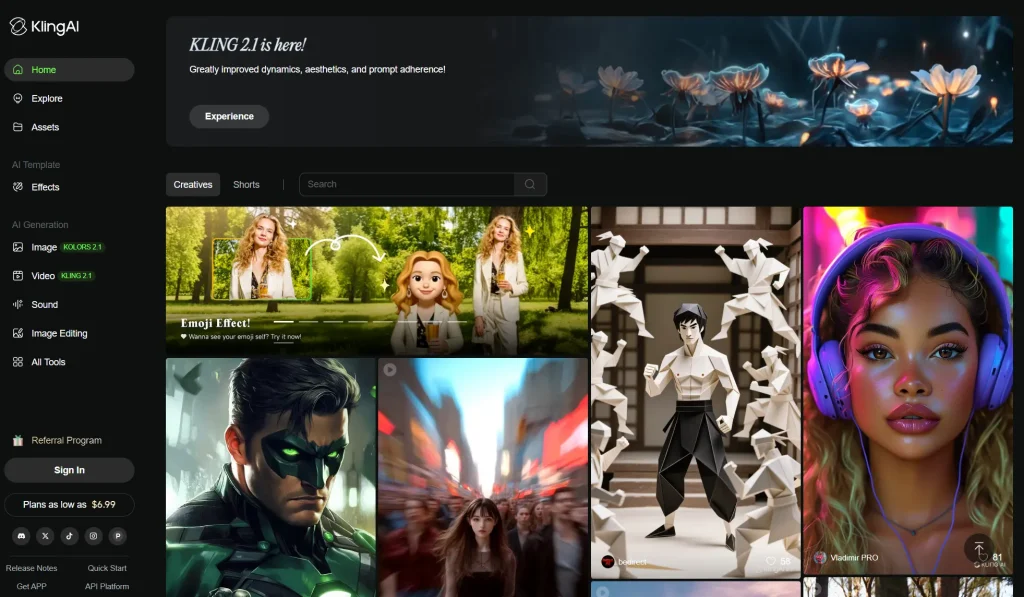
An advanced AI-powered tool designed to create customized images and videos from descriptive text prompts and reference images. Developed by the Chinese tech firm Kuaishou.
Key Features:
- Image Generation with Controls: You provide detailed prompts (up to 500 characters), negative prompts (up to 200 characters to exclude unwanted elements), and reference images. Controls include image fidelity (0 to 1 scale for closeness to reference), aspect ratio selection, and the ability to generate 1 to 9 image variations per request.
- Text-to-Video & Image-to-Video: Apart from static images, Kling AI can generate short videos (up to 2 minutes) at 1080p resolution and 30fps, with natural motion, camera effects, and facial/body animations.
- AI Voiceovers: Adds synthetic narration in various tones for video content.
- Image Editing Tools: Available under the Premier plan, including upscale resolution, resizing, and sharpening.
- Motion and Style Controls: Allow specifying camera angles, expressions, and smooth natural motions for video outputs.
- Multiple Use Cases: Real estate marketing, content creation, digital marketing, e-learning, e-commerce product demos, and entertainment storytelling.
Pros:
- Highly customizable image and video generation with fine prompt controls.
- Ability to produce multiple image/video variations quickly.
- Supports dynamic video animations with realistic human motion.
- Useful for short-form content creators, marketers, digital artists, game developers, and animators.
- Advanced AI capabilities for style transfer and motion coherence.
Cons:
- Generation speed can be slow for complex scenes.
- Closed source, limiting customization.
- Credit-based system can consume credits quickly for new users.
Pricing & Plans:
| Plan | Price (Monthly) | Monthly Credits | Best For |
|---|---|---|---|
| Free | $0 | 66 daily credits | Beginners and casual users |
| Standard | $6.99 to $10 | 660 | Hobbyists, short videos, watermark removal |
| Pro | $25.99 to $37 | 3,000 | Regular creators, longer videos, HD output |
| Premier | $64.99 to $92 | 8,000 | Heavy users, professionals, premium features |
Free Plan Limitations:
Higher-tier plans offer faster processing, no watermarks, advanced editing tools, and higher resolutions.
Who It’s Best For:
- Short-Form Content Creators: Ideal for TikTok, Instagram Reels, YouTube Shorts due to fast rendering and stylized animations.
- AI Filmmakers and Animators: Great for storyboarding, concept animations, and experimental AI-assisted filmmaking.
- Marketing and Advertising Teams: Useful for creating promotional videos, product showcases, and animated ads with customizable visuals.
- Game Developers and Digital Artists: Helpful for creating animated assets with detailed motion and 3D character movements.
- Real Estate and E-commerce: Enhances marketing materials with virtual walkthroughs and interactive product videos.
Leonardo AI

Leonardo AI Image Generator is an AI-powered creative platform designed to generate high-quality, production-ready images, textures, and videos from text descriptions or existing images.
Originally developed to assist with gaming assets, it has expanded into a full-scale content creation service appealing to artists, designers, game developers, marketers, and individual content creators.
Key Features
- Text-to-Image Generation: Create unique images from simple text prompts with the ability to fine-tune style and format.
- Image-to-Image Transformation: Upload an image and alter its style or details using AI guidance.
- Multiple Pre-trained AI Models: Offers seven diverse models tailored for different artistic styles, including photorealism and anime.
- Style Presets: Choose from various styles such as photorealistic, cartoon, or fantasy for easier customization.
- Built-in Canvas Editor: Edit images directly within the app to tweak colors, remove or add elements.
- Real-time Canvas: A brainstorming and creative workspace tool that facilitates interactive image generation.
- Universal Upscaler: Enhances image resolution while maintaining details, though some user feedback notes it can alter original details.
- HD Export: Save images in high definition suitable for professional and print use.
- Aspect Ratio Control: Select image size and shape to fit different formats like social media or presentations.
- Custom AI Model Training: Advanced users can train and build their own AI models for personalized output.
- Collaboration Tools: Supports teamwork with shared tokens, collections, and priority support in team plans.
Pros
- User-friendly interface accessible to both beginners and professionals.
- Generates high-quality, realistic images quickly.
- Wide variety of models and styles to suit different creative needs.
- Powerful customization options, including style switching and model training.
- Real-time canvas boosts creative exploration.
- Good value with flexible pricing and a free tier.
- Strong customer service and support.
Cons
- Some image presets can produce distorted or inconsistent results.
- Complex prompts can sometimes lead to hallucinated or inaccurate details.
- Upscaler may slightly alter original image details.
Pricing & Plans:
- Free Plan: 150 daily fast tokens, 200 canvas actions, public generations, watermarked videos. Ideal for beginners and casual users.
- Apprentice: $12 – 8,500 fast tokens/month, private generations, ability to train up to 10 AI models, unlimited canvas actions. Suitable for freelancers and individual creators.
- Artisan Unlimited: $30 – 25,000 fast tokens/month, unlimited relaxed generations, train up to 20 AI models, generate 3 jobs concurrently. For professionals and businesses.
- Maestro Unlimited: $60 – 60,000 fast tokens/month, unlimited relaxed image/video generations, train 50 AI models, 6 concurrent jobs. For large-scale projects and heavy users.
- Leonardo for Teams: From $24 per seat – Shared tokens, unlimited collections, priority support, IP security, team collaboration features. Best for creative teams and organizations.
Free Plan Limitations
- Limit of 150 tokens per day for image processing.
- Images output at medium or small resolutions only (max resolution limited to 1536×1024).
- Must generate four images at a time; no option to adjust batch size.
- Some premium features locked (e.g., faster generation speeds, advanced generation modes).
- Videos generated are watermarked.
- Limited control over image output details.
Who It’s Best For
- Artists and Creators: Those who want to quickly bring visual concepts to life with minimal effort and a range of style options.
- Game Developers and Designers: Suitable for creating characters, environments, textures, and concept art.
- Freelancers and Individual Creators: Affordable plans with private generation and customization options.
- Creative Teams and Businesses: Collaborative tools support multi-user workflows with priority support and resource sharing.
- Beginners: Intuitive interface and guided workspace make it easy to create unique art without prior design skills.
- Professionals: Advanced customization, model training, and high-quality output support more demanding projects.
Ideogram
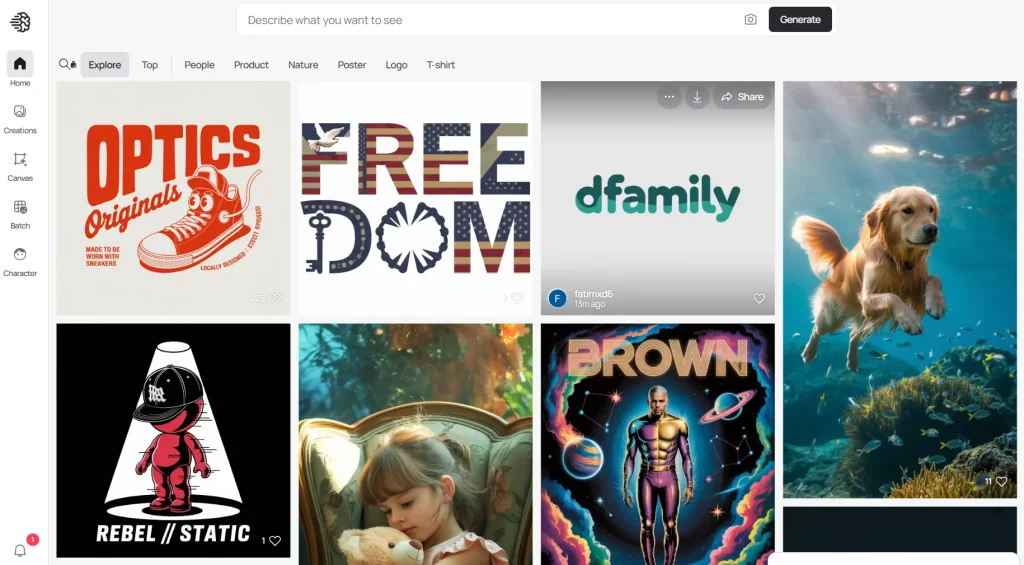
Ideogram’s big claim to fame is its incredible ability to generate images that include coherent and well-formed text.
Key Features:
- Text-to-Image Generation: Allows you to transform text prompts into diverse visuals, from artwork to realistic photos.
- Advanced Text Rendering (Typography): Ideogram stands out for its superior ability to create legible and stylized text within images.
- Magic Prompt: Automatically enhances your text prompts for improved image quality and more creative outputs.
- Image Editing Tools: Features like Canvas and inpainting allow you to edit generated images, move elements, add new ones, and make selective adjustments.
- Image-to-Image Generation: Use existing images as a starting point to generate variations, remixing and expanding on original ideas.
- Photo-realism: Capable of generating highly realistic and detailed images suitable for professional uses like product mockups or architectural visualizations.
- Comprehensive Style Control: Offers a variety of artistic styles, including cinematic, vibrant, 3D render, and more.
- Collaboration Features: Facilitates team projects, making it easier for groups, like graphic designers, to work together on visual content.
Pros:
- Excellent text generation: Produces accurate and stylistically integrated text within images.
- Helpful free plan: Allows you to test out the platform’s basic features.
- Magic Prompt: Enhances creative possibilities by improving text prompts.
- Collaboration Features: Aids team projects and workflows.
Cons:
- Limited free plan: Offers a restricted number of image generations (10 slow credits/week).
- Potential for image quality variability: While generally high-quality, results vary depending on the prompt’s complexity.
- Fewer artistic styles than some competitors: Offers a smaller selection compared to platforms like Midjourney.
Pricing & Plans:
- Free Plan: $0/month – 10 slow credits per week, limited Canvas access, community gallery, compressed JPG downloads.
- Basic Plan: $8/month (billed yearly at $7/month) – 400 priority credits, 100 slow credits per day, quality export, Canvas editing, upsacling, advanced settings, tile features, custom aspect ratios.
- Plus Plan: $20/month (billed yearly at $16/month) – 1,000 priority credits, unlimited slow credits, image upload, private generation, image deletion, custom color palettes, character consistency.
- Pro Plan: $60/month (billed yearly at $48/month) – 3,500 priority credits, unlimited slow credits, batch generation (coming soon), lowest cost per credit, and all Plus plan features.
Free Plan Limitations:
- Limited Generations: Currently set at 10 slow credits per week.
- Slower Processing Time: Images generated with the free plan are placed in the “slow queue,” which can mean longer wait times.
- Compressed Image Quality: Downloads are typically in 70% quality JPG format.
- Public Generations: Images generated in the free plan are visible to everyone in the community gallery.
- Inability to Delete Images: Once an image is generated with the free plan, it remains on the platform.
Who It’s Best For:
- Anyone interested in exploring creative visual possibilities with AI: Its user-friendly interface makes it accessible for both beginners and experienced creators.
- Bloggers and Content Creators: Rapidly generate eye-catching visuals for social media, blogs, and other online content.
- Graphic Designers and Marketing Professionals: Brainstorm ideas, create mockups, and produce high-quality marketing materials, especially when requiring accurate text within visuals.
- Small Business Owners: Create professional-looking visuals for marketing campaigns and online presence, particularly those focusing on print-on-demand or products that require embedded text in designs.
Which AI Image Generator is Right for You?
So, what’s the final verdict? These tools are all about saving you time and boosting your creative output.
For the best all-around experience with a fantastic free plan and a full editing suite, we recommend Freepik AI.
But if your main goal is to experiment with a massive variety of community-made anime and character styles, you can’t go wrong with SeaArt or Civitai.
What’s your favorite tool on the list? Did we miss one? Drop a comment below!
Frequently Asked Questions
Q: Can I use the art I create for commercial purposes?
A: This depends on the tool. Many platforms like Freepik, SeaArt, and DeepAI explicitly state that you can use the images you create commercially. However, you should always check the terms of service for the specific tool you’re using, as licensing can be complex.
Q: What’s the difference between a “model” and a “style”?
A: Think of a “model” as the engine and a “style” as the paint job. A model (like SDXL or Google Imagen) is the underlying AI technology that generates the image. A style is a specific aesthetic filter (like “photorealistic,” “anime,” or “vintage”) that is applied on top of the model’s output to give it a certain look.
Q: Do I need a powerful computer to use these tools?
A: Not at all. All the generators on this list are web-based, which means the actual processing happens on their powerful servers, not your computer. You can use them from any modern browser on a desktop or even a mobile device.
ree image generations daily without requiring an account. SeaArt AI also provides substantial free credits that refresh regularly, while DeepAI allows exploration without account creation, though with usage limitations.
Q: What’s the difference between free and paid AI image generators?
A: Free tiers typically limit the number of daily generations, restrict access to advanced models, include watermarks, or provide lower resolution outputs. Paid subscriptions usually offer unlimited or high-volume generation, access to premium AI models, higher resolution images, priority processing, and additional features like custom model training.
Q: How do I write effective prompts for AI image generation?
A: Effective prompts combine specific descriptions with style guidance. Start with the main subject, add descriptive details about setting and mood, specify the desired art style or photography type, and include technical aspects like lighting or camera angle. For example: “Professional headshot of a confident businesswoman, modern office background, natural lighting, shot with 85mm lens” produces more targeted results than simply “businesswoman.”
Changelog:
12/08/2025
- Updated for 2026
08/12/2025
- Updated the list
02/11/2025
- Updated the list
11/14/2024
- Updated the list
07/21/2024
- Updated the list
05/11/2024
- Updated the list
04/14/2024
- Updated the list
03/12/2024
- Updated the list
02/17/2024
- Updated the list
01/18/2024
- Expanded to include a list of the top 20 AI image generation platforms.
- Added historical visit data for each platform.
- Added the starting price information.
- Updated the rankings to reflect the most recent visit data as of December 2023.
See Also:
- Best AI Video Generation Tools
- Best AI Image Editors
- Free AI Image Generation Tools
- Best AI Image Enhancers and Upscalers
- Best Free AI Writing Tools
- Discover More Free AI Image Generation Tools




Great roundup of AI image generators! As a beginner in the field, I find it really helpful to have a comprehensive list of options to explore. I’m definitely going to try out a few of these free and paid options to see which ones work best for my needs. Thanks for sharing!